

Passe parâmetros personalizados, principalmente para plugins e nós personalizados, ao chamar a Agent Application e a Workflow Application do Alibaba Cloud Model Studio (que substituem as aplicações de orquestração de agentes).
Obter uma chave de API e exportar a chave de API como variável de ambiente. Se utilizar um SDK para fazer chamadas, instale o DashScope SDK.
O exemplo a seguir mostra como passar parâmetros de plugin personalizado para uma Agent Application.
O exemplo a seguir mostra como passar parâmetros personalizados para o nó inicial em uma Workflow Application.
Parâmetros de plugin personalizado
Este artigo utiliza a ferramenta de consulta de convenções de dormitório para demonstrar como passar parâmetros para um plugin personalizado via API.Os parâmetros de plugins personalizados são transmitidos por meio de uma Agent Application associada ou do nó de plugin de uma Workflow Application.
Uso
Etapa 1: Criar um plugin personalizado
Caso já tenha criado uma ferramenta de plugin ou importado um plugin, pule esta etapa.
-
Crie um plugin personalizado: Acesse a página Plugins no console do Model Studio e clique em Add Custom Plug-in. Insira as informações do plugin. Se for necessária autenticação, ative a opção Enable Authentication e configure as definições.
Exemplo de descrição do plugin: Consulta convenções de dormitório e localiza entradas específicas por índice numérico.
Exemplo de URL do plugin: https://domitorgreement-plugin-example-icohrkdjxy.cn-beijing.fcapp.run
Nota: O campo Plug-in Description resume brevemente a finalidade do plugin. Isso auxilia o modelo grande a decidir se deve chamar o plugin para uma determinada tarefa. Descreva-o em linguagem natural.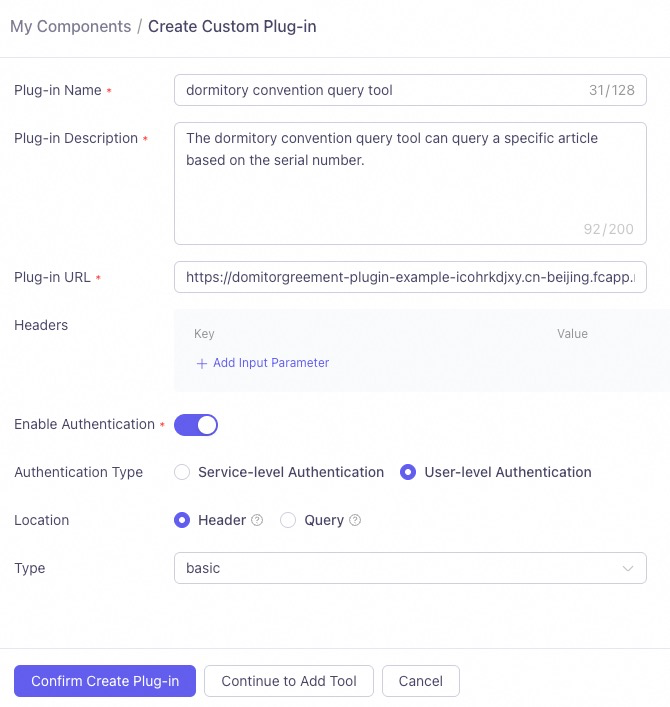
-
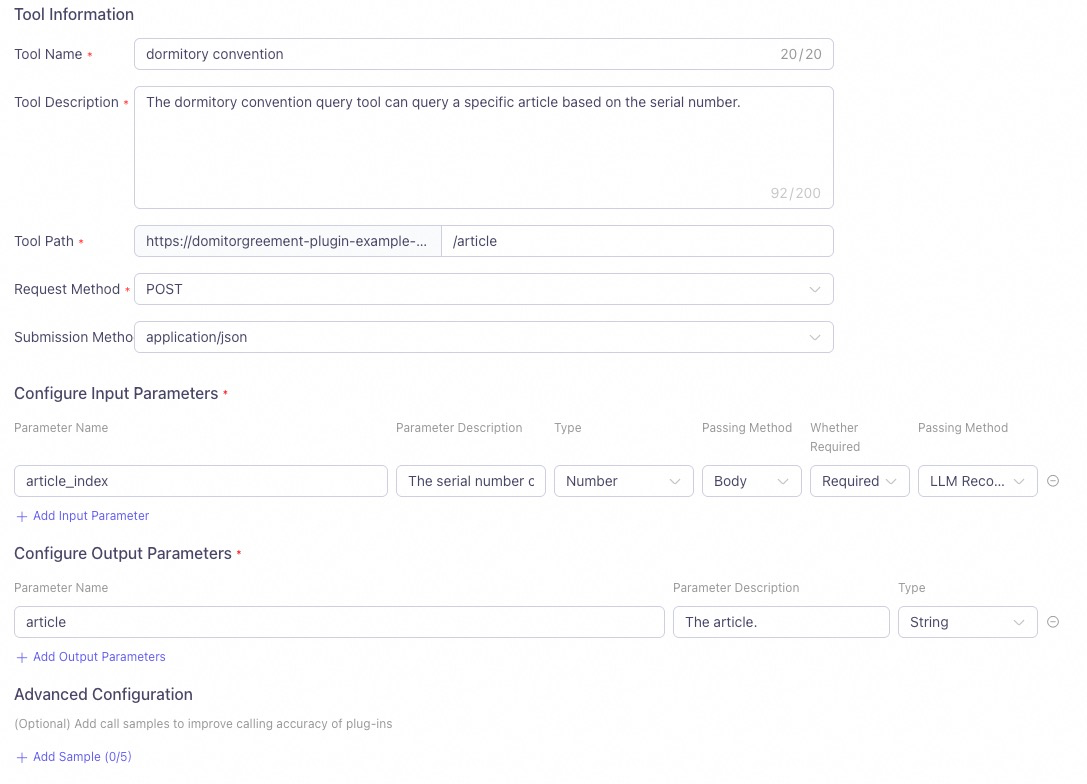
Crie uma ferramenta: Preencha as informações da ferramenta e configure os parâmetros de entrada e saída. Nota:
- A Tool Description ajuda o modelo grande a compreender melhor as funções e os casos de uso da ferramenta. Utilize linguagem natural e forneça exemplos sempre que possível.
- Um Parameter Name descritivo facilita o entendimento do modelo grande sobre a informação representada.
- A Parameter Description explica a função do parâmetro de entrada. Deve ser concisa e precisa para ajudar o modelo grande a determinar o valor correto a ser utilizado.
- É obrigatório selecionar Business Pass-through no campo Passing Method do parâmetro de entrada.
- Clique em Test Tool. Após a aprovação do teste, Publish o plugin.
Etapa 2: Associar um plugin a um agente
Só é possível associar plugins a uma Agent Application que esteja no mesmo workspace.
- No cartão de um plugin publicado, clique em Add to Agent e selecione uma aplicação de agente.
- Alternativamente, clique em + Plugin dentro de uma aplicação para associar um plugin personalizado.
- Por fim, Publish a aplicação.
Etapa 3: Chamada de API
-
Quando a autenticação não é necessária: Para chamar um plugin personalizado via API, utilize o parâmetro
user_defined_paramsdebiz_paramspara transmitir as informações do plugin. Substituayour_plugin_codepelo ID real do plugin e passe os pares chave-valor dos parâmetros de entrada configurados no plugin.É possível encontrar o ID do plugin no cartão do plugin.
Neste exemplo, passar o valor 2 para o parâmetroarticle_indexconsulta o conteúdo da segunda convenção de dormitório e retorna o resultado correto.- Python
- Java
- HTTP
Exemplo de solicitaçãoExemplo de respostaCopyimport os from http import HTTPStatus # We recommend using DashScope SDK v1.14.0 or later. from dashscope import Application biz_params = { # Pass the input parameters for the agent application's custom plugin. Replace `your_plugin_code` with your plugin ID. "user_defined_params": { "your_plugin_code": { "article_index": 2}}} response = Application.call( # If the environment variable is not set, you can use your Model Studio API key by replacing the following line with api_key="sk-xxx". We recommend using an environment variable in production to avoid leaking your API key. api_key=os.getenv("DASHSCOPE_API_KEY"), app_id='YOUR_APP_ID', prompt='Dormitory convention content', biz_params=biz_params) if response.status_code != HTTPStatus.OK: print(f'request_id={response.request_id}') print(f'code={response.status_code}') print(f'message={response.message}') print(f'For more information, see: https://www.alibabacloud.com/help/en/model-studio/developer-reference/error-code') else: print('%s\n' % (response.output.text)) # Process and output only the text. # print('%s\n' % (response.usage))CopyThe second article of the dormitory convention is as follows: "Roommates must help, care for, and learn from each other to achieve mutual improvement. They must be tolerant, forgiving, respectful, and sincere." This suggests that roommates should foster a positive living and learning environment by supporting and helping each other, while also learning to understand and respect others. If you want to learn about other articles of the convention, just ask!Exemplo de solicitaçãoExemplo de respostaCopyimport com.alibaba.dashscope.app.*; import com.alibaba.dashscope.exception.ApiException; import com.alibaba.dashscope.exception.InputRequiredException; import com.alibaba.dashscope.exception.NoApiKeyException; import com.alibaba.dashscope.utils.JsonUtils; public class Main { public static void appCall() throws NoApiKeyException, InputRequiredException { String bizParams = // Pass the input parameters for the agent application's custom plugin. Replace `{your_plugin_code}` with your plugin ID. "{\"user_defined_params\":{\"{your_plugin_code}\":{\"article_index\":2}}}"; ApplicationParam param = ApplicationParam.builder() // If the environment variable is not set, you can use your Model Studio API key by replacing the following line with .apiKey("sk-xxx"). We recommend using an environment variable in production to avoid leaking your API key. .apiKey(System.getenv("DASHSCOPE_API_KEY")) .appId("YOUR_APP_ID") .prompt("Dormitory convention content") .bizParams(JsonUtils.parse(bizParams)) .build(); Application application = new Application(); ApplicationResult result = application.call(param); System.out.printf("%s\n", result.getOutput().getText()); } public static void main(String[] args) { try { appCall(); } catch (ApiException | NoApiKeyException | InputRequiredException e) { System.out.printf("Exception: %s", e.getMessage()); System.out.println("For more information, see: https://www.alibabacloud.com/help/en/model-studio/error-code"); } System.exit(0); } }CopyThe second article of the dormitory convention is as follows: Article 2: Roommates must help, care for, and learn from each other to achieve mutual improvement. They must be tolerant, forgiving, respectful, and sincere. This emphasizes that in a shared living environment, roommates should maintain a positive and supportive relationship to create a harmonious atmosphere for living and learning. If you need to learn about any other specific articles, please let me know.- curl
- PHP
- Node.js
- C#
- Go
Exemplo de solicitaçãoCopycurl -X POST https://dashscope.aliyuncs.com/api/v1/apps/YOUR_APP_ID/completion \ --header "Authorization: Bearer $DASHSCOPE_API_KEY" \ --header 'Content-Type: application/json' \ --data '{ "input": { "prompt": "Dormitory convention content", "biz_params": { "user_defined_params": { "{your_plugin_code}": { "article_index": 2 } } } }, "parameters": {}, "debug":{} }'Substitua
Exemplo de respostaYOUR_APP_IDpelo ID da sua aplicação.Copy{"output": {"finish_reason":"stop", "session_id":"e151267ffded4fbdb13d91439011d31e", "text":"The second article of the dormitory convention is: \"Roommates must help, care for, and learn from each other to achieve mutual improvement. They must be tolerant, forgiving, respectful, and sincere.\" This means that in dormitory life, everyone must support each other to create a harmonious and positive living environment."}, "usage":{"models":[{"output_tokens":94,"model_id":"qwen-max","input_tokens":453}]}, "request_id":"a39fd2b5-7e2c-983e-84a1-1039f726f18a"}%Exemplo de solicitaçãoExemplo de respostaCopy<?php # If the environment variable is not set, you can use your Model Studio API key by replacing the following line with $api_key="sk-xxx". We recommend using an environment variable in production to avoid leaking your API key. $api_key = getenv("DASHSCOPE_API_KEY"); $application_id = 'YOUR_APP_ID'; // Replace with your app ID. $url = "https://dashscope.aliyuncs.com/api/v1/apps/$application_id/completion"; // Replace `{your_plugin_code}` with your plugin ID. // Construct the request data. $data = [ "input" => [ 'prompt' => 'Dormitory convention content', 'biz_params' => [ 'user_defined_params' => [ '{your_plugin_code}' => [ 'article_index' => 2 ] ] ] ], ]; // Encode the data as JSON. $dataString = json_encode($data); // Check if json_encode was successful. if (json_last_error() !== JSON_ERROR_NONE) { die("JSON encoding failed with error: " . json_last_error_msg()); } // Initialize a cURL session. $ch = curl_init($url); // Set the cURL options. curl_setopt($ch, CURLOPT_CUSTOMREQUEST, "POST"); curl_setopt($ch, CURLOPT_POSTFIELDS, $dataString); curl_setopt($ch, CURLOPT_RETURNTRANSFER, true); curl_setopt($ch, CURLOPT_HTTPHEADER, [ 'Content-Type: application/json', 'Authorization: Bearer ' . $api_key ]); // Execute the request. $response = curl_exec($ch); // Check if the cURL execution was successful. if ($response === false) { die("cURL Error: " . curl_error($ch)); } // Get the HTTP status code. $status_code = curl_getinfo($ch, CURLINFO_HTTP_CODE); // Close the cURL session. curl_close($ch); // Decode the response data. $response_data = json_decode($response, true); // Process the response. if ($status_code == 200) { if (isset($response_data['output']['text'])) { echo "{$response_data['output']['text']}\n"; } else { echo "No text in response.\n"; } }else { if (isset($response_data['request_id'])) { echo "request_id={$response_data['request_id']}\n";} echo "code={$status_code}\n"; if (isset($response_data['message'])) { echo "message={$response_data['message']}\n";} else { echo "message=Unknown error\n";} } ?>CopyThe second article of the dormitory convention states: Roommates must help, care for, and learn from each other to achieve mutual improvement. They must be tolerant, forgiving, respectful, and sincere. This is to ensure that everyone can live and study in a harmonious and friendly environment. If you want to learn about other specific articles or have other questions, feel free to ask.Dependências:Exemplo de solicitaçãoCopynpm install axiosExemplo de respostaCopyconst axios = require('axios'); async function callDashScope() { // If the environment variable is not set, you can use your Model Studio API key by replacing the following line with apiKey='sk-xxx'. We recommend using an environment variable in production to avoid leaking your API key. const apiKey = process.env.DASHSCOPE_API_KEY; const appId = 'YOUR_APP_ID';// Replace with your app ID. const pluginCode = 'YOUR_PLUGIN_CODE';// Replace with your plugin ID. const url = `https://dashscope.aliyuncs.com/api/v1/apps/${appId}/completion`; const data = { input: { prompt: "Dormitory convention content", biz_params: { user_defined_params: { [pluginCode]: { // 'article_index' is an example of a custom plugin parameter. 'article_index': 2 } } } }, parameters: {}, debug: {} }; try { console.log("Sending request to DashScope API..."); const response = await axios.post(url, data, { headers: { 'Authorization': `Bearer ${apiKey}`, 'Content-Type': 'application/json' } }); if (response.status === 200) { if (response.data.output && response.data.output.text) { console.log(`${response.data.output.text}`); } } else { console.log("Request failed:"); if (response.data.request_id) { console.log(`request_id=${response.data.request_id}`); } console.log(`code=${response.status}`); if (response.data.message) { console.log(`message=${response.data.message}`); } else { console.log('message=Unknown error'); } } } catch (error) { console.error(`Error calling DashScope: ${error.message}`); if (error.response) { console.error(`Response status: ${error.response.status}`); console.error(`Response data: ${JSON.stringify(error.response.data, null, 2)}`); } } } callDashScope();CopyThe second article of the dormitory convention states: Roommates must help, care for, and learn from each other to achieve mutual improvement. They must be tolerant, forgiving, respectful, and sincere. This is to ensure that everyone can live and study in a harmonious and friendly environment. If you want to learn about other specific articles or have other questions, feel free to ask.Exemplo de solicitaçãoExemplo de respostaCopyusing System.Text; class Program { static async Task Main(string[] args) { // If the environment variable is not set, you can use your Model Studio API key by replacing the following line with apiKey="sk-xxx". We recommend using an environment variable in production to avoid leaking your API key. string apiKey = Environment.GetEnvironmentVariable("DASHSCOPE_API_KEY")?? throw new InvalidOperationException("DASHSCOPE_API_KEY environment variable is not set.");; string appId = "YOUR_APP_ID";// Replace with your app ID. if (string.IsNullOrEmpty(apiKey)) { Console.WriteLine("Please ensure that the DASHSCOPE_API_KEY environment variable is set."); return; } string url = $"https://dashscope.aliyuncs.com/api/v1/apps/{appId}/completion"; using (HttpClient client = new HttpClient()) { client.DefaultRequestHeaders.Add("Authorization", $"Bearer {apiKey}"); string pluginCode = "{your_plugin_code}"; // Replace `{your_plugin_code}` with your plugin ID. string jsonContent = $@"{{ ""input"": {{ ""prompt"": ""Dormitory convention content"", ""biz_params"": {{ ""user_defined_params"": {{ ""{pluginCode}"": {{ ""article_index"": 2 }} }} }} }}, ""parameters"": {{}}, ""debug"": {{}} }}"; HttpContent content = new StringContent(jsonContent, Encoding.UTF8, "application/json"); try { HttpResponseMessage response = await client.PostAsync(url, content); if (response.IsSuccessStatusCode) { string responseBody = await response.Content.ReadAsStringAsync(); Console.WriteLine("Request successful:"); Console.WriteLine(responseBody); } else { Console.WriteLine($"Request failed with status code: {response.StatusCode}"); string responseBody = await response.Content.ReadAsStringAsync(); Console.WriteLine(responseBody); } } catch (Exception ex) { Console.WriteLine($"Error calling DashScope: {ex.Message}"); } } } }Copy{ "output": { "finish_reason": "stop", "session_id": "237ca6187c814f3b9e7461090a5f8b74", "text": "The second article of the dormitory convention is as follows:\n\n\"Roommates must help, care for, and learn from each other to achieve mutual improvement. They must be tolerant, forgiving, respectful, and sincere.\"\n\nThis indicates that in the dormitory, roommates need to establish a positive relationship, creating a harmonious living and learning environment by helping, caring for, and supporting each other. They should also learn to understand and accept differences between roommates and communicate with sincerity. If you want to learn about other articles or specific content, please let me know!" }, "usage": { "models": [ { "output_tokens": 133, "model_id": "qwen-max", "input_tokens": 829 } ] }, "request_id": "64e8c359-d071-9d2e-bb94-187e86cc3a79" }Exemplo de solicitaçãoExemplo de respostaCopypackage main import ( "bytes" "encoding/json" "fmt" "io" "net/http" "os" ) func main() { // If the environment variable is not set, you can use your Model Studio API key by replacing the following line with apiKey := "sk-xxx". We recommend using an environment variable in production to avoid leaking your API key. apiKey := os.Getenv("DASHSCOPE_API_KEY") appId := "YOUR_APP_ID" // Replace with your app ID. pluginCode := "YOUR_PLUGIN_CODE" // Replace with your plugin ID. if apiKey == "" { fmt.Println("Please ensure that the DASHSCOPE_API_KEY environment variable is set.") return } url := fmt.Sprintf("https://dashscope.aliyuncs.com/api/v1/apps/%s/completion", appId) // Create the request body. requestBody := map[string]interface{}{ "input": map[string]interface{}{ "prompt": "Dormitory convention content", "biz_params": map[string]interface{}{ "user_defined_params": map[string]interface{}{ pluginCode: map[string]interface{}{ "article_index": 2, }, }, }, }, "parameters": map[string]interface{}{}, "debug": map[string]interface{}{}, } jsonData, err := json.Marshal(requestBody) if err != nil { fmt.Printf("Failed to marshal JSON: %v\n", err) return } // Create an HTTP POST request. req, err := http.NewRequest("POST", url, bytes.NewBuffer(jsonData)) if err != nil { fmt.Printf("Failed to create request: %v\n", err) return } // Set the request headers. req.Header.Set("Authorization", "Bearer "+apiKey) req.Header.Set("Content-Type", "application/json") // Send the request. client := &http.Client{} resp, err := client.Do(req) if err != nil { fmt.Printf("Failed to send request: %v\n", err) return } defer resp.Body.Close() // Read the response. body, err := io.ReadAll(resp.Body) if err != nil { fmt.Printf("Failed to read response: %v\n", err) return } // Process the response. if resp.StatusCode == http.StatusOK { fmt.Println("Request successful:") fmt.Println(string(body)) } else { fmt.Printf("Request failed with status code: %d\n", resp.StatusCode) fmt.Println(string(body)) } }Copy{ "output": { "finish_reason": "stop", "session_id": "860d2a4c1f3649ac880298537993cb51", "text": "The second article of the dormitory convention is as follows:\n\nRoommates must help, care for, and learn from each other to achieve mutual improvement. They must be tolerant, forgiving, respectful, and sincere.\n\nThis emphasizes that in dormitory life, roommates should maintain a supportive relationship and respect each other. Would you like to learn about the content of other articles?" }, "usage": { "models": [ { "output_tokens": 84, "model_id": "qwen-max", "input_tokens": 876 } ] }, "request_id": "0a250055-90a4-992d-9276-e268ad35d1ab" }- Python
- Java
- HTTP
Exemplo de solicitaçãoExemplo de respostaCopyimport os from http import HTTPStatus # We recommend using DashScope SDK v1.14.0 or later. import dashscope from dashscope import Application dashscope.base_http_api_url = 'https://dashscope-intl.aliyuncs.com/api/v1' biz_params = { # Pass the input parameters for the agent application's custom plugin. Replace `your_plugin_code` with your plugin ID. "user_defined_params": { "your_plugin_code": { "article_index": 2}}} response = Application.call( # If the environment variable is not set, you can use your Model Studio API key by replacing the following line with api_key="sk-xxx". We recommend using an environment variable in production to avoid leaking your API key. api_key=os.getenv("DASHSCOPE_API_KEY"), app_id='YOUR_APP_ID', prompt='Dormitory convention content', biz_params=biz_params) if response.status_code != HTTPStatus.OK: print(f'request_id={response.request_id}') print(f'code={response.status_code}') print(f'message={response.message}') print(f'For more information, see: https://www.alibabacloud.com/help/en/model-studio/developer-reference/error-code') else: print('%s\n' % (response.output.text)) # Process and output only the text. # print('%s\n' % (response.usage))CopyThe second article of the dormitory convention is as follows: "Roommates must help, care for, and learn from each other to achieve mutual improvement. They must be tolerant, forgiving, respectful, and sincere." This suggests that roommates should foster a positive living and learning environment by supporting and helping each other, while also learning to understand and respect others. If you want to learn about other articles of the convention, just ask!Exemplo de solicitaçãoExemplo de respostaCopyimport com.alibaba.dashscope.app.*; import com.alibaba.dashscope.exception.ApiException; import com.alibaba.dashscope.exception.InputRequiredException; import com.alibaba.dashscope.exception.NoApiKeyException; import com.alibaba.dashscope.utils.JsonUtils; import com.alibaba.dashscope.utils.Constants; public class Main { static { Constants.baseHttpApiUrl="https://dashscope-intl.aliyuncs.com/api/v1"; } public static void appCall() throws NoApiKeyException, InputRequiredException { String bizParams = // Pass the input parameters for the agent application's custom plugin. Replace `{your_plugin_code}` with your plugin ID. "{\"user_defined_params\":{\"{your_plugin_code}\":{\"article_index\":2}}}"; ApplicationParam param = ApplicationParam.builder() // If the environment variable is not set, you can use your Model Studio API key by replacing the following line with .apiKey("sk-xxx"). We recommend using an environment variable in production to avoid leaking your API key. .apiKey(System.getenv("DASHSCOPE_API_KEY")) .appId("YOUR_APP_ID") .prompt("Dormitory convention content") .bizParams(JsonUtils.parse(bizParams)) .build(); Application application = new Application(); ApplicationResult result = application.call(param); System.out.printf("%s\n", result.getOutput().getText()); } public static void main(String[] args) { try { appCall(); } catch (ApiException | NoApiKeyException | InputRequiredException e) { System.out.printf("Exception: %s", e.getMessage()); System.out.println("For more information, see: https://www.alibabacloud.com/help/en/model-studio/developer-reference/error-code"); } System.exit(0); } }CopyThe second article of the dormitory convention is as follows: Article 2: Roommates must help, care for, and learn from each other to achieve mutual improvement. They must be tolerant, forgiving, respectful, and sincere. This emphasizes that in a shared living environment, roommates should maintain a positive and supportive relationship to create a harmonious atmosphere for living and learning. If you need to learn about any other specific articles, please let me know.- curl
- PHP
- Node.js
- C#
- Go
Exemplo de solicitaçãoCopycurl -X POST https://dashscope-intl.aliyuncs.com/api/v1/apps/YOUR_APP_ID/completion \ --header "Authorization: Bearer $DASHSCOPE_API_KEY" \ --header 'Content-Type: application/json' \ --data '{ "input": { "prompt": "Dormitory convention content", "biz_params": { "user_defined_params": { "{your_plugin_code}": { "article_index": 2 } } } }, "parameters": {}, "debug":{} }'Substitua
Exemplo de respostaYOUR_APP_IDpelo ID da sua aplicação.Copy{"output": {"finish_reason":"stop", "session_id":"e151267ffded4fbdb13d91439011d31e", "text":"The second article of the dormitory convention is: \"Roommates must help, care for, and learn from each other to achieve mutual improvement. They must be tolerant, forgiving, respectful, and sincere.\" This means that in dormitory life, everyone must support each other to create a harmonious and positive living environment."}, "usage":{"models":[{"output_tokens":94,"model_id":"qwen-max","input_tokens":453}]}, "request_id":"a39fd2b5-7e2c-983e-84a1-1039f726f18a"}%Exemplo de solicitaçãoExemplo de respostaCopy<?php # If the environment variable is not set, you can use your Model Studio API key by replacing the following line with $api_key="sk-xxx". We recommend using an environment variable in production to avoid leaking your API key. $api_key = getenv("DASHSCOPE_API_KEY"); $application_id = 'YOUR_APP_ID'; // Replace with your app ID. $url = "https://dashscope-intl.aliyuncs.com/api/v1/apps/$application_id/completion"; // Replace `{your_plugin_code}` with your plugin ID. // Construct the request data. $data = [ "input" => [ 'prompt' => 'Dormitory convention content', 'biz_params' => [ 'user_defined_params' => [ '{your_plugin_code}' => [ 'article_index' => 2 ] ] ] ], ]; // Encode the data as JSON. $dataString = json_encode($data); // Check if json_encode was successful. if (json_last_error() !== JSON_ERROR_NONE) { die("JSON encoding failed with error: " . json_last_error_msg()); } // Initialize a cURL session. $ch = curl_init($url); // Set the cURL options. curl_setopt($ch, CURLOPT_CUSTOMREQUEST, "POST"); curl_setopt($ch, CURLOPT_POSTFIELDS, $dataString); curl_setopt($ch, CURLOPT_RETURNTRANSFER, true); curl_setopt($ch, CURLOPT_HTTPHEADER, [ 'Content-Type: application/json', 'Authorization: Bearer ' . $api_key ]); // Execute the request. $response = curl_exec($ch); // Check if the cURL execution was successful. if ($response === false) { die("cURL Error: " . curl_error($ch)); } // Get the HTTP status code. $status_code = curl_getinfo($ch, CURLINFO_HTTP_CODE); // Close the cURL session. curl_close($ch); // Decode the response data. $response_data = json_decode($response, true); // Process the response. if ($status_code == 200) { if (isset($response_data['output']['text'])) { echo "{$response_data['output']['text']}\n"; } else { echo "No text in response.\n"; } }else { if (isset($response_data['request_id'])) { echo "request_id={$response_data['request_id']}\n";} echo "code={$status_code}\n"; if (isset($response_data['message'])) { echo "message={$response_data['message']}\n";} else { echo "message=Unknown error\n";} } ?>CopyThe second article of the dormitory convention states: Roommates must help, care for, and learn from each other to achieve mutual improvement. They must be tolerant, forgiving, respectful, and sincere. This is to ensure that everyone can live and study in a harmonious and friendly environment. If you want to learn about other specific articles or have other questions, feel free to ask.Dependências:Exemplo de solicitaçãoCopynpm install axiosExemplo de respostaCopyconst axios = require('axios'); async function callDashScope() { // If the environment variable is not set, you can use your Model Studio API key by replacing the following line with apiKey='sk-xxx'. We recommend using an environment variable in production to avoid leaking your API key. const apiKey = process.env.DASHSCOPE_API_KEY; const appId = 'YOUR_APP_ID';// Replace with your app ID. const pluginCode = 'YOUR_PLUGIN_CODE';// Replace with your plugin ID. const url = `https://dashscope-intl.aliyuncs.com/api/v1/apps/${appId}/completion`; const data = { input: { prompt: "Dormitory convention content", biz_params: { user_defined_params: { [pluginCode]: { // 'article_index' is an example of a custom plugin parameter. 'article_index': 2 } } } }, parameters: {}, debug: {} }; try { console.log("Sending request to DashScope API..."); const response = await axios.post(url, data, { headers: { 'Authorization': `Bearer ${apiKey}`, 'Content-Type': 'application/json' } }); if (response.status === 200) { if (response.data.output && response.data.output.text) { console.log(`${response.data.output.text}`); } } else { console.log("Request failed:"); if (response.data.request_id) { console.log(`request_id=${response.data.request_id}`); } console.log(`code=${response.status}`); if (response.data.message) { console.log(`message=${response.data.message}`); } else { console.log('message=Unknown error'); } } } catch (error) { console.error(`Error calling DashScope: ${error.message}`); if (error.response) { console.error(`Response status: ${error.response.status}`); console.error(`Response data: ${JSON.stringify(error.response.data, null, 2)}`); } } } callDashScope();CopyThe second article of the dormitory convention states: Roommates must help, care for, and learn from each other to achieve mutual improvement. They must be tolerant, forgiving, respectful, and sincere. This is to ensure that everyone can live and study in a harmonious and friendly environment. If you want to learn about other specific articles or have other questions, feel free to ask.Exemplo de solicitaçãoExemplo de respostaCopyusing System.Text; class Program { static async Task Main(string[] args) { // If the environment variable is not set, you can use your Model Studio API key by replacing the following line with apiKey="sk-xxx". We recommend using an environment variable in production to avoid leaking your API key. string apiKey = Environment.GetEnvironmentVariable("DASHSCOPE_API_KEY")?? throw new InvalidOperationException("DASHSCOPE_API_KEY environment variable is not set.");; string appId = "YOUR_APP_ID";// Replace with your app ID. if (string.IsNullOrEmpty(apiKey)) { Console.WriteLine("Please ensure that the DASHSCOPE_API_KEY environment variable is set."); return; } string url = $"https://dashscope-intl.aliyuncs.com/api/v1/apps/{appId}/completion"; using (HttpClient client = new HttpClient()) { client.DefaultRequestHeaders.Add("Authorization", $"Bearer {apiKey}"); string pluginCode = "{your_plugin_code}"; // Replace `{your_plugin_code}` with your plugin ID. string jsonContent = $@"{{ ""input"": {{ ""prompt"": ""Dormitory convention content"", ""biz_params"": {{ ""user_defined_params"": {{ ""{pluginCode}"": {{ ""article_index"": 2 }} }} }} }}, ""parameters"": {{}}, ""debug"": {{}} }}"; HttpContent content = new StringContent(jsonContent, Encoding.UTF8, "application/json"); try { HttpResponseMessage response = await client.PostAsync(url, content); if (response.IsSuccessStatusCode) { string responseBody = await response.Content.ReadAsStringAsync(); Console.WriteLine("Request successful:"); Console.WriteLine(responseBody); } else { Console.WriteLine($"Request failed with status code: {response.StatusCode}"); string responseBody = await response.Content.ReadAsStringAsync(); Console.WriteLine(responseBody); } } catch (Exception ex) { Console.WriteLine($"Error calling DashScope: {ex.Message}"); } } } }Copy{ "output": { "finish_reason": "stop", "session_id": "237ca6187c814f3b9e7461090a5f8b74", "text": "The second article of the dormitory convention is as follows:\n\n\"Roommates must help, care for, and learn from each other to achieve mutual improvement. They must be tolerant, forgiving, respectful, and sincere.\"\n\nThis indicates that in the dormitory, roommates need to establish a positive relationship, creating a harmonious living and learning environment by helping, caring for, and supporting each other. They should also learn to understand and accept differences between roommates and communicate with sincerity. If you want to learn about other articles or specific content, please let me know!" }, "usage": { "models": [ { "output_tokens": 133, "model_id": "qwen-max", "input_tokens": 829 } ] }, "request_id": "64e8c359-d071-9d2e-bb94-187e86cc3a79" }Exemplo de solicitaçãoExemplo de respostaCopypackage main import ( "bytes" "encoding/json" "fmt" "io" "net/http" "os" ) func main() { // If the environment variable is not set, you can use your Model Studio API key by replacing the following line with apiKey := "sk-xxx". We recommend using an environment variable in production to avoid leaking your API key. apiKey := os.Getenv("DASHSCOPE_API_KEY") appId := "YOUR_APP_ID" // Replace with your app ID. pluginCode := "YOUR_PLUGIN_CODE" // Replace with your plugin ID. if apiKey == "" { fmt.Println("Please ensure that the DASHSCOPE_API_KEY environment variable is set.") return } url := fmt.Sprintf("https://dashscope-intl.aliyuncs.com/api/v1/apps/%s/completion", appId) // Create the request body. requestBody := map[string]interface{}{ "input": map[string]interface{}{ "prompt": "Dormitory convention content", "biz_params": map[string]interface{}{ "user_defined_params": map[string]interface{}{ pluginCode: map[string]interface{}{ "article_index": 2, }, }, }, }, "parameters": map[string]interface{}{}, "debug": map[string]interface{}{}, } jsonData, err := json.Marshal(requestBody) if err != nil { fmt.Printf("Failed to marshal JSON: %v\n", err) return } // Create an HTTP POST request. req, err := http.NewRequest("POST", url, bytes.NewBuffer(jsonData)) if err != nil { fmt.Printf("Failed to create request: %v\n", err) return } // Set the request headers. req.Header.Set("Authorization", "Bearer "+apiKey) req.Header.Set("Content-Type", "application/json") // Send the request. client := &http.Client{} resp, err := client.Do(req) if err != nil { fmt.Printf("Failed to send request: %v\n", err) return } defer resp.Body.Close() // Read the response. body, err := io.ReadAll(resp.Body) if err != nil { fmt.Printf("Failed to read response: %v\n", err) return } // Process the response. if resp.StatusCode == http.StatusOK { fmt.Println("Request successful:") fmt.Println(string(body)) } else { fmt.Printf("Request failed with status code: %d\n", resp.StatusCode) fmt.Println(string(body)) } }Copy{ "output": { "finish_reason": "stop", "session_id": "860d2a4c1f3649ac880298537993cb51", "text": "The second article of the dormitory convention is as follows:\n\nRoommates must help, care for, and learn from each other to achieve mutual improvement. They must be tolerant, forgiving, respectful, and sincere.\n\nThis emphasizes that in dormitory life, roommates should maintain a supportive relationship and respect each other. Would you like to learn about the content of other articles?" }, "usage": { "models": [ { "output_tokens": 84, "model_id": "qwen-max", "input_tokens": 876 } ] }, "request_id": "0a250055-90a4-992d-9276-e268ad35d1ab" } -
Quando a autenticação é necessária: Este cenário descreve como chamar um plugin personalizado que possui Authentication ativada e está configurado com User-level Authentication.
É possível encontrar o ID do plugin no cartão do plugin.
- Utilize
user_defined_paramsno campobiz_paramspara passar as informações do plugin personalizado. Substituayour_plugin_codepelo ID do seu plugin e forneça os parâmetros de entrada como pares chave-valor. - Utilize
user_defined_tokensno campobiz_paramspara passar as credenciais de autenticação. Substituayour_plugin_codepelo ID do seu plugin e defina o valor deuser_tokencomo seu token de autenticação, como uma chave de API do DashScope. - Após a autenticação bem-sucedida, o serviço consulta o item especificado com base no parâmetro de índice fornecido e retorna o resultado correto.
article_indexé definido como 2, e o valor deuser_token,YOUR_TOKEN, é substituído pela DASHSCOPE_API_KEY real. Após a autenticação bem-sucedida, o conteúdo da segunda regra do dormitório é consultado e o resultado correto é retornado.- Python
- Java
- HTTP
Exemplo de solicitaçãoExemplo de respostaCopyfrom http import HTTPStatus import os # We recommend using DashScope SDK v1.14.0 or later. from dashscope import Application biz_params = { # Pass authentication credentials for the agent application's custom plugin. # Replace your_plugin_code with your plugin ID and YOUR_TOKEN with your authentication token, such as an API key. "user_defined_params": { "your_plugin_code": { "article_index": 2}}, "user_defined_tokens": { "your_plugin_code": { "user_token": "YOUR_TOKEN"}}} response = Application.call( # If the environment variable is not configured, you can use a DashScope API key by replacing the next line with: api_key="sk-xxx". # However, we do not recommend hardcoding the API key in a production environment to reduce the risk of key leakage. api_key=os.getenv("DASHSCOPE_API_KEY"), app_id='YOUR_APP_ID', prompt='Dormitory convention content', biz_params=biz_params) if response.status_code != HTTPStatus.OK: print(f'request_id={response.request_id}') print(f'code={response.status_code}') print(f'message={response.message}') print(f'For more information, refer to: https://www.alibabacloud.com/help/en/model-studio/developer-reference/error-code') else: print('%s\n' % (response.output.text)) # Process and output only the text. # print('%s\n' % (response.usage))CopyThe second article of the dormitory convention is as follows: Roommates must help, care for, and learn from each other to achieve mutual improvement. They must be tolerant, forgiving, respectful, and sincere. If you need to know about other articles of the convention, please let me know.Exemplo de solicitaçãoExemplo de respostaCopyimport com.alibaba.dashscope.app.*; import com.alibaba.dashscope.exception.ApiException; import com.alibaba.dashscope.exception.InputRequiredException; import com.alibaba.dashscope.exception.NoApiKeyException; import com.alibaba.dashscope.utils.JsonUtils; public class Main { public static void appCall() throws NoApiKeyException, InputRequiredException { String bizParams = // Replace {your_plugin_code} with your plugin ID, and YOUR_TOKEN with your token, such as an API key. "{\"user_defined_params\":{\"{your_plugin_code}\":{\"article_index\":2}}," + "\"user_defined_tokens\":{\"{your_plugin_code}\":{\"user_token\":\"YOUR_TOKEN\"}}}"; ApplicationParam param = ApplicationParam.builder() // If the environment variable is not configured, you can use a DashScope API key by replacing the next line with: .apiKey("sk-xxx"). // However, we do not recommend hardcoding the API key in a production environment to reduce the risk of key leakage. .apiKey(System.getenv("DASHSCOPE_API_KEY")) .appId("YOUR_APP_ID") .prompt("Dormitory convention content") .bizParams(JsonUtils.parse(bizParams)) .build(); Application application = new Application(); ApplicationResult result = application.call(param); System.out.printf("%s\n", result.getOutput().getText()); } public static void main(String[] args) { try { appCall(); } catch (ApiException | NoApiKeyException | InputRequiredException e) { System.out.printf("Exception: %s", e.getMessage()); System.out.println("For more information, refer to: https://www.alibabacloud.com/help/en/model-studio/error-code"); } System.exit(0); } }CopyThe second article of the dormitory convention is as follows: Roommates must help, care for, and learn from each other to achieve mutual improvement. They must be tolerant, forgiving, respectful, and sincere. If you need to query for more articles, please let me know.Substitua YOUR_APP_ID pelo ID da sua aplicação, your_plugin_code pelo ID do seu plugin personalizado e YOUR_TOKEN pelo seu token de autenticação.
- curl
- PHP
- Node.js
- C#
- Go
Exemplo de solicitaçãoCopycurl -X POST https://dashscope.aliyuncs.com/api/v1/apps/YOUR_APP_ID/completion \ --header "Authorization: Bearer $DASHSCOPE_API_KEY" \ --header 'Content-Type: application/json' \ --data '{ "input": { "prompt": "Dormitory convention content", "biz_params": { "user_defined_params": { "{your_plugin_code}": { "article_index": 2 } }, "user_defined_tokens": { "{your_plugin_code}": { "user_token": "YOUR_TOKEN" } } } }, "parameters": {}, "debug":{} }'Substitua YOUR_APP_ID pelo ID da sua aplicação, {your_plugin_code} pelo ID do seu plugin personalizado e YOUR_TOKEN pelo seu token de autenticação.
Exemplo de respostaCopy{"output":{"finish_reason":"stop", "session_id":"d3b5c3e269dc40479255a7a02df5c630", "text":"The second article of the dormitory convention is: \"Roommates must help, care for, and learn from each other to achieve mutual improvement. They must be tolerant, forgiving, respectful, and sincere.\" This emphasizes the importance of harmonious coexistence and mutual progress among members in dormitory life."}, "usage":{"models":[{"output_tokens":80,"model_id":"qwen-max","input_tokens":432}]}, "request_id":"1f77154c-edc3-9003-b622-816fa2f849cf"}%Exemplo de solicitaçãoExemplo de respostaCopy<?php # If the environment variable is not configured, you can use a DashScope API key by replacing the next line with: $api_key="sk-xxx". # However, we do not recommend hardcoding the API key in a production environment to reduce the risk of key leakage. $api_key = getenv("DASHSCOPE_API_KEY"); $application_id = 'YOUR_APP_ID'; // Replace with your application ID. $url = "https://dashscope.aliyuncs.com/api/v1/apps/$application_id/completion"; // Construct the request data. $data = [ "input" => [ 'prompt' => 'Dormitory convention content', 'biz_params' => [ 'user_defined_params' => [ '{your_plugin_code}' => [//Replace {your_plugin_code} with your plugin ID. 'article_index' => 2 ] ], 'user_defined_tokens' => [ '{your_plugin_code}' => [//Replace {your_plugin_code} with your plugin ID. 'user_token' => 'YOUR_TOKEN'//Replace with your token, such as an API key. ] ] ] ], ]; // Encode the data as JSON. $dataString = json_encode($data); // Check if json_encode was successful. if (json_last_error() !== JSON_ERROR_NONE) { die("JSON encoding failed with error: " . json_last_error_msg()); } // Initialize a cURL session. $ch = curl_init($url); // Set cURL options. curl_setopt($ch, CURLOPT_CUSTOMREQUEST, "POST"); curl_setopt($ch, CURLOPT_POSTFIELDS, $dataString); curl_setopt($ch, CURLOPT_RETURNTRANSFER, true); curl_setopt($ch, CURLOPT_HTTPHEADER, [ 'Content-Type: application/json', 'Authorization: Bearer ' . $api_key ]); // Execute the request. $response = curl_exec($ch); // Check if the cURL execution was successful. if ($response === false) { die("cURL Error: " . curl_error($ch)); } // Get the HTTP status code. $status_code = curl_getinfo($ch, CURLINFO_HTTP_CODE); // Close the cURL session. curl_close($ch); // Decode the response data. $response_data = json_decode($response, true); // Process the response. if ($status_code == 200) { if (isset($response_data['output']['text'])) { echo "{$response_data['output']['text']}\n"; } else { echo "No text in response.\n"; } }else { if (isset($response_data['request_id'])) { echo "request_id={$response_data['request_id']}\n";} echo "code={$status_code}\n"; if (isset($response_data['message'])) { echo "message={$response_data['message']}\n";} else { echo "message=Unknown error\n";} } ?>CopyThe second article of the dormitory convention is as follows: > Roommates must help, care for, and learn from each other to achieve mutual improvement. They must be tolerant, forgiving, respectful, and sincere. If you need to know more about the convention or other information, please feel free to ask.Dependências:Exemplo de solicitaçãoCopynpm install axiosExemplo de respostaCopyconst axios = require('axios'); async function callDashScope() { // If the environment variable is not configured, you can use a DashScope API key by replacing the next line with: apiKey='sk-xxx'. // However, we do not recommend hardcoding the API key in a production environment to reduce the risk of key leakage. const apiKey = process.env.DASHSCOPE_API_KEY; const appId = 'YOUR_APP_ID';// Replace with your application ID. const pluginCode = 'YOUR_PLUGIN_CODE';// Replace with your plugin ID. const url = `https://dashscope.aliyuncs.com/api/v1/apps/${appId}/completion`; const data = { input: { prompt: "Dormitory convention content", biz_params: { user_defined_params: { [pluginCode]: { // `article_index` is a sample parameter for the custom plugin. Replace it with your parameter. 'article_index': 6 } }, user_defined_tokens: { [pluginCode]: { // Replace YOUR_TOKEN with your authentication token, such as an API key. user_token: 'YOUR_TOKEN' } } } }, parameters: {}, debug: {} }; try { console.log("Sending request to DashScope API..."); const response = await axios.post(url, data, { headers: { 'Authorization': `Bearer ${apiKey}`, 'Content-Type': 'application/json' } }); if (response.status === 200) { if (response.data.output && response.data.output.text) { console.log(`${response.data.output.text}`); } } else { console.log("Request failed:"); if (response.data.request_id) { console.log(`request_id=${response.data.request_id}`); } console.log(`code=${response.status}`); if (response.data.message) { console.log(`message=${response.data.message}`); } else { console.log('message=Unknown error'); } } } catch (error) { console.error(`Error calling DashScope: ${error.message}`); if (error.response) { console.error(`Response status: ${error.response.status}`); console.error(`Response data: ${JSON.stringify(error.response.data, null, 2)}`); } } } callDashScope();CopyThe sixth article of the dormitory convention states: Develop good sleep habits. Every roommate has the right to rest and the responsibility to ensure others' right to rest. If you need to know more about the regulations, please provide more details.Exemplo de solicitaçãoExemplo de respostaCopyusing System.Text; class Program { static async Task Main(string[] args) { // If the environment variable is not configured, you can use a DashScope API key by replacing the next line with: apiKey="sk-xxx". // However, we do not recommend hardcoding the API key in a production environment to reduce the risk of key leakage. string apiKey = Environment.GetEnvironmentVariable("DASHSCOPE_API_KEY")?? throw new InvalidOperationException("DASHSCOPE_API_KEY environment variable is not set.");; string appId = "YOUR_APP_ID";// Replace with your application ID. if (string.IsNullOrEmpty(apiKey)) { Console.WriteLine("Please make sure the DASHSCOPE_API_KEY environment variable is set."); return; } string url = $"https://dashscope.aliyuncs.com/api/v1/apps/{appId}/completion"; using (HttpClient client = new HttpClient()) { client.DefaultRequestHeaders.Add("Authorization", $"Bearer {apiKey}"); string pluginCode = "your_plugin_code"; // Replace your_plugin_code with your plugin ID. // Replace YOUR_TOKEN with your token, such as an API key. string jsonContent = $@"{{ ""input"": {{ ""prompt"": ""Dormitory convention content"", ""biz_params"": {{ ""user_defined_params"": {{ ""{pluginCode}"": {{ ""article_index"": 2 }} }}, ""user_defined_tokens"": {{ ""{pluginCode}"": {{ ""user_token"": ""YOUR_TOKEN"" }} }} }} }}, ""parameters"": {{}}, ""debug"": {{}} }}"; HttpContent content = new StringContent(jsonContent, Encoding.UTF8, "application/json"); try { HttpResponseMessage response = await client.PostAsync(url, content); if (response.IsSuccessStatusCode) { string responseBody = await response.Content.ReadAsStringAsync(); Console.WriteLine("Request successful:"); Console.WriteLine(responseBody); } else { Console.WriteLine($"Request failed with status code: {response.StatusCode}"); string responseBody = await response.Content.ReadAsStringAsync(); Console.WriteLine(responseBody); } } catch (Exception ex) { Console.WriteLine($"Error calling DashScope: {ex.Message}"); } } } }Copy{ "output": { "finish_reason": "stop", "session_id": "1a1913a9922a401f8eba36df8ea1a062", "text": "The second article of the dormitory convention is as follows:\n\nRoommates must help, care for, and learn from each other to achieve mutual improvement. They must be tolerant, forgiving, respectful, and sincere.\n\nIf you need more details about the convention, please specify." }, "usage": { "models": [ { "output_tokens": 66, "model_id": "qwen-max", "input_tokens": 802 } ] }, "request_id": "04bac806-c5e6-9fab-a846-a66641862be9" }Exemplo de solicitaçãoExemplo de respostaCopypackage main import ( "bytes" "encoding/json" "fmt" "io" "net/http" "os" ) func main() { // If the environment variable is not configured, you can use a DashScope API key by replacing the next line with: apiKey := "sk-xxx". // However, we do not recommend hardcoding the API key in a production environment to reduce the risk of key leakage. apiKey := os.Getenv("DASHSCOPE_API_KEY") appId := "YOUR_APP_ID" // Replace with your application ID. pluginCode := "YOUR_PLUGIN_CODE" // Replace with your plugin ID. if apiKey == "" { fmt.Println("Please make sure the DASHSCOPE_API_KEY environment variable is set.") return } url := fmt.Sprintf("https://dashscope.aliyuncs.com/api/v1/apps/%s/completion", appId) // Create the request body. requestBody := map[string]interface{}{ "input": map[string]interface{}{ "prompt": "Dormitory convention content", "biz_params": map[string]interface{}{ "user_defined_params": map[string]interface{}{ pluginCode: map[string]interface{}{ "article_index": 10, }, }, "user_defined_tokens": map[string]interface{}{ pluginCode: map[string]interface{}{ "user_token": "YOUR_TOKEN", // Replace with your authentication token, such as an API key. }, }, }, }, "parameters": map[string]interface{}{}, "debug": map[string]interface{}{}, } jsonData, err := json.Marshal(requestBody) if err != nil { fmt.Printf("Failed to marshal JSON: %v\n", err) return } // Create an HTTP POST request. req, err := http.NewRequest("POST", url, bytes.NewBuffer(jsonData)) if err != nil { fmt.Printf("Failed to create request: %v\n", err) return } // Set request headers. req.Header.Set("Authorization", "Bearer "+apiKey) req.Header.Set("Content-Type", "application/json") // Send the request. client := &http.Client{} resp, err := client.Do(req) if err != nil { fmt.Printf("Failed to send request: %v\n", err) return } defer resp.Body.Close() // Read the response. body, err := io.ReadAll(resp.Body) if err != nil { fmt.Printf("Failed to read response: %v\n", err) return } // Process the response. if resp.StatusCode == http.StatusOK { fmt.Println("Request successful:") fmt.Println(string(body)) } else { fmt.Printf("Request failed with status code: %d\n", resp.StatusCode) fmt.Println(string(body)) } }Copy{ "output": { "finish_reason": "stop", "session_id": "b8e051ba7e954ff8919208e7b84430fa", "text": "The tenth article of the dormitory convention states that roommates should work together to create and maintain a clean, tidy, aesthetically pleasing, and culturally rich dormitory environment. To understand the full content of the dormitory convention, you may need to view other articles or directly consult the dormitory management department. Is there any other specific content you would like to know about?" }, "usage": { "models": [ { "output_tokens": 70, "model_id": "qwen-max", "input_tokens": 855 } ] }, "request_id": "0921ee34-2754-9616-a826-cea33a0e0a14" }- Python
- Java
- HTTP
Exemplo de solicitaçãoExemplo de respostaCopyfrom http import HTTPStatus import os # We recommend using DashScope SDK v1.14.0 or later. import dashscope from dashscope import Application dashscope.base_http_api_url = 'https://dashscope-intl.aliyuncs.com/api/v1' biz_params = { # Pass authentication credentials for the agent application's custom plugin. # Replace your_plugin_code with your plugin ID and YOUR_TOKEN with your authentication token, such as an API key. "user_defined_params": { "your_plugin_code": { "article_index": 2}}, "user_defined_tokens": { "your_plugin_code": { "user_token": "YOUR_TOKEN"}}} response = Application.call( # If the environment variable is not configured, you can use a DashScope API key by replacing the next line with: api_key="sk-xxx". # However, we do not recommend hardcoding the API key in a production environment to reduce the risk of key leakage. api_key=os.getenv("DASHSCOPE_API_KEY"), app_id='YOUR_APP_ID', prompt='Dormitory convention content', biz_params=biz_params) if response.status_code != HTTPStatus.OK: print(f'request_id={response.request_id}') print(f'code={response.status_code}') print(f'message={response.message}') print(f'For more information, refer to: https://www.alibabacloud.com/help/en/model-studio/developer-reference/error-code') else: print('%s\n' % (response.output.text)) # Process and output only the text. # print('%s\n' % (response.usage))CopyThe second article of the dormitory convention is as follows: Roommates must help, care for, and learn from each other to achieve mutual improvement. They must be tolerant, forgiving, respectful, and sincere. If you need to know about other articles of the convention, please let me know.Exemplo de solicitaçãoExemplo de respostaCopyimport com.alibaba.dashscope.app.*; import com.alibaba.dashscope.exception.ApiException; import com.alibaba.dashscope.exception.InputRequiredException; import com.alibaba.dashscope.exception.NoApiKeyException; import com.alibaba.dashscope.utils.JsonUtils; import com.alibaba.dashscope.utils.Constants; public class Main { static { Constants.baseHttpApiUrl="https://dashscope-intl.aliyuncs.com/api/v1"; } public static void appCall() throws NoApiKeyException, InputRequiredException { String bizParams = // Replace {your_plugin_code} with your plugin ID, and YOUR_TOKEN with your token, such as an API key. "{\"user_defined_params\":{\"{your_plugin_code}\":{\"article_index\":2}}," + "\"user_defined_tokens\":{\"{your_plugin_code}\":{\"user_token\":\"YOUR_TOKEN\"}}}"; ApplicationParam param = ApplicationParam.builder() // If the environment variable is not configured, you can use a DashScope API key by replacing the next line with: .apiKey("sk-xxx"). // However, we do not recommend hardcoding the API key in a production environment to reduce the risk of key leakage. .apiKey(System.getenv("DASHSCOPE_API_KEY")) .appId("YOUR_APP_ID") .prompt("Dormitory convention content") .bizParams(JsonUtils.parse(bizParams)) .build(); Application application = new Application(); ApplicationResult result = application.call(param); System.out.printf("%s\n", result.getOutput().getText()); } public static void main(String[] args) { try { appCall(); } catch (ApiException | NoApiKeyException | InputRequiredException e) { System.out.printf("Exception: %s", e.getMessage()); System.out.println("For more information, refer to: https://www.alibabacloud.com/help/en/model-studio/developer-reference/error-code"); } System.exit(0); } }CopyThe second article of the dormitory convention is as follows: Roommates must help, care for, and learn from each other to achieve mutual improvement. They must be tolerant, forgiving, respectful, and sincere. If you need to query for more articles, please let me know.Substitua YOUR_APP_ID pelo ID da sua aplicação, your_plugin_code pelo ID do seu plugin personalizado e YOUR_TOKEN pelo seu token de autenticação.
- curl
- PHP
- Node.js
- C#
- Go
Exemplo de solicitaçãoCopycurl -X POST https://dashscope-intl.aliyuncs.com/api/v1/apps/YOUR_APP_ID/completion \ --header "Authorization: Bearer $DASHSCOPE_API_KEY" \ --header 'Content-Type: application/json' \ --data '{ "input": { "prompt": "Dormitory convention content", "biz_params": { "user_defined_params": { "{your_plugin_code}": { "article_index": 2 } }, "user_defined_tokens": { "{your_plugin_code}": { "user_token": "YOUR_TOKEN" } } } }, "parameters": {}, "debug":{} }'Substitua YOUR_APP_ID pelo ID da sua aplicação, {your_plugin_code} pelo ID do seu plugin personalizado e YOUR_TOKEN pelo seu token de autenticação.
Exemplo de respostaCopy{"output":{"finish_reason":"stop", "session_id":"d3b5c3e269dc40479255a7a02df5c630", "text":"The second article of the dormitory convention is: \"Roommates must help, care for, and learn from each other to achieve mutual improvement. They must be tolerant, forgiving, respectful, and sincere.\" This emphasizes the importance of harmonious coexistence and mutual progress among members in dormitory life."}, "usage":{"models":[{"output_tokens":80,"model_id":"qwen-max","input_tokens":432}]}, "request_id":"1f77154c-edc3-9003-b622-816fa2f849cf"}%Exemplo de solicitaçãoExemplo de respostaCopy<?php # If the environment variable is not configured, you can use a DashScope API key by replacing the next line with: $api_key="sk-xxx". # However, we do not recommend hardcoding the API key in a production environment to reduce the risk of key leakage. $api_key = getenv("DASHSCOPE_API_KEY"); $application_id = 'YOUR_APP_ID'; // Replace with your application ID. $url = "https://dashscope-intl.aliyuncs.com/api/v1/apps/$application_id/completion"; // Construct the request data. $data = [ "input" => [ 'prompt' => 'Dormitory convention content', 'biz_params' => [ 'user_defined_params' => [ '{your_plugin_code}' => [//Replace {your_plugin_code} with your plugin ID. 'article_index' => 2 ] ], 'user_defined_tokens' => [ '{your_plugin_code}' => [//Replace {your_plugin_code} with your plugin ID. 'user_token' => 'YOUR_TOKEN'//Replace with your token, such as an API key. ] ] ] ], ]; // Encode the data as JSON. $dataString = json_encode($data); // Check if json_encode was successful. if (json_last_error() !== JSON_ERROR_NONE) { die("JSON encoding failed with error: " . json_last_error_msg()); } // Initialize a cURL session. $ch = curl_init($url); // Set cURL options. curl_setopt($ch, CURLOPT_CUSTOMREQUEST, "POST"); curl_setopt($ch, CURLOPT_POSTFIELDS, $dataString); curl_setopt($ch, CURLOPT_RETURNTRANSFER, true); curl_setopt($ch, CURLOPT_HTTPHEADER, [ 'Content-Type: application/json', 'Authorization: Bearer ' . $api_key ]); // Execute the request. $response = curl_exec($ch); // Check if the cURL execution was successful. if ($response === false) { die("cURL Error: " . curl_error($ch)); } // Get the HTTP status code. $status_code = curl_getinfo($ch, CURLINFO_HTTP_CODE); // Close the cURL session. curl_close($ch); // Decode the response data. $response_data = json_decode($response, true); // Process the response. if ($status_code == 200) { if (isset($response_data['output']['text'])) { echo "{$response_data['output']['text']}\n"; } else { echo "No text in response.\n"; } }else { if (isset($response_data['request_id'])) { echo "request_id={$response_data['request_id']}\n";} echo "code={$status_code}\n"; if (isset($response_data['message'])) { echo "message={$response_data['message']}\n";} else { echo "message=Unknown error\n";} } ?>CopyThe second article of the dormitory convention is as follows: > Roommates must help, care for, and learn from each other to achieve mutual improvement. They must be tolerant, forgiving, respectful, and sincere. If you need to know more about the convention or other information, please feel free to ask.Dependências:Exemplo de solicitaçãoCopynpm install axiosExemplo de respostaCopyconst axios = require('axios'); async function callDashScope() { // If the environment variable is not configured, you can use a DashScope API key by replacing the next line with: apiKey='sk-xxx'. // However, we do not recommend hardcoding the API key in a production environment to reduce the risk of key leakage. const apiKey = process.env.DASHSCOPE_API_KEY; const appId = 'YOUR_APP_ID';// Replace with your application ID. const pluginCode = 'YOUR_PLUGIN_CODE';// Replace with your plugin ID. const url = `https://dashscope-intl.aliyuncs.com/api/v1/apps/${appId}/completion`; const data = { input: { prompt: "Dormitory convention content", biz_params: { user_defined_params: { [pluginCode]: { // `article_index` is a sample parameter for the custom plugin. Replace it with your parameter. 'article_index': 6 } }, user_defined_tokens: { [pluginCode]: { // Replace YOUR_TOKEN with your authentication token, such as an API key. user_token: 'YOUR_TOKEN' } } } }, parameters: {}, debug: {} }; try { console.log("Sending request to DashScope API..."); const response = await axios.post(url, data, { headers: { 'Authorization': `Bearer ${apiKey}`, 'Content-Type': 'application/json' } }); if (response.status === 200) { if (response.data.output && response.data.output.text) { console.log(`${response.data.output.text}`); } } else { console.log("Request failed:"); if (response.data.request_id) { console.log(`request_id=${response.data.request_id}`); } console.log(`code=${response.status}`); if (response.data.message) { console.log(`message=${response.data.message}`); } else { console.log('message=Unknown error'); } } } catch (error) { console.error(`Error calling DashScope: ${error.message}`); if (error.response) { console.error(`Response status: ${error.response.status}`); console.error(`Response data: ${JSON.stringify(error.response.data, null, 2)}`); } } } callDashScope();CopyThe sixth article of the dormitory convention states: Develop good sleep habits. Every roommate has the right to rest and the responsibility to ensure others' right to rest. If you need to know more about the regulations, please provide more details.Exemplo de solicitaçãoExemplo de respostaCopyusing System.Text; class Program { static async Task Main(string[] args) { // If the environment variable is not configured, you can use a DashScope API key by replacing the next line with: apiKey="sk-xxx". // However, we do not recommend hardcoding the API key in a production environment to reduce the risk of key leakage. string apiKey = Environment.GetEnvironmentVariable("DASHSCOPE_API_KEY")?? throw new InvalidOperationException("DASHSCOPE_API_KEY environment variable is not set.");; string appId = "YOUR_APP_ID";// Replace with your application ID. if (string.IsNullOrEmpty(apiKey)) { Console.WriteLine("Please make sure the DASHSCOPE_API_KEY environment variable is set."); return; } string url = $"https://dashscope-intl.aliyuncs.com/api/v1/apps/{appId}/completion"; using (HttpClient client = new HttpClient()) { client.DefaultRequestHeaders.Add("Authorization", $"Bearer {apiKey}"); string pluginCode = "your_plugin_code"; // Replace your_plugin_code with your plugin ID. // Replace YOUR_TOKEN with your token, such as an API key. string jsonContent = $@"{{ ""input"": {{ ""prompt"": ""Dormitory convention content"", ""biz_params"": {{ ""user_defined_params"": {{ ""{pluginCode}"": {{ ""article_index"": 2 }} }}, ""user_defined_tokens"": {{ ""{pluginCode}"": {{ ""user_token"": ""YOUR_TOKEN"" }} }} }} }}, ""parameters"": {{}}, ""debug"": {{}} }}"; HttpContent content = new StringContent(jsonContent, Encoding.UTF8, "application/json"); try { HttpResponseMessage response = await client.PostAsync(url, content); if (response.IsSuccessStatusCode) { string responseBody = await response.Content.ReadAsStringAsync(); Console.WriteLine("Request successful:"); Console.WriteLine(responseBody); } else { Console.WriteLine($"Request failed with status code: {response.StatusCode}"); string responseBody = await response.Content.ReadAsStringAsync(); Console.WriteLine(responseBody); } } catch (Exception ex) { Console.WriteLine($"Error calling DashScope: {ex.Message}"); } } } }Copy{ "output": { "finish_reason": "stop", "session_id": "1a1913a9922a401f8eba36df8ea1a062", "text": "The second article of the dormitory convention is as follows:\n\nRoommates must help, care for, and learn from each other to achieve mutual improvement. They must be tolerant, forgiving, respectful, and sincere.\n\nIf you need more details about the convention, please specify." }, "usage": { "models": [ { "output_tokens": 66, "model_id": "qwen-max", "input_tokens": 802 } ] }, "request_id": "04bac806-c5e6-9fab-a846-a66641862be9" }Exemplo de solicitaçãoExemplo de respostaCopypackage main import ( "bytes" "encoding/json" "fmt" "io" "net/http" "os" ) func main() { // If the environment variable is not configured, you can use a DashScope API key by replacing the next line with: apiKey := "sk-xxx". // However, we do not recommend hardcoding the API key in a production environment to reduce the risk of key leakage. apiKey := os.Getenv("DASHSCOPE_API_KEY") appId := "YOUR_APP_ID" // Replace with your application ID. pluginCode := "YOUR_PLUGIN_CODE" // Replace with your plugin ID. if apiKey == "" { fmt.Println("Please make sure the DASHSCOPE_API_KEY environment variable is set.") return } url := fmt.Sprintf("https://dashscope-intl.aliyuncs.com/api/v1/apps/%s/completion", appId) // Create the request body. requestBody := map[string]interface{}{ "input": map[string]interface{}{ "prompt": "Dormitory convention content", "biz_params": map[string]interface{}{ "user_defined_params": map[string]interface{}{ pluginCode: map[string]interface{}{ "article_index": 10, }, }, "user_defined_tokens": map[string]interface{}{ pluginCode: map[string]interface{}{ "user_token": "YOUR_TOKEN", // Replace with your authentication token, such as an API key. }, }, }, }, "parameters": map[string]interface{}{}, "debug": map[string]interface{}{}, } jsonData, err := json.Marshal(requestBody) if err != nil { fmt.Printf("Failed to marshal JSON: %v\n", err) return } // Create an HTTP POST request. req, err := http.NewRequest("POST", url, bytes.NewBuffer(jsonData)) if err != nil { fmt.Printf("Failed to create request: %v\n", err) return } // Set request headers. req.Header.Set("Authorization", "Bearer "+apiKey) req.Header.Set("Content-Type", "application/json") // Send the request. client := &http.Client{} resp, err := client.Do(req) if err != nil { fmt.Printf("Failed to send request: %v\n", err) return } defer resp.Body.Close() // Read the response. body, err := io.ReadAll(resp.Body) if err != nil { fmt.Printf("Failed to read response: %v\n", err) return } // Process the response. if resp.StatusCode == http.StatusOK { fmt.Println("Request successful:") fmt.Println(string(body)) } else { fmt.Printf("Request failed with status code: %d\n", resp.StatusCode) fmt.Println(string(body)) } }Copy{ "output": { "finish_reason": "stop", "session_id": "b8e051ba7e954ff8919208e7b84430fa", "text": "The tenth article of the dormitory convention states that roommates should work together to create and maintain a clean, tidy, aesthetically pleasing, and culturally rich dormitory environment. To understand the full content of the dormitory convention, you may need to view other articles or directly consult the dormitory management department. Is there any other specific content you would like to know about?" }, "usage": { "models": [ { "output_tokens": 70, "model_id": "qwen-max", "input_tokens": 855 } ] }, "request_id": "0921ee34-2754-9616-a826-cea33a0e0a14" } - Utilize
Repasse de parâmetros de nó personalizado
Este tópico utiliza o exemplo de Consulta de divisões administrativas por nome da cidade para demonstrar como passar parâmetros de nó personalizado para uma aplicação através de uma chamada de API.Os parâmetros de nó personalizado de uma aplicação são transmitidos através do nó inicial de uma Workflow Application.
Uso
Etapa 1: Configurar parâmetros de nó personalizado
Acesse a página My Applications no console do Model Studio. Selecione uma Workflow Application e defina parâmetros personalizados para seu nó inicial. Para este exemplo, crie uma variável String chamadacity. Em seguida, insira as variáveis city e query no prompt e Publish a aplicação.
Etapa 2: Fazer uma chamada de API
Ao realizar a chamada de API, passe o valor decity no campo biz_params e o valor de query no campo prompt.
- Python
- Java
- HTTP
Exemplo de solicitaçãoExemplo de resposta
Copy
import os
from http import HTTPStatus
from dashscope import Application
# Pass custom parameters for a workflow application.
biz_params = {"city": "Hangzhou"}
response = Application.call(
# If you have not configured an environment variable, you can use your Model Studio API key by replacing the following line with: api_key="sk-xxx".
# We recommend that you do not hardcode the API key in your code in a production environment to reduce the risk of API key leaks.
api_key=os.getenv("DASHSCOPE_API_KEY"),
app_id='YOUR_APP_ID', # Replace with your actual application ID.
prompt='Query the administrative divisions of this city',
biz_params=biz_params # Pass business parameters.
)
if response.status_code != HTTPStatus.OK:
print(f'request_id={response.request_id}')
print(f'code={response.status_code}')
print(f'message={response.message}')
print(f'For more information, see: https://www.alibabacloud.com/help/en/model-studio/developer-reference/error-code')
else:
print(f'{response.output.text}') # Process and output only the text.
Copy
Hangzhou, as the capital city of Zhejiang Province, has the following 10 municipal districts: Shangcheng, Gongshu, Xihu, Binjiang, Xiaoshan, Yuhang, Linping, Qiantang, Fuyang, and Lin'an. Each district has unique characteristics and development priorities.
- Shangcheng District: Located in the center of Hangzhou, it is one of the city's political, economic, and cultural centers.
- Gongshu District: Characterized by its canal culture, it hosts numerous historical and cultural heritage sites.
- Xihu District: Home to the famous West Lake Scenic Area, it is a major tourist destination.
- Binjiang District: A hub for high-tech industries, where well-known companies like Alibaba are located.
- Xiaoshan District: An administrative district in the southeast that has experienced rapid economic growth, especially in the manufacturing sector.
- Yuhang District: Has developed rapidly in recent years, particularly in the internet economy sector. (Note: Alibaba's headquarters is actually in Binjiang District).
- Linping District: A newly established district aimed at promoting comprehensive economic and social development in the area.
- Qiantang District: Also a result of recent administrative restructuring, it emphasizes the combination of innovative development and ecological protection.
- Fuyang District: Located to the southwest of Hangzhou, it is known for its rich natural landscapes and long history and culture.
- Lin'an District: Situated in the west of Hangzhou, it is famous for its excellent ecological environment and profound cultural heritage.
Please note that specific city planning may change over time. Refer to the latest official information.
Exemplo de solicitaçãoExemplo de resposta
Copy
import com.alibaba.dashscope.app.*;
import com.alibaba.dashscope.exception.ApiException;
import com.alibaba.dashscope.exception.InputRequiredException;
import com.alibaba.dashscope.exception.NoApiKeyException;
import com.alibaba.dashscope.utils.JsonUtils;
import io.reactivex.Flowable;
public class Main {
public static void appCall() throws NoApiKeyException, InputRequiredException {
String bizParams =
"{\"city\":\"Hangzhou\"}";
ApplicationParam param = ApplicationParam.builder()
// If you have not configured an environment variable, you can use your Model Studio API key by replacing the following line with: .apiKey("sk-xxx").
// We recommend that you do not hardcode the API key in your code in a production environment to reduce the risk of API key leaks.
.apiKey(System.getenv("DASHSCOPE_API_KEY"))
.appId("YOUR_APP_ID")
.prompt("Query the administrative divisions of this city")
.bizParams(JsonUtils.parse(bizParams))
.build();
Application application = new Application();
ApplicationResult result = application.call(param);
System.out.printf("%s\n",
result.getOutput().getText());
}
public static void main(String[] args) {
try {
appCall();
} catch (ApiException | NoApiKeyException | InputRequiredException e) {
System.out.printf("Exception: %s", e.getMessage());
System.out.println("For more information, see: https://www.alibabacloud.com/help/en/model-studio/error-code");
}
System.exit(0);
}
}
Copy
Hangzhou is the capital city of Zhejiang Province, and its administrative divisions primarily include 10 municipal districts: Shangcheng, Gongshu, Xihu, Binjiang, Xiaoshan, Yuhang, Linping, Qiantang, Fuyang, and Lin'an. Each district has its own characteristics and development focus.
- Shangcheng District: Located in the center of Hangzhou, it has many historical and cultural heritage sites.
- Gongshu District: Famous for its Grand Canal culture, it is also an important commercial and residential area.
- Xihu District: Known for its beautiful natural scenery, including the famous West Lake Scenic Area.
- Binjiang District: A high-tech industry cluster where the Hangzhou National High-Tech Industry Development Zone is located.
- Xiaoshan District: Has experienced rapid economic growth, with particularly outstanding performance in manufacturing.
- Yuhang District: Has grown rapidly in recent years with the development of high-tech companies such as Alibaba. (Note: Alibaba's headquarters is actually in Binjiang District).
- Linping District: Formed in 2021 from parts of the original Yuhang District, it focuses on ecological development and technological innovation.
- Qiantang District: Also a new district established in 2021, it is positioned as a new hub for transportation and industrial development in eastern Hangzhou.
- Fuyang District: A historic and cultural city, and also one of the major centers for the papermaking industry.
- Lin'an District: Located in western Hangzhou, it has a high forest coverage rate and an excellent ecological environment.
These areas collectively form the unique geographic layout and socio-economic structure of Hangzhou. If you are interested in a specific area or need more detailed information, please let me know!
- curl
- PHP
- Node.js
- C#
- Go
Exemplo de solicitação
Copy
curl -X POST https://dashscope.aliyuncs.com/api/v1/apps/YOUR_APP_ID/completion \
--header "Authorization: Bearer $DASHSCOPE_API_KEY" \
--header 'Content-Type: application/json' \
--data '{
"input": {
"prompt": "Query the administrative divisions of this city",
"biz_params": {
"city": "Hangzhou"}
},
"parameters": {}
}'
Substitua YOUR_APP_ID pelo ID real da sua aplicação.Exemplo de resposta
Copy
{"output":{"finish_reason":"stop","session_id":"c211219896004b50a1f6f66f2ec5413e",
"text":"Hangzhou administers 10 districts, 1 county, and 2 county-level cities, which are:\nShangcheng District, Gongshu District, Xihu District, Binjiang District, Xiaoshan District, Yuhang District, Linping District, Qiantang District, Fuyang District, Lin'an District, Tonglu County, Chun'an County, Jiande City, and Zhuji City.\nNote: Zhuji City is directly administered by Zhejiang Province and jointly managed by Hangzhou and Shaoxing cities."},"usage":{},
"request_id":"02c3c9e1-7912-9505-91aa-248d04fb1f5d"}
Exemplo de solicitaçãoExemplo de resposta
Copy
<?php
# If you have not configured an environment variable, you can use your Model Studio API key by replacing the following line with: $api_key="sk-xxx".
# We recommend that you do not hardcode the API key in your code in a production environment to reduce the risk of API key leaks.
$api_key = getenv("DASHSCOPE_API_KEY");
$application_id = 'YOUR_APP_ID'; // Replace with your actual application ID.
$url = "https://dashscope.aliyuncs.com/api/v1/apps/$application_id/completion";
// Construct the request data.
$data = [
"input" => [
'prompt' => 'Query the administrative divisions of this city',
'biz_params' => [
'city' => 'Hangzhou'
]
],
];
// Encode the data as JSON.
$dataString = json_encode($data);
// Check if json_encode was successful.
if (json_last_error() !== JSON_ERROR_NONE) {
die("JSON encoding failed with error: " . json_last_error_msg());
}
// Initialize a cURL session.
$ch = curl_init($url);
// Set the cURL options.
curl_setopt($ch, CURLOPT_CUSTOMREQUEST, "POST");
curl_setopt($ch, CURLOPT_POSTFIELDS, $dataString);
curl_setopt($ch, CURLOPT_RETURNTRANSFER, true);
curl_setopt($ch, CURLOPT_HTTPHEADER, [
'Content-Type: application/json',
'Authorization: Bearer ' . $api_key
]);
// Execute the request.
$response = curl_exec($ch);
// Check if the cURL execution was successful.
if ($response === false) {
die("cURL Error: " . curl_error($ch));
}
// Get the HTTP status code.
$status_code = curl_getinfo($ch, CURLINFO_HTTP_CODE);
// Close the cURL session.
curl_close($ch);
// Process the response.
$response_data = json_decode($response, true);
// Process the response.
if ($status_code == 200) {
if (isset($response_data['output']['text'])) {
echo "{$response_data['output']['text']}\n";
} else {
echo "No text in response.\n";
}
} else {
if (isset($response_data['request_id'])) {
echo "request_id={$response_data['request_id']}\n";
}
echo "code={$status_code}\n";
if (isset($response_data['message'])) {
echo "message={$response_data['message']}\n";
} else {
echo "message=Unknown error\n";
}
}
Copy
Hangzhou is the capital city of Zhejiang Province, and its administrative divisions mainly include 10 municipal districts: Shangcheng, Gongshu, Xihu, Binjiang, Xiaoshan, Yuhang, Linping, Qiantang, Fuyang, and Lin'an.
- Shangcheng and Gongshu districts are located in the center of Hangzhou, with bustling commerce and a long history.
- Xihu District is famous for the beautiful West Lake and is also an important scientific and cultural area.
- Binjiang District is known for its high-tech industry development.
- Xiaoshan, Yuhang, and other districts are new urban areas or economic development zones that have grown rapidly in recent years.
- Lin'an and Fuyang districts have largely preserved their natural landscapes and rural character.
Please note that administrative divisions in China may be adjusted according to national policies. Obtain the latest information from official channels.
Instale a dependência necessária:Exemplo de solicitaçãoExemplo de resposta
Copy
npm install axios
Copy
const axios = require('axios');
async function callDashScope() {
// If you have not configured an environment variable, you can use your Model Studio API key by replacing the following line with: apiKey='sk-xxx'.
// We recommend that you do not hardcode the API key in your code in a production environment to reduce the risk of API key leaks.
const apiKey = process.env.DASHSCOPE_API_KEY;
const appId = 'YOUR_APP_ID'; // Replace with your actual application ID.
const url = `https://dashscope.aliyuncs.com/api/v1/apps/${appId}/completion`;
const data = {
input: {
prompt: "Query the administrative divisions of this city",
biz_params: {
'city': 'Hangzhou',
},
},
parameters: {},
debug: {},
};
try {
console.log("Sending request to DashScope API...");
const response = await axios.post(url, data, {
headers: {
'Authorization': `Bearer ${apiKey}`,
'Content-Type': 'application/json'
}
});
if (response.status === 200) {
if (response.data.output && response.data.output.text) {
console.log(`${response.data.output.text}`);
}
} else {
console.log("Request failed:");
if (response.data.request_id) {
console.log(`request_id=${response.data.request_id}`);
}
console.log(`code=${response.status}`);
if (response.data.message) {
console.log(`message=${response.data.message}`);
} else {
console.log('message=Unknown error');
}
}
} catch (error) {
console.error(`Error calling DashScope: ${error.message}`);
if (error.response) {
console.error(`Response status: ${error.response.status}`);
console.error(`Response data: ${JSON.stringify(error.response.data, null, 2)}`);
}
}
}
callDashScope();
Copy
Hangzhou is the capital of Zhejiang Province, and its administrative divisions include 10 municipal districts. They are as follows:
1. Shangcheng District (Shàngchéng Qū): Located in the south-central part of Hangzhou, it is one of the oldest areas with the richest cultural heritage.
2. Gongshu District (Gǒngshù Qū): A new district formed by the merger of the former Xiacheng and Gongshu districts, located in the northern part of Hangzhou.
3. Xihu District (Xīhú Qū): Famous for the West Lake, a UNESCO World Heritage site, it boasts rich natural and cultural landscapes.
4. Binjiang District (Bīnjiāng Qū): Situated on the south bank of the Qiantang River, it is a hub for high-tech industries.
5. Xiaoshan District (Xiāoshān Qū): Located in the eastern part of Hangzhou, it is one of China's major manufacturing bases.
6. Yuhang District (Yúháng Qū): Once home to Linping, one of China's four famous ancient towns, it has now become a key economic development zone in Hangzhou.
7. Fuyang District (Fùyáng Qū): Located in the southwest of Hangzhou, named after the Fuchun River that flows through it.
8. Lin'an District (Lín'ān Qū): Situated in the mountainous area west of Hangzhou, it is known for its beautiful natural scenery.
9. Qiantang District (Qiántáng Qū): Established in 2021 from the former Dajiangdong Industrial Cluster and parts of Xiaoshan District, it aims to promote development in eastern Hangzhou.
10. Linping District (Lín Píng Qū): A new administrative district separated from Yuhang, primarily covering the area of the former Linping Sub-district.
This information reflects the situation as of my last update. Please note that administrative divisions may be adjusted, and refer to the latest official announcements for the most accurate information.
Exemplo de solicitaçãoExemplo de resposta
Copy
using System.Text;
class Program
{
static async Task Main(string[] args)
{
//If you have not configured an environment variable, you can use your Model Studio API key by replacing the following line with: apiKey="sk-xxx".
//We recommend that you do not hardcode the API key in your code in a production environment to reduce the risk of API key leaks.
string apiKey = Environment.GetEnvironmentVariable("DASHSCOPE_API_KEY") ?? throw new InvalidOperationException("DASHSCOPE_API_KEY environment variable is not set.");
string appId = "YOUR_APP_ID"; // Replace with your actual application ID.
string url = $"https://dashscope.aliyuncs.com/api/v1/apps/{appId}/completion";
using (HttpClient client = new HttpClient())
{
client.DefaultRequestHeaders.Add("Authorization", $"Bearer {apiKey}");
string jsonContent = @"{
""input"": {
""prompt"": ""Query the administrative divisions of this city"",
""biz_params"":{
""city"":""Hangzhou""
}
},
""parameters"": {},
""debug"": {}
}";
HttpContent content = new StringContent(jsonContent, Encoding.UTF8, "application/json");
try
{
HttpResponseMessage response = await client.PostAsync(url, content);
if (response.IsSuccessStatusCode)
{
string responseBody = await response.Content.ReadAsStringAsync();
Console.WriteLine("Request successful:");
Console.WriteLine(responseBody);
}
else
{
Console.WriteLine($"Request failed with status code: {response.StatusCode}");
string responseBody = await response.Content.ReadAsStringAsync();
Console.WriteLine(responseBody);
}
}
catch (Exception ex)
{
Console.WriteLine($"Error calling DashScope: {ex.Message}");
}
}
}
}
Copy
{
"output": {
"finish_reason": "stop",
"session_id": "7a9ff57eec7d475fa5d487de5f5178d2",
"text": "Hangzhou is the capital of Zhejiang Province, and it has 10 municipal districts: Shangcheng, Gongshu, Xihu, Binjiang, Xiaoshan, Yuhang, Linping, Qiantang, Fuyang, and Lin'an. Each district has its unique geographical location and development characteristics. For example, Xihu District is known for its beautiful natural scenery, especially the famous West Lake located there, while Binjiang District is better known for its high-tech industries. Additionally, as the city develops, administrative divisions may be adjusted. Please refer to the latest information released by official sources."
},
"usage": {
},
"request_id": "d2c2fcc9-f821-98c9-9430-8704a2a41225"
}
Exemplo de solicitaçãoExemplo de resposta
Copy
package main
import (
"bytes"
"encoding/json"
"fmt"
"io"
"net/http"
"os"
)
func main() {
// If you have not configured an environment variable, you can use your Model Studio API key by replacing the following line with: apiKey := "sk-xxx".
// We recommend that you do not hardcode the API key in your code in a production environment to reduce the risk of API key leaks.
apiKey := os.Getenv("DASHSCOPE_API_KEY")
appId := "YOUR_APP_ID" // Replace with your actual application ID.
if apiKey == "" {
fmt.Println("Ensure that the DASHSCOPE_API_KEY environment variable is set.")
return
}
url := fmt.Sprintf("https://dashscope.aliyuncs.com/api/v1/apps/%s/completion", appId)
// Create the request body.
requestBody := map[string]interface{}{
"input": map[string]interface{}{
"prompt": "Query the administrative divisions of this city",
"biz_params": map[string]interface{}{
"city": "Hangzhou",
},
},
"parameters": map[string]interface{}{},
"debug": map[string]interface{}{},
}
jsonData, err := json.Marshal(requestBody)
if err != nil {
fmt.Printf("Failed to marshal JSON: %v\n", err)
return
}
// Create an HTTP POST request.
req, err := http.NewRequest("POST", url, bytes.NewBuffer(jsonData))
if err != nil {
fmt.Printf("Failed to create request: %v\n", err)
return
}
// Set the request headers.
req.Header.Set("Authorization", "Bearer "+apiKey)
req.Header.Set("Content-Type", "application/json")
// Send the request.
client := &http.Client{}
resp, err := client.Do(req)
if err != nil {
fmt.Printf("Failed to send request: %v\n", err)
return
}
defer resp.Body.Close()
// Read the response.
body, err := io.ReadAll(resp.Body)
if err != nil {
fmt.Printf("Failed to read response: %v\n", err)
return
}
// Process the response.
if resp.StatusCode == http.StatusOK {
fmt.Println("Request successful:")
fmt.Println(string(body))
} else {
fmt.Printf("Request failed with status code: %d\n", resp.StatusCode)
fmt.Println(string(body))
}
}
Copy
{
"output": {
"finish_reason": "stop",
"session_id": "2dc3e1a9dcd248c6bb9ca92bffc3e745",
"text": "Hangzhou, abbreviated as 'Hang', is the capital city of Zhejiang Province. According to the latest administrative division adjustments, Hangzhou now governs 10 municipal districts, 2 county-level cities, and 1 county, as follows:\n\n- Municipal districts (10): Shangcheng, Gongshu, Xihu, Binjiang, Xiaoshan, Yuhang, Linping, Qiantang, Fuyang, and Lin'an.\n- County-level cities (2): Jiande City, Tonglu County (Note that Tonglu is treated as a county-level city here, but it is technically a county).\n- County (1): Chun'an County.\n\nPlease note that administrative divisions may be adjusted over time. Refer to the latest official announcements for the most accurate information. The information above is compiled from recent data. For the latest changes, please consult the official government website for the most accurate information."
},
"usage": {
},
"request_id": "d3c8f368-b645-9446-bfe4-20ca51821a02"
}
- Python
- Java
- HTTP
Exemplo de solicitaçãoExemplo de resposta
Copy
import os
from http import HTTPStatus
import dashscope
from dashscope import Application
# Pass custom parameters for a workflow application.
dashscope.base_http_api_url = 'https://dashscope-intl.aliyuncs.com/api/v1'
biz_params = {"city": "Hangzhou"}
response = Application.call(
# If you have not configured an environment variable, you can use your Model Studio API key by replacing the following line with: api_key="sk-xxx".
# We recommend that you do not hardcode the API key in your code in a production environment to reduce the risk of API key leaks.
api_key=os.getenv("DASHSCOPE_API_KEY"),
app_id='YOUR_APP_ID', # Replace with your actual application ID.
prompt='Query the administrative divisions of this city',
biz_params=biz_params # Pass business parameters.
)
if response.status_code != HTTPStatus.OK:
print(f'request_id={response.request_id}')
print(f'code={response.status_code}')
print(f'message={response.message}')
print(f'For more information, see: https://www.alibabacloud.com/help/en/model-studio/developer-reference/error-code')
else:
print(f'{response.output.text}') # Process and output only the text.
Copy
Hangzhou, the capital city of Zhejiang Province, is divided into 10 municipal districts: Shangcheng, Gongshu, Xihu, Binjiang, Xiaoshan, Yuhang, Linping, Qiantang, Fuyang, and Lin'an. Each district has its own unique features and development priorities.
- Shangcheng District: Located in the center of Hangzhou, it is one of the city's political, economic, and cultural hubs.
- Gongshu District: Known for its canal culture and numerous historical and cultural heritage sites.
- Xihu District: Home to the famous West Lake scenic area, a major tourist destination.
- Binjiang District: A hub for high-tech industries, where well-known companies such as Alibaba are located.
- Xiaoshan District: An administrative district in the southeast known for its rapid economic development, especially in manufacturing.
- Yuhang District: Has developed rapidly in recent years, especially in the internet economy. Alibaba's headquarters is also located here (Note: Alibaba's headquarters is actually in Binjiang District).
- Linping District: A newly established administrative district aimed at promoting comprehensive economic and social development in the area.
- Qiantang District: Also a result of recent administrative division adjustments, it emphasizes both innovative development and ecological protection.
- Fuyang District: Located to the southwest of Hangzhou, it is known for its rich natural landscapes and long history and culture.
- Lin'an District: Situated in the western part of Hangzhou, it is famous for its beautiful ecology and profound cultural heritage.
Note that specific urban planning may change over time. Refer to the latest official information.
Exemplo de solicitaçãoExemplo de resposta
Copy
import com.alibaba.dashscope.app.*;
import com.alibaba.dashscope.exception.ApiException;
import com.alibaba.dashscope.exception.InputRequiredException;
import com.alibaba.dashscope.exception.NoApiKeyException;
import com.alibaba.dashscope.utils.JsonUtils;
import io.reactivex.Flowable;
import com.alibaba.dashscope.utils.Constants;
public class Main {
static {
Constants.baseHttpApiUrl="https://dashscope-intl.aliyuncs.com/api/v1";
}
public static void appCall() throws NoApiKeyException, InputRequiredException {
String bizParams =
"{\"city\":\"Hangzhou\"}";
ApplicationParam param = ApplicationParam.builder()
// If you have not configured an environment variable, you can use your Model Studio API key by replacing the following line with: .apiKey("sk-xxx").
// We recommend that you do not hardcode the API key in your code in a production environment to reduce the risk of API key leaks.
.apiKey(System.getenv("DASHSCOPE_API_KEY"))
.appId("YOUR_APP_ID")
.prompt("Query the administrative divisions of this city")
.bizParams(JsonUtils.parse(bizParams))
.build();
Application application = new Application();
ApplicationResult result = application.call(param);
System.out.printf("%s\n",
result.getOutput().getText());
}
public static void main(String[] args) {
try {
appCall();
} catch (ApiException | NoApiKeyException | InputRequiredException e) {
System.out.printf("Exception: %s", e.getMessage());
System.out.println("For more information, see: https://www.alibabacloud.com/help/en/model-studio/developer-reference/error-code");
}
System.exit(0);
}
}
Copy
Hangzhou is the capital city of Zhejiang Province. Its administrative divisions mainly include 10 municipal districts: Shangcheng, Gongshu, Xihu, Binjiang, Xiaoshan, Yuhang, Linping, Qiantang, Fuyang, and Lin'an. Each district has its own characteristics and development priorities.
- Shangcheng District: Located in the center of Hangzhou, it has many historical and cultural heritage sites.
- Gongshu District: Famous for its Grand Canal culture, it is also an important commercial and residential area.
- Xihu District: Known for its beautiful natural scenery, including the famous West Lake scenic area.
- Binjiang District: A hub for high-tech industries. The Hangzhou National High-tech Industrial Development Zone is located here.
- Xiaoshan District: It has experienced rapid economic growth, with outstanding performance in manufacturing.
- Yuhang District: It has grown rapidly in recent years with the rise of high-tech companies like Alibaba. (Note: Alibaba's headquarters is actually in Binjiang District.)
- Linping District: Formed from parts of the original Yuhang District in 2021, it focuses on ecological development and technological innovation.
- Qiantang District: Also established in 2021, this new district is positioned as a hub for transportation and industrial development in eastern Hangzhou.
- Fuyang District: It is a city with a long history and a major center for the papermaking industry.
- Lin'an District: Located in the west of Hangzhou, it has high forest coverage and a good ecological environment.
Together, these districts form the unique geographical layout and socio-economic structure of Hangzhou. If you are interested in a specific area or need more detailed information, let me know!
- curl
- PHP
- Node.js
- C#
- Go
Exemplo de solicitação
Copy
curl -X POST https://dashscope-intl.aliyuncs.com/api/v1/apps/YOUR_APP_ID/completion \
--header "Authorization: Bearer $DASHSCOPE_API_KEY" \
--header 'Content-Type: application/json' \
--data '{
"input": {
"prompt": "Query the administrative divisions of this city",
"biz_params": {
"city": "Hangzhou"}
},
"parameters": {}
}'
Substitua YOUR_APP_ID pelo ID real da sua aplicação.Exemplo de resposta
Copy
{"output":{"finish_reason":"stop","session_id":"c211219896004b50a1f6f66f2ec5413e",
"text":"Hangzhou administers 10 districts, 1 county, and 2 county-level cities, which are:\nShangcheng District, Gongshu District, Xihu District, Binjiang District, Xiaoshan District, Yuhang District, Linping District, Qiantang District, Fuyang District, Lin'an District, Tonglu County, Chun'an County, Jiande City, and Zhuji City.\nNote: Zhuji City is directly administered by Zhejiang Province and jointly managed by Hangzhou and Shaoxing cities."},"usage":{},
"request_id":"02c3c9e1-7912-9505-91aa-248d04fb1f5d"}
Exemplo de solicitaçãoExemplo de resposta
Copy
<?php
# If you have not configured an environment variable, you can use your Model Studio API key by replacing the following line with: $api_key="sk-xxx".
# We recommend that you do not hardcode the API key in your code in a production environment to reduce the risk of API key leaks.
$api_key = getenv("DASHSCOPE_API_KEY");
$application_id = 'YOUR_APP_ID'; // Replace with your actual application ID.
$url = "https://dashscope-intl.aliyuncs.com/api/v1/apps/$application_id/completion";
// Construct the request data.
$data = [
"input" => [
'prompt' => 'Query the administrative divisions of this city',
'biz_params' => [
'city' => 'Hangzhou'
]
],
];
// Encode the data as JSON.
$dataString = json_encode($data);
// Check if json_encode was successful.
if (json_last_error() !== JSON_ERROR_NONE) {
die("JSON encoding failed with error: " . json_last_error_msg());
}
// Initialize a cURL session.
$ch = curl_init($url);
// Set the cURL options.
curl_setopt($ch, CURLOPT_CUSTOMREQUEST, "POST");
curl_setopt($ch, CURLOPT_POSTFIELDS, $dataString);
curl_setopt($ch, CURLOPT_RETURNTRANSFER, true);
curl_setopt($ch, CURLOPT_HTTPHEADER, [
'Content-Type: application/json',
'Authorization: Bearer ' . $api_key
]);
// Execute the request.
$response = curl_exec($ch);
// Check if the cURL execution was successful.
if ($response === false) {
die("cURL Error: " . curl_error($ch));
}
// Get the HTTP status code.
$status_code = curl_getinfo($ch, CURLINFO_HTTP_CODE);
// Close the cURL session.
curl_close($ch);
// Decode the response data.
$response_data = json_decode($response, true);
// Process the response.
if ($status_code == 200) {
if (isset($response_data['output']['text'])) {
echo "{$response_data['output']['text']}\n";
} else {
echo "No text in response.\n";
}
} else {
if (isset($response_data['request_id'])) {
echo "request_id={$response_data['request_id']}\n";
}
echo "code={$status_code}\n";
if (isset($response_data['message'])) {
echo "message={$response_data['message']}\n";
} else {
echo "message=Unknown error\n";
}
}
Copy
Hangzhou is the capital city of Zhejiang Province. Its administrative divisions mainly include 10 municipal districts: Shangcheng, Gongshu, Xihu, Binjiang, Xiaoshan, Yuhang, Linping, Qiantang, Fuyang, and Lin'an.
Each district has its own characteristics and development priorities, such as:
- Shangcheng and Gongshu districts are located in the center of Hangzhou, with bustling commerce and a long history.
- Xihu District is famous for the beautiful West Lake and is also an important scientific, educational, and cultural area.
- Binjiang District is known for its high-tech industry development.
- Xiaoshan District, Yuhang District, and others are new urban areas or economic development zones that have grown rapidly in recent years.
- Lin'an District, Fuyang District, and other areas have preserved more of their natural scenery and rural features.
Please note that China's administrative divisions may be adjusted according to national policy. Obtain the latest information through official channels.
Instale a dependência necessária:Exemplo de solicitaçãoExemplo de resposta
Copy
npm install axios
Copy
const axios = require('axios');
async function callDashScope() {
// If you have not configured an environment variable, you can use your Model Studio API key by replacing the following line with: apiKey='sk-xxx'.
// We recommend that you do not hardcode the API key in your code in a production environment to reduce the risk of API key leaks.
const apiKey = process.env.DASHSCOPE_API_KEY;
const appId = 'YOUR_APP_ID'; // Replace with your actual application ID.
const url = `https://dashscope-intl.aliyuncs.com/api/v1/apps/${appId}/completion`;
const data = {
input: {
prompt: "Query the administrative divisions of this city",
biz_params: {
'city': 'Hangzhou',
},
},
parameters: {},
debug: {},
};
try {
console.log("Sending request to DashScope API...");
const response = await axios.post(url, data, {
headers: {
'Authorization': `Bearer ${apiKey}`,
'Content-Type': 'application/json'
}
});
if (response.status === 200) {
if (response.data.output && response.data.output.text) {
console.log(`${response.data.output.text}`);
}
} else {
console.log("Request failed:");
if (response.data.request_id) {
console.log(`request_id=${response.data.request_id}`);
}
console.log(`code=${response.status}`);
if (response.data.message) {
console.log(`message=${response.data.message}`);
} else {
console.log('message=Unknown error');
}
}
} catch (error) {
console.error(`Error calling DashScope: ${error.message}`);
if (error.response) {
console.error(`Response status: ${error.response.status}`);
console.error(`Response data: ${JSON.stringify(error.response.data, null, 2)}`);
}
}
}
callDashScope();
Copy
Hangzhou is the capital of Zhejiang Province. Its administrative divisions include 10 municipal districts. They are as follows:
1. Shangcheng District (Shàngchéng Qū): Located south of the city center, it is one of the oldest and most culturally rich areas in Hangzhou.
2. Gongshu District (Gǒngshù Qū): A new district formed by the merger of the former Xiacheng and Gongshu districts, located in the northern part of Hangzhou.
3. Xihu District (Xīhú Qū): Famous for the West Lake, a UNESCO World Heritage site, it boasts rich natural and cultural landscapes.
4. Binjiang District (Bīnjiāng Qū): Located on the south bank of the Qiantang River, it is a hub for high-tech industries.
5. Xiaoshan District (Xiāoshān Qū): Located in the eastern part of Hangzhou, it is one of China's important manufacturing bases.
6. Yuhang District (Yúháng Qū): Once home to Linping, one of the four famous towns in China, it has now become an important economic development zone in Hangzhou.
7. Fuyang District (Fùyáng Qū): Located in the southwest of Hangzhou, it is named after the Fuchun River that flows through it.
8. Lin'an District (Lín'ān Qū): Located in the mountainous area west of Hangzhou, it is known for its beautiful natural scenery.
9. Qiantang District (Qiántáng Qū): Established in 2021, it is composed of the former Dajiangdong Industrial Cluster and parts of Xiaoshan District, and aims to promote the development of eastern Hangzhou.
10. Linping District (Lín Píng Qū): A new administrative division separated from Yuhang District, mainly covering areas such as the former Linping Sub-district within Yuhang.
The information above reflects the situation as of my last update. Please note that administrative divisions may be adjusted. Refer to the latest official announcements for the most accurate information.
Exemplo de solicitaçãoExemplo de resposta
Copy
using System.Text;
class Program
{
static async Task Main(string[] args)
{
//If you have not configured an environment variable, you can use your Model Studio API key by replacing the following line with: apiKey="sk-xxx".
//We recommend that you do not hardcode the API key in your code in a production environment to reduce the risk of API key leaks.
string apiKey = Environment.GetEnvironmentVariable("DASHSCOPE_API_KEY") ?? throw new InvalidOperationException("DASHSCOPE_API_KEY environment variable is not set.");
string appId = "YOUR_APP_ID"; // Replace with your actual application ID.
string url = $"https://dashscope-intl.aliyuncs.com/api/v1/apps/{appId}/completion";
using (HttpClient client = new HttpClient())
{
client.DefaultRequestHeaders.Add("Authorization", $"Bearer {apiKey}");
string jsonContent = @"{
""input"": {
""prompt"": ""Query the administrative divisions of this city"",
""biz_params"":{
""city"":""Hangzhou""
}
},
""parameters"": {},
""debug"": {}
}";
HttpContent content = new StringContent(jsonContent, Encoding.UTF8, "application/json");
try
{
HttpResponseMessage response = await client.PostAsync(url, content);
if (response.IsSuccessStatusCode)
{
string responseBody = await response.Content.ReadAsStringAsync();
Console.WriteLine("Request successful:");
Console.WriteLine(responseBody);
}
else
{
Console.WriteLine($"Request failed with status code: {response.StatusCode}");
string responseBody = await response.Content.ReadAsStringAsync();
Console.WriteLine(responseBody);
}
}
catch (Exception ex)
{
Console.WriteLine($"Error calling DashScope: {ex.Message}");
}
}
}
}
Copy
{
"output": {
"finish_reason": "stop",
"session_id": "7a9ff57eec7d475fa5d487de5f5178d2",
"text": "Hangzhou is the capital of Zhejiang Province. It governs 10 municipal districts: Shangcheng, Gongshu, Xihu, Binjiang, Xiaoshan, Yuhang, Linping, Qiantang, Fuyang, and Lin'an. Each district has its unique geographical location and development characteristics. For example, Xihu District is known for its beautiful natural scenery, especially the famous West Lake. Binjiang District is better known for its high-tech industries. In addition, as the city develops, administrative divisions may be adjusted. Refer to the latest information from official sources."
},
"usage": {
},
"request_id": "d2c2fcc9-f821-98c9-9430-8704a2a41225"
}
Exemplo de solicitaçãoExemplo de resposta
Copy
package main
import (
"bytes"
"encoding/json"
"fmt"
"io"
"net/http"
"os"
)
func main() {
// If you have not configured an environment variable, you can use your Model Studio API key by replacing the following line with: apiKey := "sk-xxx".
// We recommend that you do not hardcode the API key in your code in a production environment to reduce the risk of API key leaks.
apiKey := os.Getenv("DASHSCOPE_API_KEY")
appId := "YOUR_APP_ID" // Replace with your actual application ID.
if apiKey == "" {
fmt.Println("Ensure that the DASHSCOPE_API_KEY environment variable is set.")
return
}
url := fmt.Sprintf("https://dashscope-intl.aliyuncs.com/api/v1/apps/%s/completion", appId)
// Create the request body.
requestBody := map[string]interface{}{
"input": map[string]interface{}{
"prompt": "Query the administrative divisions of this city",
"biz_params": map[string]interface{}{
"city": "Hangzhou",
},
},
"parameters": map[string]interface{}{},
"debug": map[string]interface{}{},
}
jsonData, err := json.Marshal(requestBody)
if err != nil {
fmt.Printf("Failed to marshal JSON: %v\n", err)
return
}
// Create an HTTP POST request.
req, err := http.NewRequest("POST", url, bytes.NewBuffer(jsonData))
if err != nil {
fmt.Printf("Failed to create request: %v\n", err)
return
}
// Set the request headers.
req.Header.Set("Authorization", "Bearer "+apiKey)
req.Header.Set("Content-Type", "application/json")
// Send the request.
client := &http.Client{}
resp, err := client.Do(req)
if err != nil {
fmt.Printf("Failed to send request: %v\n", err)
return
}
defer resp.Body.Close()
// Read the response.
body, err := io.ReadAll(resp.Body)
if err != nil {
fmt.Printf("Failed to read response: %v\n", err)
return
}
// Process the response.
if resp.StatusCode == http.StatusOK {
fmt.Println("Request successful:")
fmt.Println(string(body))
} else {
fmt.Printf("Request failed with status code: %d\n", resp.StatusCode)
fmt.Println(string(body))
}
}
Copy
{
"output": {
"finish_reason": "stop",
"session_id": "2dc3e1a9dcd248c6bb9ca92bffc3e745",
"text": "Hangzhou, abbreviated as 'Hang', is the capital city of Zhejiang Province. According to the latest administrative division adjustments, Hangzhou now governs 10 municipal districts, 2 county-level cities, and 1 county, as follows:\n\n- Municipal districts (10): Shangcheng, Gongshu, Xihu, Binjiang, Xiaoshan, Yuhang, Linping, Qiantang, Fuyang, and Lin'an.\n- County-level cities (2): Jiande City, Tonglu County (Note that Tonglu is treated as a county-level city here, but it is technically a county).\n- County (1): Chun'an County.\n\nPlease note that administrative divisions may be adjusted over time. Refer to the latest official announcements for the most accurate information. The information above is compiled from recent data. For the latest changes, please consult the official government website for the most accurate information."
},
"usage": {
},
"request_id": "d3c8f368-b645-9446-bfe4-20ca51821a02"
}