

A Assistant API oferece um conjunto de ferramentas de desenvolvimento para facilitar o gerenciamento de mensagens de conversa e a chamada de ferramentas. Este tópico usa o exemplo de criação de um assistente de pintura do zero para ajudar você a aprender rapidamente os métodos básicos de codificação da Assistant API.
A Assistant API está sendo descontinuada. Migre para a Responses API como alternativa. A Responses API inclui várias ferramentas integradas e suporta gerenciamento de contexto em múltiplos turnos.
Processo típico
O processo a seguir é típico para criar uma aplicação de agente (Assistant):- Crie um Assistant: Ao criar um assistente, selecione um modelo, forneça instruções e adicione ferramentas, como um interpretador de código e chamada de função.
- Crie um Thread: Quando um usuário iniciar uma conversa, crie um thread de sessão para rastrear o histórico da conversa.
- Envie uma mensagem para o Thread: Adicione a mensagem do usuário à conversa.
- Inicie um Run: Execute o assistente no thread de sessão. O assistente analisa a mensagem, chama as ferramentas ou serviços apropriados, gera uma resposta e a retorna para você.
Cenário de exemplo
Modelos de geração de texto não conseguem gerar imagens por conta própria. Geralmente, é necessário um modelo específico de texto para imagem para converter texto em imagens. Uma aplicação de agente criada com a Assistant API pode otimizar automaticamente as palavras descritivas fornecidas pelo usuário, chamar uma ferramenta de texto para imagem para gerar imagens de alta qualidade. Por exemplo, para gerar uma imagem realista de um gato de estimação, basta fornecer uma descrição básica. O assistente de desenho refina automaticamente o prompt e o passa diretamente para a ferramenta de texto para imagem, concluindo eficientemente a tarefa de criação da imagem.Procedimento
As etapas a seguir orientam você pelo processo em Python para o modo de saída sem streaming. Para obter o código completo dos SDKs Python e Java para saída com e sem streaming, consulte Código completo no final deste tópico.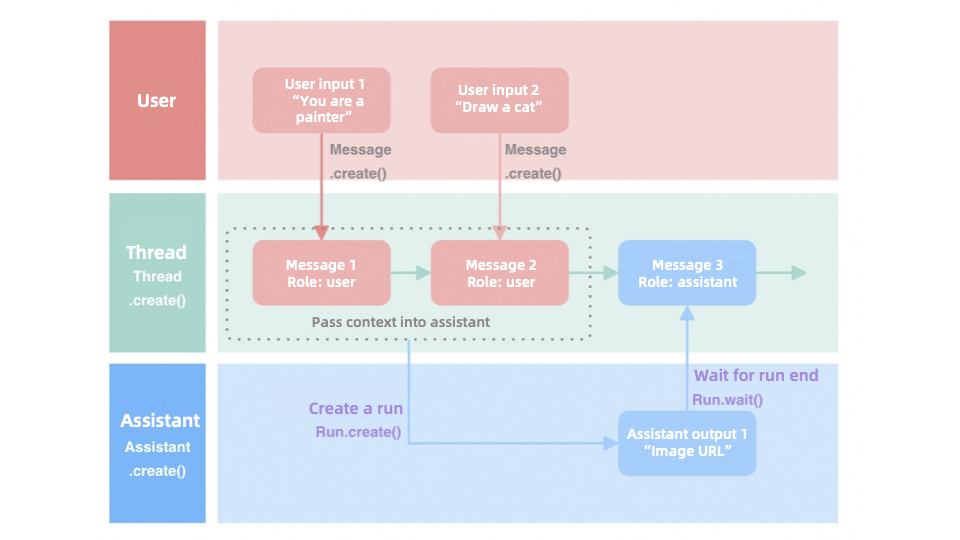
Etapa 1: Preparar o ambiente de desenvolvimento
| Copy Copy Copy |
Etapa 2: Criar um AssistantApós importar o Dashscope SDK, use o método create da classe Assistant para criar um agente Assistant. Esse processo envolve a definição dos seguintes parâmetros principais:
| Copy |
Etapa 3: Criar um ThreadUm Thread é um conceito fundamental na Assistant API que representa um contexto de conversa contínua.O Thread permite criar um encadeamento de gerenciamento de sessão quando um usuário inicia uma nova conversa. O Assistant pode usar o Thread para compreender todo o contexto da conversa e fornecer respostas mais coerentes e relevantes.Recomendamos que você:
| Copy |
Etapa 4: Adicionar uma mensagem a um ThreadSua entrada é transmitida por meio de um objeto Message. A Assistant API suporta o envio de uma ou mais mensagens para um único Thread. Ao criar uma Message, considere os seguintes parâmetros:
Após a execução do método Messages.create(), a mensagem é adicionada automaticamente ao thread e o spooling é acionado. Isso equivale a concluir as operações de criação e envio da mensagem simultaneamente, que é o comportamento padrão da API. | Copy |
Etapa 5: Criar e executar um RunDepois que um usuário atribui uma mensagem a um Thread específico, inicie um Run para ativar o Assistant pré-configurado. O assistente usa todas as mensagens no thread como contexto, utiliza o modelo especificado e os plugins disponíveis para responder inteligentemente às perguntas do usuário e insere as respostas geradas na sequência de mensagens do thread.Neste cenário, execute as seguintes etapas:
Muitos usuários podem estar usando o modelo simultaneamente, o que pode prolongar o tempo de processamento. Recomendamos aguardar até que o status mostre "complete" antes de realizar a próxima operação para garantir um processo tranquilo. | Copy |
Código completo
- Non-streaming output
- Streaming output
Copy
import dashscope
from http import HTTPStatus
import json
def check_status(component, operation):
if component.status_code == HTTPStatus.OK:
print(f"{operation} successful.")
return True
else:
print(f"{operation} failed. Status code: {component.status_code}, Error code: {component.code}, Error message: {component.message}")
return False
# 1. Create a painting assistant
painting_assistant = dashscope.Assistants.create(
model='qwen-max', # Model list: https://www.alibabacloud.com/help/en/model-studio/getting-started/models
name='Art Maestro',
description='AI assistant for painting and art knowledge',
instructions='''Provide information on painting techniques, art history, and creative guidance.
Use tools for research and image generation.''',
tools=[
{'type': 'quark_search', 'description': 'For researching art topics'},
{'type': 'text_to_image', 'description': 'For creating visual examples'}
]
)
if not check_status(painting_assistant, "Assistant creation"):
exit()
# 2. Create a new thread
thread = dashscope.Threads.create()
if not check_status(thread, "Thread creation"):
exit()
# 3. Send a message to the thread
message = dashscope.Messages.create(thread.id, content='Please help me draw a picture of a ragdoll cat.')
if not check_status(message, "Message creation"):
exit()
# 4. Run the assistant on the thread
run = dashscope.Runs.create(thread.id, assistant_id=painting_assistant.id)
if not check_status(run, "Run creation"):
exit()
# 5. Wait for the run to complete
print("Waiting for the assistant to process the request...")
run = dashscope.Runs.wait(run.id, thread_id=thread.id)
if check_status(run, "Run completion"):
print(f"Run completed, status: {run.status}")
else:
print("Run not completed.")
exit()
# 6. Retrieve and display the assistant's response
messages = dashscope.Messages.list(thread.id)
if check_status(messages, "Message retrieval"):
if messages.data:
# Display the content of the last message (the assistant's response)
last_message = messages.data[0]
print("\nAssistant's response:")
print(json.dumps(last_message, ensure_ascii=False, default=lambda o: o.__dict__, sort_keys=True, indent=4))
else:
print("No messages found in the thread.")
else:
print("Failed to retrieve the assistant's response.")
# Tip: This code creates a painting assistant, starts a conversation about how to draw a ragdoll cat,
# and displays the assistant's answer.
Copy
package com.example;
import java.util.Arrays;
import com.alibaba.dashscope.assistants.Assistant;
import com.alibaba.dashscope.assistants.AssistantParam;
import com.alibaba.dashscope.assistants.Assistants;
import com.alibaba.dashscope.common.GeneralListParam;
import com.alibaba.dashscope.common.ListResult;
import com.alibaba.dashscope.exception.ApiException;
import com.alibaba.dashscope.exception.InputRequiredException;
import com.alibaba.dashscope.exception.InvalidateParameter;
import com.alibaba.dashscope.exception.NoApiKeyException;
import com.alibaba.dashscope.threads.AssistantThread;
import com.alibaba.dashscope.threads.ThreadParam;
import com.alibaba.dashscope.threads.Threads;
import com.alibaba.dashscope.threads.messages.Messages;
import com.alibaba.dashscope.threads.messages.TextMessageParam;
import com.alibaba.dashscope.threads.messages.ThreadMessage;
import com.alibaba.dashscope.threads.runs.Run;
import com.alibaba.dashscope.threads.runs.RunParam;
import com.alibaba.dashscope.threads.runs.Runs;
import com.alibaba.dashscope.tools.T2Image.Text2Image;
import com.alibaba.dashscope.tools.search.ToolQuarkSearch;
public class PaintingAssistant {
private static boolean checkStatus(Object response, String operation) {
if (response != null) {
System.out.println(operation + " successful.");
return true;
} else {
System.out.println(operation + " failed.");
return false;
}
}
public static void main(String[] args) {
try {
// 1. Create a painting assistant
Assistants assistants = new Assistants();
AssistantParam assistantParam = AssistantParam.builder()
// Model list: https://www.alibabacloud.com/help/en/model-studio/getting-started/models
.model("qwen-max")
.name("Art Maestro")
.description("AI assistant for painting and art knowledge")
.instructions("Provide information on painting techniques, art history, and creative guidance. Use tools for research and image generation.")
.tools(Arrays.asList(ToolQuarkSearch.builder().build(),Text2Image.builder().build()))
.build();
Assistant paintingAssistant = assistants.create(assistantParam);
if (!checkStatus(paintingAssistant, "Assistant creation")) {
System.exit(1);
}
// 2. Create a new thread
Threads threads = new Threads();
AssistantThread thread = threads.create(ThreadParam.builder().build());
if (!checkStatus(thread, "Thread creation")) {
System.exit(1);
}
// 3. Create and automatically send a message to the specified thread
Messages messages = new Messages();
ThreadMessage message = messages.create(thread.getId(),
TextMessageParam.builder()
.role("user")
.content("Please help me draw a picture of a ragdoll cat.")
.build());
if (!checkStatus(message, "Message creation")) {
System.exit(1);
}
// 4. Run the assistant on the thread
Runs runs = new Runs();
RunParam runParam = RunParam.builder().assistantId(paintingAssistant.getId()).build();
Run run = runs.create(thread.getId(), runParam);
if (!checkStatus(run, "Run creation")) {
System.exit(1);
}
// 5. Wait for the run to complete
System.out.println("Waiting for the assistant to process the request...");
while (true) {
if (run.getStatus().equals(Run.Status.COMPLETED) ||
run.getStatus().equals(Run.Status.FAILED) ||
run.getStatus().equals(Run.Status.CANCELLED) ||
run.getStatus().equals(Run.Status.REQUIRES_ACTION) ||
run.getStatus().equals(Run.Status.EXPIRED)) {
break;
}
Thread.sleep(1000);
run = runs.retrieve(thread.getId(), run.getId());
}
if (checkStatus(run, "Run completion")) {
System.out.println("Run completed, status: " + run.getStatus());
} else {
System.out.println("Run not completed.");
System.exit(1);
}
// 6. Retrieve and display the assistant's response
ListResult<ThreadMessage> messagesList = messages.list(thread.getId(), GeneralListParam.builder().build());
if (checkStatus(messagesList, "Message retrieval")) {
if (!messagesList.getData().isEmpty()) {
// Display the last message (the assistant's response)
ThreadMessage lastMessage = messagesList.getData().get(0);
System.out.println("\nAssistant's response:");
System.out.println(lastMessage.getContent());
} else {
System.out.println("No messages found in the thread.");
}
} else {
System.out.println("Failed to retrieve the assistant's response.");
}
} catch (ApiException | NoApiKeyException | InputRequiredException | InvalidateParameter | InterruptedException e) {
e.printStackTrace();
}
}
}
The Java SDK does not currently support streaming calls for the image generation tool.
Copy
import dashscope
from http import HTTPStatus
import json
import sys
def check_status(response, operation):
if response.status_code == HTTPStatus.OK:
print(f"{operation} successful.")
return True
else:
print(f"{operation} failed. Status code: {response.status_code}, Error code: {response.code}, Error message: {response.message}")
sys.exit(response.status_code)
# 1. Create a painting assistant
def create_painting_assistant():
return dashscope.Assistants.create(
model='qwen-max', # Model list: https://www.alibabacloud.com/help/en/model-studio/getting-started/models
name='Art Maestro',
description='AI assistant for painting and art knowledge',
instructions='''Provide information on painting techniques, art history, and creative guidance.
Use tools for research and image generation.''',
tools=[
{'type': 'quark_search', 'description': 'For researching art topics'},
{'type': 'text_to_image', 'description': 'For creating visual examples'}
]
)
if __name__ == '__main__':
# Create a painting assistant
painting_assistant = create_painting_assistant()
print(painting_assistant)
check_status(painting_assistant, "Assistant creation")
# Create a new thread with an initial message
thread = dashscope.Threads.create(
messages=[{
'role': 'user',
'content': 'Please help me draw a picture of a ragdoll cat.'
}]
)
print(thread)
check_status(thread, "Thread creation")
# Create a run with streaming output
run_iterator = dashscope.Runs.create(
thread.id,
assistant_id=painting_assistant.id,
stream=True
)
# Iterate over events and messages
print("Processing request...")
for event, msg in run_iterator:
print(event)
print(msg)
# Retrieve and display the assistant's response
messages = dashscope.Messages.list(thread.id)
check_status(messages, "Message retrieval")
print("\nAssistant's response:")
print(json.dumps(messages, ensure_ascii=False, default=lambda o: o.__dict__, sort_keys=True, indent=4))
# Tip: This script creates a painting assistant with streaming output, starts a conversation about drawing a ragdoll cat,
# and displays the assistant's responses in real time.
Copy
import java.util.Arrays;
import com.alibaba.dashscope.assistants.Assistant;
import com.alibaba.dashscope.assistants.AssistantParam;
import com.alibaba.dashscope.assistants.Assistants;
import com.alibaba.dashscope.common.GeneralListParam;
import com.alibaba.dashscope.common.ListResult;
import com.alibaba.dashscope.exception.ApiException;
import com.alibaba.dashscope.exception.InputRequiredException;
import com.alibaba.dashscope.exception.InvalidateParameter;
import com.alibaba.dashscope.exception.NoApiKeyException;
import com.alibaba.dashscope.threads.AssistantThread;
import com.alibaba.dashscope.threads.ThreadParam;
import com.alibaba.dashscope.threads.Threads;
import com.alibaba.dashscope.threads.messages.Messages;
import com.alibaba.dashscope.threads.messages.TextMessageParam;
import com.alibaba.dashscope.threads.messages.ThreadMessage;
import com.alibaba.dashscope.threads.runs.AssistantStreamMessage;
import com.alibaba.dashscope.threads.runs.Run;
import com.alibaba.dashscope.threads.runs.RunParam;
import com.alibaba.dashscope.threads.runs.Runs;
import com.alibaba.dashscope.tools.T2Image.Text2Image;
import com.alibaba.dashscope.tools.search.ToolQuarkSearch;
import io.reactivex.Flowable;
public class PaintingAssistant {
private static boolean checkStatus(Object response, String operation) {
if (response != null) {
System.out.println(operation + " successful.");
return true;
} else {
System.out.println(operation + " failed.");
return false;
}
}
private static Assistant createPaintingAssistant() throws ApiException, NoApiKeyException {
Assistants assistants = new Assistants();
AssistantParam assistantParam = AssistantParam.builder()
// Model list: https://www.alibabacloud.com/help/en/model-studio/getting-started/models
.model("qwen-max")
.name("Art Maestro")
.description("AI assistant for painting and art knowledge")
.instructions("Provide information on painting techniques, art history, and creative guidance. Use tools for research and image generation.")
.tools(Arrays.asList(ToolQuarkSearch.builder().build(), Text2Image.builder().build()))
.build();
return assistants.create(assistantParam);
}
private static void runPaintingAssistant(String assistantId) throws ApiException, NoApiKeyException, InvalidateParameter, InputRequiredException, InterruptedException {
Threads threads = new Threads();
AssistantThread thread = threads.create(ThreadParam.builder().build());
if (!checkStatus(thread, "Thread creation")) {
System.exit(1);
}
// Create and automatically send a message to the specified thread
Messages messages = new Messages();
ThreadMessage message = messages.create(thread.getId(),
TextMessageParam.builder()
.role("user")
.content("Please help me draw a picture of a ragdoll cat.")
.build());
if (!checkStatus(message, "Message creation")) {
System.exit(1);
}
Runs runs = new Runs();
RunParam runParam = RunParam.builder().assistantId(assistantId).stream(true).build();
try {
System.out.println("Attempting to stream the assistant's response...");
Flowable<AssistantStreamMessage> runFlowable = runs.createStream(thread.getId(), runParam);
runFlowable.blockingForEach(assistantStreamMessage -> {
System.out.println("Event: " + assistantStreamMessage.getEvent());
System.out.println("Data: " + assistantStreamMessage.getData());
});
} catch (Exception e) {
System.out.println("Streaming failed, switching to non-streaming method.");
e.printStackTrace();
// Switch to non-streaming method
Run run = runs.create(thread.getId(), RunParam.builder().assistantId(assistantId).build());
while (true) {
if (run.getStatus().equals(Run.Status.COMPLETED) ||
run.getStatus().equals(Run.Status.FAILED) ||
run.getStatus().equals(Run.Status.CANCELLED) ||
run.getStatus().equals(Run.Status.REQUIRES_ACTION) ||
run.getStatus().equals(Run.Status.EXPIRED)) {
break;
}
Thread.sleep(1000);
run = runs.retrieve(thread.getId(), run.getId());
}
System.out.println("Run completed, status: " + run.getStatus());
}
// Retrieve and display the assistant's response
GeneralListParam listParam = GeneralListParam.builder().limit(100L).build();
ListResult<ThreadMessage> messagesList = messages.list(thread.getId(), listParam);
if (checkStatus(messagesList, "Message retrieval")) {
if (!messagesList.getData().isEmpty()) {
System.out.println("\nAssistant's response:");
for (ThreadMessage threadMessage : messagesList.getData()) {
System.out.println(threadMessage.getContent());
}
} else {
System.out.println("No messages found in the thread.");
}
} else {
System.out.println("Failed to retrieve the assistant's response.");
}
}
public static void main(String[] args) {
try {
Assistant paintingAssistant = createPaintingAssistant();
if (!checkStatus(paintingAssistant, "Assistant creation")) {
System.exit(1);
}
runPaintingAssistant(paintingAssistant.getId());
} catch (ApiException | NoApiKeyException | InputRequiredException | InvalidateParameter | InterruptedException e) {
System.out.println("An error occurred while running the painting assistant:");
e.printStackTrace();
}
}
}
- Non-streaming output
- Streaming output
Copy
import dashscope
from http import HTTPStatus
import json
dashscope.base_http_api_url = 'https://dashscope-intl.aliyuncs.com/api/v1'
def check_status(component, operation):
if component.status_code == HTTPStatus.OK:
print(f"{operation} successful.")
return True
else:
print(f"{operation} failed. Status code: {component.status_code}, Error code: {component.code}, Error message: {component.message}")
return False
# 1. Create a painting assistant
painting_assistant = dashscope.Assistants.create(
# Model list: https://www.alibabacloud.com/help/en/model-studio/getting-started/models
model='qwen-max',
name='Art Maestro',
description='AI assistant for painting and art knowledge',
instructions='''Provide information on painting techniques, art history, and creative guidance.
Use tools for research and image generation.''',
tools=[
{'type': 'text_to_image', 'description': 'For creating visual examples'}
]
)
if not check_status(painting_assistant, "Assistant creation"):
exit()
# 2. Create a new thread
thread = dashscope.Threads.create()
if not check_status(thread, "Thread creation"):
exit()
# 3. Send a message to the thread
message = dashscope.Messages.create(thread.id, content='Please help me draw a picture of a ragdoll cat.')
if not check_status(message, "Message creation"):
exit()
# 4. Run the assistant on the thread
run = dashscope.Runs.create(thread.id, assistant_id=painting_assistant.id)
if not check_status(run, "Run creation"):
exit()
# 5. Wait for the run to complete
print("Waiting for the assistant to process the request...")
run = dashscope.Runs.wait(run.id, thread_id=thread.id)
if check_status(run, "Run completion"):
print(f"Run completed, status: {run.status}")
else:
print("Run not completed.")
exit()
# 6. Retrieve and display the assistant's response
messages = dashscope.Messages.list(thread.id)
if check_status(messages, "Message retrieval"):
if messages.data:
# Display the content of the last message (the assistant's response)
last_message = messages.data[0]
print("\nAssistant's response:")
print(json.dumps(last_message, ensure_ascii=False, default=lambda o: o.__dict__, sort_keys=True, indent=4))
else:
print("No messages found in the thread.")
else:
print("Failed to retrieve the assistant's response.")
# Tip: This code creates a painting assistant, starts a conversation about how to draw a ragdoll cat,
# and displays the assistant's answer.
Copy
package com.example;
import java.util.Arrays;
import com.alibaba.dashscope.protocol.Protocol;
import com.alibaba.dashscope.assistants.Assistant;
import com.alibaba.dashscope.assistants.AssistantParam;
import com.alibaba.dashscope.assistants.Assistants;
import com.alibaba.dashscope.common.GeneralListParam;
import com.alibaba.dashscope.common.ListResult;
import com.alibaba.dashscope.exception.ApiException;
import com.alibaba.dashscope.exception.InputRequiredException;
import com.alibaba.dashscope.exception.InvalidateParameter;
import com.alibaba.dashscope.exception.NoApiKeyException;
import com.alibaba.dashscope.threads.AssistantThread;
import com.alibaba.dashscope.threads.ThreadParam;
import com.alibaba.dashscope.threads.Threads;
import com.alibaba.dashscope.threads.messages.Messages;
import com.alibaba.dashscope.threads.messages.TextMessageParam;
import com.alibaba.dashscope.threads.messages.ThreadMessage;
import com.alibaba.dashscope.threads.runs.Run;
import com.alibaba.dashscope.threads.runs.RunParam;
import com.alibaba.dashscope.threads.runs.Runs;
import com.alibaba.dashscope.tools.T2Image.Text2Image;
import com.alibaba.dashscope.tools.search.ToolQuarkSearch;
import com.alibaba.dashscope.utils.Constants;
public class PaintingAssistant {
static {
Constants.baseHttpApiUrl="https://dashscope-intl.aliyuncs.com/api/v1";
}
private static boolean checkStatus(Object response, String operation) {
if (response != null) {
System.out.println(operation + " successful.");
return true;
} else {
System.out.println(operation + " failed.");
return false;
}
}
public static void main(String[] args) {
try {
// 1. Create a painting assistant
Assistants assistants = new Assistants();
AssistantParam assistantParam = AssistantParam.builder()
// Model list: https://www.alibabacloud.com/help/en/model-studio/getting-started/models
.model("qwen-max")
.name("Art Maestro")
.description("AI assistant for painting and art knowledge")
.instructions("Provide information on painting techniques, art history, and creative guidance. Use tools for research and image generation.")
.tools(Arrays.asList(ToolQuarkSearch.builder().build(),Text2Image.builder().build()))
.build();
Assistant paintingAssistant = assistants.create(assistantParam);
if (!checkStatus(paintingAssistant, "Assistant creation")) {
System.exit(1);
}
// 2. Create a new thread
Threads threads = new Threads();
AssistantThread thread = threads.create(ThreadParam.builder().build());
if (!checkStatus(thread, "Thread creation")) {
System.exit(1);
}
// 3. Send a message to the thread
Messages messages = new Messages();
ThreadMessage message = messages.create(thread.getId(),
TextMessageParam.builder()
.role("user")
.content("Please help me draw a picture of a ragdoll cat.")
.build());
if (!checkStatus(message, "Message creation")) {
System.exit(1);
}
// 4. Run the assistant on the thread
Runs runs = new Runs();
RunParam runParam = RunParam.builder().assistantId(paintingAssistant.getId()).build();
Run run = runs.create(thread.getId(), runParam);
if (!checkStatus(run, "Run creation")) {
System.exit(1);
}
// 5. Wait for the run to complete
System.out.println("Waiting for the assistant to process the request...");
while (true) {
if (run.getStatus().equals(Run.Status.COMPLETED) ||
run.getStatus().equals(Run.Status.FAILED) ||
run.getStatus().equals(Run.Status.CANCELLED) ||
run.getStatus().equals(Run.Status.REQUIRES_ACTION) ||
run.getStatus().equals(Run.Status.EXPIRED)) {
break;
}
Thread.sleep(1000);
run = runs.retrieve(thread.getId(), run.getId());
}
if (checkStatus(run, "Run completion")) {
System.out.println("Run completed, status: " + run.getStatus());
} else {
System.out.println("Run not completed.");
System.exit(1);
}
// 6. Retrieve and display the assistant's response
ListResult<ThreadMessage> messagesList = messages.list(thread.getId(), GeneralListParam.builder().build());
if (checkStatus(messagesList, "Message retrieval")) {
if (!messagesList.getData().isEmpty()) {
// Display the last message (the assistant's response)
ThreadMessage lastMessage = messagesList.getData().get(0);
System.out.println("\nAssistant's response:");
System.out.println(lastMessage.getContent());
} else {
System.out.println("No messages found in the thread.");
}
} else {
System.out.println("Failed to retrieve the assistant's response.");
}
} catch (ApiException | NoApiKeyException | InputRequiredException | InvalidateParameter | InterruptedException e) {
e.printStackTrace();
}
}
}
The Java SDK does not currently support streaming calls for the image generation tool.
Copy
import dashscope
from http import HTTPStatus
import json
import sys
dashscope.base_http_api_url = 'https://dashscope-intl.aliyuncs.com/api/v1'
def check_status(response, operation):
if response.status_code == HTTPStatus.OK:
print(f"{operation} successful.")
return True
else:
print(f"{operation} failed. Status code: {response.status_code}, Error code: {response.code}, Error message: {response.message}")
sys.exit(response.status_code)
# 1. Create a painting assistant
def create_painting_assistant():
return dashscope.Assistants.create(
# Model list: https://www.alibabacloud.com/help/en/model-studio/getting-started/models
model='qwen-max',
name='Art Maestro',
description='AI assistant for painting and art knowledge',
instructions='''Provide information on painting techniques, art history, and creative guidance.
Use tools for research and image generation.''',
tools=[
{'type': 'text_to_image', 'description': 'For creating visual examples'}
]
)
if __name__ == '__main__':
# Create a painting assistant
painting_assistant = create_painting_assistant()
print(painting_assistant)
check_status(painting_assistant, "Assistant creation")
# Create a new thread with an initial message
thread = dashscope.Threads.create(
messages=[{
'role': 'user',
'content': 'Please help me draw a picture of a ragdoll cat.'
}]
)
print(thread)
check_status(thread, "Thread creation")
# Create a run with streaming output
run_iterator = dashscope.Runs.create(
thread.id,
assistant_id=painting_assistant.id,
stream=True
)
# Iterate over events and messages
print("Processing request...")
for event, msg in run_iterator:
print(event)
print(msg)
# Retrieve and display the assistant's response
messages = dashscope.Messages.list(thread.id)
check_status(messages, "Message retrieval")
print("\nAssistant's response:")
print(json.dumps(messages, ensure_ascii=False, default=lambda o: o.__dict__, sort_keys=True, indent=4))
# Tip: This script creates a painting assistant with streaming output, starts a conversation about drawing a ragdoll cat,
# and displays the assistant's responses in real time.
Copy
import java.util.Arrays;
import com.alibaba.dashscope.protocol.Protocol;
import com.alibaba.dashscope.assistants.Assistant;
import com.alibaba.dashscope.assistants.AssistantParam;
import com.alibaba.dashscope.assistants.Assistants;
import com.alibaba.dashscope.common.GeneralListParam;
import com.alibaba.dashscope.common.ListResult;
import com.alibaba.dashscope.exception.ApiException;
import com.alibaba.dashscope.exception.InputRequiredException;
import com.alibaba.dashscope.exception.InvalidateParameter;
import com.alibaba.dashscope.exception.NoApiKeyException;
import com.alibaba.dashscope.threads.AssistantThread;
import com.alibaba.dashscope.threads.ThreadParam;
import com.alibaba.dashscope.threads.Threads;
import com.alibaba.dashscope.threads.messages.Messages;
import com.alibaba.dashscope.threads.messages.TextMessageParam;
import com.alibaba.dashscope.threads.messages.ThreadMessage;
import com.alibaba.dashscope.threads.runs.AssistantStreamMessage;
import com.alibaba.dashscope.threads.runs.Run;
import com.alibaba.dashscope.threads.runs.RunParam;
import com.alibaba.dashscope.threads.runs.Runs;
import com.alibaba.dashscope.tools.T2Image.Text2Image;
import com.alibaba.dashscope.tools.search.ToolQuarkSearch;
import io.reactivex.Flowable;
public class PaintingAssistant {
static {
Constants.baseHttpApiUrl="https://dashscope-intl.aliyuncs.com/api/v1";
}
private static boolean checkStatus(Object response, String operation) {
if (response != null) {
System.out.println(operation + " successful.");
return true;
} else {
System.out.println(operation + " failed.");
return false;
}
}
private static Assistant createPaintingAssistant() throws ApiException, NoApiKeyException {
Assistants assistants = new Assistants();
AssistantParam assistantParam = AssistantParam.builder()
// Model list: https://www.alibabacloud.com/help/en/model-studio/getting-started/models
.model("qwen-max")
.name("Art Maestro")
.description("AI assistant for painting and art knowledge")
.instructions("Provide information on painting techniques, art history, and creative guidance. Use tools for research and image generation.")
.tools(Arrays.asList(ToolQuarkSearch.builder().build(), Text2Image.builder().build()))
.build();
return assistants.create(assistantParam);
}
private static void runPaintingAssistant(String assistantId) throws ApiException, NoApiKeyException, InvalidateParameter, InputRequiredException, InterruptedException {
Threads threads = new Threads();
AssistantThread thread = threads.create(ThreadParam.builder().build());
if (!checkStatus(thread, "Thread creation")) {
System.exit(1);
}
Messages messages = new Messages();
ThreadMessage message = messages.create(thread.getId(),
TextMessageParam.builder()
.role("user")
.content("Please help me draw a picture of a ragdoll cat.")
.build());
if (!checkStatus(message, "Message creation")) {
System.exit(1);
}
Runs runs = new Runs();
RunParam runParam = RunParam.builder().assistantId(assistantId).stream(true).build();
try {
System.out.println("Attempting to stream the assistant's response...");
Flowable<AssistantStreamMessage> runFlowable = runs.createStream(thread.getId(), runParam);
runFlowable.blockingForEach(assistantStreamMessage -> {
System.out.println("Event: " + assistantStreamMessage.getEvent());
System.out.println("Data: " + assistantStreamMessage.getData());
});
} catch (Exception e) {
System.out.println("Streaming failed, switching to non-streaming method.");
e.printStackTrace();
// Switch to non-streaming method
Run run = runs.create(thread.getId(), RunParam.builder().assistantId(assistantId).build());
while (true) {
if (run.getStatus().equals(Run.Status.COMPLETED) ||
run.getStatus().equals(Run.Status.FAILED) ||
run.getStatus().equals(Run.Status.CANCELLED) ||
run.getStatus().equals(Run.Status.REQUIRES_ACTION) ||
run.getStatus().equals(Run.Status.EXPIRED)) {
break;
}
Thread.sleep(1000);
run = runs.retrieve(thread.getId(), run.getId());
}
System.out.println("Run completed, status: " + run.getStatus());
}
// Retrieve and display the assistant's response
GeneralListParam listParam = GeneralListParam.builder().limit(100L).build();
ListResult<ThreadMessage> messagesList = messages.list(thread.getId(), listParam);
if (checkStatus(messagesList, "Message retrieval")) {
if (!messagesList.getData().isEmpty()) {
System.out.println("\nAssistant's response:");
for (ThreadMessage threadMessage : messagesList.getData()) {
System.out.println(threadMessage.getContent());
}
} else {
System.out.println("No messages found in the thread.");
}
} else {
System.out.println("Failed to retrieve the assistant's response.");
}
}
public static void main(String[] args) {
try {
Assistant paintingAssistant = createPaintingAssistant();
if (!checkStatus(paintingAssistant, "Assistant creation")) {
System.exit(1);
}
runPaintingAssistant(paintingAssistant.getId());
} catch (ApiException | NoApiKeyException | InputRequiredException | InvalidateParameter | InterruptedException e) {
System.out.println("An error occurred while running the painting assistant:");
e.printStackTrace();
}
}
}
- Non-streaming output
- Streaming output
Copy
import dashscope
from http import HTTPStatus
import json
def check_status(component, operation):
if component.status_code == HTTPStatus.OK:
print(f"{operation} successful.")
return True
else:
print(f"{operation} failed. Status: {component.status_code}, Code: {component.code}, Message: {component.message}")
return False
# 1. Create a painting Assistant
painting_assistant = dashscope.Assistants.create(
model='qwen-max', # Model list: https://www.alibabacloud.com/help/en/model-studio/getting-started/models
name='Art Maestro',
description='AI assistant for painting and art knowledge',
instructions='''Provide information on painting techniques, art history, and creative guidance.
Use tools for research and image generation.''',
tools=[
{'type': 'quark_search', 'description': 'For researching art topics'},
{'type': 'text_to_image', 'description': 'For creating visual examples'}
]
)
if not check_status(painting_assistant, "Assistant creation"):
exit()
# 2. Create a new thread
thread = dashscope.Threads.create()
if not check_status(thread, "Thread creation"):
exit()
# 3. Send a message to the thread
message = dashscope.Messages.create(thread.id, content='Please help me draw a picture of a Ragdoll cat.')
if not check_status(message, "Message creation"):
exit()
# 4. Run the Assistant on the thread
run = dashscope.Runs.create(thread.id, assistant_id=painting_assistant.id)
if not check_status(run, "Run creation"):
exit()
# 5. Wait for the run to complete
print("Waiting for the assistant to process the request...")
run = dashscope.Runs.wait(run.id, thread_id=thread.id)
if check_status(run, "Run completion"):
print(f"Run completed with status: {run.status}")
else:
print("Failed to complete the run.")
exit()
# 6. Retrieve and display the Assistant's response
messages = dashscope.Messages.list(thread.id)
if check_status(messages, "Message retrieval"):
if messages.data:
# Display the content of the last message (Assistant's response)
last_message = messages.data[0]
print("\nAssistant's response:")
print(json.dumps(last_message, ensure_ascii=False, default=lambda o: o.__dict__, sort_keys=True, indent=4))
else:
print("No messages found in the thread.")
else:
print("Failed to retrieve the assistant's response.")
# Note: This code creates a painting Assistant, starts a conversation about how to draw a Ragdoll cat,
# and displays the Assistant's response.
Copy
package com.example;
import java.util.Arrays;
import com.alibaba.dashscope.assistants.Assistant;
import com.alibaba.dashscope.assistants.AssistantParam;
import com.alibaba.dashscope.assistants.Assistants;
import com.alibaba.dashscope.common.GeneralListParam;
import com.alibaba.dashscope.common.ListResult;
import com.alibaba.dashscope.exception.ApiException;
import com.alibaba.dashscope.exception.InputRequiredException;
import com.alibaba.dashscope.exception.InvalidateParameter;
import com.alibaba.dashscope.exception.NoApiKeyException;
import com.alibaba.dashscope.threads.AssistantThread;
import com.alibaba.dashscope.threads.ThreadParam;
import com.alibaba.dashscope.threads.Threads;
import com.alibaba.dashscope.threads.messages.Messages;
import com.alibaba.dashscope.threads.messages.TextMessageParam;
import com.alibaba.dashscope.threads.messages.ThreadMessage;
import com.alibaba.dashscope.threads.runs.Run;
import com.alibaba.dashscope.threads.runs.RunParam;
import com.alibaba.dashscope.threads.runs.Runs;
import com.alibaba.dashscope.tools.T2Image.Text2Image;
import com.alibaba.dashscope.tools.search.ToolQuarkSearch;
public class PaintingAssistant {
private static boolean checkStatus(Object response, String operation) {
if (response != null) {
System.out.println(operation + " successful.");
return true;
} else {
System.out.println(operation + " failed.");
return false;
}
}
public static void main(String[] args) {
try {
// 1. Create the painting assistant
Assistants assistants = new Assistants();
AssistantParam assistantParam = AssistantParam.builder()
.model("qwen-max")
.name("Art Maestro")
.description("AI assistant for painting and art knowledge")
.instructions("Provide information on painting techniques, art history, and creative guidance. Use tools for research and image generation.")
.tools(Arrays.asList(ToolQuarkSearch.builder().build(),Text2Image.builder().build()))
.build();
Assistant paintingAssistant = assistants.create(assistantParam);
if (!checkStatus(paintingAssistant, "Assistant creation")) {
System.exit(1);
}
// 2. Create a new thread
Threads threads = new Threads();
AssistantThread thread = threads.create(ThreadParam.builder().build());
if (!checkStatus(thread, "Thread creation")) {
System.exit(1);
}
// 3. Send a message to the thread
Messages messages = new Messages();
ThreadMessage message = messages.create(thread.getId(),
TextMessageParam.builder()
.role("user")
.content("Please help me draw a picture of a Ragdoll cat.")
.build());
if (!checkStatus(message, "Message creation")) {
System.exit(1);
}
// 4. Run the assistant on the thread
Runs runs = new Runs();
RunParam runParam = RunParam.builder().assistantId(paintingAssistant.getId()).build();
Run run = runs.create(thread.getId(), runParam);
if (!checkStatus(run, "Run creation")) {
System.exit(1);
}
// 5. Wait for the run to complete
System.out.println("Waiting for the assistant to process the request...");
while (true) {
if (run.getStatus().equals(Run.Status.COMPLETED) ||
run.getStatus().equals(Run.Status.FAILED) ||
run.getStatus().equals(Run.Status.CANCELLED) ||
run.getStatus().equals(Run.Status.REQUIRES_ACTION)||
run.getStatus().equals(Run.Status.EXPIRED)) {
break;
}
Thread.sleep(1000);
run = runs.retrieve(thread.getId(), run.getId());
}
if (checkStatus(run, "Run completion")) {
System.out.println("Run completed with status: " + run.getStatus());
} else {
System.out.println("Failed to complete the run.");
System.exit(1);
}
// 6. Retrieve and display the assistant's response
ListResult<ThreadMessage> messagesList = messages.list(thread.getId(), GeneralListParam.builder().build());
if (checkStatus(messagesList, "Message retrieval")) {
if (!messagesList.getData().isEmpty()) {
// Display the last message (the assistant's response)
ThreadMessage lastMessage = messagesList.getData().get(0);
System.out.println("\nAssistant's response:");
System.out.println(lastMessage.getContent());
} else {
System.out.println("No messages found in the thread.");
}
} else {
System.out.println("Failed to retrieve the assistant's response.");
}
} catch (ApiException | NoApiKeyException | InputRequiredException | InvalidateParameter | InterruptedException e) {
e.printStackTrace();
}
}
}
The Java SDK does not currently support streaming calls for the image generation tool.
Copy
import dashscope
from http import HTTPStatus
import json
import sys
def check_status(response, operation):
if response.status_code == HTTPStatus.OK:
print(f"{operation} successful.")
return True
else:
print(f"{operation} failed. Status: {response.status_code}, Code: {response.code}, Message: {response.message}")
sys.exit(response.status_code)
# Create the painting assistant
def create_painting_assistant():
return dashscope.Assistants.create(
model='qwen-max',
name='Art Maestro',
description='AI assistant for painting and art knowledge',
instructions='''Provide information on painting techniques, art history, and creative guidance.
Use tools for research and image generation.''',
tools=[
{'type': 'quark_search', 'description': 'For researching art topics'},
{'type': 'text_to_image', 'description': 'For creating visual examples'}
]
)
if __name__ == '__main__':
# Create the painting assistant
painting_assistant = create_painting_assistant()
print(painting_assistant)
check_status(painting_assistant, "Assistant creation")
# Create a new thread with an initial message
thread = dashscope.Threads.create(
messages=[{
'role': 'user',
'content': 'Please help me draw a picture of a Ragdoll cat.'
}]
)
print(thread)
check_status(thread, "Thread creation")
# Create run with stream
run_iterator = dashscope.Runs.create(
thread.id,
assistant_id=painting_assistant.id,
stream=True
)
# Iterate over the events and messages
print("Processing the request...")
for event, msg in run_iterator:
print(event)
print(msg)
# Retrieve and display the assistant's response
messages = dashscope.Messages.list(thread.id)
check_status(messages, "Message retrieval")
print("\nAssistant's response:")
print(json.dumps(messages, ensure_ascii=False, default=lambda o: o.__dict__, sort_keys=True, indent=4))
# Note: This script creates a streaming painting assistant, starts a conversation about
# drawing a Ragdoll cat, and displays the assistant's responses in real-time.
Copy
import java.util.Arrays;
import com.alibaba.dashscope.assistants.Assistant;
import com.alibaba.dashscope.assistants.AssistantParam;
import com.alibaba.dashscope.assistants.Assistants;
import com.alibaba.dashscope.common.GeneralListParam;
import com.alibaba.dashscope.common.ListResult;
import com.alibaba.dashscope.exception.ApiException;
import com.alibaba.dashscope.exception.InputRequiredException;
import com.alibaba.dashscope.exception.InvalidateParameter;
import com.alibaba.dashscope.exception.NoApiKeyException;
import com.alibaba.dashscope.threads.AssistantThread;
import com.alibaba.dashscope.threads.ThreadParam;
import com.alibaba.dashscope.threads.Threads;
import com.alibaba.dashscope.threads.messages.Messages;
import com.alibaba.dashscope.threads.messages.TextMessageParam;
import com.alibaba.dashscope.threads.messages.ThreadMessage;
import com.alibaba.dashscope.threads.runs.AssistantStreamMessage;
import com.alibaba.dashscope.threads.runs.Run;
import com.alibaba.dashscope.threads.runs.RunParam;
import com.alibaba.dashscope.threads.runs.Runs;
import com.alibaba.dashscope.tools.T2Image.Text2Image;
import com.alibaba.dashscope.tools.search.ToolQuarkSearch;
import io.reactivex.Flowable;
public class PaintingAssistant {
private static boolean checkStatus(Object response, String operation) {
if (response != null) {
System.out.println(operation + " successful.");
return true;
} else {
System.out.println(operation + " failed.");
return false;
}
}
private static Assistant createPaintingAssistant() throws ApiException, NoApiKeyException {
Assistants assistants = new Assistants();
AssistantParam assistantParam = AssistantParam.builder()
.model("qwen-max")
.name("Art Maestro")
.description("AI assistant for painting and art knowledge")
.instructions("Provide information on painting techniques, art history, and creative guidance. Use tools for research and image generation.")
.tools(Arrays.asList(ToolQuarkSearch.builder().build(), Text2Image.builder().build()))
.build();
return assistants.create(assistantParam);
}
private static void runPaintingAssistant(String assistantId) throws ApiException, NoApiKeyException, InvalidateParameter, InputRequiredException, InterruptedException {
Threads threads = new Threads();
AssistantThread thread = threads.create(ThreadParam.builder().build());
if (!checkStatus(thread, "Thread creation")) {
System.exit(1);
}
Messages messages = new Messages();
ThreadMessage message = messages.create(thread.getId(),
TextMessageParam.builder()
.role("user")
.content("Please help me draw a picture of a Ragdoll cat.")
.build());
if (!checkStatus(message, "Message creation")) {
System.exit(1);
}
Runs runs = new Runs();
RunParam runParam = RunParam.builder().assistantId(assistantId).stream(true).build();
try {
System.out.println("Attempting to stream the assistant's response...");
Flowable<AssistantStreamMessage> runFlowable = runs.createStream(thread.getId(), runParam);
runFlowable.blockingForEach(assistantStreamMessage -> {
System.out.println("Event: " + assistantStreamMessage.getEvent());
System.out.println("Data: " + assistantStreamMessage.getData());
});
} catch (Exception e) {
System.out.println("Streaming failed. Falling back to non-streaming method.");
e.printStackTrace();
// Fallback to non-streaming method
Run run = runs.create(thread.getId(), RunParam.builder().assistantId(assistantId).build());
while (true) {
if (run.getStatus().equals(Run.Status.COMPLETED) ||
run.getStatus().equals(Run.Status.FAILED) ||
run.getStatus().equals(Run.Status.CANCELLED) ||
run.getStatus().equals(Run.Status.REQUIRES_ACTION) ||
run.getStatus().equals(Run.Status.EXPIRED)) {
break;
}
Thread.sleep(1000);
run = runs.retrieve(thread.getId(), run.getId());
}
System.out.println("Run completed with status: " + run.getStatus());
}
// Retrieve and display the assistant's response
GeneralListParam listParam = GeneralListParam.builder().limit(100L).build();
ListResult<ThreadMessage> messagesList = messages.list(thread.getId(), listParam);
if (checkStatus(messagesList, "Message retrieval")) {
if (!messagesList.getData().isEmpty()) {
System.out.println("\nAssistant's responses:");
for (ThreadMessage threadMessage : messagesList.getData()) {
System.out.println(threadMessage.getContent());
}
} else {
System.out.println("No messages found in the thread.");
}
} else {
System.out.println("Failed to retrieve the assistant's response.");
}
}
public static void main(String[] args) {
try {
Assistant paintingAssistant = createPaintingAssistant();
if (!checkStatus(paintingAssistant, "Assistant creation")) {
System.exit(1);
}
runPaintingAssistant(paintingAssistant.getId());
} catch (ApiException | NoApiKeyException | InputRequiredException | InvalidateParameter | InterruptedException e) {
System.out.println("An error occurred while running the painting assistant:");
e.printStackTrace();
}
}
}