Synthesize speech with qwen-audio-3.1-tts-flash over AOQ

Use qwen-audio-3.1-tts-flash over AOQ to synthesize text in segments and buffer and play the resulting PCM audio in an Android app.

Solution overview

TTS typically generates and delivers audio faster than it plays. When synthesizing long passages, the client buffers much of the audio before playing it. If you use the SDK player, the playback path closes when the server disconnects after about 60 seconds of inactivity. Audio left in its buffer may not play. This solution uses the following approach:
  1. Use onReceivedAudioFrame, introduced in SDK 1.4.2, to deliver incoming PCM to the app without waiting for SDK playback.
  2. Start the SDK player in external mode. Configure PCM output and subscribe to the Audio track in Segment mode. The SDK sends no sound to the device; the app plays its own queue.
  3. The app manages buffering, playback progress, pause, resume, and stop. Do not stop the app player or clear it when the connection closes or the engine is destroyed. Audio already saved can still play.
  4. To synthesize more audio after disconnection, obtain fresh credentials and reconnect. The app decides whether to keep or discard existing audio and how to append the new audio.

Prerequisites

  1. Activate Model Studio and get an API key in the console. Store the API key only on your application server (AppServer). Do not include it in client code or commit it to a repository.
  2. Confirm the AOQ endpoint for the region in which your application is deployed. For selection guidance, see Select a region, deployment scope, and endpoint.
  3. Get the AOQ Client SDK from SDK download. Use version 1.4.2 or later with the incoming audio callback. Version 1.4.1 and earlier do not meet this requirement.
  4. Set up an AppServer by following the AOQ authentication steps for Qwen-Audio-TTS. Before each new connection, the client must obtain new connection credentials from the AppServer.

Import the SDK

Import the SDK for your platform. The callback and client examples below use Android Java. For callback signatures and audio buffer lifetimes on other platforms, see the respective SDK reference. PCM output does not require the Opus plugin.

Android

  1. Put AoqClientSdk-release.aar into app/libs, and configure the dependency and the ABIs supported by the SDK in app/build.gradle:
    android {
        defaultConfig {
            minSdk 21
            ndk { abiFilters 'armeabi-v7a', 'arm64-v8a' }
        }
    }
    
    dependencies {
        implementation fileTree(dir: 'libs', include: ['*.aar'])
    }
    
  2. Declare the following permissions in AndroidManifest.xml:
    <uses-permission android:name="android.permission.INTERNET" />
    <uses-permission android:name="android.permission.ACCESS_NETWORK_STATE" />
    
  3. This scenario does not require microphone or camera permissions.

iOS

  1. Drag AoqClientSdk.framework into the Xcode project, and select Embed & Sign under Target > General > Frameworks, Libraries, and Embedded Content. The SDK supports iOS 13.0 and later on arm64 devices.
  2. This scenario does not use the microphone or camera, so no corresponding permissions are required.
  3. In a Swift project, use import AoqClientSdk; in an Objective-C project, use #import <AoqClientSdk/AoqClientSdk.h>.

HarmonyOS

  1. Put AoqClientSdk.har into entry/libs, and declare the dependency in entry/oh-package.json5. The SDK is compatible with API 12 and supports arm64-v8a:
    {
      "dependencies": {
        "@aoq/client-sdk": "file:./libs/AoqClientSdk.har"
      }
    }
    
  2. Declare the following permissions in entry/src/main/module.json5:
    {
      "requestPermissions": [
        { "name": "ohos.permission.INTERNET" }
      ]
    }
    
  3. This scenario does not require microphone or camera permissions.

Implementation flow

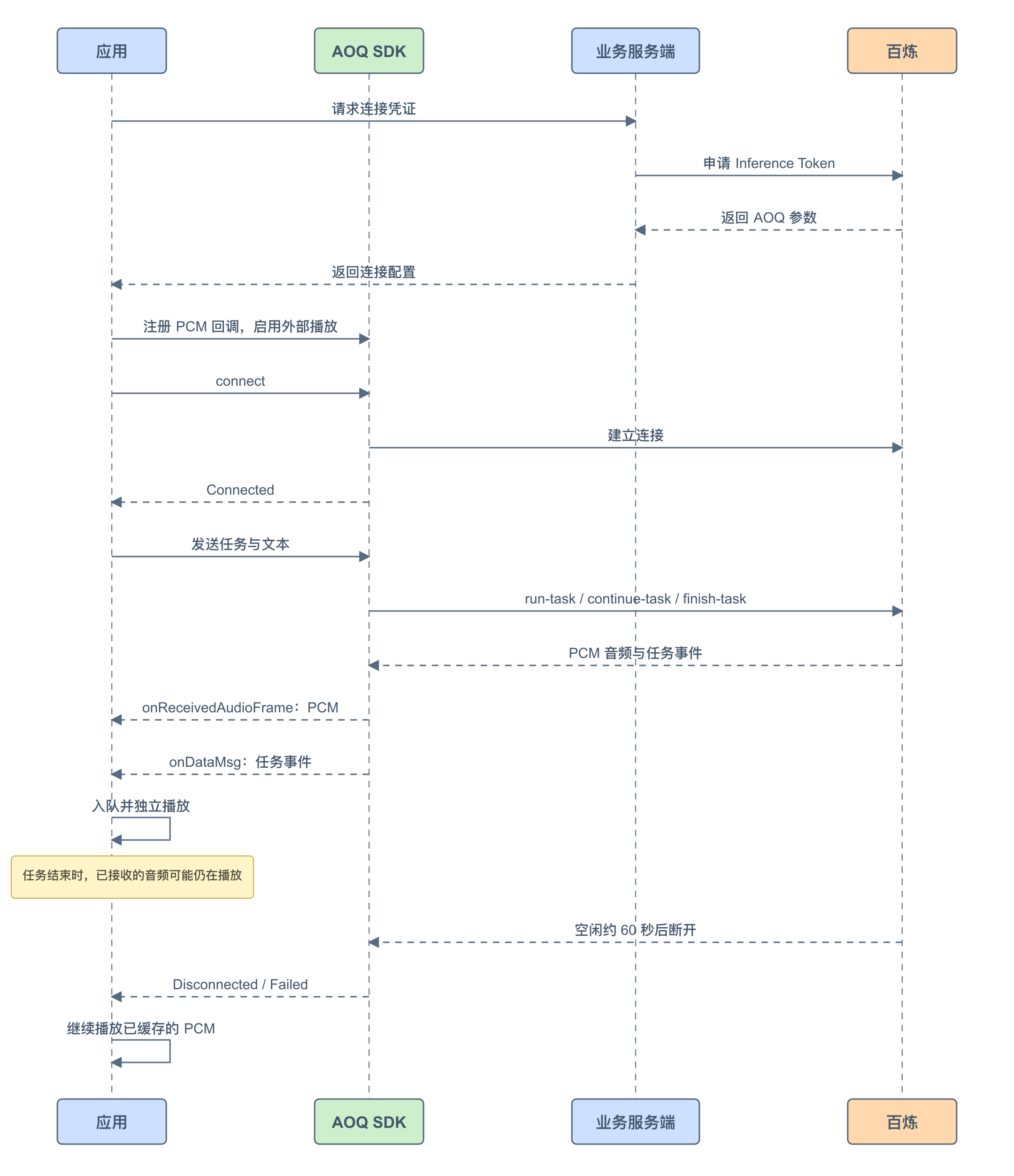
  1. The AppServer requests AOQ connection parameters for qwen-audio-3.1-tts-flash from the inference token endpoint and returns them to the client.
  2. The client creates the engine, registers and enables the incoming audio callback, and starts the SDK player in external mode. It configures PCM decoding, subscribes to the Audio track in Segment mode, publishes and subscribes to the Data track, and connects.
  3. After connecting, use a new task_id to send run-task. Once task-started arrives, send one or more continue-task text segments as needed.
  4. The SDK delivers incoming PCM to the app through onReceivedAudioFrame. Enqueue it promptly and play it with AudioTrack on a separate thread. Local playback does not determine the receive rate.
  5. After sending all text, send finish-task. The server continues to deliver the remaining audio and events. When task-finished arrives, update the task state without stopping the player or immediately disabling the audio callback.
  6. On disconnection, mark local input as ended. Continue playing data in the queue and in AudioTrack. Report playback completion only after input has ended and all buffered data has played.
  7. For another synthesis task, use a new task_id if still connected. Otherwise, obtain fresh credentials and reconnect. Release the engine when no longer needed. Close the app player separately when playback finishes or the user leaves.
The diagram shows the main flow. The app buffers and plays audio internally, shown as calls to itself. The implementation steps below give the order of client events.
实现流程: AOQ / PCM

Obtain a Token from the AppServer

Set DASHSCOPE_API_KEY on the AppServer, and send the request using the endpoint of the selected region. clientIp is the client's real public IP; this field is optional, but passing it is recommended so that the service can assign an appropriate Relay access point. Set ENDPOINT to the access domain of the workspace in that region; if a public IP is provided, assign it to CLIENT_REAL_IP.
curl -X POST \
  "https://${ENDPOINT:?}/api/v1/webrtc/inference?model=qwen-audio-3.1-tts-flash" \
  -H "Content-Type: application/json" \
  -H "Authorization: Bearer ${DASHSCOPE_API_KEY}" \
  -H "x-dashscope-rtc-transport: moq" \
  -d "{\"clientIp\": \"${CLIENT_REAL_IP:?}\"}"
If the AppServer cannot obtain the client's real public IP, remove the clientIp field instead of passing an empty string. The AppServer returns the following fields from the response to the client; the API Key is stored only on the AppServer.
Response fieldSDK field
aoqTokenForClientAoqConnectConfig.token
sidAoqConnectConfig.sid
clientRelayCertFingerprintAoqConnectConfig.certFingerprint
clientRelayEndpointsAoqConnectConfig.relayEndpoints
extraInfo.workspaceIdHashAoqConnectConfig.workspaceIdHash

Client implementation (Android as an example)

After obtaining AoqConnectConfig from the AppServer, the client follows the steps below. In the code snippets, main is the main-thread Handler, and player is the app's PcmPlayer instance. For how the complete classes are composed, see Complete example.

Create the engine and set callbacks

Create the AOQ singleton engine and register callbacks for connection state, Data track messages, and errors. SDK callbacks run on an internal SDK thread; the examples forward connection states and task events to the main thread for processing.
AoqClientListener listener = new AoqClientListener() {
    @Override
    public void onConnectionStatusChange(AoqClientEngine.AoqConnectionStatus status) {
        main.post(() -> handleConnectionStatus(status));
    }

    @Override
    public void onDataMsg(AoqClientEngine.AoqDataMsg msg) {

        byte[] data = msg.data;

        main.post(() -> handleServerEvent(data));
    }

    @Override
    public void onError(int code, String message) {
        Log.e(TAG, "onError code=" + code + " message=" + message);
    }
};

AoqClientEngine.AoqCreateConfig createConfig = new AoqClientEngine.AoqCreateConfig();
createConfig.workDir = context.getFilesDir().getAbsolutePath();
engine = AoqClientEngine.createEngine(context, createConfig, listener);

Enable the audio receiving callback

First call setAudioFrameObserver to register the audio frame callback object, then call enableAudioFrameObserver to enable AoqAudioSourceReceived. Complete the configuration before connect; do not rely on enabling it after the connection to establish the receiving path.
engine.setAudioFrameObserver(new AoqClientListener.AoqAudioFrameListener() {
    @Override
    public void onReceivedAudioFrame(AoqClientEngine.AoqTrackType trackType,
                                     AoqClientEngine.AoqAudioFrameData frame) {
        // 回调中只做入队,不做耗时操作,也不调用 SDK 接口。
        try {
            if (trackType != AoqClientEngine.AoqTrackType.AoqTrackTypeAudio) return;
            if (frame.dataPtr == null || frame.dataSize <= 0 || frame.bytesPerSample != 2) return;
            player.enqueue(frame.samplesPerSec, frame.numOfChannels, frame.dataPtr, frame.dataSize);
        } catch (RuntimeException e) {
            Log.e(TAG, "enqueue pcm failed", e);
        }
    }
});

AoqClientEngine.AoqAudioObserverConfig observerConfig = new AoqClientEngine.AoqAudioObserverConfig();
observerConfig.sampleRate = 24000;  // 建议与 run-task 的 sample_rate 一致。
observerConfig.channels = 1;
observerConfig.mode = AoqClientEngine.AoqAudioObserverMode.AoqAudioObserverModeReadOnly;
int ret = engine.enableAudioFrameObserver(true,
        AoqClientEngine.AoqAudioSource.AoqAudioSourceReceived, observerConfig);
if (ret != 0) {
    throw new IllegalStateException("enableAudioFrameObserver failed: " + ret);
}
AoqAudioObserverConfig parameters:
ParameterDescription
sampleRateSample rate of the callback audio. Keep it consistent with sample_rate of run-task to avoid extra sample rate conversion
channelsNumber of channels of the callback audio; this document uses 1
modeThe audio receiving callback is treated as read-only. Set it to AoqAudioObserverModeReadOnly; when configured in read-write mode, it is still handled as read-only, and modified data is not written back to the SDK
onReceivedAudioFrame callback parameters:
ParameterDescription
trackTypeTrack type of the audio. This document only handles AoqTrackTypeAudio
framePCM audio data of this callback; see the table below for field descriptions
AoqAudioFrameData key fields:
FieldDescription
dataPtr16-bit interlaced PCM data. The Android Java callback uses a dedicated byte[]; the app can hold a reference to this array for playback after the callback, without copying it again to extend its lifetime; do not extend this rule to native pointers on other platforms
dataSizeNumber of bytes of PCM data in this callback
numOfSamplesNumber of samples per channel in this callback; audio duration is calculated from the actual value
bytesPerSampleNumber of bytes per sample; 2 in this document
numOfChannelsNumber of channels of the callback audio
samplesPerSecSample rate of the callback audio
timeStampTimestamp in milliseconds. The app enqueues in callback order and does not use task events to infer playback progress
Usage limits of the audio receiving callback:
  1. Only PCM downstream and the Audio track Segment mode are supported; the output is 16-bit PCM. Receiving Opus audio or audio in Stream mode with this callback is not supported.
  2. The callback runs on the receiving side and does not depend on the SDK playback clock. Do not enable unnecessary playback audio callbacks at the same time, otherwise the SDK playback-side buffer continues to be maintained.
  3. A single callback does not equal a single network packet. Consume data based on dataSize and numOfSamples; do not rely on network packet length or assume that data smaller than one frame at the end of an utterance will always be re-sent.
  4. The callback runs on an internal SDK thread and only performs fast enqueueing. Do not call SDK interfaces such as enableAudioFrameObserver, setAudioFrameObserver, disconnect, or destroy in the callback, and do not wait for the main thread; otherwise a deadlock may occur.
  5. After the connection is closed, playback is guaranteed only for PCM that the app has successfully saved. Audio that has not yet arrived at the client or has not yet been delivered through the callback is not part of the app's local cache; if your business requires sample-level consistency with model output, additionally verify audio boundaries and integrity.

Start the player in external mode

The app plays audio, but it must still call startAudioPlayer with isExternal set to true. The SDK does not send sound to the device. In this receive path, application Data messages need not wait for SDK playback either.
AoqClientEngine.AoqAudioPlaybackConfig playbackConfig = new AoqClientEngine.AoqAudioPlaybackConfig();
playbackConfig.isExternal = true;
playbackConfig.channel = 1;
engine.startAudioPlayer(playbackConfig);
Do not skip this step or set isExternal to false. Timestamped task events could wait for SDK playback, or both players could output sound. The app selects its own output device, such as the speaker or earpiece.

Configure the decoder and tracks and connect

Match these three settings:
  1. In setAudioDecoderConfig, set codecType to AoqEncoderTypeAudioPCM.
  2. When subscribing to the Audio track, set trackMode to AoqTrackModeSegment.
  3. In run-task, set format to pcm and match sample_rate to the decoder sample rate.
AoqClientEngine.AoqAudioCodecConfig audioDecoderConfig = new AoqClientEngine.AoqAudioCodecConfig();
audioDecoderConfig.trackType = AoqClientEngine.AoqTrackType.AoqTrackTypeAudio;
audioDecoderConfig.codecType = AoqClientEngine.AoqEncoderType.AoqEncoderTypeAudioPCM;
audioDecoderConfig.sampleRate = 24000;
audioDecoderConfig.channel = 1;
engine.setAudioDecoderConfig(audioDecoderConfig);

AoqClientEngine.AoqTrackParam publishDataTrack = new AoqClientEngine.AoqTrackParam();
publishDataTrack.trackType = AoqClientEngine.AoqTrackType.AoqTrackTypeData;
connectConfig.publishTracks.add(publishDataTrack);

AoqClientEngine.AoqTrackParam subscribeAudioTrack = new AoqClientEngine.AoqTrackParam();
subscribeAudioTrack.trackType = AoqClientEngine.AoqTrackType.AoqTrackTypeAudio;
subscribeAudioTrack.trackMode = AoqClientEngine.AoqTrackMode.AoqTrackModeSegment;
connectConfig.subscribeTracks.add(subscribeAudioTrack);

AoqClientEngine.AoqTrackParam subscribeDataTrack = new AoqClientEngine.AoqTrackParam();
subscribeDataTrack.trackType = AoqClientEngine.AoqTrackType.AoqTrackTypeData;
connectConfig.subscribeTracks.add(subscribeDataTrack);

engine.connect(connectConfig);
Enabling the callback alone does not enable this path. Without both PCM and Segment mode, the callback may deliver no audio even if the connection succeeds; there is no fixed error code. Check the actual output format, callback delivery, and SDK logs.

Call sendDataMsg to send a run-task event

After connecting, generate a new UUID for task_id. Configure the model, voice, text type, audio format, and sample rate. Set format to pcm and match sample_rate to the decoder. For optional parameters, see Client events.
taskId = UUID.randomUUID().toString();
JSONObject header = new JSONObject()
        .put("action", "run-task")
        .put("task_id", taskId)
        .put("streaming", "duplex");
JSONObject parameters = new JSONObject()
        .put("text_type", "PlainText")
        .put("voice", voice)
        .put("format", "pcm")
        .put("sample_rate", 24000);
JSONObject payload = new JSONObject()
        .put("task_group", "audio")
        .put("task", "tts")
        .put("function", "SpeechSynthesizer")
        .put("model", "qwen-audio-3.1-tts-flash")
        .put("input", new JSONObject())
        .put("parameters", parameters);
JSONObject runTask = new JSONObject().put("header", header).put("payload", payload);
AoqClientEngine.AoqDataMsg dataMessage = new AoqClientEngine.AoqDataMsg();
dataMessage.data = runTask.toString().getBytes(StandardCharsets.UTF_8);
engine.sendDataMsg(dataMessage);

Call sendDataMsg to send a continue-task event

Wait for task-started before sending continue-task. Each segment can contain up to 20,000 characters, up to 200,000 in total. Use the same ID for run-task, continue-task, and finish-task in task_id. Send the next segment or end the task promptly instead of relying on a fixed connection timeout.
JSONObject continueHeader = new JSONObject()
        .put("action", "continue-task")
        .put("task_id", taskId)
        .put("streaming", "duplex");
JSONObject payload = new JSONObject()
        .put("input", new JSONObject().put("text", text));
JSONObject continueTask = new JSONObject()
        .put("header", continueHeader)
        .put("payload", payload);
AoqClientEngine.AoqDataMsg dataMessage = new AoqClientEngine.AoqDataMsg();
dataMessage.data = continueTask.toString().getBytes(StandardCharsets.UTF_8);
engine.sendDataMsg(dataMessage);

Handle server events

In onDataMsg, read header.event to track task state and handle failures. result-generated returns sentence metadata; the audio arrives on the Audio track and reaches the app through onReceivedAudioFrame. For all fields, see Server events.
JSONObject header = new JSONObject(new String(data, StandardCharsets.UTF_8)).optJSONObject("header");
if (header == null) return;
String name = header.optString("event");
if ("task-started".equals(name)) {
    // 可以发送一个或多个 continue-task 事件。
} else if ("result-generated".equals(name)) {
    // 句子元信息,不在此处推动播放器进度。
} else if ("task-finished".equals(name)) {
    taskActive = false;
    // 仅更新任务状态,不在此处停止播放器或标记音频输入结束。
} else if ("task-failed".equals(name)) {
    taskActive = false;
    String message = header.optString("error_message");
    // 展示或记录错误;是否停止合成、清空已收到的音频由业务决定。
}
The complete example calls player.markInputEnded() only after the connection reaches a terminal state or the connection and callback have been released. This ends local audio input; it does not prove that all model output has arrived. While connected, continue receiving and playing without waiting for disconnection. Do not end local input or report per-task playback completion based solely on task-finished.

Call sendDataMsg to send a finish-task event

Send finish-task immediately after the last text segment so that the server synthesizes any buffered partial sentence. Wait for subsequent audio and events. For details, see Client events.
JSONObject finishHeader = new JSONObject()
        .put("action", "finish-task")
        .put("task_id", taskId)
        .put("streaming", "duplex");
JSONObject finishTask = new JSONObject()
        .put("header", finishHeader)
        .put("payload", new JSONObject().put("input", new JSONObject()));
AoqClientEngine.AoqDataMsg dataMessage = new AoqClientEngine.AoqDataMsg();
dataMessage.data = finishTask.toString().getBytes(StandardCharsets.UTF_8);
engine.sendDataMsg(dataMessage);
Do not disconnect immediately after sending finish-task. Receiving task-finished does not mean playback is complete. Before releasing the connection early, ensure that doing so will not cut off audio in transit, or explicitly accept that reception will stop.

Buffer and play PCM

The app player must support the following:
  1. Fast enqueueing: Only enqueue PCM in the callback. Write to AudioTrack on a separate playback thread so that device writes do not block SDK callbacks.
  2. Independent lifetime: Do not clear the local queue or release the player when the connection closes or the engine is destroyed.
  3. Playback tracking: An empty queue does not mean the device has finished. Check that AudioTrack has played all samples written to it.
  4. Playback controls: The app implements pause, resume, and clear. To replay audio, save it separately; the playback queue is consumed.
The Complete example includes the PcmPlayer implementation. 24 kHz mono 16-bit PCM uses 48,000 bytes per second, about 2.75 MiB per minute. Set a memory budget for long passages. If buffered audio exceeds the budget, store it in a local file and read it for playback. Write files on a separate thread, not in the SDK callback.

Distinguish disconnection from playback completion

Distinguish these states:
StateConditionAction
Synthesis task endedtask-finished or task-failed receivedUpdate the task state. Do not stop playback or assume all audio callbacks have completed.
Local input endedConnection is Disconnected or Failed, or the app has released the connection and callbackCall markInputEnded() without clearing the queue.
Local playback endedInput has ended, the queue is empty, and AudioTrack has played all data written to itReport completion and release this AudioTrack.
private void handleConnectionStatus(AoqClientEngine.AoqConnectionStatus status) {
    if (status == AoqClientEngine.AoqConnectionStatus.AoqConnectionStatusConnected) {
        if (!closing && !connected) {
            connected = true;
            callback.onConnected(this);
        }
    } else if (status == AoqClientEngine.AoqConnectionStatus.AoqConnectionStatusDisconnected
            || status == AoqClientEngine.AoqConnectionStatus.AoqConnectionStatusFailed) {
        connectionEnded = true;
        connected = false;
        taskActive = false;
        if (closing) {
            finishClose();  // 已请求释放:此时才注销回调并销毁引擎。
        } else {
            player.markInputEnded();  // 封口本地输入,已保存的音频继续播放。
        }
    }
}
closing, connectionEnded, and finishClose() manage asynchronous release. See Complete example for the full definitions. Notes:
  1. Do not stop the app player or clear it on disconnection. A terminal connection state means no more audio will arrive on that connection, not that playback is complete.
  2. A network failure may occur before all audio arrives. Saved audio can still play; missing audio cannot be recovered this way.
  3. When the user stops playback, discard the audio: pause, clear local playback, stop retaining new audio, then end the connection asynchronously. Close the player according to the page lifecycle when the user leaves.

Start another synthesis after disconnection

The server disconnects after about 60 seconds of inactivity; the actual interval is determined by the server. With long passages, much of the audio may still be queued locally when synthesis ends, so the connection may close during playback. Do not send a new task on a closed connection or reuse its credentials. To continue:
  1. Release the old engine but keep the app player and its queue.
  2. Get new credentials from the AppServer.
  3. Recreate the engine, repeat the engine setup, and call connect.
  4. Once connected, send a new task_id with run-task. Append new audio after the existing queue or clear the old audio first, as appropriate.
// 当前 client 对应的连接已断开;等待旧单例引擎真正释放后再创建新引擎。
private void synthesizeAfterDisconnect(String text, String voice) {
    client.close(() -> appServer.fetchConnectConfig(connectConfig -> main.post(() -> {
        client = new LongTtsClient(context, connectConfig, player, callback);
        pendingRequest = new Pair<>(text, voice);  // 在连接成功后调用 client.synthesize。
    })));
}
appServer.fetchConnectConfig and pendingRequest stand for the app's credential retrieval and pending-request logic. Implement them in the app; do not rely on the SDK to reconnect, resume old tasks, or decide when to clear buffered audio.

Disconnect and destroy the engine

When no more audio is needed, request disconnection. Wait for Disconnected or Failed before unregistering the callback and destroying the engine on the main thread. disconnect() is asynchronous: returning does not mean already received data has been processed. Do not immediately clear the observer or wait for disconnection on the SDK callback thread.
// 请求关闭时:若已经收到终态,可直接清理;否则保留 observer 等待终态回调。
closing = true;
if (connectionEnded) {
    finishClose();
} else {
    engine.disconnect();
}

// 由主线程上的连接终态处理逻辑调用,不在 SDK 回调线程中调用。
private void finishClose() {
    engine.enableAudioFrameObserver(false,
            AoqClientEngine.AoqAudioSource.AoqAudioSourceReceived,
            new AoqClientEngine.AoqAudioObserverConfig());
    engine.setAudioFrameObserver(null);
    AoqClientEngine.destroy();
    player.markInputEnded();
}

// 销毁引擎不停止本地播放。
// 本地音频播放完毕,或用户退出页面后再调用 player.close()。
Disconnecting stops further network reception; it does not confirm that all audio arrived. The app manages its buffer and player separately.

Main server events

EventMeaningApp action
task-startedThe task has started; continue-task can be sentSubmit text.
result-generatedSentence metadata; audio arrives on the Audio trackRecord the result without advancing or ending local playback.
task-finishedAll buffered text has been processed and synthesis has endedUpdate the task state. Continue receiving and playing; do not end local input on this event alone.
task-failedTask failed; read the error code and messageDisplay or log the error. The app decides whether to continue playing or stop.

Complete example

The example includes two classes:
  1. LongTtsClient manages the engine, connection, and task events. Pass an AoqConnectConfig built from the AppServer token response to the constructor, then call synthesize(text, voice) when connected. Use the constructor and public methods on the main thread.
  2. PcmPlayer manages local buffering and playback independently of the connection. The callback submits PCM; the playback thread accesses the queue and device state. Call controls on the main thread. Completion is reported there, and an input generation counter filters out stale notifications after a clear or new input.
The example ends local input after the connection reaches a terminal state. close() only requests asynchronous closure. The callback passed to close(Runnable) runs after the old engine is released, so a new singleton can safely be created. While connected, new audio can be appended even after the queue drains. onPlaybackFinished does not report completion for each task_id. Some devices need a minimum amount of buffered audio to start. After input ends, the player adds silence without blocking until the playback head passes the last real frame. Silence does not count towards PCM duration. New input waits in the queue for a new track after the old AudioTrack is released. For production, handle UI state, storage and memory budgets for long audio, player errors, a stalled playback head, and new connections. Both classes can be saved in LongTtsClient.java. If you split them, keep the required imports in each file and use the same package.
import android.content.Context;
import android.media.AudioAttributes;
import android.media.AudioFormat;
import android.media.AudioManager;
import android.media.AudioTrack;
import android.os.Handler;
import android.os.HandlerThread;
import android.os.Looper;
import android.util.Log;


import com.alibaba.aoq.clientsdk.AoqClientEngine;
import com.alibaba.aoq.clientsdk.AoqClientListener;

import org.json.JSONException;
import org.json.JSONObject;

import java.nio.ByteBuffer;
import java.nio.charset.StandardCharsets;
import java.util.ArrayDeque;
import java.util.UUID;

public final class LongTtsClient {
    private static final String TAG = "LongTtsClient";
    private static final String MODEL = "qwen-audio-3.1-tts-flash";
    static final int SAMPLE_RATE = 24000;

    public interface Callback {
        void onConnected(LongTtsClient client);
        void onPlaybackFinished();
        void onTaskFailed(String message);
    }

    private final Handler main = new Handler(Looper.getMainLooper());
    private final PcmPlayer player;
    private final Callback callback;
    private AoqClientEngine engine;
    private String taskId;
    private String pendingText;
    private String pendingVoice;
    private boolean connected;
    private boolean taskActive;
    private boolean connectionEnded;
    private boolean closing;
    private boolean closed;
    private volatile boolean discardReceived;
    private Runnable afterClose;

    public LongTtsClient(Context context, AoqClientEngine.AoqConnectConfig connectConfig,
                         PcmPlayer player, Callback callback) {
        this.player = player;
        this.callback = callback;
        player.setOnFinishedListener(callback::onPlaybackFinished);

        AoqClientListener listener = new AoqClientListener() {
            @Override
            public void onConnectionStatusChange(AoqClientEngine.AoqConnectionStatus status) {
                main.post(() -> {
                    if (!closed) handleConnectionStatus(status);
                });
            }

            @Override
            public void onDataMsg(AoqClientEngine.AoqDataMsg msg) {

                byte[] data = msg.data;

                main.post(() -> {
                    if (!closed && !closing) handleServerEvent(data);
                });
            }

            @Override
            public void onError(int code, String message) {
                Log.e(TAG, "onError code=" + code + " message=" + message);
            }
        };

        AoqClientEngine.AoqCreateConfig createConfig = new AoqClientEngine.AoqCreateConfig();
        createConfig.workDir = context.getFilesDir().getAbsolutePath();
        engine = AoqClientEngine.createEngine(context, createConfig, listener);

        // 在 connect 之前开启接收音频回调。
        engine.setAudioFrameObserver(new AoqClientListener.AoqAudioFrameListener() {
            @Override
            public void onReceivedAudioFrame(AoqClientEngine.AoqTrackType trackType,
                                             AoqClientEngine.AoqAudioFrameData frame) {
                try {
                    if (discardReceived) return;  // 用户主动停止后不再保留音频。
                    if (trackType != AoqClientEngine.AoqTrackType.AoqTrackTypeAudio) return;
                    if (frame.dataPtr == null || frame.dataSize <= 0 || frame.bytesPerSample != 2) return;
                    player.enqueue(frame.samplesPerSec, frame.numOfChannels, frame.dataPtr, frame.dataSize);
                } catch (RuntimeException e) {
                    Log.e(TAG, "enqueue pcm failed", e);
                }
            }
        });
        AoqClientEngine.AoqAudioObserverConfig observerConfig = new AoqClientEngine.AoqAudioObserverConfig();
        observerConfig.sampleRate = SAMPLE_RATE;
        observerConfig.channels = 1;
        observerConfig.mode = AoqClientEngine.AoqAudioObserverMode.AoqAudioObserverModeReadOnly;
        int ret = engine.enableAudioFrameObserver(true,
                AoqClientEngine.AoqAudioSource.AoqAudioSourceReceived, observerConfig);
        if (ret != 0) throw new IllegalStateException("enableAudioFrameObserver failed: " + ret);

        // 外部播放模式:SDK 不输出声音,业务 Data 不等待 SDK 播放进度。
        AoqClientEngine.AoqAudioPlaybackConfig playbackConfig = new AoqClientEngine.AoqAudioPlaybackConfig();
        playbackConfig.isExternal = true;
        playbackConfig.channel = 1;
        engine.startAudioPlayer(playbackConfig);

        AoqClientEngine.AoqAudioCodecConfig audioDecoderConfig = new AoqClientEngine.AoqAudioCodecConfig();
        audioDecoderConfig.trackType = AoqClientEngine.AoqTrackType.AoqTrackTypeAudio;
        audioDecoderConfig.codecType = AoqClientEngine.AoqEncoderType.AoqEncoderTypeAudioPCM;
        audioDecoderConfig.sampleRate = SAMPLE_RATE;
        audioDecoderConfig.channel = 1;
        engine.setAudioDecoderConfig(audioDecoderConfig);

        AoqClientEngine.AoqTrackParam publishDataTrack = new AoqClientEngine.AoqTrackParam();
        publishDataTrack.trackType = AoqClientEngine.AoqTrackType.AoqTrackTypeData;
        connectConfig.publishTracks.add(publishDataTrack);

        AoqClientEngine.AoqTrackParam subscribeAudioTrack = new AoqClientEngine.AoqTrackParam();
        subscribeAudioTrack.trackType = AoqClientEngine.AoqTrackType.AoqTrackTypeAudio;
        subscribeAudioTrack.trackMode = AoqClientEngine.AoqTrackMode.AoqTrackModeSegment;
        connectConfig.subscribeTracks.add(subscribeAudioTrack);

        AoqClientEngine.AoqTrackParam subscribeDataTrack = new AoqClientEngine.AoqTrackParam();
        subscribeDataTrack.trackType = AoqClientEngine.AoqTrackType.AoqTrackTypeData;
        connectConfig.subscribeTracks.add(subscribeDataTrack);

        engine.connect(connectConfig);
    }

    /** 主线程调用;连接成功且没有进行中的任务时,提交一轮合成。 */
    public void synthesize(String text, String voice) {
        if (!connected || taskActive) {
            throw new IllegalStateException("The connection is not ready or a task is active.");
        }
        taskId = UUID.randomUUID().toString();
        pendingText = text;
        pendingVoice = voice;
        taskActive = true;
        player.beginInput();
        sendRunTask();
    }

    /** 主线程调用;立即请求停止本地播放,并异步结束连接。 */
    public void stop() {
        if (closed) {
            player.clear();
            player.setPaused(false);
            return;
        }
        discardReceived = true;
        player.setPaused(true);
        player.clear();
        close();
    }

    /** 主线程调用;异步释放连接和引擎,已保存的音频继续播放。 */
    public void close() {
        close(null);
    }

    /** afterClose 在主线程执行,可用于等待旧单例引擎释放后创建新引擎。 */
    public void close(Runnable afterClose) {
        if (closed) {
            if (afterClose != null) afterClose.run();
            return;
        }
        if (afterClose != null) this.afterClose = afterClose;
        if (closing) return;
        closing = true;
        connected = false;
        taskActive = false;
        if (connectionEnded) {
            finishClose();
        } else {
            engine.disconnect();  // 异步操作,等待连接终态回调,不立即注销 observer。
        }
    }

    private void finishClose() {
        if (closed) return;
        closed = true;
        engine.enableAudioFrameObserver(false,
                AoqClientEngine.AoqAudioSource.AoqAudioSourceReceived,
                new AoqClientEngine.AoqAudioObserverConfig());
        engine.setAudioFrameObserver(null);
        AoqClientEngine.destroy();
        engine = null;
        if (discardReceived) {
            // 排空结束后再次清空,消除停止请求与已进入回调之间的竞争。
            player.clear();
            player.setPaused(false);
        } else {
            player.markInputEnded();
        }
        Runnable done = afterClose;
        afterClose = null;
        if (done != null) done.run();
    }

    private void handleConnectionStatus(AoqClientEngine.AoqConnectionStatus status) {
        if (status == AoqClientEngine.AoqConnectionStatus.AoqConnectionStatusConnected) {
            if (!closing && !connected) {
                connected = true;
                callback.onConnected(this);
            }
        } else if (status == AoqClientEngine.AoqConnectionStatus.AoqConnectionStatusDisconnected
                || status == AoqClientEngine.AoqConnectionStatus.AoqConnectionStatusFailed) {
            connectionEnded = true;
            connected = false;
            taskActive = false;
            if (closing) {
                finishClose();
            } else {
                player.markInputEnded();
            }
        }
    }


    private void handleServerEvent(byte[] data) {

        try {
            JSONObject header = new JSONObject(new String(data, StandardCharsets.UTF_8))
                    .optJSONObject("header");
            if (header == null) return;
            String incomingTaskId = header.optString("task_id", "");
            if (!incomingTaskId.isEmpty() && !incomingTaskId.equals(taskId)) return;
            String event = header.optString("event");
            if ("task-started".equals(event)) {
                sendContinueTask();
                sendFinishTask();
            } else if ("task-finished".equals(event)) {
                taskActive = false;
                // 任务事件不是音频接收完成屏障,不在此处 markInputEnded。
            } else if ("task-failed".equals(event)) {
                taskActive = false;
                callback.onTaskFailed(header.optString("error_message"));
            }
        } catch (JSONException e) {
            Log.w(TAG, "Invalid server event", e);
        }
    }

    private void sendRunTask() {
        try {
            JSONObject parameters = new JSONObject()
                    .put("text_type", "PlainText")
                    .put("voice", pendingVoice)
                    .put("format", "pcm")
                    .put("sample_rate", SAMPLE_RATE);
            JSONObject payload = new JSONObject()
                    .put("task_group", "audio")
                    .put("task", "tts")
                    .put("function", "SpeechSynthesizer")
                    .put("model", MODEL)
                    .put("input", new JSONObject())
                    .put("parameters", parameters);
            send(header("run-task"), payload);
        } catch (JSONException e) {
            throw new IllegalStateException("Failed to create run-task", e);
        }
    }

    private void sendContinueTask() {
        try {
            send(header("continue-task"),
                    new JSONObject().put("input", new JSONObject().put("text", pendingText)));
        } catch (JSONException e) {
            throw new IllegalStateException("Failed to create continue-task", e);
        }
    }

    private void sendFinishTask() {
        try {
            send(header("finish-task"), new JSONObject().put("input", new JSONObject()));
        } catch (JSONException e) {
            throw new IllegalStateException("Failed to create finish-task", e);
        }
    }

    private JSONObject header(String action) throws JSONException {
        return new JSONObject()
                .put("action", action)
                .put("task_id", taskId)
                .put("streaming", "duplex");
    }

    private void send(JSONObject header, JSONObject payload) throws JSONException {
        AoqClientEngine.AoqDataMsg dataMessage = new AoqClientEngine.AoqDataMsg();
        dataMessage.data = new JSONObject().put("header", header).put("payload", payload)
                .toString().getBytes(StandardCharsets.UTF_8);
        engine.sendDataMsg(dataMessage);
    }
}

/** 本地 PCM 缓存与播放;内部状态只在播放线程中访问。 */
final class PcmPlayer implements AutoCloseable {
    private static final String TAG = "PcmPlayer";
    private static final int CHANNEL_MASK = AudioFormat.CHANNEL_OUT_MONO;
    private static final int ENCODING = AudioFormat.ENCODING_PCM_16BIT;

    private final int sampleRate;
    private final HandlerThread thread = new HandlerThread("tts-local-playout");
    private final Handler worker;
    private final Handler main = new Handler(Looper.getMainLooper());
    private final ArrayDeque<ByteBuffer> queue = new ArrayDeque<>();
    private final ByteBuffer finishSilence = ByteBuffer.allocate(2048);
    private final Runnable pump = this::pump;
    private volatile boolean closed;
    private Runnable onFinished;
    private long inputGeneration;  // 主线程访问,取消已投递的旧完成通知。
    private long workerGeneration; // 播放线程访问,标记当前输入。
    private boolean tailDraining;

    private AudioTrack track;
    private long writtenFrames;
    private boolean inputEnded = true;
    private boolean finishNotified = true;
    private boolean paused;
    private boolean pumpScheduled;

    PcmPlayer(int sampleRate) {
        this.sampleRate = sampleRate;
        thread.start();
        worker = new Handler(thread.getLooper());
    }

    void setOnFinishedListener(Runnable listener) {
        worker.post(() -> onFinished = listener);
    }

    /** 可在 SDK 回调线程调用,只向播放线程提交音频。 */

    void enqueue(int frameSampleRate, int channels, byte[] pcm, int byteCount) {

        if (closed || frameSampleRate != sampleRate || channels != 1 || byteCount <= 0
                || byteCount > pcm.length || (byteCount & 1) != 0) return;
        worker.post(() -> {
            if (closed) return;
            queue.addLast(ByteBuffer.wrap(pcm, 0, byteCount));
            schedulePump(0);
        });
    }

    /** 主线程调用;开始新输入,可保留上一轮尚未播放完的音频。 */
    void beginInput() {
        long generation = ++inputGeneration;
        worker.post(() -> {
            workerGeneration = generation;
            inputEnded = false;
            finishNotified = false;
        });
    }

    /** 确认不会再有该输入的音频后调用,不清空队列。 */
    void markInputEnded() {
        worker.post(() -> {
            inputEnded = true;
            schedulePump(0);
        });
    }

    void setPaused(boolean pause) {
        worker.post(() -> {
            paused = pause;
            if (pause && track != null) track.pause();
            if (!pause) schedulePump(0);
        });
    }

    /** 主线程调用;丢弃全部音频,取消旧完成通知。 */
    void clear() {
        ++inputGeneration;
        worker.post(() -> {
            worker.removeCallbacks(pump);
            pumpScheduled = false;
            queue.clear();
            inputEnded = true;
            finishNotified = true;
            releaseTrack();
        });
    }

    @Override
    public void close() {
        if (closed) return;
        ++inputGeneration;
        closed = true;
        worker.post(() -> {
            worker.removeCallbacks(pump);
            queue.clear();
            releaseTrack();
            thread.quitSafely();
        });
    }

    private void schedulePump(long delayMs) {
        if (pumpScheduled || paused || closed) return;
        pumpScheduled = true;
        worker.postDelayed(pump, delayMs);
    }

    private void pump() {
        pumpScheduled = false;
        if (closed || paused) return;
        try {
            if (!queue.isEmpty() && track == null) track = createTrack();
            if (track == null) {
                if (inputEnded) notifyFinishedOnce();
                return;
            }
            if (track.getPlayState() != AudioTrack.PLAYSTATE_PLAYING) track.play();
            if (tailDraining) {
                drainTail();
                return;
            }
            // 单次最多提交约 100 ms 的单声道 16 bit PCM。
            int budget = sampleRate / 5;
            while (budget > 0 && !queue.isEmpty()) {
                ByteBuffer head = queue.getFirst();
                int written = track.write(head, Math.min(head.remaining(), budget),
                        AudioTrack.WRITE_NON_BLOCKING);
                if (written < 0) throw new IllegalStateException("AudioTrack.write: " + written);
                if (written == 0) break;
                writtenFrames += written / 2;
                budget -= written;
                if (!head.hasRemaining()) queue.removeFirst();
            }
            if (inputEnded && queue.isEmpty()) {
                tailDraining = true;
                drainTail();
                return;
            }
            long playedFrames = track.getPlaybackHeadPosition() & 0xffffffffL;
            if (queue.isEmpty() && playedFrames >= writtenFrames) {
                track.pause();
                return;  // 输入仍开放,后续 enqueue 会继续驱动播放。
            }
        } catch (RuntimeException e) {
            Log.e(TAG, "Local playback failed", e);
            releaseTrack();
            return;
        }
        schedulePump(10);
    }

    /** 封口后补静音满足设备启动阈值,只统计真实 PCM 的 writtenFrames。 */
    private void drainTail() {
        long playedFrames = track.getPlaybackHeadPosition() & 0xffffffffL;
        if (playedFrames >= writtenFrames) {
            releaseTrack();
            if (inputEnded && queue.isEmpty()) notifyFinishedOnce();
            if (!queue.isEmpty()) schedulePump(0);
            return;
        }
        finishSilence.clear();
        int n = track.write(finishSilence, finishSilence.remaining(),
                AudioTrack.WRITE_NON_BLOCKING);
        if (n < 0) throw new IllegalStateException("AudioTrack padding write: " + n);
        // 不把静音加入 writtenFrames;新输入留在队列,旧 Track 排空后另建 Track。
        schedulePump(10);
    }

    /** 主线程交付前再校验代次,防止清空或新输入后收到旧完成通知。 */
    private void notifyFinishedOnce() {
        if (finishNotified) return;
        finishNotified = true;
        long generation = workerGeneration;
        Runnable listener = onFinished;
        main.post(() -> {
            if (!closed && generation == inputGeneration && listener != null) listener.run();
        });
    }

    private AudioTrack createTrack() {
        int minBytes = AudioTrack.getMinBufferSize(sampleRate, CHANNEL_MASK, ENCODING);
        if (minBytes <= 0) throw new IllegalStateException("Unsupported PCM output");
        AudioTrack output = new AudioTrack(
                new AudioAttributes.Builder()
                        .setUsage(AudioAttributes.USAGE_MEDIA)
                        .setContentType(AudioAttributes.CONTENT_TYPE_SPEECH)
                        .build(),
                new AudioFormat.Builder()
                        .setSampleRate(sampleRate)
                        .setChannelMask(CHANNEL_MASK)
                        .setEncoding(ENCODING)
                        .build(),
                Math.max(minBytes, sampleRate / 5), AudioTrack.MODE_STREAM,
                AudioManager.AUDIO_SESSION_ID_GENERATE);
        if (output.getState() != AudioTrack.STATE_INITIALIZED) {
            output.release();
            throw new IllegalStateException("AudioTrack initialization failed");
        }
        writtenFrames = 0;
        return output;
    }

    private void releaseTrack() {
        if (track != null) {
            track.release();
            track = null;
        }
        writtenFrames = 0;
        tailDraining = false;
    }
}

Usage:
// 在主线程创建;播放器的生命周期跟随页面,而不是连接。
PcmPlayer player = new PcmPlayer(LongTtsClient.SAMPLE_RATE);
LongTtsClient.Callback callback = new LongTtsClient.Callback() {
    @Override public void onConnected(LongTtsClient session) {
        // voice 为模型支持的系统音色或有效 voice_id。
        session.synthesize(text, voice);
    }
    @Override public void onPlaybackFinished() { Log.i("TTS", "Playback complete"); }
    @Override public void onTaskFailed(String message) { Log.e("TTS", message); }
};
LongTtsClient client = new LongTtsClient(context, connectConfig, player, callback);


// 暂停或继续播放,不影响音频接收。
// player.setPaused(true);
// player.setPaused(false);

// 用户主动停止时:client.stop();
// 页面退出时:
// client.close();
// player.close();
For all parameters, event fields, and interfaces for other platforms, see:
  1. Obtain and configure an API key
  2. Select a region, deployment scope, and endpoint
  3. AOQ Client SDK overview
  4. SDK download
  5. Qwen-Audio-TTS AOQ access
  6. Qwen-Audio-TTS user guide
  7. Client events
  8. Server events