

Datasets are the foundation of model training and evaluation. The Alibaba Cloud Model Studio Data Management feature helps you efficiently create and manage datasets.
Dataset overview
Alibaba Cloud Model Studio Data Management centrally manages all large model-related datasets in your business workspace. Datasets are divided into Training Set (used for model fine-tuning, supporting SFT/DPO/CPT) and Evaluation Set (used for Model evaluation).
Training sets support 4 training scenarios: text generation, multimodal understanding, I2V (first frame), and I2V (first frame and last frame). Evaluation sets support text generation (two sample formats: single-turn and multi-turn), as well as multimodal scenarios such as visual understanding, text-to-image, image-to-image, and I2V (first frame/first frame and last frame) for multimodal model evaluation. The dataset type cannot be changed after creation, so choose carefully based on your downstream use.
Dataset names can be up to 50 characters long (Chinese, English, digits, underscores, hyphens, and periods are supported), and descriptions up to 200 characters. Creating or publishing empty datasets is not supported. There is no limit on the number of datasets you can create, and no upper bound on the amount of data you can import.
DPO/CPT training methods and cloud storage mounting are supported only in the Beijing region.
Training methods and scenarios
Training sets support three training methods with different applicable scenarios and minimum data requirements:
- SFT (supervised fine-tuning): instruction fine-tuning that enables the model to solve specific tasks. At least one thousand entries recommended. Available on all sites.
- DPO (direct preference optimization): preference alignment training. At least one hundred entries recommended.
- CPT (continual pre-training): domain knowledge injection. At least 50 million tokens of data recommended.
Training method | Purpose | Recommended data volume | Site availability |
|---|---|---|---|
SFT | Supervised fine-tuning (instruction fine-tuning) | 1,000+ entries | All sites |
DPO | Direct preference optimization (preference alignment) | 100+ entries | Beijing region |
CPT | Continual pre-training (domain knowledge) | 50 million tokens | Beijing region |
Import methods
Datasets support three import methods with different applicable scenarios and prerequisites:
- Upload Local File: no prerequisites; directly upload local files, suitable for small batches of data.
- OSS Import: add the tag
bailian-datahub-access=readto the target bucket; suitable for large batches of data. Not supported for evaluation sets. - Log Backflow: automatically extract training data from SLS inference logs; requires authorizing a service-linked role, forming an inference → data → fine-tuning enhancement loop.
Import method | Prerequisites | Applicable scenario | Evaluation set supported |
|---|---|---|---|
Local upload | None | Small batches of data | Supported |
OSS import | Bucket tag bailian-datahub-access=read | Large batches of data | Not supported |
Log backflow | Authorization + API Key/model filter | Build training data from inference logs | Supported |
Data Preparation
Preparing high-quality data is key to model fine-tuning results. For the recommended data volumes of each training method (SFT/DPO/CPT text generation), see Tuning data upload rules.
There are no official recommended data volumes for multimodal understanding and image-to-video training sets; prepare sufficient samples based on your actual scenario.
Data format and templates
For the data file format specifications of each training scenario (SFT text/multimodal understanding (image/video → text), DPO, CPT, evaluation sets), see Tuning data upload rules.
We recommend downloading the data template for the corresponding scenario on the dataset creation page in Data Management. Preparing data according to the template structure can prevent import failures. Evaluation sets support the text generation (prompt&completion) single-turn format and the text generation (ChatML-messages) multi-turn conversation format. Evaluation sets for multimodal scenarios (visual understanding, text-to-image, image-to-image, and I2V) are in Zip archive format. For detailed field specifications and examples, see Fine-tuning data upload rules - evaluation set format.
For data diversity and augmentation strategies, see the model fine-tuning documentation. For evaluation sets, prepare an independent set of non-overlapping data to objectively assess model generalization.
Create a dataset
Before creating a dataset, the following prerequisites must be met: Model Studio service is activated; for OSS import, add the tag bailian-datahub-access=read to the target bucket; for log backflow, authorize a service-linked role.
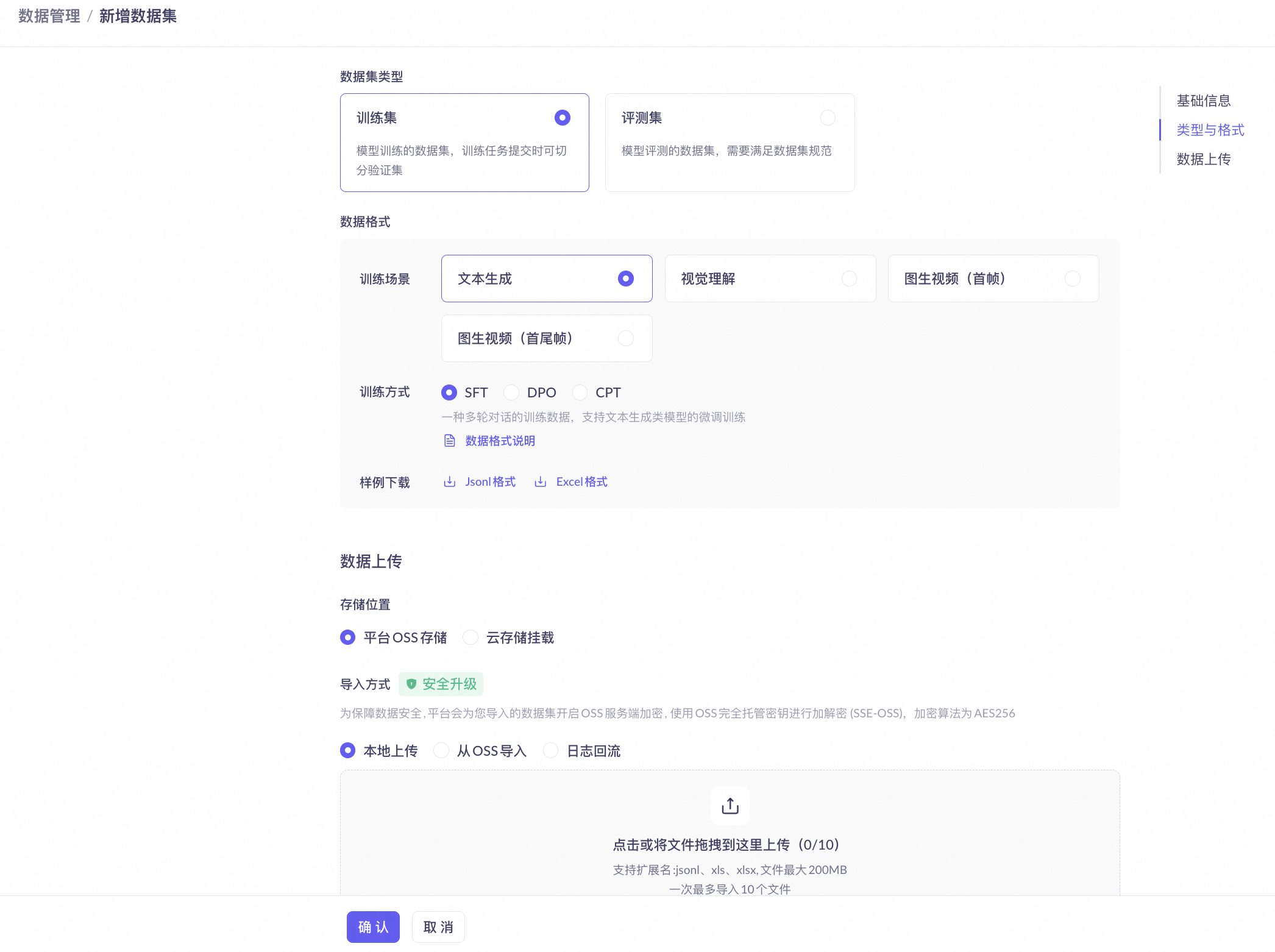
On the Data Management > Dataset list page, click Add Dataset, then follow these steps:
- Enter the dataset name (up to 50 characters) and description (up to 200 characters, optional).
- Select the dataset type: Training set or Evaluation set (cannot be changed after creation).
- Select the training scenario: Training set supports text generation, multimodal understanding, I2V (first frame), and I2V (first frame and last frame); for an Evaluation set, select the sample format or scenario here — text generation (ChatML-messages) (multi-turn conversation; supports jsonl, xls, and xlsx; single file up to 200 MB), text generation (prompt&completion) (single-turn; only xls and xlsx; single file up to 20 MB), or multimodal scenarios such as visual understanding, text-to-image, image-to-image, I2V (first frame), and I2V (first frame and last frame) (Zip archive; single file up to 2 GB; the root directory of the archive contains data.jsonl, and image and video files can be located in subdirectories). The creation page provides sample template downloads for the corresponding formats, and the data format description and sample download change dynamically when you switch scenarios.
- Select the training method: SFT, DPO, or CPT (only required for training sets; evaluation sets do not have this configuration).
- Select the storage location: Platform OSS storage (free, with no data volume limit) or Mount Cloud Storage (not available for evaluation sets).
- Select the import method and upload data: upload a local file, import from OSS, or log ingestion (see the tabbed descriptions below for details).
- After you click Submit, the dataset is published immediately and the creation is complete.
Parameter | Description | Required | Value description |
|---|---|---|---|
Dataset Name | Dataset ID | true | Up to 50 characters; Chinese/English/numbers/underscores/hyphens/periods |
Dataset Description | Dataset Description | Up to 200 characters | |
Dataset Type | Training set or evaluation set; cannot be changed after creation | true | Training set/Evaluation set |
Training Scenario | The training scenario applicable to the data | true | Text generation/Multimodal understanding/I2V (first frame)/I2V (first frame and last frame) |
Training Method | Training algorithm type | true | SFT/DPO/CPT |
Storage Location | Dataset storage method | true | Platform OSS storage/Mount Cloud Storage |
Import Method | Data import source | true | Upload Local File/OSS import/Log ingestion |
- Local upload
- OSS import
- Log backflow
Version Management
A dataset can have multiple independent versions, with version numbers incrementing automatically. On the dataset details page, click Add Version to create a new version.
New versions use create mode, which requires re-importing all data; the inherit mode that incrementally modifies the previous version's data is no longer supported.
- Create mode: Re-import all data, suitable for large-scale updates.
Dataset Management
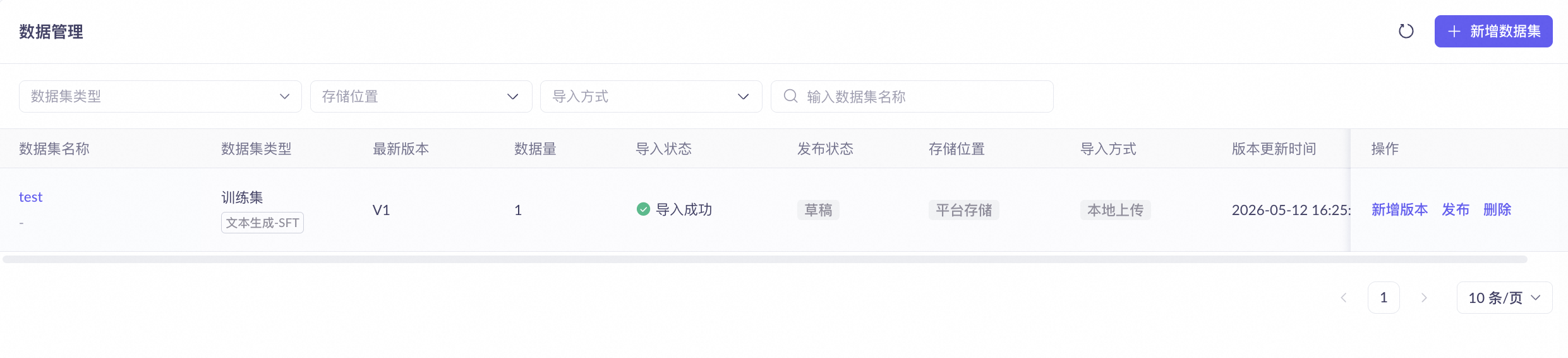
On the Data Management > Dataset list page, you can view all datasets, filter them by type (training set/evaluation set), and search by name. Datasets being imported automatically refresh their status every 5 seconds, so no manual refresh is required.
Publish and Delete
The Publish operation is irreversible, and published versions can no longer be edited. Deleting a published version is also irreversible; only draft versions created through historical creation can be deleted. Deleting an entire dataset removes all of its versions. These operations cannot be recovered, so proceed with caution.
Edit and Export
Only draft versions created through historical creation can be edited online (the Prompt/Completion content can be edited). For newly created datasets, submission publishes the dataset directly and no draft version is created; the editing feature is unavailable for published versions. When exporting a dataset, the format varies by type: SFT training sets are exported as jsonl, multimodal training sets as zip, and evaluation sets as xlsx. Exporting empty datasets is not supported.
Billing
The Data Management feature is free, but dataset storage and downstream resources incur fees; see the Model Studio billing page for details.
- Platform OSS storage: fees are based on the Model Studio billing page.
- Mount Cloud Storage: fees are billed to the user's own OSS account.
- Log Backflow: SLS fees incurred are billed to the SLS product account.
Next steps
After a dataset is created and published, it can be used in the following downstream scenarios:
- After a training set is published, it is used for model fine-tuning (SFT/DPO/CPT).
- After an evaluation set is published, it is used for Model evaluation.