

Real-time speech translation with qwen3.8-livetranslate-flash-realtime over AOQ

This tutorial uses Android to show how to integrate the AOQ Client SDK with qwen3.8-livetranslate-flash-realtime for real-time speech translation. Other platforms use similar integration and model-event handling flows with their corresponding SDK methods. All client-side examples below use Java.

For model capabilities, see Real-time speech and audio/video translation. For the roles of media and model events, see AOQ access.

Download the SDK

For the AOQ Client SDK and the Opus audio plugin, see SDK download. The audio transmission examples in this tutorial use Opus, so you must also import the plugin for your platform. For supported regions, languages, pricing, and rate limits, see Real-time speech and audio/video translation.

Import the SDK

  • Android
  • iOS
  • HarmonyOS
Place AoqClientSdk-release.aar in app/libs/. Place libPluginOpus.so in app/libs/armeabi-v7a/ and app/libs/arm64-v8a/, according to the ABI.Declare the dependency in app/build.gradle:
android {
    defaultConfig {
        minSdk 21
        ndk { abiFilters 'armeabi-v7a', 'arm64-v8a' }
    }
    sourceSets { main { jniLibs.srcDirs = ['libs'] } }
}

dependencies {
    implementation fileTree(dir: 'libs', include: ['*.aar'])
}
If the host project already contains native libraries with the same names, check their versions and dependencies before packaging them to avoid including different versions of the same library.Declare the permissions in AndroidManifest.xml:
<uses-permission android:name="android.permission.INTERNET" />
<uses-permission android:name="android.permission.ACCESS_NETWORK_STATE" />
<uses-permission android:name="android.permission.RECORD_AUDIO" />
<uses-permission android:name="android.permission.MODIFY_AUDIO_SETTINGS" />
Request RECORD_AUDIO permission at runtime and obtain user authorization. Speech-only translation does not require camera permission. Declare and request CAMERA only when you enable visual enhancement.The Java examples use the following imports:
import com.alibaba.aoq.clientsdk.AoqClientEngine;
import com.alibaba.aoq.clientsdk.AoqClientEngine.*;
import com.alibaba.aoq.clientsdk.AoqClientListener;
import java.nio.charset.StandardCharsets;
import java.util.HashMap;
import java.util.Map;
import org.json.JSONException;
import org.json.JSONObject;

Obtain a token through your AppServer

Do not store the Model Studio API key on the client. Your AppServer uses the API key for the corresponding region and workspace to request temporary credentials for each translation connection. It returns the credentials over HTTPS to a client that has passed your application's authentication. Set up an AppServer by following the AOQ authentication steps for Qwen-LiveTranslate-Realtime. Real-time translation uses the Realtime protocol. Specify the following when requesting credentials:
model=qwen3.8-livetranslate-flash-realtime
Run the following command only on your AppServer. Set BAILIAN_ENDPOINT to the endpoint for your workspace: {WorkspaceId}.cn-beijing.maas.aliyuncs.com or {WorkspaceId}.ap-southeast-1.maas.aliyuncs.com. Read DASHSCOPE_API_KEY from a server-side environment variable or a secrets management service.
curl --fail-with-body --request POST \
  "https://${BAILIAN_ENDPOINT}/api/v1/webrtc/realtime?model=qwen3.8-livetranslate-flash-realtime" \
  --header "Content-Type: application/json" \
  --header "Authorization: Bearer ${DASHSCOPE_API_KEY}" \
  --header "x-dashscope-rtc-transport: moq" \
  --data '{}'
If your AppServer can obtain the client's actual public IP address from a trusted proxy chain, include clientIp in the request body for access point scheduling. Map the response fields to AoqConnectConfig on the client:
Gateway response fieldSDK fieldDescription
aoqTokenForClienttokenTemporary token for this connection
sidsidIdentifier of this session
clientRelayCertFingerprintcertFingerprintUse the certificate fingerprint exactly as returned
clientRelayEndpointsrelayEndpointsConvert the complete access point list to the SDK structure
extraInfo.workspaceIdHashworkspaceIdHashUse the returned value. If it is absent, follow the SDK's requirements

Implement real-time speech translation

Interaction flow
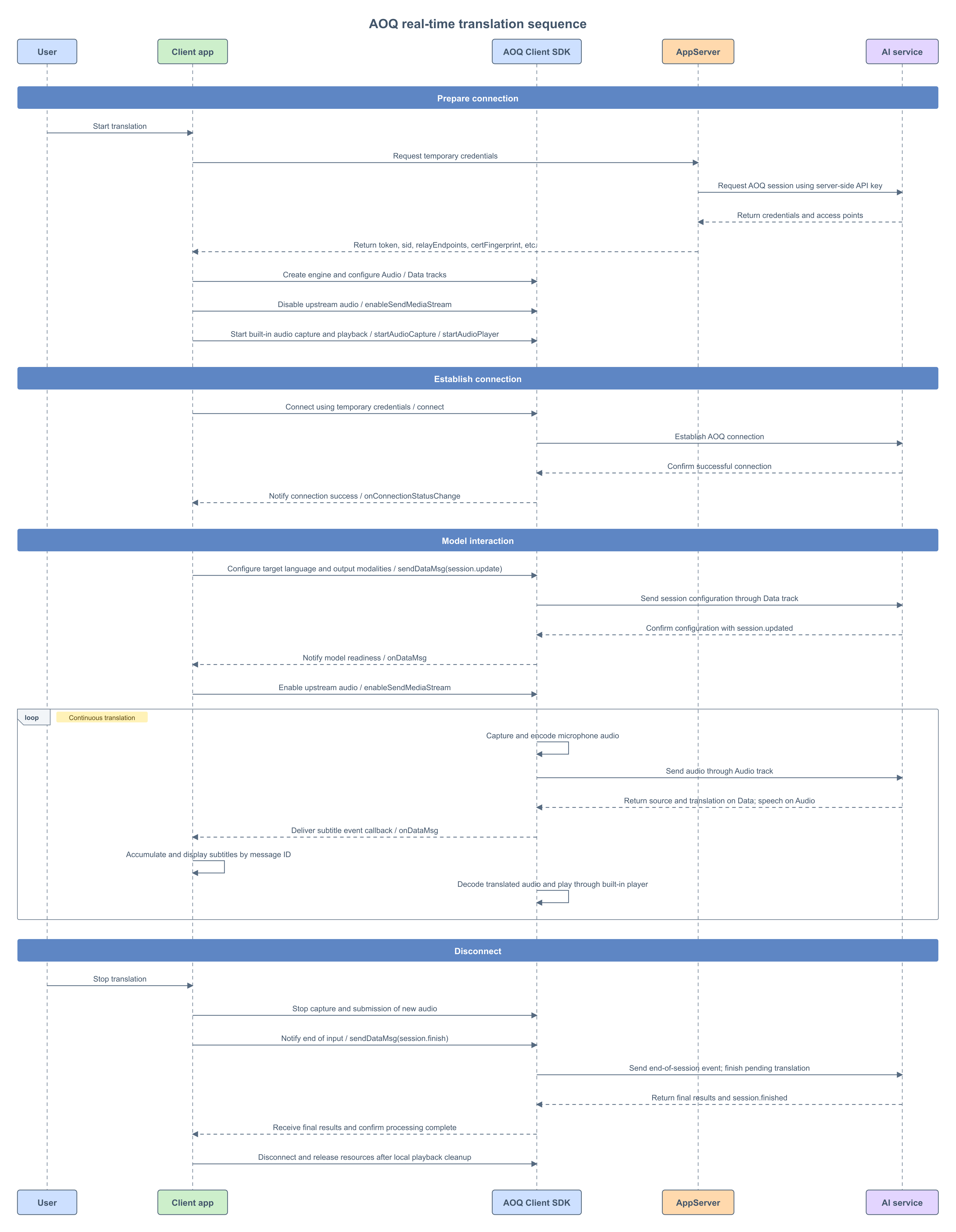
AOQ real-time speech translation sequence

Create the engine and set callbacks

Call createEngine to create the engine and register callbacks for connection status, Data messages, and errors. Your application must retain the engine and listener objects throughout the session.
// 配置引擎工作目录。
AoqCreateConfig createConfig = new AoqCreateConfig();
createConfig.workDir = appCtx.getFilesDir().getAbsolutePath();
// 创建引擎并注册事件监听对象。
engine = AoqClientEngine.createEngine(appCtx, createConfig, listener);
Implement AoqClientListener to receive connection, model-message, and media-device events, and pass it when creating the engine.
AoqClientListener listener = new AoqClientListener() {
    // 接收音频采集与播放设备状态。
    @Override
    public void onAudioDeviceStateChanged(AoqAudioDeviceState state) {

    }

    // 接收耳机、蓝牙及扬声器等音频路由变化。
    @Override
    public void onAudioDeviceRouteChanged(int routeType) {
        android.util.Log.i("LiveTranslate", "音频路由: " + AoqAudioDeviceRouteType.fromValue(routeType));
    }

    // 接收音频设备中断及中断结束通知。
    @Override
    public void onAudioDeviceInterrupted(boolean interrupt) {
        android.util.Log.i("LiveTranslate", "音频设备中断: " + interrupt);
    }

    // 接收 Android 音频焦点变化。
    @Override
    public void onAudioDeviceFocusChanged(int audioFocus) {
        android.util.Log.i("LiveTranslate", "音频焦点: " + audioFocus);
    }

    // 接收 SDK 异步错误。
    @Override
    public void onError(int code, String message) {
        android.util.Log.e("LiveTranslate", "SDK 错误: " + code + ", " + message);
    }
};

Start audio capture and playback

After obtaining microphone permission, prepare audio capture and playback. Disable audio transmission before starting capture to prevent the engine from sending media automatically after connecting. Starting capture does not mean the model is ready to receive audio. Prompt the user to speak only after receiving session.updated and successfully enabling transmission. This tutorial does not implement audio buffering before connection.
// 关闭音频上行,等待模型配置确认。
engine.enableSendMediaStream(AoqTrackType.AoqTrackTypeAudio, false);

AoqAudioCaptureConfig audioCaptureConfig = new AoqAudioCaptureConfig();
audioCaptureConfig.channel = 1;
audioCaptureConfig.isExternal = false;
// 启动 SDK 内置麦克风采集。
engine.startAudioCapture(audioCaptureConfig);

AoqAudioPlaybackConfig audioPlaybackConfig = new AoqAudioPlaybackConfig();
audioPlaybackConfig.channel = 1;
audioPlaybackConfig.isExternal = false;
// 启动 SDK 内置播放器,播放下行译音。
engine.startAudioPlayer(audioPlaybackConfig);

Configure codecs and establish the connection

The main scenario requires the following tracks:
DirectionTrackPurpose
PublishAudioSend speech to the model
PublishDataSend session configuration and completion events
SubscribeAudioReceive translated speech
SubscribeDataReceive source text, translated text, and status events
Configure upstream and downstream audio separately. The following example uses Opus, 16 kHz, and mono audio for transmission.
AoqAudioCodecConfig audioEncoderConfig = new AoqAudioCodecConfig();
audioEncoderConfig.codecType = AoqEncoderType.AoqEncoderTypeAudioOpus;
audioEncoderConfig.sampleRate = 16000;
audioEncoderConfig.channel = 1;
// 设置上行音频编码参数。
engine.setAudioEncoderConfig(audioEncoderConfig);

AoqAudioCodecConfig audioDecoderConfig = new AoqAudioCodecConfig();
audioDecoderConfig.codecType = AoqEncoderType.AoqEncoderTypeAudioOpus;
audioDecoderConfig.sampleRate = 16000;
audioDecoderConfig.channel = 1;
// 设置下行音频解码参数。
engine.setAudioDecoderConfig(audioDecoderConfig);

AoqTrackParam audioTrackParam = new AoqTrackParam();
audioTrackParam.trackType = AoqTrackType.AoqTrackTypeAudio;
AoqTrackParam dataTrackParam = new AoqTrackParam();
dataTrackParam.trackType = AoqTrackType.AoqTrackTypeData;
// 发布音频和 Data 轨,发送语音及模型事件。
connectConfig.publishTracks.add(audioTrackParam);
connectConfig.publishTracks.add(dataTrackParam);
// 订阅音频和 Data 轨,接收译音及字幕事件。
connectConfig.subscribeTracks.add(audioTrackParam);
connectConfig.subscribeTracks.add(dataTrackParam);

// 发起 AOQ 连接,连接结果通过 onConnectionStatusChange 返回。
engine.connect(connectConfig);
A successful return from connect means that the call was accepted. Wait for onConnectionStatusChange to report a successful connection before sending the model configuration.

Configure the translation session

After connecting, send the following session.update event through the Data track. This configuration uses the default voice and does not enable voice cloning:
{
  "type": "session.update",
  "session": {
    "output_modalities": ["text", "audio"],
    "audio": {
      "input": {
        "turn_detection": {
          "type": "speaker_detection",
          "threshold": 0.5
        }
      }
    },
    "translation": {
      "language": "en"
    }
  }
}
For the interaction flow, see Real-time translation. For all session.update parameters, see Real-time translation client events. Encode the JSON as UTF-8 bytes and send it with sendDataMsg.
private static final String SESSION_UPDATE_JSON =
        "{\"type\":\"session.update\",\"session\":{"
        + "\"output_modalities\":[\"text\",\"audio\"],"
        + "\"audio\":{\"input\":{\"turn_detection\":{"
        + "\"type\":\"speaker_detection\",\"threshold\":0.5}}},"
        + "\"translation\":{\"language\":\"en\"}}}";

// 接收 AOQ 连接状态变化。
@Override
public void onConnectionStatusChange(AoqConnectionStatus status) {
    if (status == AoqConnectionStatus.AoqConnectionStatusConnected) {
        AoqDataMsg message = new AoqDataMsg();
        message.data = SESSION_UPDATE_JSON.getBytes(StandardCharsets.UTF_8);
        // 通过 Data 轨发送翻译会话配置。
        engine.sendDataMsg(message);
    }
}

Enable media transmission after receiving session.updated

Parse the event type in onDataMsg. The following snippet routes control events. For source-text and translated-text events, see Server events. After receiving session.finished, set your application's completion state and use the release method described in "Disconnect and destroy the engine" to finish cleanup.
// 接收 Data 轨中的模型事件。
@Override
public void onDataMsg(AoqDataMsg message) {
    if (message == null || message.data == null) { return; }
    try {
        JSONObject event = new JSONObject(new String(message.data, StandardCharsets.UTF_8));
        String type = event.optString("type");
        if ("session.updated".equals(type)) {
            // 模型配置生效后,开启音频上行。
            engine.enableSendMediaStream(AoqTrackType.AoqTrackTypeAudio, true);
        } else if ("session.finished".equals(type)) {
            android.util.Log.i("LiveTranslate", "服务端已完成本次翻译处理");
        } else if ("error".equals(type)) {
            android.util.Log.e("LiveTranslate", "翻译模型错误: " + event.optJSONObject("error"));
        }
    } catch (JSONException error) {
        android.util.Log.e("LiveTranslate", "无法解析模型事件", error);
    }
}
AOQ and WebSocket differences: This example sends and receives audio directly through Audio tracks. Do not send input_audio_buffer.append to upload the same audio again, or copy the WebSocket example and start another player when response.audio.delta is received. Translated audio is handled by the SDK audio subscription and player. The Data track carries subtitles and model events. For media and Data track usage, see AOQ access.

Finish input and wait for the final translation

When the user stops translation, follow this order:
  1. Stop capture so that no new input is submitted.
  2. After finalizing input, disable upstream audio and send session.finish once. Keep the AOQ connection, Data subscription, and audio playback active.
  3. Continue receiving the final source text, translated text, and translated speech. Wait for session.finished.
  4. Disconnect and release resources according to your local playback completion policy.
For the requirements for sending session.finish, see Real-time translation client events. For the fields and meaning of session.finished, see Real-time translation server events.
AoqDataMsg message = new AoqDataMsg();
message.data = "{\"type\":\"session.finish\"}".getBytes(StandardCharsets.UTF_8);
// 通知模型输入结束,等待 session.finished。
engine.sendDataMsg(message);

Disconnect and destroy the engine

After session.finished is received, the server has finished processing this session. This does not mean the local speaker has finished playing the last audio segment. If your application must play all translated speech, complete local playback before running the following methods.
// 停止译音播放。
engine.stopAudioPlayer();
// 断开 AOQ 连接。
engine.disconnect();
// 销毁本会话独占的引擎。
AoqClientEngine.destroy();