

Learn about WebSocket endpoints, authentication, Realtime and Inference interaction flows, and model-specific events.
Prerequisites
- Activate the target model or application and confirm its supported regions.
- Obtain an API key for the region and workspace you will use. See Token authentication.
- Obtain your Workspace ID if you use a workspace-specific domain.
Request headers
Set Authorization in the WebSocket handshake request. Use other headers as described in the target model's parameter reference.
| Header | Required | Description |
|---|---|---|
Authorization | Yes | Pass the API key as Bearer <API_KEY>. |
user-agent | No | Identifies the client. |
X-DashScope-WorkSpace | Model-specific | Specifies a workspace ID. See the model-specific header reference for usage. |
X-DashScope-DataInspection | Model-specific | Configures data inspection. See the model-specific header reference for supported values and applicability. |
Endpoints
Use wss:// and select the API path and model-name location for your target model. The table below lists connection methods by model. For supported models and regions, see the corresponding model documentation.
| Model family | API path | Model-name location |
|---|---|---|
| Qwen-Omni-Realtime | /api-ws/v1/realtime | URL query parameter model |
| Qwen-Audio-TTS/CosyVoice | /api-ws/v1/inference | payload.model in run-task |
| Qwen-TTS-Realtime | /api-ws/v1/realtime | URL query parameter model |
| Qwen-Audio-ASR/Fun-ASR/Paraformer | /api-ws/v1/inference | payload.model in run-task |
| Qwen-ASR-Realtime | /api-ws/v1/realtime | URL query parameter model |
| Qwen-Audio-Realtime | /api-ws/v1/realtime | URL query parameter model |
| Qwen-LiveTranslate-Realtime | /api-ws/v1/realtime | URL query parameter model |
| Region | Workspace-specific domain |
|---|---|
| China (Beijing) | {WorkspaceId}.cn-beijing.maas.aliyuncs.com |
| Singapore | {WorkspaceId}.ap-southeast-1.maas.aliyuncs.com |
{WorkspaceId} with your workspace ID. Examples:
dashscope.aliyuncs.com for Beijing and dashscope-intl.aliyuncs.com for Singapore, with the same /api-ws/v1/realtime path. The API key must match the region.
Common interaction flows
/api-ws/v1/realtime uses a session-based protocol, while /api-ws/v1/inference uses a task-based protocol.
Realtime protocol
After connecting, the client configures the session with session.update and waits for session.updated before sending input. The target model determines how to commit input, trigger a response, and finish the session.
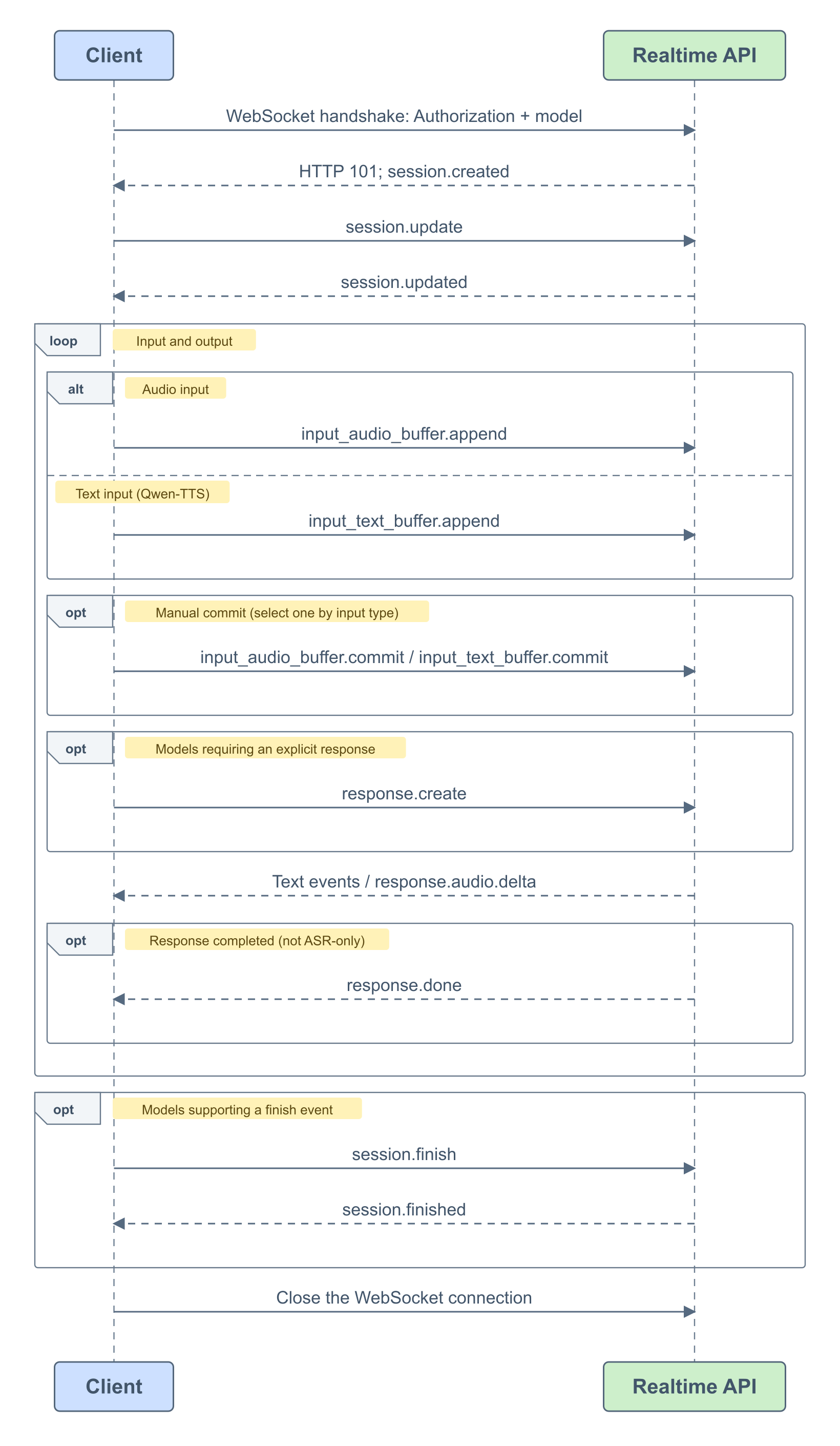
- Connect: Specify the model in the URL's
modelquery parameter and include the API key in the request headers. After a successful handshake, the server sendssession.created. - Configure the session: Send
session.updateto configure supported audio formats, output modalities, voices, or speech detection parameters, then wait forsession.updated. See the model-specific client event reference for supported session parameters. - Send input: Send Base64-encoded audio with
input_audio_buffer.append. For Qwen-TTS, send text withinput_text_buffer.append. Models that support image input useinput_image_buffer.append; follow the model's image and audio timing requirements. - Commit and receive results: In automatic modes, the server triggers processing. In manual modes, send
input_audio_buffer.commitorinput_text_buffer.commitaccording to the input type. Whetherresponse.createis also required, and which result events to handle, depends on the model. See the comparison below. - Finish the session: For models that support a finish event, send
session.finishand wait forsession.finishedand remaining results. For other models, close the WebSocket after receiving the results.response.donemarks the end of one response, not the connection. For ASR-only models, transcription-completion events mark the end of recognition.
Inference protocol
The client sends run-task and waits for task-started before transmitting input. Speech recognition uses binary audio frames; speech synthesis sends text with continue-task. When input ends, send finish-task and wait for task-finished.
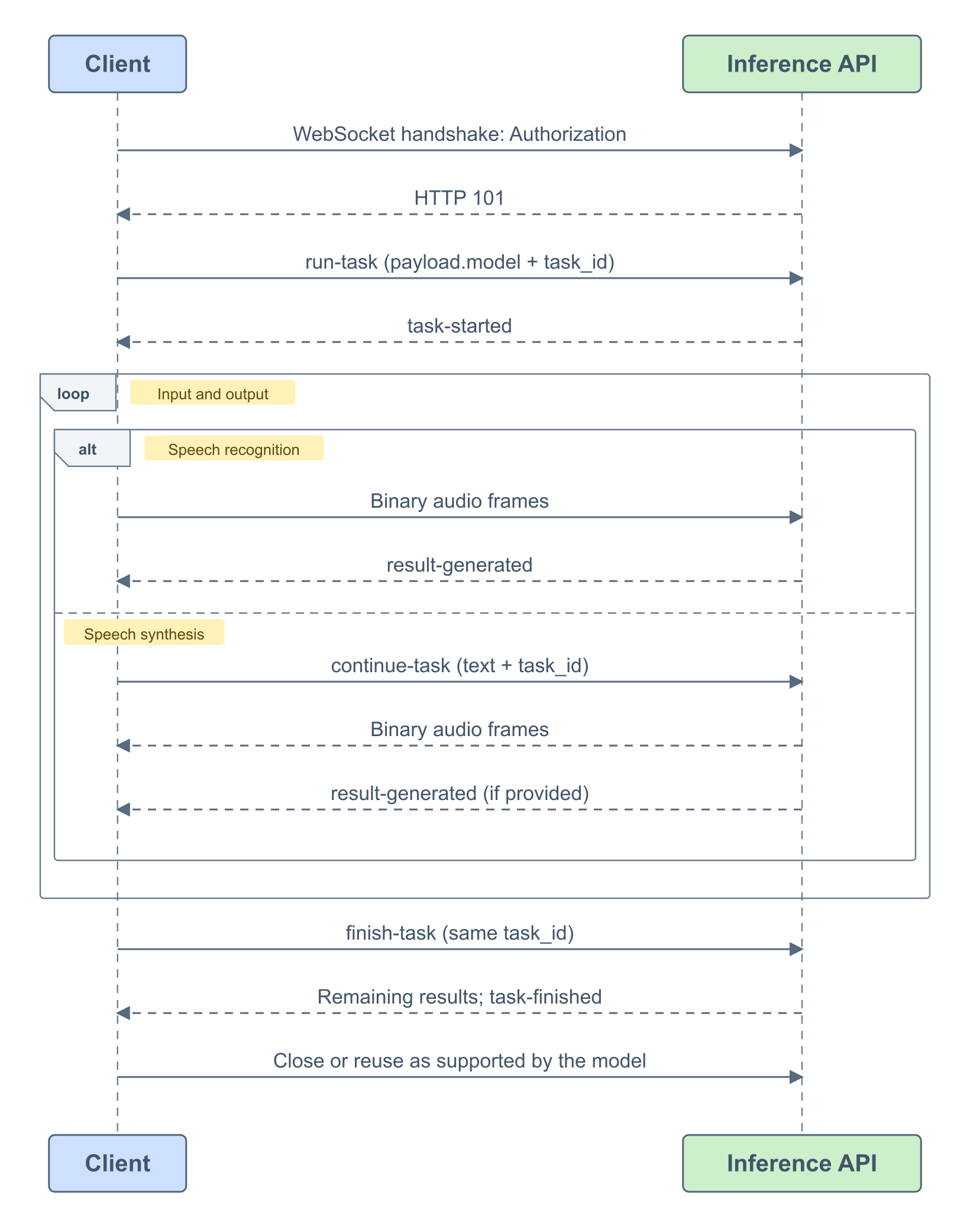
- Connect: Use
/api-ws/v1/inferenceand include the API key in the request headers. - Start a task: Send
run-task, specifying the model inpayload.modeland parameters such as the input format. Generate a uniqueheader.task_idand wait fortask-started. - Send input and receive results:
- Speech recognition: Send binary audio frames and receive recognition results through
result-generated. - Speech synthesis: Send text in
payload.input.textofcontinue-taskand receive binary audio frames. The model may also return information such as timestamps throughresult-generated.
- Speech recognition: Send binary audio frames and receive recognition results through
- Finish the task: After sending
finish-task, keep receiving remaining results untiltask-finishedarrives. Allrun-task,continue-task, andfinish-taskevents for the same task must use the sameheader.task_id. Then close the connection, or reuse it as supported by the model.
Model differences
Realtime models
The table below summarizes input triggers and session termination. For all supported VAD types, audio formats, and other parameter values, see the model-specific event references.
| Model | Input and response trigger | Termination |
|---|---|---|
| Qwen3.8-Omni / Qwen3.5-Omni | VAD modes trigger responses automatically. In Manual mode, send input_audio_buffer.commit followed by response.create. | Close the connection after receiving the results. |
| Qwen-TTS-Realtime | server_commit commits text automatically. In commit mode, send input_text_buffer.commit; response.create is not required. | session.finish → session.finished |
| Qwen-ASR-Realtime | VAD mode processes input automatically. In Manual mode, send input_audio_buffer.commit; response.create is not required. | session.finish → session.finished |
| Qwen-Audio-Realtime | Automatic modes detect turns on the server. In Manual mode, send input_audio_buffer.commit followed by response.create. | Close the connection after receiving the results. |
| Qwen3.8-LiveTranslate | Configure output modalities with output_modalities and turn detection with audio.input.turn_detection. Stream audio and send session.finish when input ends. | session.finish → session.finished |
| Qwen3.5-LiveTranslate | Configure the session with modalities and turn_detection. In Manual mode, input_audio_buffer.commit triggers a response without response.create. | session.finish → session.finished |
| Model | Main output events |
|---|---|
| Qwen-Omni-Realtime | response.text.delta / response.audio_transcript.delta / response.audio.delta / response.done |
| Qwen-TTS-Realtime | response.audio.delta / response.done |
| Qwen-ASR-Realtime | conversation.item.input_audio_transcription.text / conversation.item.input_audio_transcription.completed |
| Qwen-Audio-Realtime | response.audio_transcript.delta / response.audio.delta / response.done |
| Qwen3.8-LiveTranslate | response.text.delta / response.audio_transcript.delta / response.audio.delta / response.done |
| Qwen3.5-LiveTranslate | response.text.text / response.audio_transcript.text / response.audio.delta / response.done |
Translation event names depend on the model version: Qwen3.8-LiveTranslate uses
.delta, while Qwen3.5-LiveTranslate uses .text. For example, translated audio transcripts use response.audio_transcript.delta and response.audio_transcript.text, respectively.Inference models
Qwen-Audio-TTS/CosyVoice uses the run-task → task-started → continue-task → finish-task → task-finished task flow. Qwen-Audio-ASR/Fun-ASR/Paraformer speech recognition sends binary audio frames after task-started. Both types report task errors through task-failed.
Model-specific integration guides
Real-time omni
Real-time speech synthesis
Qwen-Audio-TTS/CosyVoice
Qwen-TTS-Realtime
Sambert
Real-time speech recognition
Qwen-Audio-3.x-ASR-Flash-Streaming/Qwen-Audio-3.1-ASR-Flash-Message/Fun-ASR-Realtime
Qwen-ASR-Realtime
Paraformer
Real-time voice conversation
Qwen-Audio-Realtime
Real-time audio and video translation
Qwen-Livetranslate-Realtime
Error handling
- Handshake failure: Use the HTTP status and error message to check the endpoint, API key, workspace, and model permissions. For 401/403, check authentication first.
- Model unavailable or not activated: Verify the model name, service activation, and region.
- Realtime errors: Handle
errorevents and read their type and message. Adjust the event type or parameters in the request based on the error message. - Inference errors: A
task-failedevent indicates that the task has failed. Readheader.error_codeandheader.error_messagefor the cause.