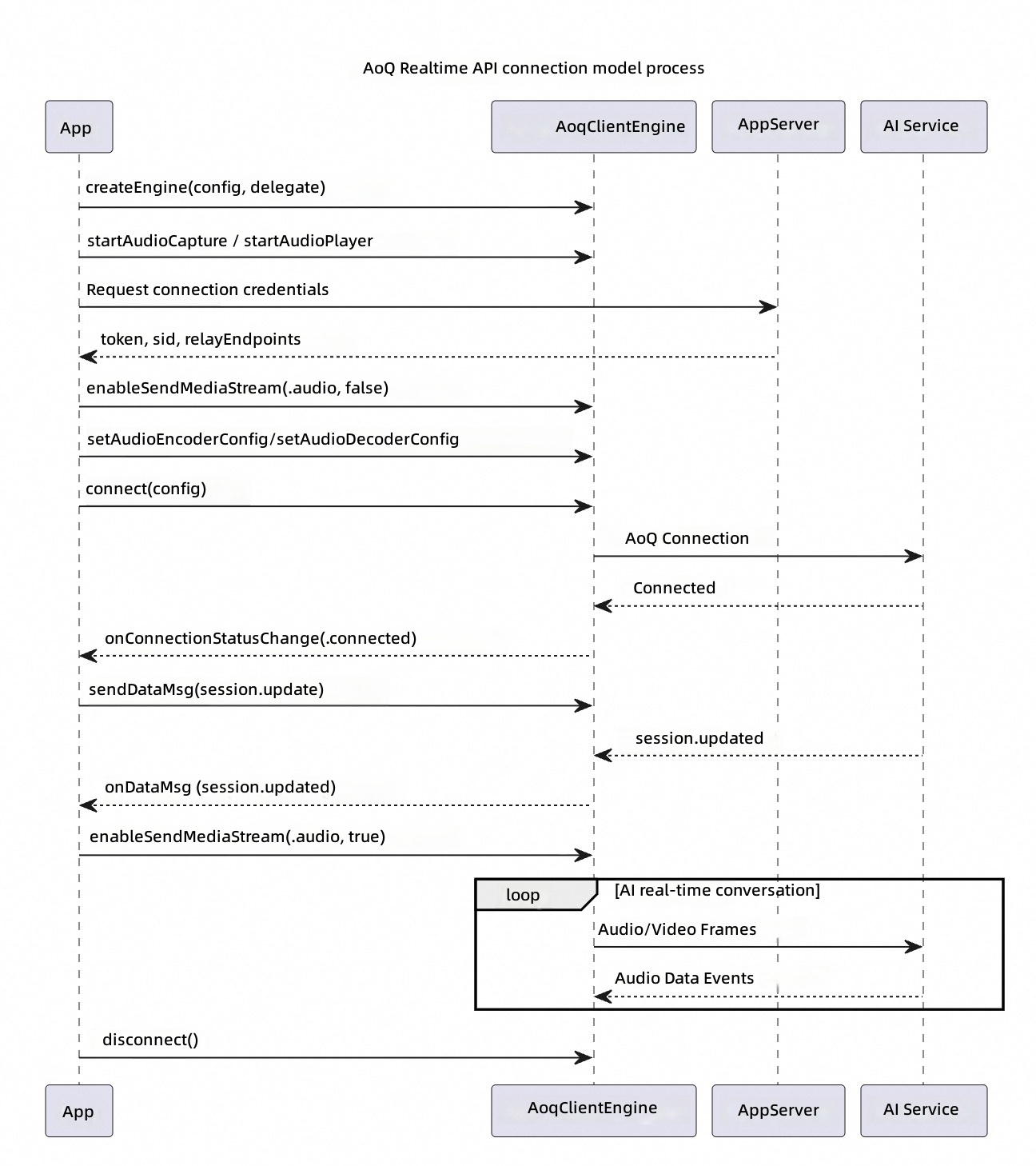
AOQ is deeply customized on top of the QUIC protocol. It suits native mobile apps, supports mixed audio, video, and data transmission, and has built-in weak-network resilience. The following example uses the Real-time omni (Omni) iOS demo to walk through the AOQ connection flow. For AOQ SDK API details, see AOQ client SDK.
Before you begin, download the AOQ Client SDK and Opus plugin from SDK download. Add AoqClientSdk.framework and PluginOpus.framework to your Xcode project and select Embed & Sign.
Important: The AOQ SDK sends media data by default after the connection is established. This example disables media sending when connecting to the model and enables it only after the session is ready.
After the connection succeeds, send a session.update event. For details, see Client events:
Copy
func onConnectionStatusChange(_ status: AoqConnectionStatus) { if status == .connected { sendSessionUpdate() }}private func sendSessionUpdate() { let json = """ { // The ID of this event, generated by the client "event_id": "event_ToPZqeobitzUJnt3QqtWg", // Event type, fixed to session.update "type": "session.update", // Session configuration "session": { // Output modalities. Set to ["text"] (text only) or ["text","audio"] (text and audio). "modalities": [ "text", "audio" ], // Voice for the output audio "voice": "Tina", // Input audio format. Only pcm is supported. The input audio is a PCM audio stream with a 16 kHz sample rate. "input_audio_format": "pcm", // Output audio format. Only pcm is supported. The output audio is a PCM audio stream with a 24 kHz sample rate. "output_audio_format": "pcm", // System message that sets the model's goal or role. "instructions": "You are an AI customer service agent at a five-star hotel. Accurately and courteously answer customer questions about room types, facilities, prices, and booking policies. Always respond in a professional and helpful manner, and never provide unverified information or information beyond the scope of the hotel's services.", // Whether to enable voice activity detection. To enable it, pass a configuration object; the server then automatically detects when speech starts and stops. // Set to null to let the client decide when to trigger a model response. "turn_detection": { // VAD type: server_vad or semantic_vad. semantic_vad is recommended for Qwen3.8-Omni-Flash-Realtime and the Qwen3.5-Omni-Realtime series. "type": "semantic_vad", // VAD detection threshold. Increase it in noisy environments and decrease it in quiet environments. "threshold": 0.5, // Silence duration for detecting the end of speech. A model response is triggered after this duration is exceeded "silence_duration_ms": 800 } } } """ let msg = AoqDataMsg() msg.data = json.data(using: .utf8)! engine.send(msg)}
Enable media sending after receiving session.updated
The following example handles the session.updated reply from the model. For details, see Server events:
Copy
func onDataMsg(_ msg: AoqDataMsg) { guard let obj = try? JSONSerialization.jsonObject(with: msg.data) as? [String: Any], let type = obj["type"] as? String else { return } if type == "session.updated" { engine.enableSendMediaStream(.audio, enable: true) engine.enableSendMediaStream(.video, enable: true) }}
Enable media stream sending only after you receive session.updated. Otherwise, the server might not be ready to receive data.
The audio and video tracks added during connection setup (the AOQ media channels) automatically transmit data to the server.
Audio: transmitted directly over the audio track. No input_audio_buffer.append events are needed.
Video: frames are sent over the video track. No input_image_buffer.append events are needed.
The DATA track added during connection setup (the AOQ text channel) carries text communication between the client and server. The client sends client events and receives server events over this channel.