Connect to models and applications

WebRTC connection

Connection steps and examples for accessing Realtime API over WebRTC.

Before you begin, review the prerequisites in Connection overview.
WebRTC doesn't have a dedicated SDK. On the web, connect directly with the browser's native JavaScript API. On other clients, connect through an open source WebRTC library or a third-party RTC service that supports the standard WebRTC protocol. The following example uses JavaScript on the web.

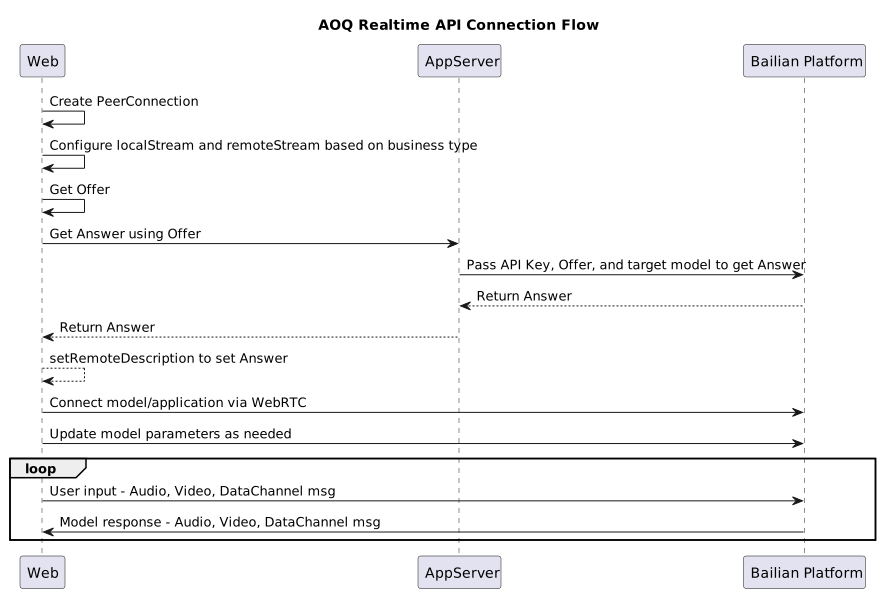
Overall flow diagram

WebRTC flow diagram

Establish connection

# pip install aiortc aiohttp certifi
import asyncio, aiohttp, ssl, certifi
from aiortc import RTCPeerConnection, RTCConfiguration, RTCSessionDescription
from aiortc.mediastreams import AudioStreamTrack

API_KEY = "your-api-key"
MODEL = "target-model"
SIGNALING_URL = f"https://{{endpoint}}/api/v1/webrtc/realtime?model={MODEL}"

async def connect():
    pc = RTCPeerConnection(RTCConfiguration(iceServers=[]))

    # Add an audio track so that the Offer SDP contains m=audio (required by the server)
    pc.addTrack(AudioStreamTrack())

    # Create a DataChannel to trigger SDP negotiation (the name is customizable; the server pushes events through a channel named "txt")
    pc.createDataChannel("oai-events")

    # SDP exchange: create an Offer and send it to the server
    offer = await pc.createOffer()
    await pc.setLocalDescription(offer)

    async with aiohttp.ClientSession() as session:
        async with session.post(
            SIGNALING_URL,
            ssl=ssl.create_default_context(cafile=certifi.where()),
            data=offer.sdp.encode("utf-8"),
            headers={
                "Content-Type": "application/sdp",
                "Authorization": f"Bearer {API_KEY}",
            },
        ) as resp:
            if not resp.ok:
                raise Exception(f"SDP exchange failed: {resp.status} {await resp.text()}")
            answer_sdp = await resp.text()

    print("=== Offer SDP ===")
    print(offer.sdp)
    print("=== Answer SDP ===")
    print(answer_sdp)

    # ICE connection setup completes automatically
    await pc.setRemoteDescription(RTCSessionDescription(sdp=answer_sdp, type="answer"))
    print("WebRTC connection established")
    return pc

Configure model parameters

Listen for messages that the model returns over the DataChannel to keep the interaction sequence correct:
pc.ondatachannel = (event) => {
  const ch = event.channel;
  ch.onmessage = (e) => {
    let obj;
    try { obj = JSON.parse(e.data); }
    catch (err) {
      return;
    }
    if (obj?.type === "session.created") {
      sendUpdate(event.channel);
      // Start pushing audio and video
      audioSender?.replaceTrack(audioTrack);
      videoSender?.replaceTrack(videoTrack);
    }
  };
};

Send and receive media data

The audio and video tracks added during connection setup (the RTP media channels) automatically transmit data to the server.
  • Audio: transmitted directly over the audio track (RTP). No input_audio_buffer.append events are needed.
  • Images: frames are sent over the video track (RTP). input_image_buffer.append events are not supported.
WebRTC supports only server-side VAD modes (server_vad or semantic_vad). Manual mode is not supported.

Demo source code

Prerequisites

  • A modern browser that supports WebRTC (such as Chrome, Edge, Firefox, or Safari).
  • Microphone permission granted to the browser.
  • The browser can't send the connection request directly to the server because of cross-origin security policies. Run the curl command in a terminal to establish the connection.


Run the demo

Create an HTML file named webrtc_demo.html and copy the following code into it: webrtc_demo.html. Open the file in a browser and follow these steps:
  1. Click Start session. The page automatically generates the Offer SDP and the corresponding curl command.
  2. Click Copy curl command and run the command in a terminal. The command returns the Answer SDP.
  3. Paste the Answer SDP into the Answer SDP text box on the page, then click Set Answer to establish the connection and start the voice conversation.

Best practices

Text Generation
Image Generation
  • FAQ
Video Generation
World models
Audio
  • Audio generation
Realtime API
Text Embedding
TokenPlan
Model Production