

Explore supported Realtime API models, access methods, authentication, and existing tutorials and demos.
The Realtime API supports real-time multimodal interaction, speech recognition, speech synthesis, voice conversation, and audio and video translation. Find the access methods supported by your model, then choose one for your application and open the corresponding access documentation.
The following table lists the protocols supported by each model and application. Click "Supported" to open the corresponding access documentation.
C# reference SDK overview · Methods and events
The Realtime API supports WebSocket, WebRTC, and AOQ (AI over QUIC). Available access methods and input and output capabilities depend on the selected model. Refer to its access documentation.
Confirm the regions and endpoints for calls, and obtain the API Key for the corresponding region and workspace.
When using AOQ, download the AOQ SDK based on your client platform.
The Realtime API uses an API Key for identity authentication. Whether you connect via the AOQ, WebRTC, or WebSocket protocol, authentication is completed through the

Model and protocol support
The following table lists the protocols supported by each model and application. Click "Supported" to open the corresponding access documentation.
| Model/application type | Model | WebSocket | WebRTC | AOQ |
|---|---|---|---|---|
| Real-time multimodal | qwen3.8-omni-flash-realtime、qwen3.5-omni-plus-realtime、qwen3.5-omni-flash-realtime | Supported | Supported | Supported |
| Real-time speech synthesis | qwen-audio-3.1-tts-plus、qwen-audio-3.1-tts-flash、qwen-audio-3.0-tts-flash、qwen-audio-3.0-tts-plus | Supported | Unsupported | Supported |
| CosyVoice series models | Supported | Unsupported | Supported | |
| Real-time speech recognition | qwen-audio-3.1-asr-flash-message, qwen-audio-3.1-asr-flash-streaming, qwen-audio-3.0-asr-flash-streaming, Fun-ASR-Realtime series models | Qwen-Audio-ASR-MessageQwen-Audio-ASR-StreamingFun-ASR-Realtime | Unsupported | Qwen-Audio-ASR-MessageQwen-Audio-ASR-StreamingFun-ASR-Realtime |
| Real-time voice conversation | qwen-audio-3.1-realtime-plus、qwen-audio-3.1-realtime-flash、qwen-audio-3.0-realtime-plus、qwen-audio-3.0-realtime-flash | Supported | Supported | Supported |
| Qwen-Audio-Live | qwen-audio-3.1-live | Supported | Supported | Supported |
| Real-time speech translation | Qwen-Livetranslate-Realtime series models | Supported | Supported | Supported |
For information such as model names, context windows, prices, and snapshot versions, see the Alibaba Cloud Model Studio console. For rate limits, see Rate limiting.
WebSocket SDKs by model
| Model | Languages and platforms |
|---|---|
| Qwen-Omni-Realtime | Python · Java · C# |
| Qwen-Audio-ASR-Streaming | Python · Java · Node.js · C# · Android · iOS · HarmonyOS · Flutter |
| Qwen-Audio-ASR-Message | Python · Java · Node.js · C# · Android · iOS · HarmonyOS · Flutter |
| Fun-ASR-Realtime | Python · Java · C# · Android · iOS · HarmonyOS · Flutter |
| Qwen-ASR-Realtime | Python · Java |
| Paraformer | Python · Java · C# · HarmonyOS · Flutter |
| Qwen-Audio-TTS | Python · Java · Node.js · C# · Android · iOS · HarmonyOS · Flutter |
| CosyVoice | Python · Java · C# · Android · iOS · HarmonyOS · Flutter |
| Qwen-TTS-Realtime | Python · Java |
| Qwen-Audio-Realtime | Node.js · C# · Android · iOS · HarmonyOS · Flutter |
| Qwen-LiveTranslate-Realtime | Python · Java · C# · Flutter |
Choose an access method
The Realtime API supports WebSocket, WebRTC, and AOQ (AI over QUIC). Available access methods and input and output capabilities depend on the selected model. Refer to its access documentation.
| Dimension | WebSocket | WebRTC | AOQ |
|---|---|---|---|
| Use cases | Real-time voice and multimodal interaction, server-side integration, rapid prototyping | Real-time browser audio and video interaction, applications with existing WebRTC infrastructure | Native applications that need weak-network optimization and coordinated transmission of audio, video, and model events |
| Browser compatibility | Natively supported; the API authentication requirements still apply | Natively supported | The current AOQ SDK does not provide browser access |
| Echo cancellation and noise suppression | Provided by the audio capture and processing components used by the client | Provided by the browser or WebRTC client, depending on the platform and configuration | Depends on the AOQ SDK audio configuration for the selected platform |
| Client platform support | All platforms (any environment that supports WebSocket) | Browsers, mobile clients | Mobile, desktop, and Linux. For details, see AOQ SDK downloads. |
| Token Plan | Supported | Supported | Supported |
- WebSocket: Suitable for real-time voice and multimodal interaction, server-side integration, and prototype validation. The DashScope SDK enables quick implementation of real-time voice conversations.
- WebRTC: Suitable for real-time audio and video interaction that requires native browser support or an existing WebRTC infrastructure.
- AOQ: AOQ is based on QUIC and optimized for real-time interaction on weak networks. It supports separate-track transmission of audio/video and model events, and is suitable for native applications that need to integrate media capture, encoding/decoding, and playback capabilities.
Preparation
Confirm the regions and endpoints for calls, and obtain the API Key for the corresponding region and workspace.
For first-time use, activate the service as prompted by the console. After creation, immediately copy and securely store the API Key, manage it through environment variables, and do not embed it in clients or commit it to code repositories.
Authentication Method
The Realtime API uses an API Key for identity authentication. Whether you connect via the AOQ, WebRTC, or WebSocket protocol, authentication is completed through the Authorization field in the HTTP request header carrying a Bearer Token.
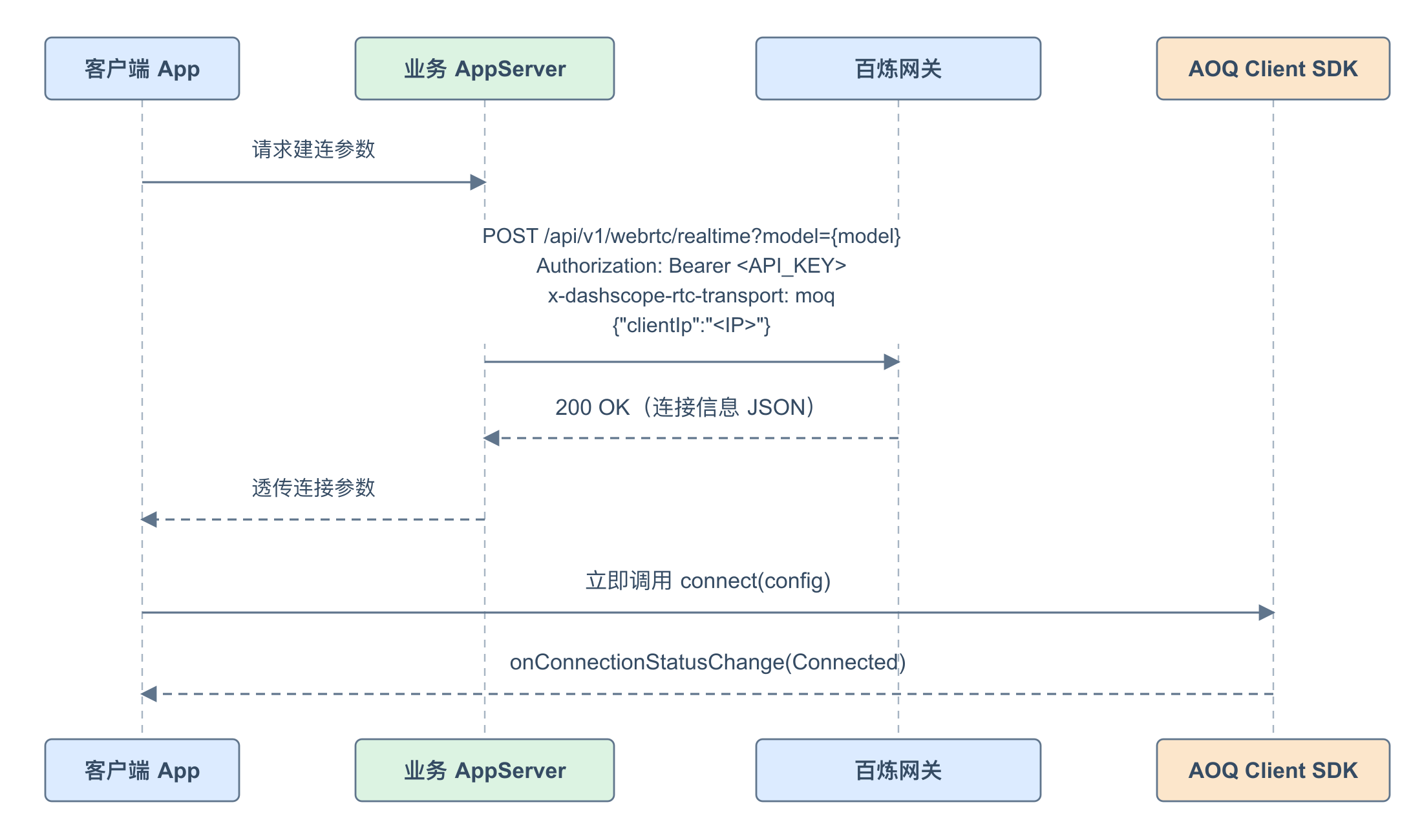
WebRTC and WebSocket authenticate at connection establishment; AOQ uses the API Key for authentication when the AppServer requests a connection credential, and the client then establishes the connection with a temporary token. Data transmission after the connection is established does not require repeated authentication.
Connection Authentication Details
- WebSocket
- WebRTC
- AOQ
WebSocket carries the API Key in the HTTP request header for authentication when establishing the connection. For specific requirements, see the access documentation of the corresponding model.
Developer resources
WebRTC Tutorials
AOQ Tutorials and Demos
- Implement real-time calls with qwen3.8-omni-flash-realtime via AOQ
- Use AOQ to access qwen3.5-omni-plus-realtime to implement push-to-talk voice dialogue
- Use AOQ to access qwen-audio-3.1-asr-flash-streaming to implement a voice input method
- Use AOQ to access qwen3.8-livetranslate-flash-realtime to implement real-time speech translation
- Use AOQ to access qwen-audio-3.1-tts-flash to implement speech synthesis
- Use AOQ to access fun-asr-realtime to implement real-time speech recognition
- Use AOQ to access qwen-audio-3.1-realtime-plus to implement real-time voice conversation
workspaceId after installation, and then you can try some of the models supported by the Demo.