

Instead of polling for task results, you can configure an HTTP callback URL or RocketMQ to receive task completion notifications from EventBridge. Once notified, query the result API once to get the output.
Background
Alibaba Cloud Model Studio integrates with EventBridge to deliver task completion events to your configured event targets.
When an asynchronous task finishes (success or failure), a task completion event containing the task status and ID is reported to EventBridge, which forwards it to your target. For more event targets, see Event targets and Target service types.
Polling vs. event-driven notifications
Comparison dimension | Polling | Event-driven |
|---|---|---|
Rate limiting | Result API is rate-limited (20 QPS) | No rate limiting |
Integration complexity | Simple—poll the result API. Some tasks (such as text-to-image and text-to-video) provide SDKs with built-in polling. | Configure HTTP callback or RocketMQ in EventBridge and parse notifications. |
Server resource consumption | Consumes server resources with frequent queries. | No resource consumption—EventBridge pushes to you. |
Latency | Depends on polling interval. | Near real-time—pushed immediately on completion. |
Recommendation | Low-concurrency or latency-tolerant scenarios. | High-concurrency or latency-sensitive scenarios. |
- HTTP callback URL: A publicly accessible or VPC endpoint that accepts POST requests. Suitable for most scenarios.
- RocketMQ: Consume events via Message Queue for RocketMQ. Ideal for high-reliability scenarios.
Option 1: Configure an HTTP callback URL
Overview
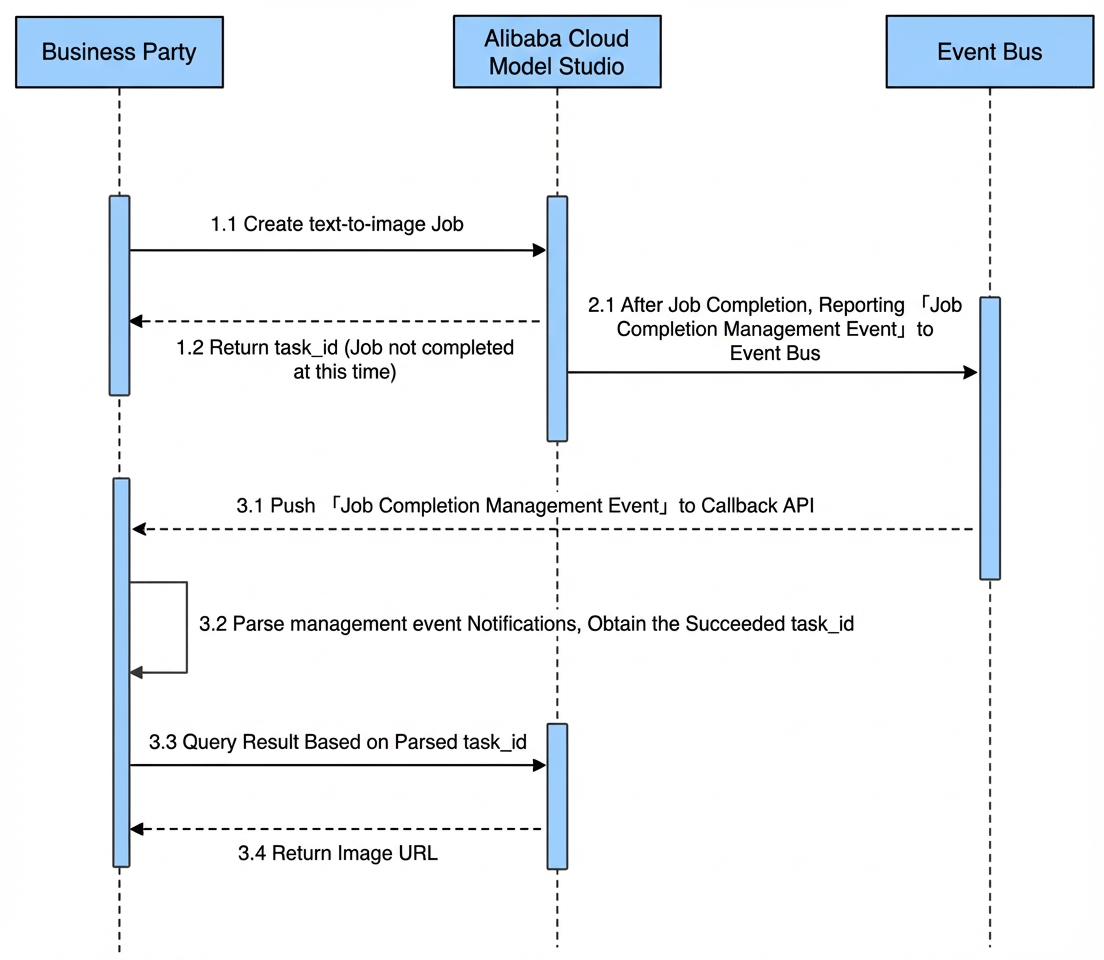
After Alibaba Cloud Model Studio completes a task, it reports the task completion event to EventBridge. EventBridge then pushes this event to your callback endpoint. Your callback endpoint parses the event to extract the successfully processed task ID and calls the result query API once to retrieve the task output.
Benefits: Compared to direct polling, this approach avoids unnecessary polling requests, reduces resource consumption, and lowers pressure on the result query API’s rate limits.
Billing: EventBridge billing.
For example, the asynchronous invocation flow using an HTTP callback URL for text-to-image is as follows:
|  |
Procedure
Step 1: Prepare the HTTP callback endpoint
Step 1: Prepare the HTTP callback endpoint
- Request URL: An HTTP URL accessible over the public network or an Alibaba Cloud VPC.
- Request method:
POST. - Request body:
JSONformat containing the asynchronous task completion event data. You can view the exact event structure in the EventBridge console. Example:
Click to view the data structure of the asynchronous task completion event
Click to view the data structure of the asynchronous task completion event
Step 2: Query events in the EventBridge console
Step 2: Query events in the EventBridge console
-
Log on to your Alibaba Cloud account and go to the EventBridge console. Switch to the Singapore region. In the navigation pane on the left, select Event buses and click default to enter the default event bus for cloud services.
Alibaba Cloud Model Studio uses the default event bus by default.
-
Click Event tracking and enter query conditions to find asynchronous task completion events from Alibaba Cloud Model Studio.
- Event source: Search for and select
acs.dashscope, indicating the event originates from DashScope (the underlying model service of Alibaba Cloud Model Studio). - Event type: Search for and select
dashscope:System:AsyncTaskFinish, indicating an asynchronous task completion event.
- Event source: Search for and select
- Click Details to view the full details of the reported event.
Click to view parameter descriptions
Click to view parameter descriptions
Parameter | Type | Description | Example value |
|---|---|---|---|
datacontenttype | String | Data format of the data field. Only |
|
aliyunaccountid | String | Alibaba Cloud account ID. | 123456789098**** |
aliyunpublishtime | String | Time when the event was received. | 2020-11-19T21:04:42.179PRC |
data | Object | Event content. A JSON object whose structure is defined by the originating service. CloudEvents may include contextual information provided by the event producer at the time of occurrence, encapsulated within data. | |
data[].start_time | String | Asynchronous task start time. Format: yyyy-MM-dd HH:mm:ss | 2023-10-25 09:45:09 |
data[].end_time | String | Asynchronous task completion time. Format: yyyy-MM-dd HH:mm:ss | 2023-10-25 09:45:16 |
data[].user_api_unique_key | String | Unique API key (the five elements of the model API used when submitting the task). Format:
|
|
data[].task_status | String | Task status
| SUCCEEDED |
data[].task_id | String | Task ID | a154c328-xxxx-xxxx-xxxx-e52a9a7e9a35 |
data[].region | String | Region where the task runs | ap-southeast-1 |
data[].request_id | String | Request ID | 108f38f5-xxxx-xxxx-xxxx-6504db9080b3 |
data[].api_key_id | String | API key ID | 1234 |
data[].contain_result | Boolean | Whether the event contains result details.
| true |
data[].output_result | JSON | Result details. Returned when |
|
aliyunoriginalaccountid | String | Original Alibaba Cloud account ID | 123456789098**** |
specversion | String | CloudEvents protocol version | 1.0 |
aliyuneventbusname | String | Name of the event bus that receives the event | default |
id | String | Event ID—a unique value identifying the event. | 45ef4dewdwe1-7c35-447a-bd93-fab**** |
source | String | Event source. The service that provides the event, identifying what occurred. It typically includes the event source type, publishing mechanism, or production process. The sender must ensure that each event’s | acs.dashscope |
time | String | Time when the event was generated. If the exact event time is unknown, CloudEvents producers may set time to another value (e.g., current time), but all producers for the same source must use consistent values. | 2020-11-19T21:04:41+08:00 |
aliyunregionid | String | Region that receives the event. | ap-southeast-1 |
type | String | Event type. Describes the type of event related to the source. Used for routing, event queries, and policy enforcement. The format is defined by the producer and includes version information. | dashscope:System:AsyncTaskFinish |
Step 3: Configure event forwarding rules
Step 3: Configure event forwarding rules
- In the navigation pane on the left, select Event rules and click Create rule.
- Configure basic information: Enter a custom rule name and description.
-
Configure event pattern: Specify which events to forward.
-
Event source: Search for and select
acs.dashscope, indicating the event originates from Alibaba Cloud Model Studio. -
Event type: Search for and select
dashscope:System:AsyncTaskFinish, indicating an asynchronous task completion event. -
Pattern content: Configure filter conditions to match specific events. Use fields from the event details queried in Step 2. For pattern syntax, see Event patterns. Examples:
- Default: After selecting the event source and type, the pattern defaults to the following, forwarding all
dashscope:System:AsyncTaskFinishevents.
- Default: After selecting the event source and type, the pattern defaults to the following, forwarding all
-
Event source: Search for and select
- Filter by field: Forward only events where the
user_api_unique_keyfield ends with:paraformer-8k-v2—that is, only events for theparaformer-8k-v2model. Event type isdashscope:System:AsyncTaskFinish.
- Configure event targets: Supports multiple event target types, including HTTP callback URLs and RocketMQ message queues. See Step 4 for details.
Step 4: Set the event target to an HTTP callback endpoint
Step 4: Set the event target to an HTTP callback endpoint
-
Configure event target: Forward events to an HTTP callback URL.
- Service type: Select “HTTP”.
- URL: Enter the HTTP service endpoint.
- Body: Select “Complete event”.
-
Network type: Choose based on your service endpoint.
- HTTP supports both public and private networks. If you select private network, configure VPC, vSwitch, and SecurityGroup.
- Click Confirm to save the rule. If the event target shows an HTTP style, the configuration succeeded. The rule’s Event target column now displays HTTP (1).
Option 2: Configure RocketMQ
Overview
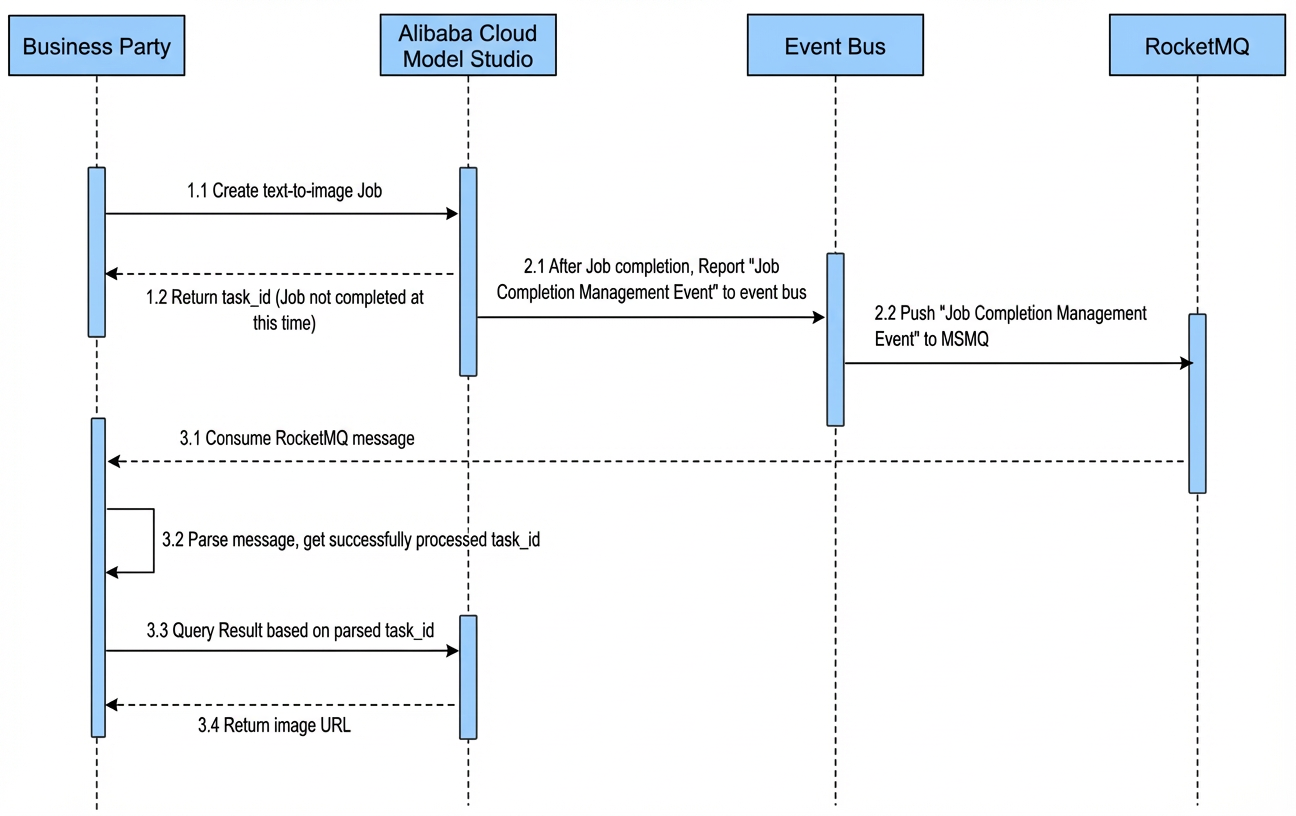
After Alibaba Cloud Model Studio completes a task, it reports the task completion event to EventBridge. EventBridge forwards the event to Message Queue for RocketMQ. Your application listens to the message queue, consumes the message, extracts the completed task ID, and calls the result query API once to retrieve the task output.
Benefits: Unlike the HTTP callback approach, RocketMQ guarantees message delivery and supports retry on failure—ideal for scenarios requiring high message reliability.
Billing: EventBridge billing, RocketMQ billing.
For example, the asynchronous invocation flow using RocketMQ for text-to-image is as follows:
|  |
Procedure
Step 1: Prepare a RocketMQ instance (skip if you already have a RocketMQ queue)
Step 1: Prepare a RocketMQ instance (skip if you already have a RocketMQ queue)
-
Go to the RocketMQ console. In the navigation pane on the left, select Instances and click Create Instance.
Instance ID example:
rmq-cn-nwy*******. -
Create a
Topicfor the instance and enter a custom topic name. -
Create a
Groupfor the instance and enter a custom group name.
Step 2: Query events in the EventBridge console
Step 2: Query events in the EventBridge console
-
Log on to your Alibaba Cloud account and go to the EventBridge console. Switch to the Singapore region. In the navigation pane on the left, select Event buses and click default to enter the default event bus for cloud services.
Alibaba Cloud Model Studio uses the default event bus by default.
-
Click Event tracking and enter query conditions to find asynchronous task completion events from Alibaba Cloud Model Studio.
- Event source: Search for and select
acs.dashscope, indicating the event originates from DashScope (the underlying model service of Alibaba Cloud Model Studio). - Event type: Search for and select
dashscope:System:AsyncTaskFinish, indicating an asynchronous task completion event.
- Event source: Search for and select
- Click Details to view the full details of the reported event.
Click to view parameter descriptions
Click to view parameter descriptions
Parameter | Type | Description | Example value |
|---|---|---|---|
datacontenttype | String | Data format of the data field. Only |
|
aliyunaccountid | String | Alibaba Cloud account ID. | 123456789098**** |
aliyunpublishtime | String | Time when the event was received. | 2020-11-19T21:04:42.179PRC |
data | Object | Event content. A JSON object whose structure is defined by the originating service. CloudEvents may include contextual information provided by the event producer at the time of occurrence, encapsulated within data. | |
data[].start_time | String | Asynchronous task start time. Format: yyyy-MM-dd HH:mm:ss | 2023-10-25 09:45:09 |
data[].end_time | String | Asynchronous task completion time. Format: yyyy-MM-dd HH:mm:ss | 2023-10-25 09:45:16 |
data[].user_api_unique_key | String | Unique API key (the five elements of the model API used when submitting the task). Format:
|
|
data[].task_status | String | Task status
| SUCCEEDED |
data[].task_id | String | Task ID | a154c328-xxxx-xxxx-xxxx-e52a9a7e9a35 |
data[].region | String | Region where the task runs | ap-southeast-1 |
data[].request_id | String | Request ID | 108f38f5-xxxx-xxxx-xxxx-6504db9080b3 |
data[].api_key_id | String | API key ID | 1234 |
data[].contain_result | Boolean | Whether the event contains result details.
| true |
data[].output_result | JSON | Result details. Returned when |
|
aliyunoriginalaccountid | String | Original Alibaba Cloud account ID | 123456789098**** |
specversion | String | CloudEvents protocol version | 1.0 |
aliyuneventbusname | String | Name of the event bus that receives the event | default |
id | String | Event ID—a unique value identifying the event. | 45ef4dewdwe1-7c35-447a-bd93-fab**** |
source | String | Event source. The service that provides the event, identifying what occurred. It typically includes the event source type, publishing mechanism, or production process. The sender must ensure that each event’s | acs.dashscope |
time | String | Time when the event was generated. If the exact event time is unknown, CloudEvents producers may set time to another value (e.g., current time), but all producers for the same source must use consistent values. | 2020-11-19T21:04:41+08:00 |
aliyunregionid | String | Region that receives the event. | ap-southeast-1 |
type | String | Event type. Describes the type of event related to the source. Used for routing, event queries, and policy enforcement. The format is defined by the producer and includes version information. | dashscope:System:AsyncTaskFinish |
Step 3: Configure event forwarding rules
Step 3: Configure event forwarding rules
- In the navigation pane on the left, select Event rules and click Create rule.
- Configure basic information: Enter a custom rule name and description.
-
Configure event pattern: Specify which events to forward.
-
Event source: Search for and select
acs.dashscope, indicating the event originates from Alibaba Cloud Model Studio. -
Event type: Search for and select
dashscope:System:AsyncTaskFinish, indicating an asynchronous task completion event. -
Pattern content: Configure filter conditions to match specific events. Use fields from the event details queried in Step 2. For pattern syntax, see Event patterns. Examples:
- Default: After selecting the event source and type, the pattern defaults to the following, forwarding all
dashscope:System:AsyncTaskFinishevents.
- Default: After selecting the event source and type, the pattern defaults to the following, forwarding all
-
Event source: Search for and select
- Filter by field: Forward only events where the
user_api_unique_keyfield ends with:paraformer-8k-v2—that is, only events for theparaformer-8k-v2model. Event type isdashscope:System:AsyncTaskFinish.
- Configure event targets: Supports multiple event target types, including HTTP callback URLs and RocketMQ message queues. See Step 4 for details.
Step 4: Set the event target to RocketMQ
Step 4: Set the event target to RocketMQ
Step 5: View messages in the RocketMQ console
Step 5: View messages in the RocketMQ console
- To view messages online in RocketMQ, enable the one-click send/receive experience feature.
- This feature uses Function Compute. If you exceed the free trial quota, minimal charges apply. See Function Compute billing rules.
Step 6: Use the SDK to receive and consume messages
Step 6: Use the SDK to receive and consume messages
- In a Maven project, add this dependency:
- Example code for consuming MQ messages:
FAQ
Can one event rule have multiple event targets?
Yes. A single event rule can have multiple event targets. If configured, the same event is delivered to every target.
I configured an event rule but am not receiving events. Why?
Ensure the event forwarding rule’s region matches the event’s region. For example, a rule configured in the Singapore region only forwards Singapore events—not other regions. Check the EventBridge region in the region selector at the top of the console page.
HTTP/HTTPS service request times out or returns an error?
Follow these steps to troubleshoot:
- Check the HTTP/HTTPS service status.
- Verify the URL configured in the event target.
-
Check the network type configured for the event target:
- PublicNetwork: Public network—ensure the URL is publicly accessible.
-
PrivateNetwork: VPC network—if selected, verify VPC, vSwitch, and SecurityGroup configurations.
- Check VPC and vSwitch settings.
- Check network security group settings.
- For other parameter settings, see Event target parameters.