

Qwen-LiveTranslate-Realtime WebRTC access
WebRTC uses media tracks to transmit audio and DataChannel to transmit model events and text. The web client can use the browser’s native API, while other clients can use libraries that support standard WebRTC. Model Studio does not provide a dedicated WebRTC SDK.
This document provides the WebRTC integration procedure for this model, along with a complete browser-side example.
This document is intended for Qwen-LiveTranslate-Realtime. The existing guidelines list
The browser submits an Offer SDP to the business AppServer. The AppServer forwards the following request using the API Key and returns the Answer SDP unchanged to the browser; long-term API Keys do not reach the frontend.
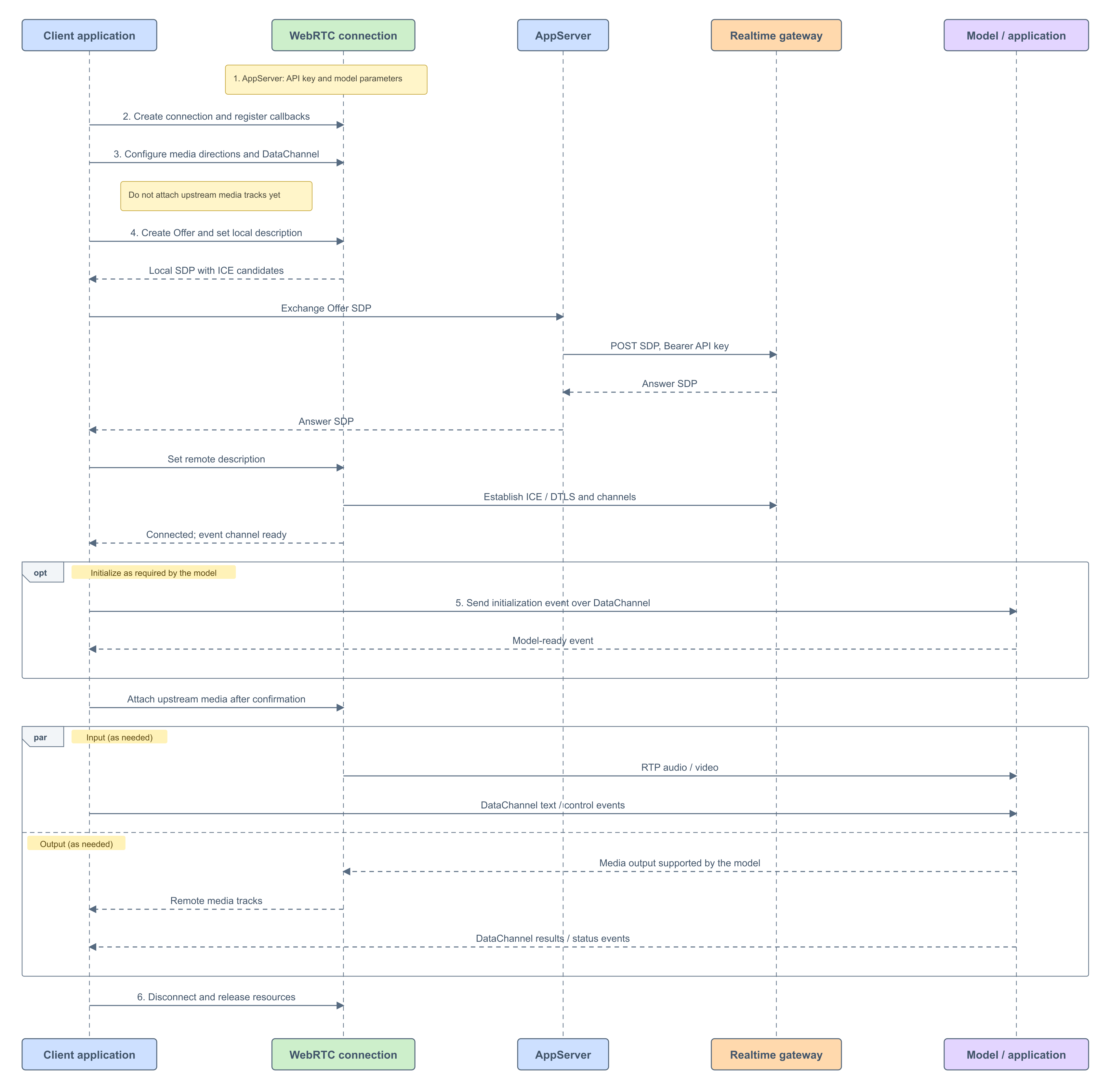
The following is a complete browser-side example. First, implement the
AppServer configures SDP exchange for the target model, region, and workspace. The following parameters apply to standard Realtime connections. For application-specific parameters, follow the corresponding best practice.
Complete regional, address, and authentication details can be found in Authentication and SDP Exchange. The business AppServer’s interface is implemented by the business itself and is not part of Model Studio’s SDK API.
On the web side, create a
Directions are relative to the client. WebRTC transceivers negotiate sending and receiving:
For example, configure audio uplink when inputting speech; configure audio downlink when voice translation is required. The Offer SDP must include the audio media section
This model outputs text or audio but does not output video.
This table describes the media directions needed by the application; it does not guarantee that every combination can be negotiated independently. Configuration depends on the target model and server negotiation capabilities.
Negotiate the required directions before creating the Offer. For models that require initialization confirmation, reserve sending capabilities without attaching captured tracks. After the model is ready, use
The following uses two-way voice as an example. The two switches in
Create a DataChannel before creating an Offer so that the SDP includes data channel negotiation. Refer to Data Channel Send and Receive Events for how the client and server handle channel creation.
The DataChannel is responsible for sending model initialization, text, and control events, and for receiving model results, status, and errors. The media track is responsible for audio transmission.
The complete example creates a client event channel and registers the server-side channel callback before creating an Offer.
Complete the connection in the following order:
Listen to
When the connection and event channel are available, initialize the target model according to its protocol. Store server initialization events and combine them with channel state to advance the flow; do not assume a fixed callback arrival order.
For example, when configuring a model using
The following example demonstrates the
Once the model is ready, attach the required upstream audio track. Handle the model’s output via the remote track callback and continuously parse the events returned by the DataChannel.
For the example model
Check that the channel is
Use the same binding function for client-created and server-created channels. It handles transport and JSON parsing;
Also follow these rules:
Scope of Application
This document is intended for Qwen-LiveTranslate-Realtime. The existing guidelines list qwen3.8-livetranslate-flash-realtime and qwen3.5-livetranslate-flash-realtime, which have different configurations and event fields; see Client Events for details. The examples in this document use qwen3.8-livetranslate-flash-realtime.
- Use the API Key and Workspace ID corresponding to your selected region and workspace.
- Beijing domain:
{WorkspaceId}.cn-beijing.maas.aliyuncs.com; Singapore domain:{WorkspaceId}.ap-southeast-1.maas.aliyuncs.com. - Long-term API Keys are stored on the server side and should not be included in browser or mobile applications. For instructions on generating temporary API Keys and their permissions, see Generate Temporary API Key.
Authentication and SDP Exchange
The browser submits an Offer SDP to the business AppServer. The AppServer forwards the following request using the API Key and returns the Answer SDP unchanged to the browser; long-term API Keys do not reach the frontend.
- Method:
POST - Beijing address:
https://{WorkspaceId}.cn-beijing.maas.aliyuncs.com/api/v1/webrtc/realtime?model=qwen3.8-livetranslate-flash-realtime - Singapore address:
https://{WorkspaceId}.ap-southeast-1.maas.aliyuncs.com/api/v1/webrtc/realtime?model=qwen3.8-livetranslate-flash-realtime - Request headers:
Authorization: Bearer <API_KEY>,Content-Type: application/sdp - Request body: Offer SDP string.
- Successful response: HTTP 200, with the Answer SDP in the body; failure returns 4xx.
/api/realtime/sdp refers to a custom interface built by the business AppServer, which must implement the aforementioned forwarding process—it is not a URL provided by Model Studio.
Workflow
- Prepare the API key and target model parameters on AppServer.
- Create the client connection object and register callbacks.
- Configure media directions and DataChannels without attaching upstream media tracks.
- Exchange SDP through AppServer and wait for the connection and event channel to become ready.
- Configure the model according to its protocol. Attach the required upstream media tracks after confirmation.
- Stop capture, close the connection, and release resources when interaction is complete.
- Audio is transmitted via WebRTC media tracks; the application is responsible for obtaining the local audio track, binding the remote player, and sending/receiving DataChannel messages according to the target model’s event definitions.
- WebRTC authentication takes place during SDP exchange; no AOQ token is required. Proxy authentication and SDP through AppServer to keep the long-term API key out of frontend code.
-
Connection success indicates that the transport channel has been established, but it does not mean that the model has completed initialization. When using
qwen3.8-livetranslate-flash-realtimeon this page, sendsession.updateand, after receivingsession.updated, enable the required upstream media stream.
Complete Example
The following is a complete browser-side example. First, implement the /api/realtime/sdp API of the business AppServer according to Authentication and SDP Exchange; then open this HTML page from the same origin as the business AppServer. The protocol, host, and port must match. For example, both the page and /api/realtime/sdp are served by http://localhost:3000. The server is responsible for storing the API Key and forwarding the SDP; do not place long-term API Keys in the page. Click “Finish input” to send session.finish, wait for session.finished, and after the remaining audio has finished playing, click “Disconnect after audio playback.” During connection setup or if you need to exit early, click “Cancel and disconnect”; this operation will immediately close the connection and may result in lost translations that have not yet been returned or audio that has not yet been played. This example establishes one connection at a time; reload the page to use it again.
1. Prepare authentication and connection parameters
AppServer configures SDP exchange for the target model, region, and workspace. The following parameters apply to standard Realtime connections. For application-specific parameters, follow the corresponding best practice.
| Setting | Value |
|---|---|
| Method | POST |
| URL | https://{endpoint}/api/v1/webrtc/realtime?model={model_name} |
Content-Type | application/sdp |
Authorization | Bearer <API_KEY> |
| Request body | Offer SDP |
| Successful response | Answer SDP |
2. Initialize the Connection Object and Register Callbacks
On the web side, create a RTCPeerConnection; on other platforms, perform the corresponding library initialization. Before establishing the connection, register the following handlers:
- Connection state changes: Determine whether the connection succeeded, failed, or was disconnected.
- DataChannel establishment, opening, messages, and closure: carries model events.
- Remote media track: receives and plays audio, or handles other media supported by the target application.
finishRequested to avoid repeatedly sending the end event.
Message listeners should be registered before model initialization to avoid missing session events proactively sent by the server. Do not listen only to channels created by the client: the server will push events through a channel named txt, so you must handle the datachannel callback.
3. Configure media directions and DataChannels
Select media directions
Directions are relative to the client. WebRTC transceivers negotiate sending and receiving: sendrecv is bidirectional, sendonly sends only, and recvonly receives only. Available capabilities also depend on the server's SDP answer and model support.
| Direction | Configuration |
|---|---|
| pushes audio | negotiates audio transmission capabilities and prepares the microphone or an external audio track; attach the track after the model is ready. |
| pulls audio | negotiates audio reception capabilities and binds audio playback in the remote track callback |
| pushes video | negotiates video transmission capabilities based on the selected version and supported scenarios, preparing the camera or an external video track |
m=audio; do not remove this media section simply because the application does not need to play audio.
Media Direction for This Model
| Model or application | Send audio | Receive audio | Send video | Receive video |
|---|---|---|---|---|
| Qwen-LiveTranslate-Realtime | Enable when voice input is active | Enable when voice translation is needed | Configure according to the selected version and scenario | Does not support enabling |
Prepare media without sending it
Negotiate the required directions before creating the Offer. For models that require initialization confirmation, reserve sending capabilities without attaching captured tracks. After the model is ready, use replaceTrack on the corresponding sender to start transmission. Register media reception handlers in advance.
Audio transmission and reception should be configured separately as needed; do not combine microphone activation, audio playback, and model initialization into a single operation.
Media configuration example
The following uses two-way voice as an example. The two switches in media control audio transmission and reception, respectively. addTransceiver pre-negotiates the direction; the captured track is first stored locally and attached to the sender only after the model is ready.
See full example for the code.
Create event channels
Create a DataChannel before creating an Offer so that the SDP includes data channel negotiation. Refer to Data Channel Send and Receive Events for how the client and server handle channel creation.
The DataChannel is responsible for sending model initialization, text, and control events, and for receiving model results, status, and errors. The media track is responsible for audio transmission.
The complete example creates a client event channel and registers the server-side channel callback before creating an Offer.
4. Establish Connection
Complete the connection in the following order:
- Call
createOfferandsetLocalDescription. - Collect candidate information according to the ICE methods supported by the server; in this example, the local SDP is sent after ICE collection is complete.
- Send the local SDP to the business AppServer, which uses the API Key to request the Model Studio SDP exchange interface.
- Check the HTTP status, and upon success, call
setRemoteDescriptionusing the returned Answer SDP. - Wait for the connection status to become successful, and confirm that the DataChannel used for sending model events has been opened.
setRemoteDescription only indicates that the corresponding negotiation step has been completed; it cannot be directly taken as proof that the media connection has succeeded. Model events also cannot be sent when the DataChannel is not in the open state.
Connection Code and Status Callbacks
Listen to connectionstatechange to determine the connection status, and listen to icegatheringstatechange to wait for the complete local SDP. Model initialization also requires the open of the DataChannel and the model’s ready event; it should not rely solely on the completion of SDP exchange for judgment.
The full example completes SDP exchange via startSession() and handles the connection result through the connection status callback.
The business AppServer should forward the Offer according to the address and request headers specified in Section 1; the sample API is expected to return plain SDP text. Do not pass content containing HTTP response headers, logs, or JSON wrappers directly to setRemoteDescription.
5. Exchange model events and media
Initialize the model
When the connection and event channel are available, initialize the target model according to its protocol. Store server initialization events and combine them with channel state to advance the flow; do not assume a fixed callback arrival order.
For example, when configuring a model using session.update, construct the event according to its protocol and wait for configuration confirmation before sending input. Parameters such as voice, output modalities, VAD, and sampling rate should all be derived from the current model’s documentation.
session.created indicates session creation; it should not be uniformly regarded as configuration having taken effect. For models that require confirmation of session configuration, wait for session.updated.
See Client Events and Server Events for the model’s event definitions. Media transmission and available modes should be handled as described on this page.
Model Event Examples
Audio is transmitted via the media track and does not use WebSocket’s media send event.
session.created → session.update → session.updated process for qwen3.8-livetranslate-flash-realtime. Configure the fields according to the model’s event reference. Only after receiving session.updated confirming that the configuration is complete should you attach the uplink media track.
The following configuration translates speech into English using the Tina voice profile.
See full example for the code.
For the example model qwen3.8-livetranslate-flash-realtime, when audio output is enabled, you can use response.audio.done to check the model’s audio generation status; this event does not indicate that the client has finished playing the audio.
Start media transmission and reception
Once the model is ready, attach the required upstream audio track. Handle the model’s output via the remote track callback and continuously parse the events returned by the DataChannel.
-
Audio travels over RTP media tracks; no
input_audio_buffer.appendevent is required. - DataChannels carry text, status, control, and error events.
startSendingMedia() attaches the upstream track, and ontrack processes the received media.
6. End interaction and release resources
For the example model qwen3.8-livetranslate-flash-realtime, after completing audio input, stop capturing and transmitting audio, and send session.finish via DataChannel. Continue receiving the final sentence in its original form, the translation, and the translated audio, and wait for session.finished. This event indicates that the model has finished processing the translation, but it does not mean that the client has finished playing the remaining translated audio; if full playback is required, call endSession() to release resources after playback is complete.
In the complete example, finishTranslation() uses the created audio track and DataChannel. If input comes from a file or business buffer, the buffered audio must be sent first before ending the input.
The implementation of finishTranslation() can be found in Complete Example.
endSession() only releases the connection and media resources; it does not send an end event.
After completing the model interaction, the client’s business layer stops the locally captured track held by the application, closes the DataChannel and RTCPeerConnection, releases resources such as the player, and cleans up the business state.
Clear model readiness after a failed or unexpected disconnection. Initialize the model again on a new connection instead of reusing the previous connection's session state.
In the complete example, endSession() is responsible for releasing the connection and media resources.
Call endSession() after completing the model interaction and processing the remaining translated audio. If recording is additionally used by the business, MediaRecorder must also be stopped.
Send and receive events over the Data channel
Check that the channel is open before calling send with a serialized event. Parse incoming messages in its message callback, including events on server-created channels.
The names, fields, parameters, and timing of sent events follow the target model’s Client Event Definitions; the parsing method, state changes, results, and error handling after receiving messages adhere to the model’s Server Event Definitions. Initialization events are sent as needed according to the model’s requirements, while subsequent text and control events are sent based on business needs.
DataChannel example
Use the same binding function for client-created and server-created channels. It handles transport and JSON parsing; handleModelEvent in section 5 handles model semantics. Use sendModelEvent for model initialization, text, or control events only when permitted by the model's protocol.
In the complete example, sendModelEvent() and bindDataChannel() send and receive events.
In the complete example, startSession() is called at the start of translation, finishTranslation() at the end of input, and endSession() after finishing translation and playback cleanup. These functions are examples provided in this document and are not built-in API of WebRTC.
Qwen-LiveTranslate-Realtime Event Definitions
| Model or application | Client events (send) | Server events (receive) |
|---|---|---|
| Qwen-LiveTranslate-Realtime | Client Events | Server Events |
-
Use the
typefield of events to identify model events, and handle associated identifiers according to this model’s event reference. - Operations such as initialization confirmation, input submission, response cancellation, and task completion—required by the model—are all handled within the Data channel according to the corresponding protocol; these constitute the model’s interaction semantics and are distinct from disconnecting the transport connection.
- Audio data is transmitted over media tracks. When using the model event reference, follow this page for media encapsulation and available interaction modes. Do not directly apply the WebSocket method for sending media.