

Learn how the Realtime API authenticates connections with tokens, including how to get an API key and how to authenticate over the WebSocket, WebRTC, and AOQ protocols.
Authentication methods
The Realtime API uses API keys for authentication. Whether you connect over AOQ, WebRTC, or WebSocket, you pass a bearer token in the Authorization HTTP request header.
Authentication happens only during connection setup. After the connection is established, data transmission doesn't require re-authentication.
The following table compares how the three protocols authenticate:
Protocol | When authentication happens | Authentication method | Notes |
|---|---|---|---|
AOQ | When the business AppServer requests the gateway | HTTP header | The API key is used only on the server side. The client uses the token returned by the gateway |
WebRTC | During the SDP exchange HTTP request | HTTP header | The client or server initiates the SDP exchange with the API key |
WebSocket | During the WebSocket handshake | HTTP header | The client or server connects directly with the API key |
Get an API key
Step 1: Activate Model Studio
- Go to the Alibaba Cloud Model Studio console and log on with your Alibaba Cloud account.
- If this is your first time using the service, follow the on-screen instructions to activate it.
Step 2: Create an API Key
- In the left navigation pane of the console, choose API Key.
- Click Create API Key and select the workspace to associate with the key.
- After the key is created, copy and store it immediately.
Connection authentication details
AOQ protocol authentication
AOQ uses a server-side proxy authentication model: the API key is used only on the business AppServer. The client connects with a temporary token returned by the gateway, which keeps the API key off the client.
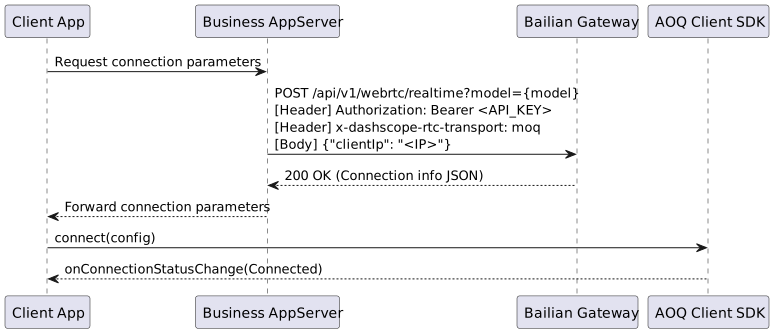
| Model series | Connection request path |
|---|---|
| Qwen-Omni-Realtime, Qwen-Audio-Realtime, Qwen-Livetranslate-Realtime | /api/v1/webrtc/realtime |
| Qwen-Audio-TTS, CosyVoice, Qwen-Audio-ASR-Streaming, Qwen-Audio-ASR-Message, Fun-ASR-Realtime | /api/v1/webrtc/inference |
qwen3.8-omni-flash-realtime. Set {endpoint} to {WorkspaceId}.cn-beijing.maas.aliyuncs.com for China (Beijing) or {WorkspaceId}.ap-southeast-1.maas.aliyuncs.com for Singapore. Replace {WorkspaceId} with your workspace ID and use the API key for the same region and workspace.
Request fields
Item | Value | Description |
|---|---|---|
endpoint | Select an access domain based on your business scenario | Specifies the access domain. For details, see Regions and access domains. If you use Token Plan, the |
Content-Type |
| Specifies the message type |
Authorization |
| Your API key |
x-dashscope-rtc-transport |
| Specifies the AOQ protocol |
clientIp | The client's real public IP address | Optional. If not specified, the IP address that requests the Model Studio gateway is used. If specified, the clientIp value takes precedence. The Realtime API assigns the best Relay access point based on the client IP address |
Response example
Response fields
Field | Description |
|---|---|
sid | Unique session ID |
aoqTokenForClient | Client connection token. Pass it to the SDK's token field |
clientRelayEndpoints | Array of Relay access points (endpoint + port) |
clientRelayCertFingerprint | Relay TLS certificate fingerprint |
sidExpiresInSecs | Session expiration time, in seconds |
extraInfo.workspaceIdHash | Workspace ID hash |
AOQ Client SDK connection example
clientIp is an optional field in the request body. If not specified, the IP address that requests the Model Studio gateway is used as the client IP. If specified, the clientIp value takes precedence. Have your business AppServer obtain the client's real IP address and pass it in to get the best Relay access point.WebRTC protocol authentication
WebRTC completes the SDP exchange over an HTTP POST request, and authentication happens at this stage. The client sends the Offer SDP to the server, and the server returns the Answer SDP.
Item | Value | Description |
|---|---|---|
Request method | POST | - |
Request URL |
| Replace endpoint and model_name. The connection URL varies by model. For details, see WebRTC connection |
Content-Type |
| The request body is an SDP string |
Authorization |
| Your API key |
Response | HTTP 200 with the Answer SDP | Returns a 4xx status code on failure |
WebSocket protocol authentication
WebSocket has the simplest authentication: send the API key in an HTTP header when you establish the connection.
Item | Value | Description |
|---|---|---|
Connection URL |
| The connection URL varies by model. For details, see WebSocket connection |
Authorization |
| Your API key |