

This article describes the endpoint URL, request headers, and interaction flow for accessing the Qwen-TTS-Realtime Real-time Speech Synthesis service over a WebSocket connection.
User Guide: For model introduction and selection recommendations, see Real-time Speech Synthesis
The Qwen-TTS Realtime API is based on the WebSocket protocol. For Java and Python, calling through the DashScope SDK is recommended, which saves you from handling WebSocket details; for other languages, you can connect directly using a WebSocket library.
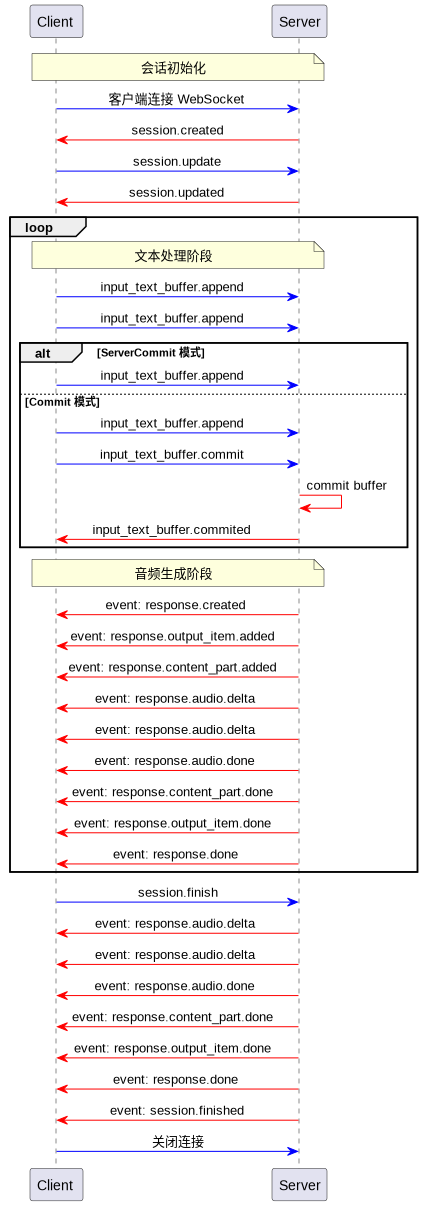 Key process description:
Endpoint URL
The WebSocket URL is fixed as follows; specify the model to call via the query parametermodel:
- Singapore
- China (Beijing)
WebSocket URL:
wss://dashscope-intl.aliyuncs.com/api-ws/v1/realtime?model=qwen3-tts-flash-realtimeWebSocket URL:
wss://dashscope.aliyuncs.com/api-ws/v1/realtime?model=qwen3-tts-flash-realtimeThe URL must use the
wss:// protocol. Authorization is set in the request headers (see Request headers), and the model is specified via the URL query parameter model.Request Headers
Add the following information in the request headers:Parameter | Type | Required | Description |
|---|---|---|---|
Authorization | string | Yes | Authentication token in the format |
user-agent | string | No | Client identifier, which helps the server trace the request source. |
X-DashScope-WorkSpace | string | No | The Alibaba Cloud Model Studio Workspace ID. |
Authorization is verified during the WebSocket handshake. If the API Key is invalid or missing, the handshake fails and an HTTP 401/403 error is returned.
Interaction Flow
For detailed descriptions of client events and server events, see Client events and Server events. Two usage patterns are supported:- ServerCommit pattern: The server intelligently determines text segmentation and synthesis timing, so developers do not need to handle internal state splitting.
- Commit pattern: The client controls when each piece of text is committed, and must explicitly call
input_text_buffer.committo trigger synthesis.
Pattern description:
- In ServerCommit mode, the client calls
input_text_buffer.appendmultiple times, and the system determines the synthesis starting point based on internal rules. - If the client actively calls
input_text_buffer.commitin ServerCommit mode, it means the current buffer content is synthesized immediately, and ServerCommit mode is maintained afterwards. - In Commit mode, calling only
input_text_buffer.appenddoes not trigger synthesis; you must explicitly callinput_text_buffer.commit.
-
Connection phase: The client initiates a WebSocket connection, and the server returns
session.created, indicating that the session has been initialized. -
Configure the session: The client sends the
session.updateevent to set parameters such as voice, format, and mode. -
Text input phase: The client adds text to the buffer by sending
input_text_buffer.appendmultiple times. -
Trigger synthesis phase:
- In ServerCommit mode, the system automatically determines the synthesis timing, or the client manually calls
input_text_buffer.committo force triggering. - In Commit mode, only the
input_text_buffer.commitoperation actually triggers the speech synthesis process.
- In ServerCommit mode, the system automatically determines the synthesis timing, or the client manually calls
-
Audio generation phase: The server sends
response.createdto indicate that the task has started, then returns audio in chunks viaresponse.audio.delta(base64-encoded) untilresponse.audio.done. -
Session end phase: The client explicitly calls
session.finishto notify the server to clean up state, and the server closes the connection after returningsession.finished.
session.created event:
Copy
{
"event_id": "event_xxx",
"type": "session.created",
"session": {
"object": "realtime.session",
"mode": "server_commit",
"model": "qwen3-tts-flash-realtime",
"voice": "Cherry",
"response_format": "pcm",
"sample_rate": 24000,
"id": "sess_xxx"
}
}
Sample Code
The following examples provide Python and Java clients as well as both commit modes. ConfigureDASHSCOPE_API_KEY first, and make sure the API Key matches the region of the sample API. Python requires websockets and pyaudio; Java requires Java-WebSocket and Gson, and uses Java Sound to play audio. Each client event uses a separate UUID.
Java
Copy
<dependencies>
<dependency>
<groupId>org.java-websocket</groupId>
<artifactId>Java-WebSocket</artifactId>
<version>1.5.3</version>
</dependency>
<dependency>
<groupId>com.google.code.gson</groupId>
<artifactId>gson</artifactId>
<version>2.10.1</version>
</dependency>
</dependencies>
-
Create a client
- Java
- Python
Create a new Java file locally, name itTTSRealtimeClient.java, and copy the following code into the file:Copyimport com.google.gson.Gson; import com.google.gson.JsonObject; import org.java_websocket.client.WebSocketClient; import org.java_websocket.handshake.ServerHandshake; import java.net.URI; import java.util.Base64; import java.util.HashMap; import java.util.Map; import java.util.concurrent.CountDownLatch; import java.util.function.Consumer; /** * A client for interacting with the TTS Realtime API. * * This class provides methods for connecting to the TTS Realtime API, sending text data, retrieving audio output, and managing WebSocket connections. */ public class TTSRealtimeClient { public enum SessionMode { SERVER_COMMIT("server_commit"), COMMIT("commit"); private final String value; SessionMode(String value) { this.value = value; } public String getValue() { return value; } } /** * Audio callback interface */ public interface AudioCallback { void onAudio(byte[] audioData); } private final String baseUrl; private final String apiKey; private final String voice; private final SessionMode mode; private final String languageType; private final AudioCallback audioCallback; private final Gson gson = new Gson(); private WebSocketClient ws; private CountDownLatch responseDoneLatch; private CountDownLatch sessionFinishedLatch; public TTSRealtimeClient(String baseUrl, String apiKey, String voice, SessionMode mode, AudioCallback audioCallback, String languageType) { this.baseUrl = baseUrl; this.apiKey = apiKey; this.voice = voice; this.mode = mode; this.audioCallback = audioCallback; this.languageType = languageType; } public TTSRealtimeClient(String baseUrl, String apiKey, String voice, SessionMode mode, AudioCallback audioCallback) { this(baseUrl, apiKey, voice, mode, audioCallback, "Auto"); } /** * Establish a WebSocket connection to the TTS Realtime API. */ public void connect() throws Exception { Map<String, String> headers = new HashMap<>(); headers.put("Authorization", "Bearer " + apiKey); responseDoneLatch = new CountDownLatch(0); sessionFinishedLatch = new CountDownLatch(1); ws = new WebSocketClient(new URI(baseUrl), headers) { @Override public void onOpen(ServerHandshake handshake) { System.out.println("WebSocket 连接已建立"); // Send default session configuration JsonObject session = new JsonObject(); session.addProperty("mode", mode.getValue()); session.addProperty("voice", TTSRealtimeClient.this.voice); session.addProperty("language_type", languageType); session.addProperty("response_format", "pcm"); session.addProperty("sample_rate", 24000); updateSession(session); } @Override public void onMessage(String message) { JsonObject event = gson.fromJson(message, JsonObject.class); String eventType = event.has("type") ? event.get("type").getAsString() : ""; if (!"response.audio.delta".equals(eventType)) { System.out.println("收到事件: " + eventType); } switch (eventType) { case "error": System.err.println("错误: " + event.get("error")); break; case "session.created": System.out.println("会话创建,ID: " + event.getAsJsonObject("session").get("id").getAsString()); break; case "session.updated": System.out.println("会话更新,ID: " + event.getAsJsonObject("session").get("id").getAsString()); break; case "input_text_buffer.committed": System.out.println("文本缓冲区已提交,项目ID: " + event.get("item_id")); break; case "input_text_buffer.cleared": System.out.println("文本缓冲区已清除"); break; case "response.created": System.out.println("响应已创建,ID: " + event.getAsJsonObject("response").get("id").getAsString()); responseDoneLatch = new CountDownLatch(1); break; case "response.output_item.added": System.out.println("输出项已添加,ID: " + event.getAsJsonObject("item").get("id").getAsString()); break; case "response.audio.delta": if (audioCallback != null) { byte[] audioBytes = Base64.getDecoder().decode( event.get("delta").getAsString()); audioCallback.onAudio(audioBytes); } break; case "response.audio.done": System.out.println("音频生成完成"); break; case "response.done": System.out.println("响应完成"); responseDoneLatch.countDown(); break; case "session.finished": System.out.println("会话已结束"); sessionFinishedLatch.countDown(); break; } } @Override public void onClose(int code, String reason, boolean remote) { System.out.println("连接已关闭: " + reason); } @Override public void onError(Exception ex) { System.err.println("WebSocket 错误: " + ex.getMessage()); } }; ws.connectBlocking(); } /** * Send an event to the server. */ public void sendEvent(JsonObject event) { String eventId = "event_" + java.util.UUID.randomUUID().toString(); event.addProperty("event_id", eventId); System.out.println("发送事件: type=" + event.get("type").getAsString() + ", event_id=" + eventId); ws.send(gson.toJson(event)); } /** * Update the session configuration. */ public void updateSession(JsonObject config) { JsonObject event = new JsonObject(); event.addProperty("type", "session.update"); event.add("session", config); System.out.println("更新会话配置: " + event); sendEvent(event); } /** * Send text data to the API. */ public void appendText(String text) { JsonObject event = new JsonObject(); event.addProperty("type", "input_text_buffer.append"); event.addProperty("text", text); sendEvent(event); } /** * Commit the text buffer to trigger processing. */ public void commitTextBuffer() { JsonObject event = new JsonObject(); event.addProperty("type", "input_text_buffer.commit"); sendEvent(event); } /** * Clear the text buffer. */ public void clearTextBuffer() { JsonObject event = new JsonObject(); event.addProperty("type", "input_text_buffer.clear"); sendEvent(event); } /** * End the session. */ public void finishSession() { JsonObject event = new JsonObject(); event.addProperty("type", "session.finish"); sendEvent(event); } /** * Wait for the response.done event. */ public void waitForResponseDone() throws InterruptedException { responseDoneLatch.await(); } /** * Wait for the session.finished event. */ public void waitForSessionFinished() throws InterruptedException { sessionFinishedLatch.await(); } /** * Close the WebSocket connection. */ public void close() { if (ws != null) { ws.close(); } } }Create a new Python file locally, name ittts_realtime_client.py, and copy the following code into the file:Copy# -- coding: utf-8 -- import asyncio import websockets import json import base64 import time import uuid from typing import Optional, Callable, Dict, Any from enum import Enum class SessionMode(Enum): SERVER_COMMIT = "server_commit" COMMIT = "commit" class TTSRealtimeClient: """ 与 TTS Realtime API 交互的客户端。 该类提供了连接 TTS Realtime API、发送文本数据、获取音频输出以及管理 WebSocket 连接的相关方法。 属性说明: base_url (str): Realtime API 的基础地址。 api_key (str): 用于身份验证的 API Key。 voice (str): 服务端合成语音所使用的声音。 mode (SessionMode): 会话模式,可选 server_commit 或 commit。 audio_callback (Callable[[bytes], None]): 接收音频数据的回调函数。 language_type(str) 合成的语音的语种,可选值Chinese、English、German、Italian、Portuguese、Spanish、Japanese、Korean、French、Russian、Auto """ def __init__( self, base_url: str, api_key: str, voice: str = "Cherry", mode: SessionMode = SessionMode.SERVER_COMMIT, audio_callback: Optional[Callable[[bytes], None]] = None, language_type: str = "Auto"): self.base_url = base_url self.api_key = api_key self.voice = voice self.mode = mode self.ws = None self.audio_callback = audio_callback self.language_type = language_type # Current response state self._current_response_id = None self._current_item_id = None self._is_responding = False self._response_done_future = None async def connect(self) -> None: """与 TTS Realtime API 建立 WebSocket 连接。""" headers = { "Authorization": f"Bearer {self.api_key}" } self.ws = await websockets.connect(self.base_url, additional_headers=headers) # Set default session configuration await self.update_session({ "mode": self.mode.value, "voice": self.voice, "language_type": self.language_type, "response_format": "pcm", "sample_rate": 24000 }) async def send_event(self, event) -> None: """发送事件到服务器。""" event['event_id'] = "event_" + uuid.uuid4().hex print(f"发送事件: type={event['type']}, event_id={event['event_id']}") await self.ws.send(json.dumps(event)) async def update_session(self, config: Dict[str, Any]) -> None: """更新会话配置。""" event = { "type": "session.update", "session": config } print("更新会话配置: ", event) await self.send_event(event) async def append_text(self, text: str) -> None: """向 API 发送文本数据。""" event = { "type": "input_text_buffer.append", "text": text } await self.send_event(event) async def commit_text_buffer(self) -> None: """提交文本缓冲区以触发处理。""" event = { "type": "input_text_buffer.commit" } await self.send_event(event) async def clear_text_buffer(self) -> None: """清除文本缓冲区。""" event = { "type": "input_text_buffer.clear" } await self.send_event(event) async def finish_session(self) -> None: """结束会话。""" event = { "type": "session.finish" } await self.send_event(event) async def wait_for_response_done(self): """等待 response.done 事件""" if self._response_done_future: await self._response_done_future async def handle_messages(self) -> None: """处理来自服务器的消息。""" try: async for message in self.ws: event = json.loads(message) event_type = event.get("type") if event_type != "response.audio.delta": print(f"收到事件: {event_type}") if event_type == "error": print("错误: ", event.get('error', {})) continue elif event_type == "session.created": print("会话创建,ID: ", event.get('session', {}).get('id')) elif event_type == "session.updated": print("会话更新,ID: ", event.get('session', {}).get('id')) elif event_type == "input_text_buffer.committed": print("文本缓冲区已提交,项目ID: ", event.get('item_id')) elif event_type == "input_text_buffer.cleared": print("文本缓冲区已清除") elif event_type == "response.created": self._current_response_id = event.get("response", {}).get("id") self._is_responding = True # Create a new future to wait for response.done self._response_done_future = asyncio.Future() print("响应已创建,ID: ", self._current_response_id) elif event_type == "response.output_item.added": self._current_item_id = event.get("item", {}).get("id") print("输出项已添加,ID: ", self._current_item_id) # Handle audio delta elif event_type == "response.audio.delta" and self.audio_callback: audio_bytes = base64.b64decode(event.get("delta", "")) self.audio_callback(audio_bytes) elif event_type == "response.audio.done": print("音频生成完成") elif event_type == "response.done": self._is_responding = False self._current_response_id = None self._current_item_id = None # Mark future as done if self._response_done_future and not self._response_done_future.done(): self._response_done_future.set_result(True) print("响应完成") elif event_type == "session.finished": print("会话已结束") except websockets.exceptions.ConnectionClosed: print("连接已关闭") except Exception as e: print("消息处理出错: ", str(e)) async def close(self) -> None: """关闭 WebSocket 连接。""" if self.ws: await self.ws.close()
Available SDKs
-
Select a speech synthesis mode
The Realtime API supports the following two modes:
- server_commit mode The server intelligently determines text segmentation and synthesis timing, and the client only needs to send text. Suitable for low-latency scenarios (such as GPS navigation).
- commit mode The client adds text to the buffer and then actively triggers synthesis. Suitable for scenarios that require fine-grained control over sentence breaks (such as news broadcasting).
- server_commit mode
- commit mode
- Java
- Python
In the same directory asTTSRealtimeClient.java, create another new Java file, name itServerCommit.java, and copy the following code into the file:Compile and runCopyimport javax.sound.sampled.*; import java.io.*; import java.util.ArrayList; import java.util.List; import java.util.concurrent.ConcurrentLinkedQueue; import java.util.concurrent.atomic.AtomicBoolean; public class ServerCommit { // The following is the configuration for the Singapore region. private static final String URL = "wss://dashscope-intl.aliyuncs.com/api-ws/v1/realtime?model=qwen3-tts-flash-realtime"; // The API Key differs between the Singapore and Beijing regions. Get your API Key: https://www.alibabacloud.com/help/model-studio/get-api-key // If you have not configured the environment variable, replace the next line with your Model Studio API Key: private static final String API_KEY = "sk-xxx"; private static final String API_KEY = System.getenv("DASHSCOPE_API_KEY"); private static final int SAMPLE_RATE = 24000; // Audio data cache private static final List<byte[]> audioChunks = new ArrayList<>(); // Real-time playback queue private static final ConcurrentLinkedQueue<byte[]> playbackQueue = new ConcurrentLinkedQueue<>(); private static final AtomicBoolean playing = new AtomicBoolean(true); public static void main(String[] args) throws Exception { if (API_KEY == null || API_KEY.isEmpty()) { throw new IllegalStateException("请设置 DASHSCOPE_API_KEY 环境变量"); } // Initialize audio playback AudioFormat format = new AudioFormat(SAMPLE_RATE, 16, 1, true, false); DataLine.Info info = new DataLine.Info(SourceDataLine.class, format); SourceDataLine audioLine = (SourceDataLine) AudioSystem.getLine(info); audioLine.open(format); audioLine.start(); // Start the playback thread Thread playerThread = new Thread(() -> { while (playing.get() || !playbackQueue.isEmpty()) { byte[] chunk = playbackQueue.poll(); if (chunk != null) { audioLine.write(chunk, 0, chunk.length); } else { try { Thread.sleep(10); } catch (InterruptedException ignored) {} } } }); playerThread.start(); // Create the TTS client TTSRealtimeClient client = new TTSRealtimeClient( URL, API_KEY, "Cherry", TTSRealtimeClient.SessionMode.SERVER_COMMIT, audioData -> { playbackQueue.add(audioData); audioChunks.add(audioData); System.out.println("收到音频数据: " + audioData.length + " bytes"); } ); client.connect(); // Send text fragments String[] textFragments = { "阿里云的大模型服务平台阿里云百炼是一站式的大模型开发及应用构建平台。", "不论是开发者还是业务人员,都能深入参与大模型应用的设计和构建。", "您可以通过简单的界面操作,在5分钟内开发出一款大模型应用,", "或在几小时内训练出一个专属模型,从而将更多精力专注于应用创新。" }; System.out.println("开始发送文本..."); for (String text : textFragments) { System.out.println("发送片段: " + text); client.appendText(text); Thread.sleep(100); } Thread.sleep(1000); client.finishSession(); // Wait for the response to complete client.waitForResponseDone(); client.waitForSessionFinished(); client.close(); // Wait for playback to complete playing.set(false); playerThread.join(); audioLine.drain(); audioLine.close(); // Save the audio file saveWav("output.wav"); System.out.println("完成"); } private static void saveWav(String filename) throws IOException { if (audioChunks.isEmpty()) { System.out.println("没有音频数据可保存"); return; } ByteArrayOutputStream bos = new ByteArrayOutputStream(); for (byte[] chunk : audioChunks) { bos.write(chunk); } byte[] allAudio = bos.toByteArray(); AudioFormat format = new AudioFormat(SAMPLE_RATE, 16, 1, true, false); AudioInputStream ais = new AudioInputStream( new ByteArrayInputStream(allAudio), format, allAudio.length / 2); new File("outputs").mkdirs(); AudioSystem.write(ais, AudioFileFormat.Type.WAVE, new File("outputs/" + filename)); System.out.println("音频已保存到: outputs/" + filename); } }ServerCommit.java, and you will hear audio generated in real time by the Realtime API.In the same directory astts_realtime_client.py, create another new Python file, name itserver_commit.py, and copy the following code into the file:RunCopyimport os import asyncio import logging import wave from tts_realtime_client import TTSRealtimeClient, SessionMode import pyaudio # QwenTTS service configuration # The following is the configuration for the Singapore region. URL = "wss://dashscope-intl.aliyuncs.com/api-ws/v1/realtime?model=qwen3-tts-flash-realtime" # The API Key differs between the Singapore and Beijing regions. Get your API Key: https://www.alibabacloud.com/help/model-studio/get-api-key # If you have not configured the environment variable, replace the next line with your Model Studio API Key: API_KEY="sk-xxx" API_KEY = os.getenv("DASHSCOPE_API_KEY") if not API_KEY: raise ValueError("Please set DASHSCOPE_API_KEY environment variable") # Collect audio data _audio_chunks = [] # Real-time playback related _AUDIO_SAMPLE_RATE = 24000 _audio_pyaudio = pyaudio.PyAudio() _audio_stream = None # Will be opened at runtime def _audio_callback(audio_bytes: bytes): """TTSRealtimeClient 音频回调: 实时播放并缓存""" global _audio_stream if _audio_stream is not None: try: _audio_stream.write(audio_bytes) except Exception as exc: logging.error(f"PyAudio playback error: {exc}") _audio_chunks.append(audio_bytes) logging.info(f"Received audio chunk: {len(audio_bytes)} bytes") def _save_audio_to_file(filename: str = "output.wav", sample_rate: int = 24000) -> bool: """将收集到的音频数据保存为 WAV 文件""" if not _audio_chunks: logging.warning("No audio data to save") return False try: audio_data = b"".join(_audio_chunks) with wave.open(filename, 'wb') as wav_file: wav_file.setnchannels(1) # Mono wav_file.setsampwidth(2) # 16-bit wav_file.setframerate(sample_rate) wav_file.writeframes(audio_data) logging.info(f"Audio saved to: {filename}") return True except Exception as exc: logging.error(f"Failed to save audio: {exc}") return False async def _produce_text(client: TTSRealtimeClient): """向服务器发送文本片段""" text_fragments = [ "阿里云的大模型服务平台阿里云百炼是一站式的大模型开发及应用构建平台。", "不论是开发者还是业务人员,都能深入参与大模型应用的设计和构建。", "您可以通过简单的界面操作,在5分钟内开发出一款大模型应用,", "或在几小时内训练出一个专属模型,从而将更多精力专注于应用创新。", ] logging.info("Sending text fragments…") for text in text_fragments: logging.info(f"Sending fragment: {text}") await client.append_text(text) await asyncio.sleep(0.1) # Brief delay between fragments # Wait for the server to finish internal processing before ending the session await asyncio.sleep(1.0) await client.finish_session() async def _run_demo(): """运行完整 Demo""" global _audio_stream # Open PyAudio output stream _audio_stream = _audio_pyaudio.open( format=pyaudio.paInt16, channels=1, rate=_AUDIO_SAMPLE_RATE, output=True, frames_per_buffer=1024 ) client = TTSRealtimeClient( base_url=URL, api_key=API_KEY, voice="Cherry", mode=SessionMode.SERVER_COMMIT, audio_callback=_audio_callback ) # Establish connection await client.connect() # Run message handling and text sending in parallel consumer_task = asyncio.create_task(client.handle_messages()) producer_task = asyncio.create_task(_produce_text(client)) await producer_task # Wait for text sending to complete # Wait for response.done await client.wait_for_response_done() # Close connection and cancel consumer task await client.close() consumer_task.cancel() # Close audio stream if _audio_stream is not None: _audio_stream.stop_stream() _audio_stream.close() _audio_pyaudio.terminate() # Save audio data os.makedirs("outputs", exist_ok=True) _save_audio_to_file(os.path.join("outputs", "qwen_tts_output.wav")) def main(): """同步入口""" logging.basicConfig( level=logging.INFO, format='%(asctime)s [%(levelname)s] %(message)s', datefmt='%Y-%m-%d %H:%M:%S' ) logging.info("Starting QwenTTS Realtime Client demo…") asyncio.run(_run_demo()) if __name__ == "__main__": main()server_commit.py, and you will hear audio generated in real time by the Realtime API.- Java
- Python
In the same directory asTTSRealtimeClient.java, create another new Java file, name itCommit.java, and copy the following code into the file:Compile and runCopyimport javax.sound.sampled.*; import java.io.*; import java.util.ArrayList; import java.util.List; import java.util.Scanner; import java.util.concurrent.ConcurrentLinkedQueue; import java.util.concurrent.atomic.AtomicBoolean; public class Commit { // The following is the configuration for the Singapore region. private static final String URL = "wss://dashscope-intl.aliyuncs.com/api-ws/v1/realtime?model=qwen3-tts-flash-realtime"; // The API Key differs between the Singapore and Beijing regions. Get your API Key: https://www.alibabacloud.com/help/model-studio/get-api-key // If you have not configured the environment variable, replace the next line with your Model Studio API Key: private static final String API_KEY = "sk-xxx"; private static final String API_KEY = System.getenv("DASHSCOPE_API_KEY"); private static final int SAMPLE_RATE = 24000; private static final List<byte[]> audioChunks = new ArrayList<>(); private static final ConcurrentLinkedQueue<byte[]> playbackQueue = new ConcurrentLinkedQueue<>(); private static final AtomicBoolean playing = new AtomicBoolean(true); public static void main(String[] args) throws Exception { if (API_KEY == null || API_KEY.isEmpty()) { throw new IllegalStateException("请设置 DASHSCOPE_API_KEY 环境变量"); } // Initialize audio playback AudioFormat format = new AudioFormat(SAMPLE_RATE, 16, 1, true, false); DataLine.Info info = new DataLine.Info(SourceDataLine.class, format); SourceDataLine audioLine = (SourceDataLine) AudioSystem.getLine(info); audioLine.open(format); audioLine.start(); // Start the playback thread Thread playerThread = new Thread(() -> { while (playing.get() || !playbackQueue.isEmpty()) { byte[] chunk = playbackQueue.poll(); if (chunk != null) { audioLine.write(chunk, 0, chunk.length); } else { try { Thread.sleep(10); } catch (InterruptedException ignored) {} } } }); playerThread.start(); // Create a TTS client (commit mode) TTSRealtimeClient client = new TTSRealtimeClient( URL, API_KEY, "Cherry", TTSRealtimeClient.SessionMode.COMMIT, audioData -> { playbackQueue.add(audioData); audioChunks.add(audioData); System.out.println("收到音频数据: " + audioData.length + " bytes"); } ); client.connect(); // Interactive input System.out.println("请输入文本(直接按Enter发送commit事件并结束本次会话,按Ctrl+D结束程序):"); Scanner scanner = new Scanner(System.in); while (true) { System.out.print("> "); if (!scanner.hasNextLine()) { client.finishSession(); break; } String userText = scanner.nextLine(); if (userText.isEmpty()) { // Empty input: commit the buffer and end the session System.out.println("空输入,发送 commit 事件并结束本次会话"); client.commitTextBuffer(); Thread.sleep(300); client.finishSession(); break; } else { System.out.println("发送文本: " + userText); client.appendText(userText); } } scanner.close(); // Wait for the response to complete client.waitForResponseDone(); client.waitForSessionFinished(); client.close(); // Wait for playback to complete playing.set(false); playerThread.join(); audioLine.drain(); audioLine.close(); // Save the audio file saveWav("output.wav"); System.out.println("完成"); } private static void saveWav(String filename) throws IOException { if (audioChunks.isEmpty()) { System.out.println("没有音频数据可保存"); return; } ByteArrayOutputStream bos = new ByteArrayOutputStream(); for (byte[] chunk : audioChunks) { bos.write(chunk); } byte[] allAudio = bos.toByteArray(); AudioFormat format = new AudioFormat(SAMPLE_RATE, 16, 1, true, false); AudioInputStream ais = new AudioInputStream( new ByteArrayInputStream(allAudio), format, allAudio.length / 2); new File("outputs").mkdirs(); AudioSystem.write(ais, AudioFileFormat.Type.WAVE, new File("outputs/" + filename)); System.out.println("音频已保存到: outputs/" + filename); } }Commit.java; you can enter the text to synthesize multiple times. Press the Enter key without entering text, and you will hear the audio returned by the Realtime API from the speaker.In the same directory astts_realtime_client.py, create another new Python file, name itcommit.py, and copy the following code into the file:RunCopyimport os import asyncio import logging import wave from tts_realtime_client import TTSRealtimeClient, SessionMode import pyaudio # QwenTTS service configuration # The following is the configuration for the Singapore region. URL = "wss://dashscope-intl.aliyuncs.com/api-ws/v1/realtime?model=qwen3-tts-flash-realtime" # The API Key differs between the Singapore and Beijing regions. Get your API Key: https://www.alibabacloud.com/help/model-studio/get-api-key # If you have not configured the environment variable, replace the next line with your Model Studio API Key: API_KEY="sk-xxx" API_KEY = os.getenv("DASHSCOPE_API_KEY") if not API_KEY: raise ValueError("Please set DASHSCOPE_API_KEY environment variable") # Collect audio data _audio_chunks = [] _AUDIO_SAMPLE_RATE = 24000 _audio_pyaudio = pyaudio.PyAudio() _audio_stream = None def _audio_callback(audio_bytes: bytes): """TTSRealtimeClient 音频回调: 实时播放并缓存""" global _audio_stream if _audio_stream is not None: try: _audio_stream.write(audio_bytes) except Exception as exc: logging.error(f"PyAudio playback error: {exc}") _audio_chunks.append(audio_bytes) logging.info(f"Received audio chunk: {len(audio_bytes)} bytes") def _save_audio_to_file(filename: str = "output.wav", sample_rate: int = 24000) -> bool: """将收集到的音频数据保存为 WAV 文件""" if not _audio_chunks: logging.warning("No audio data to save") return False try: audio_data = b"".join(_audio_chunks) with wave.open(filename, 'wb') as wav_file: wav_file.setnchannels(1) # Mono wav_file.setsampwidth(2) # 16-bit wav_file.setframerate(sample_rate) wav_file.writeframes(audio_data) logging.info(f"Audio saved to: {filename}") return True except Exception as exc: logging.error(f"Failed to save audio: {exc}") return False async def _user_input_loop(client: TTSRealtimeClient): """持续获取用户输入并发送文本,当用户输入空文本时发送commit事件并结束本次会话""" print("请输入文本(直接按Enter发送commit事件并结束本次会话,按Ctrl+C或Ctrl+D结束整个程序):") while True: try: user_text = input("> ") if not user_text: # User input is empty # Empty input is treated as end of a conversation: commit buffer -> end session -> break loop logging.info("空输入,发送 commit 事件并结束本次会话") await client.commit_text_buffer() # Wait briefly for the server to process the commit, preventing premature session end that could lose audio await asyncio.sleep(0.3) await client.finish_session() break # Exit user input loop directly, no need to press Enter again else: logging.info(f"发送文本: {user_text}") await client.append_text(user_text) except EOFError: # User pressed Ctrl+D break except KeyboardInterrupt: # User pressed Ctrl+C break # End session logging.info("结束会话...") async def _run_demo(): """运行完整 Demo""" global _audio_stream # Open PyAudio output stream _audio_stream = _audio_pyaudio.open( format=pyaudio.paInt16, channels=1, rate=_AUDIO_SAMPLE_RATE, output=True, frames_per_buffer=1024 ) client = TTSRealtimeClient( base_url=URL, api_key=API_KEY, voice="Cherry", mode=SessionMode.COMMIT, # Changed to COMMIT mode audio_callback=_audio_callback ) # Establish connection await client.connect() # Run message handling and user input in parallel consumer_task = asyncio.create_task(client.handle_messages()) producer_task = asyncio.create_task(_user_input_loop(client)) await producer_task # Wait for user input to complete # Wait for response.done await client.wait_for_response_done() # Close connection and cancel consumer task await client.close() consumer_task.cancel() # Close audio stream if _audio_stream is not None: _audio_stream.stop_stream() _audio_stream.close() _audio_pyaudio.terminate() # Save audio data os.makedirs("outputs", exist_ok=True) _save_audio_to_file(os.path.join("outputs", "qwen_tts_output.wav")) def main(): logging.basicConfig( level=logging.INFO, format='%(asctime)s [%(levelname)s] %(message)s', datefmt='%Y-%m-%d %H:%M:%S' ) logging.info("Starting QwenTTS Realtime Client demo…") asyncio.run(_run_demo()) if __name__ == "__main__": main()commit.py; you can enter the text to synthesize multiple times. Press the Enter key without entering text, and you will hear the audio returned by the Realtime API from the speaker.