

A knowledge base supplements an LLM with private data and up-to-date information. Using retrieval-augmented generation (RAG), the LLM improves answer accuracy by first retrieving relevant content from the knowledge base before generating a response.
Application without a dedicated knowledge base Without a dedicated knowledge base, an LLM cannot answer domain-specific questions accurately. For example, when a user sends "Please help me pick the best camera phone from Alibaba Cloud Model Studio, within a budget of 3,000 yuan" in the chat interface, the AI assistant cannot provide accurate product recommendations due to the lack of a relevant knowledge base. | Application with a dedicated knowledge base With a dedicated knowledge base, an LLM can answer domain-specific questions accurately. 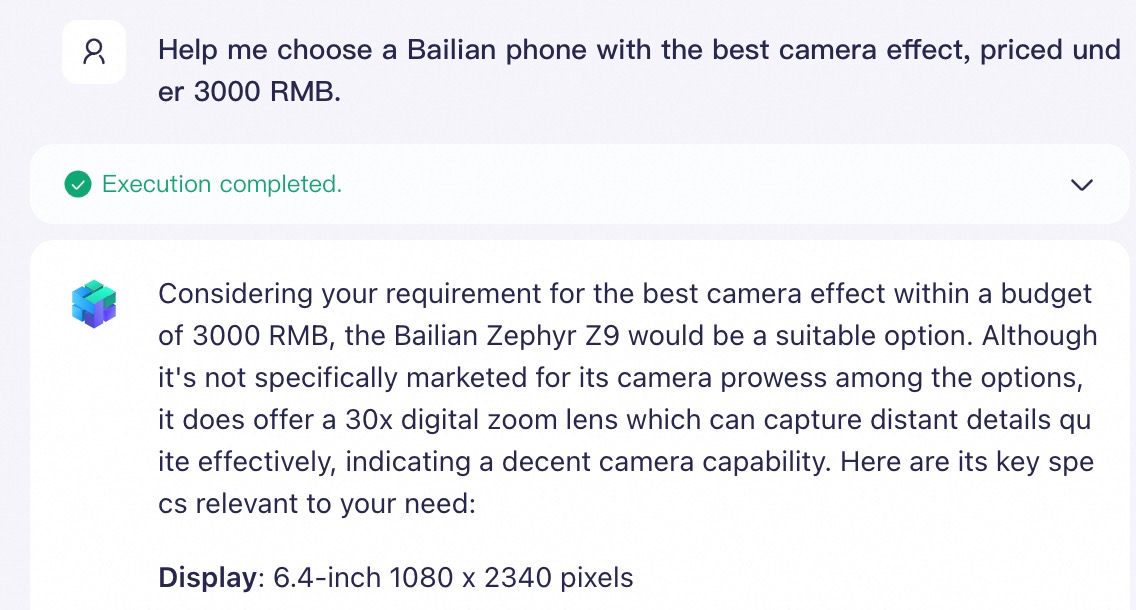 |
Supported models
The following models can be used with a knowledge base. Configure Qwen to use a knowledge base
- Qwen-Max/Plus/Turbo
- QwenVL-Max/Plus
- Qwen open-source version (e.g., Qwen2.5)
For an up-to-date list of available models, see the Application Management page when creating an application.
Quick start
This quickstart shows how to build a no-code LLM Q&A application to answer domain-specific questions, using "Alibaba Cloud Model Studio phones" as an example.
1. Build a knowledge base
- Go to the Knowledge Base page and click Create Knowledge Base. Enter a Name and Description, leave the other settings at their default values, and click Next Step.
- Select the Default Category and upload the Alibaba Cloud Model Studio Phone Series Product Introduction.docx file. Click Next Step, and then click Complete.
2. Integrate with business applications
After you create a knowledge base, you can associate it with an Alibaba Cloud Model Studio application or an external application within the same workspace to process retrieval requests.
- Agent application
- Workflow application
- External application
- Go to the App Center page, find your agent application, click Configure on its card, and select a model for the application.
-
Click the + icon next to Document Knowledge Base to add the knowledge base that you just created. You can keep the default values for the similarity threshold and weight.
(Optional) Similarity threshold: Filter retrieval results
A knowledge base uses semantic search to find conceptually relevant text in your private data or files, even without matching keywords.For example, a user submits the following query:Which Alibaba Cloud phone is best for photography?The actual answer (for example, "Qwen Vivid 7...") does not contain any keywords from the query.In the table below, keyword similarity is calculated using the Jaccard index, and semantic similarity is the cosine similarity calculated by the
text-embedding-v4model.
Similarity threshold: Only text with a semantic similarity score higher than this value is retrieved. Setting this threshold too high can cause relevant text to be filtered out.Retrieved text
Keyword similarity
Semantic similarity
Qwen Vivid 7: A new experience in smart photography
0
0.43
Alibaba Cloud Model Studio Ace Ultra: The choice for gamers
0.17
0.32
Alibaba Cloud Model Studio Flex Fold+: A new era of foldable screens
0.25
0.24
(Optional) Weight: Influence retrieval order from multiple knowledge bases
When an agent application is associated with multiple knowledge bases, you can assign a weight to each based on the importance of the information source. During multi-source retrieval, if chunks from different knowledge bases have the same similarity score, the system prioritizes chunks from the knowledge base with the higher weight.- Key limitation: The weight only takes effect between knowledge bases of the same type. For example, the weight of a document search knowledge base does not affect the retrieval order of a data query knowledge base, and vice versa.
- How it works: The system first calculates the relevance of the user query to the content in each knowledge base to identify the most relevant chunks. It then multiplies the similarity score of each chunk by the weight of its corresponding knowledge base. After reranking based on these weighted scores, the results are provided to the LLM as context, ensuring that chunks with higher weighted scores are prioritized in the final answer.
-
In the input box on the right, enter a question. The LLM then uses the knowledge base to generate an answer.
For example: "Help me choose the Alibaba Cloud Model Studio phone with the best camera for under 3,000 CNY."
Batch generation strategy: When you need an agent application to generate a large volume of content from a knowledge base, such as quiz questions or summaries, a single request may return fewer items than requested because the output length of one LLM response is limited. Split the request into multiple batches of about 30 items each and complete them over multiple turns. For example, first send "Generate questions 1-30 based on the knowledge base", and after that batch is complete, send "Continue with questions 31-60". Measured reference: a single request for 100 questions returned only about 24 questions, whereas three batches of 30 questions each returned all 30 questions per batch, for 90 questions in total. The actual number of generated items varies with the selected model and content length, so use your own test results as the final reference.
3. Optimize RAG performance (Optional)
If you receive incomplete or inaccurate results from the Q&A process, see RAG performance optimization.
How-to
On the knowledge base page, you can view and manage all knowledge bases in the current workspace.
Knowledge base ID: The ID of each knowledge base, used for API calls.
- Create a knowledge base
- Update a knowledge base
- Edit knowledge base
- Delete a knowledge base
- Change configuration
- Hit testing
- On the knowledge base page, click Create Knowledge Base.
-
Basic information
Select a Knowledge Base Type based on your use case. A single knowledge base supports only one type. If you select the document search type, you must also select a use case: Basic document Q&A, Rich-text Reply.
- Basic document Q&A: Ideal for semantic search on plain-text documents.
- Rich-text Reply: Ideal for use cases that require responses containing both text and images.
The knowledge base type cannot be changed after the knowledge base is created.
-
Document search
-
Use cases:
- Ideal for retrieving information from unstructured data, such as internal corporate documents and product manuals. Unstructured data is information that is not organized in a predefined data model or schema and can include text, tables, and images.
- If your files contain images that you want the application to include in its responses, select document search.
-
Data source: You can upload local files or import them from Object Storage Service (OSS).
Document search creation
-
Select data: Specify a data source (files or content) for the knowledge base. The system imports the source content into the knowledge base for retrieval. You can use local upload or cloud import (by selecting an existing category or file).
-
Local upload: Upload files directly from your computer. Expand the collapsible panel below to learn how to select a parsing method.
Parsing methods
Configure the parsing strategy based on your needs. If you are unsure which option to choose, we recommend using the default settings.- Digital Parsing: Does not parse illustrations or charts in files. This is the fastest parsing method. A 10- to 20-page plain-text document is typically parsed within a few seconds to 1 minute.
- Intelligent Document Parsing: Recognizes and extracts text from illustrations in your files to generate text summaries. These summaries, along with other non-image content, are then chunked and vectorized for retrieval. This method is relatively fast. A 10- to 20-page document with illustrations typically takes 1 to 5 minutes to parse.
- LLM Parsing: Enables applications that use the Qwen-VL model to answer questions about the content of illustrations and charts in your files. To enable the recognition and understanding of this content, select LLM Parsing. Because this method calls an LLM for deep understanding, a 10- to 20-page document with charts typically takes 2 to 10 minutes to parse.
- Qwen-VL parsing: Designed specifically for image files. You can specify a Qwen-VL model and provide a prompt to guide the recognition and extraction of the image layout and elements. A single image is typically parsed within a few seconds to 1 minute.
- Cloud import: Import existing files from Object Storage Service (OSS).
-
Local upload: Upload files directly from your computer. Expand the collapsible panel below to learn how to select a parsing method.
-
Index configuration: Defines how imported data is processed and stored, which directly affects retrieval performance.
Among the following settings, only vector storage with AnalyticDB for PostgreSQL (ADB-PG) may incur fees. All other settings are free.
- Metadata extraction
- Excel header assembly
- Chunking method
- Multi-turn conversation rewriting
- Embedding model
- Reranking model
- Similarity threshold
- Maximum recall count
- Vector storage
Metadata consists of additional attributes for unstructured data, which are integrated into chunks as key-value pairs.- Purpose: Metadata provides important context for chunks and can significantly improve the accuracy of knowledge base retrieval. For example, consider a knowledge base that contains thousands of product introduction files where the file name is the product name. When a user searches for "functional overview of Product A," if the body of every file contains "functional overview" but none mention "Product A," the knowledge base might retrieve many irrelevant chunks. However, if you add the product name as metadata to all chunks, the knowledge base can accurately filter for chunks that are related to "Product A" and also contain "functional overview." This improves retrieval accuracy and reduces the LLM's input token consumption.
- Usage: When you call an application using an API, you can specify
metadatain themetadata_filterrequest parameter. When the application retrieves information from the knowledge base, it first filters for relevant files based on the specifiedmetadata. - Note: You cannot configure metadata extraction after a knowledge base is created.
Metadata configuration
Enable Metadata extraction, and then click Settings to attach uniform or personalized metadata to all files in the knowledge base. During chunking, the metadata for each file is integrated into its respective chunks.New metadata template
Value extraction methods-
Constant: Attaches a fixed attribute to all files in the knowledge base.
As shown in the preceding example, if all files in the knowledge base have the same author, you can set a constant for a field named
author. -
Variable: Attaches a variable attribute to each file in the knowledge base. The currently supported attributes are
file_nameandcat_name. If you selectfile_name, Alibaba Cloud Model Studio attaches the name of the file to its metadata, as shown in the preceding example. If you selectcat_name, Alibaba Cloud Model Studio attaches the name of the category that contains the file to the file's metadata. -
LLM: The system matches the file content against the configured Entity Description rule, extracts the relevant information, and attaches it as a metadata attribute.
As shown in the metadata template in the preceding example, to extract all years that appear in each file as file attributes, you can configure an LLM field named
In the Entity Description input box, enterdate. The entity description is configured as follows:date information, extract only the year, then click OK. -
RegEx: The system matches the text content of each file in the knowledge base against the specified regular expression. Content that matches the expression is extracted and added as an attribute to the file's metadata.
As shown in the meta information template in the example above, if you need to extract all references that appear in each file (assuming that a reference is any text that starts with '《' and ends with '》'), you can configure a regular expression field named
Set the regular expression value toreference. The regular expression is configured as follows:《.*?》. -
Keyword search: The system searches each file for preset keywords and adds the matched keywords as attributes to the file's metadata.
For example, in the metadata template in the preceding example, the preset keywords are:
Because the file contains only the keywords "financing," "industry," "green," and "capital," the system extracts only these four keywords as the value for the file's
keywordsattribute.
Visual understanding creation
When you select the visual understanding (rich-text documents) use case, the knowledge base uses a multimodal embedding model to visually understand documents and preserve the original layout information, instead of using traditional chunking methods.File format restrictions
In the file upload area of the Select data tab, hover over View format requirements to view the requirements.Index configuration differences
The index configuration for the visual understanding use case differs from that for Basic document Q&A:- Embedding model: The qwen3-vl-embedding model is automatically selected and cannot be changed after creation.
- Multi-turn conversation rewriting: Can be enabled or disabled.
- Similarity threshold: The default is 0.20.
- Final maximum recall count: The default is 5.
- Chunking method: Visual understanding does not use traditional chunking methods such as smart chunking or custom chunking. Instead, it understands the entire document page based on visual indexing.
Editing restrictions
- The embedding model (qwen3-vl-embedding) and vector storage type (built-in) cannot be changed after creation.
- You can change the knowledge base edition only once per day.
-
Select data: Specify a data source (files or content) for the knowledge base. The system imports the source content into the knowledge base for retrieval. You can use local upload or cloud import (by selecting an existing category or file).
-
Use cases:
-
Data query
-
Use cases:
- Ideal for building Q&A systems based on structured data (data organized according to a predefined table schema), such as assistants for querying FAQs, product data, or personnel information.
-
If your data consists of complete FAQ question-and-answer pairs, select Data Query. For example, if an Excel file contains two columns,
QuestionandAnswer, a Data Query knowledge base can use theQuestioncolumn for retrieval and theAnswercolumn as context for the LLM's response.This column-specific processing is unavailable in the document search knowledge base type.
- You can import multiple Excel files, but their table schemas must be identical.
-
Data source integration: You can upload local XLS or XLSX files.
Data query creation
-
Select data: Specify a data source (files or content) for the knowledge base. The system imports the source content into the knowledge base for retrieval. You can use local upload or cloud import.
The data source cannot be changed after you create the knowledge base. A single knowledge base supports only one data source.
- Local upload: Upload data tables in XLS or XLSX format from your computer. The first row must be the table header.
- Cloud import (select data table): Select an existing data table from an Alibaba Cloud Model Studio .
-
Index configuration: Defines how imported data is processed and stored, which directly affects retrieval performance.
Among the following settings, only vector storage with AnalyticDB for PostgreSQL (ADB-PG) may incur fees. All other settings are free.
- Retrieval and reply settings
- Multi-turn conversation rewriting
- Embedding model
- Reranking model
- Similarity threshold
- Maximum recall count
- Vector storage
- Used for Retrieval: If enabled, the knowledge base performs retrieval on this column.
- Used for Model Reply: If enabled, retrieval results from this column are provided to the LLM as context for response generation. For example, if you enable Used for Retrieval for the "Name," "Gender," "Position," and "Age" columns, but enable Used for Model Reply only for the "Name" and "Position" columns, the knowledge base retrieves from all four columns. However, only the content from the "Name" and "Position" columns of the retrieved data is provided to the LLM as context for its response. Because the "Age" column is not enabled for model responses, the LLM associated with this knowledge base cannot answer the question "What is Zhang San's age?".
-
Select data: Specify a data source (files or content) for the knowledge base. The system imports the source content into the knowledge base for retrieval. You can use local upload or cloud import.
-
Use cases:
-
Image Q&A
-
Use cases:
- Ideal for building multimodal retrieval applications that support search-by-image and search-by-image-plus-text, such as product discovery assistants or visual Q&A assistants.
-
Data source integration: You can upload local XLS or XLSX files.
XLS and XLSX files must contain publicly accessible image URLs to build image indexes. For details, see the creation instructions below.
Image Q&A creation
-
Select data: Specify a data source (files or content) to import into the knowledge base for retrieval. You can use local upload or cloud import (select an existing data table from a data connector).
The data source cannot be changed after creation, and a single knowledge base supports only one data source.
-
Local upload: Upload data tables in XLS or XLSX format directly from your computer.
- Field requirement: The data table must contain at least one field of the type
image_urlto generate the image index. - Build process: The knowledge base accesses the image URL in the
image_urlfield, extracts visual features, and converts them into vectors for storage. - Retrieval process: The knowledge base compares the vector generated from the user's uploaded image with the stored image vectors and returns the most relevant records.
- Field requirement: The data table must contain at least one field of the type
- Cloud import (select a data table): Select an existing data table from your application data in Alibaba Cloud Model Studio.
-
Local upload: Upload data tables in XLS or XLSX format directly from your computer.
-
Index configuration: Defines how imported data is processed and stored, which directly affects retrieval performance.
Among the following settings, only vector storage with AnalyticDB for PostgreSQL (ADB-PG) may incur fees. All other settings are free.
- Retrieval and reply settings
- Multi-turn conversation rewriting
- Embedding model
- Reranking model
- Similarity threshold
- Maximum recall count
- Vector storage
- Used for Retrieval: If enabled, the knowledge base performs retrieval on this column.
- Used for Model Reply: If enabled, retrieval results from this column are provided to the LLM as context for response generation. For example, if you enable Used for Retrieval for the "Name," "Gender," "Position," and "Age" columns, but enable Used for Model Reply only for the "Name" and "Position" columns, the knowledge base retrieves from all four columns. However, only the content from the "Name" and "Position" columns of the retrieved data is provided to the LLM as context for its response. Because the "Age" column is not enabled for model responses, the LLM associated with this knowledge base cannot answer the question "What is Zhang San's age?".
-
Select data: Specify a data source (files or content) to import into the knowledge base for retrieval. You can use local upload or cloud import (select an existing data table from a data connector).
-
Use cases:
 icon to download the data in XLSX format.
 icon in the upper-left corner of the data table and confirm the prompt to synchronize the data table's latest content with the knowledge base.
 icon on its card, and then click Edit. Note: You can modify a knowledge base's configuration only once per calendar day. Subsequent attempts will be silently rejected.
 Icon: For an image Q&A knowledge base, the system first converts the input image into a vector and retrieves relevant segments. It then sends these segments along with the question to an LLM to generate an answer. For document search, data query knowledge bases, the system does not use the uploaded image for retrieval. However, a document search knowledge base configured for "visual understanding" does use the image for retrieval, supporting text-only, image-only, and image+text query modes. This combined query can improve retrieval relevance.
Quotas and limits
- For information about supported data sources, capacity, and other limits for a knowledge base, see Knowledge base quotas and limits.
-
The following limits apply when you associate knowledge bases with a Model Studio application:
- Document search: Up to 5
- Data query: Up to 5
- Image Q&A: Up to 1
Billing
Using the knowledge base feature is free, but you may be charged for calling an Alibaba Cloud Model Studio application that uses it.
| Step | Billing | |
|---|---|---|
| Build a knowledge base | Free of charge. | |
| Integrate with business applications | When you call an Alibaba Cloud Model Studio application, text chunks retrieved from the knowledge base increase the input token count for the LLM, increasing model inference fees. For more information, see Billable Items and Pricing.Note: You are not charged if you only use the Retrieve API for retrieval and do not use an Alibaba Cloud Model Studio application to generate a response. | |
| Management and O&M | Free of charge. | |
API reference
- See the API directory (Knowledge Base) for a complete list of knowledge base APIs and their parameters.
- See the Knowledge Base API guide for detailed usage and code examples.
FAQ
Building a knowledge base
Q: Can I delete a file or data table from Application Data after importing it into a knowledge base?
Q: Can I delete a file or data table from Application Data after importing it into a knowledge base?
- For document searchknowledge bases: Yes. Files in a knowledge base are independent of their source in Application Data. Deleting the source file does not affect the imported data.
- For data query and Image Q&A knowledge bases: No. Deleting the source data will break features like data synchronization and knowledge base viewing.
Q: What should I do if a knowledge base API call returns the BailianIndexServiceNotOpen error code?
Q: What should I do if a knowledge base API call returns the BailianIndexServiceNotOpen error code?
BailianIndexServiceNotOpen error code means you have not activated the Model Studio knowledge base service. Log in to the Model Studio console, go to the Data > Knowledge Base page, and click Activate Now to activate the service. Then, try the API call again.Handling images and multimodal content
Q: My file contains illustrations that I want a Model Studio application to include in its responses. What should I do?
Q: My file contains illustrations that I want a Model Studio application to include in its responses. What should I do?
- Document search
- Image Q&A
Method 1 (For agent applications only)
Method 1 (For agent applications only)
-
When you create a knowledge base, set the Knowledge Base Type to document search and the With Illustrations to With Illustrations.
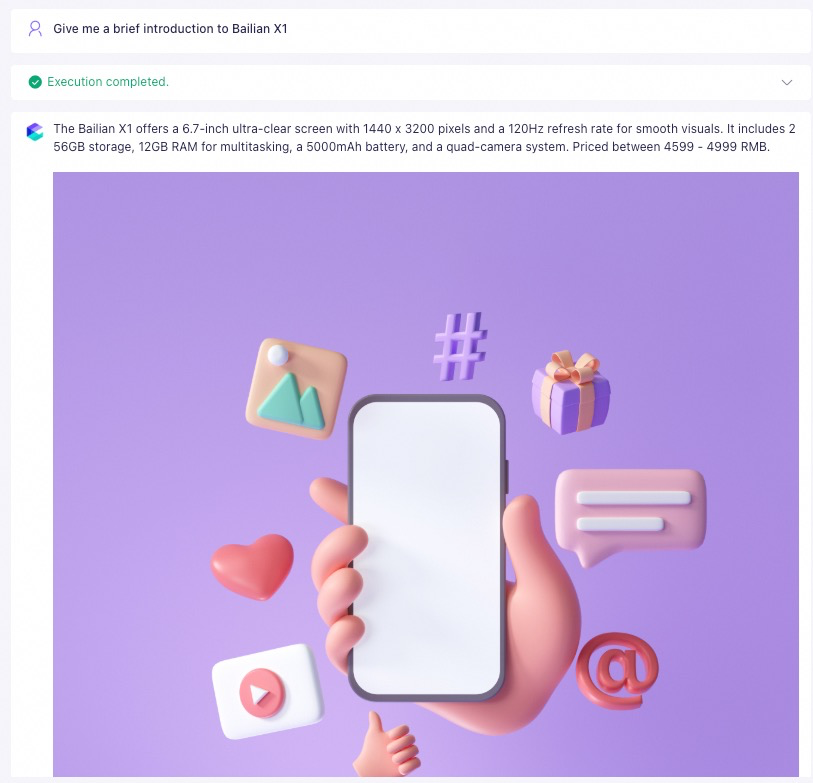
When you select With Illustrations, the knowledge base extracts summaries from the illustrations in the file. The large language model then decides whether to insert an image based on the summary's relevance to the user's question.
-
When you create or edit an agent application, select the Qwen-Plus or Qwen-Plus-Latest model (testing shows these models provide the best performance). Click the + button to the right of Document Knowledge Base and add the knowledge base you created in the previous step.
The recall length must be shorter than the document length. If it is longer, the system returns the entire document and bypasses the With Illustrations logic.
Note: The "With Illustrations" and "Show Answer Source" features cannot be enabled simultaneously.
-
Actual Q&A result:
Method 2 (For agent and workflow applications)
Method 2 (For agent and workflow applications)
- Upload the image to a publicly accessible location and obtain its full URL. We recommend using OSS. For instructions, see Upload an image to OSS and use its file URL.
-
Insert the full URL into the file. Relative paths are not supported. Do not embed image files directly in the document (for example, by copying and pasting or by inserting a local image from a menu). You must reference images using their publicly accessible URLs.
If an image fails to display, ensure the URL in the chunk is complete. Remove any extra spaces or special characters that might cause parsing errors. You can edit the chunk directly to make these corrections.
Example of correctly referencing an image in a file Sample prompt template Actual Q&A result 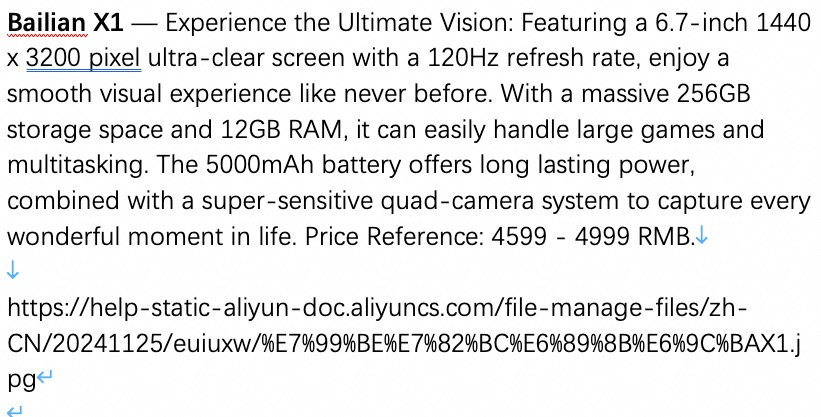
Example of incorrectly referencing an image in a file Sample prompt template Actual Q&A result 
In the chat test interface, after entering a prompt, the AI response returns only plain text content without any images.Explanation: When you embed an image directly in a file, the Model Studio application does not display the image in its response.
Permissions and security
Q: What should I do if I get a "Missing permissions for this module" error when managing a knowledge base?
Q: What should I do if I get a "Missing permissions for this module" error when managing a knowledge base?
Administrator permissions or include at least both the Application Data-Actions and Knowledge Base-Actions permissions.Q: Is a knowledge base private? Can other organizations or users access it?
Q: Is a knowledge base private? Can other organizations or users access it?
Q: Will Alibaba Cloud use the knowledge bases in my account to answer other users' questions?
Q: Will Alibaba Cloud use the knowledge bases in my account to answer other users' questions?
Migration and export
Q: How do I export a knowledge base to my local machine?
Q: How do I export a knowledge base to my local machine?