

Common questions about Model Studio applications and data management.
Tools and billing
What built-in tools are available?
Model Studio provides three built-in tools:
- Python code interpreter
- Calculator
- Image generation
Am I charged for custom tools?
No. Custom tools are free. Charges apply only for prompt optimization, application calls, and test window usage during agent API setup.
Agents and the Assistant API
How does the assistant handle custom tool and function parameters?
The assistant understands custom API tools and follows the protocol to pass parameters to the model. For functions, the model learns from input parameters and returns comprehensive results.
What is the difference between an agent and the Assistant API?
The Assistant API provides simplified tuning options.
Can Model Studio pass custom headers to my tool's endpoint?
No. Only authorization headers are passed through.
Retrieval-Augmented Generation (RAG)
Where is RAG commonly applied?
RAG is applied in many domains, including:
- Q&A and dialog systems
- Text summarization
- Knowledge graph construction and reasoning
- Education and training programs
- Customer service
- News and content generation
- Intelligent search and recommendation systems
How do I improve inaccurate RAG responses?
To report a response quality issue:
- Click Feedback below the response.
- Select the issue type.
- Click Submit.
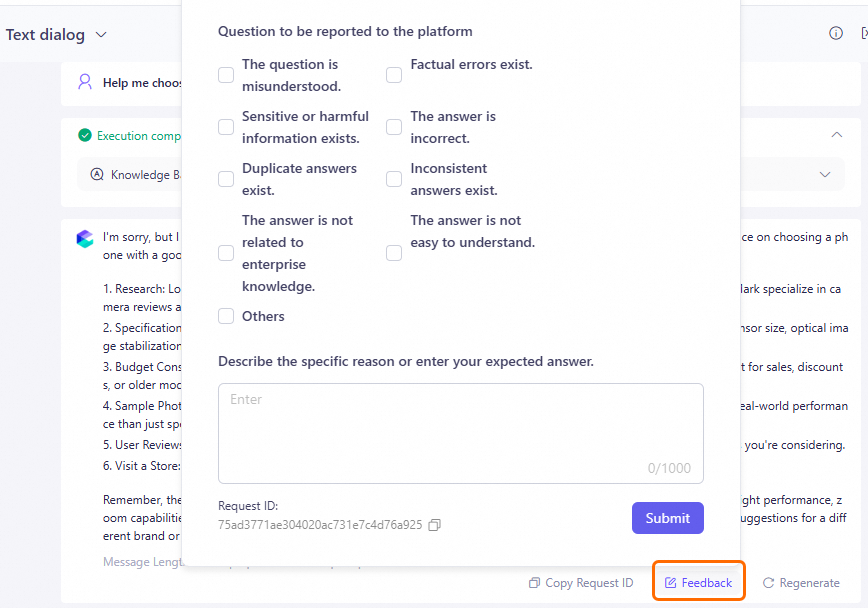
requestID from the response and submit a support ticket.
Does RAG retrieve from multiple knowledge bases in parallel or sequentially?
In parallel. RAG queries all knowledge bases simultaneously, then selects the top N results by score.
Streaming and output formatting
How do I enable incremental streaming output through the API?
Set two parameters in your API request:
Why does model output show bold markers instead of formatted text?
The ** ** syntax is standard Markdown for bold text. Parse and render Markdown in your frontend to display bold formatting correctly.
Data management
Why does my PDF upload fail with error code 140010?
This error typically means the file extension is uppercase (for example, .PDF). Rename to lowercase (.pdf) and retry.