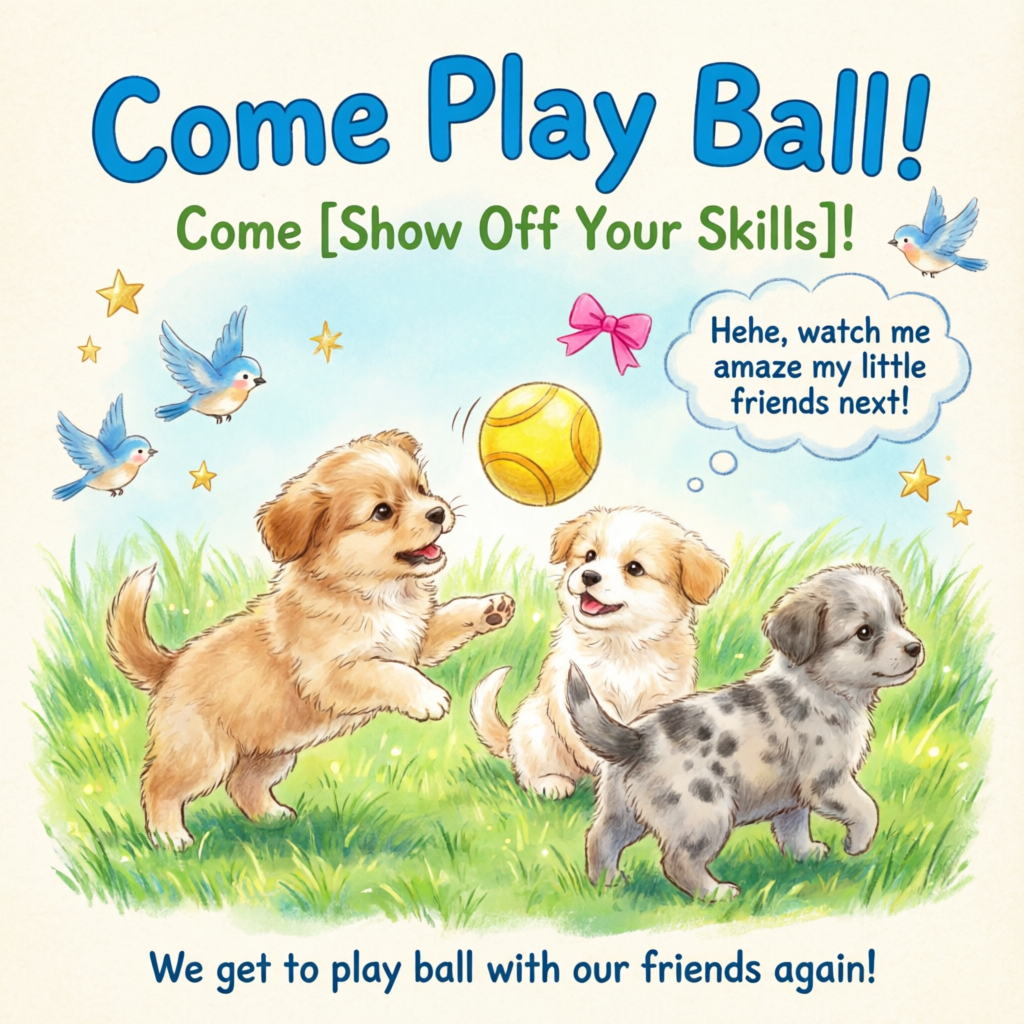
Qwen-Image is a general-purpose image generation model that supports multiple artistic styles and excels at complex text rendering . It handles multi-line layouts, paragraph-level text generation, and fine-grained detail rendering.
A healing-style hand-drawn poster featuring three puppies playing with a ball on lush green grass, adorned with decorative elements such as birds and stars. The main title “Come Play Ball!” appears prominently at the top in bold, blue cartoon font. Below it, the subtitle “Come [Show Off Your Skills]!” appears in green font. A speech bubble adds playful charm with the text: “Hehe, watch me amaze my little friends next!” At the bottom, supplementary text reads: “We get to play ball with our friends again!” The color palette centers on fresh greens and blues, accented with bright pink and yellow tones to highlight a cheerful, childlike atmosphere.
The Qwen image generation and editing 3.0 series supports both text-to-image (T2I) and image-to-image/image editing (I2I). For 3.0 series API calls, see Qwen Image Generation and Editing 3.0.
Resolution: Total pixels must be between 512×512 and 2048×2048.
Format: PNG
qwen-image-3.0 Recommended
Balances quality and speed.
qwen-image-2.0-pro Recommended
Same capabilities as qwen-image-2.0-pro-2026-04-22
Qwen Pro series for image generation and editing. Offers stronger text rendering, realistic texture, and semantic adherence.
The China (Beijing) and Singapore regions have separate API keys and request endpoints. They cannot be used interchangeably. Cross-region calls lead to authentication failures or service errors.
Synchronous calls return results in a single request.Singapore:POST https://{WorkspaceId}.ap-southeast-1.maas.aliyuncs.com/api/v1/services/aigc/multimodal-generation/generationBeijing:POST https://{WorkspaceId}.cn-beijing.maas.aliyuncs.com/api/v1/services/aigc/multimodal-generation/generationReplace {WorkspaceId} with your actual workspace ID.
Request parameters
Text-to-image
Copy
curl --location 'https://{WorkspaceId}.ap-southeast-1.maas.aliyuncs.com/api/v1/services/aigc/multimodal-generation/generation' \--header 'Content-Type: application/json' \--header "Authorization: Bearer $DASHSCOPE_API_KEY" \--data '{ "model": "qwen-image-2.0-pro", "input": { "messages": [ { "role": "user", "content": [ { "text": "Healing-style hand-drawn poster featuring three puppies playing with a ball on lush green grass, adorned with decorative elements such as birds and stars. The main title “Come Play Ball!” is prominently displayed at the top in bold, blue cartoon font. Below it, the subtitle “Come [Show Off Your Skills]!” appears in green font. A speech bubble adds playful charm with the text: “Hehe, watch me amaze my little friends next!” At the bottom, supplementary text reads: “We get to play ball with our friends again!” The color palette centers on fresh greens and blues, accented with bright pink and yellow tones to highlight a cheerful, childlike atmosphere." } ] } ] }, "parameters": { "negative_prompt": "Low resolution, low quality, distorted limbs, malformed fingers, oversaturated colors, wax-figure appearance, lack of facial detail, excessive smoothness, AI-looking artifacts, chaotic composition, blurry or warped text.", "prompt_extend": true, "watermark": false, "size": "2048*2048" }}'
Request headers
Content-Typestring(Required)The content type of the request. Must be application/json.
Authorizationstring(Required)Authenticates the request with a Model Studio API key. Example: Bearer sk-xxxx.
messagesarray(required)Array of message objects. Only single-turn conversations are supported, so the array must contain exactly one element.
Properties
rolestring(required)Message role. Set to user.contentarray(required)Array of message content objects.
Properties
textstring(required)A positive prompt describing the image content, style, and composition you want.Supports Chinese and English. The qwen-image-2.0 series accept up to 1,300 tokens. Other models accept up to 800 tokens. The system truncates excess tokens.Note: Only one text field is allowed. Omitting it or providing more than one returns an error.
negative_promptstring (optional)A negative prompt describing what you do not want in the image.Supports Chinese and English. Maximum length is 500 characters. Excess characters are truncated automatically.Example: Low resolution, low quality, distorted limbs, malformed fingers, oversaturated colors, wax-like appearance, no facial details, overly smooth surfaces, AI-generated look. Chaotic composition. Blurry or distorted text.sizestring (optional)Output image resolution, formatted as width*height.qwen-image-2.0 series models: Total pixels must be between 512×512 and 2048×2048. Default resolution is 2048×2048. Recommended resolutions:
2688*1536: 16:9
1536*2688: 9:16
2048*2048(default): 1:1
2368*1728: 4:3
1728*2368: 3:4
qwen-image-max and qwen-image-plus series models: Default resolution is 1664*928. Supported resolutions and their aspect ratios:
1664*928(default): 16:9
1472*1104: 4:3
1328*1328: 1:1
1104*1472: 3:4
928*1664: 9:16
ninteger (optional)Number of output images. Default is 1.For qwen-image-2.0 series models, you can choose 1–6 images.For qwen-image-max and qwen-image-plus series models, this value is fixed at 1. Setting any other value returns an error.prompt_extendbool (optional)Enable smart prompt rewriting. The model optimizes the positive prompt. Does not affect the negative prompt.
true: Default. Enables rewriting. Use this for more diverse image content; the model adds details.
false: Disables rewriting. Use this for tighter control over image details. For best results, optimize your prompts based on Text-to-image prompt guide.
View rewriting examples
Only asynchronous calls return the actual rewritten prompt.
Original prompt (orig_prompt): A sitting ginger cat with a joyful expression, looking lively, adorable, and incredibly lifelike.Actual prompt (actual_prompt): Photorealistic wildlife portrait: A sitting ginger cat with lush, sun-kissed fur and a vibrant, joyful expression, eyes sparkling with curiosity and warmth. The cat's head is slightly tilted, ears perked forward, mouth gently open in a contented, lively pose—exuding adorable charm and incredible lifelike detail. Soft natural lighting enhances the texture of each individual whisker and fur strand, with subtle highlights on the muzzle and inner ears. Background: a softly blurred autumn garden at golden hour—warm tones of amber leaves, dappled sunlight filtering through trees, and faint hints of mossy stone steps. Composition emphasizes the cat as the central focal point, captured in sharp focus with shallow depth of field. Style: ultra-realistic photography, National Geographic-level detail, 8K resolution, Canon EOS R5, f/1.2 aperture, cinematic lighting, true-to-life color grading, minimal post-processing. No text or overlays.
watermarkbool (optional)Adds a “Qwen-Image” watermark to the bottom-right corner of the image. Default: false. Watermark style: seedinteger (optional)Random number seed. Valid range: [0,2147483647].Using the same seed yields similar outputs. If omitted, the algorithm uses a random seed.Note: Image generation is probabilistic. Even with the same seed, results may vary.
Response parameters
Task succeeded
Task failed
Image URLs are valid for only 24 hours and then automatically purged. Save generated images promptly.
imagestringURL of the generated image (PNG format). Expires after 24 hours. Download and save it promptly.
task_metricobjectTask result statistics. Not returned for qwen-image-2.0 series models.
Properties
TOTALintegerTotal number of tasks.SUCCEEDEDintegerNumber of successful tasks.FAILEDintegerNumber of failed tasks.
usageobject
This field is only returned in async calls. Synchronous ImageSynthesis SDK calls do not return this field.
Output statistics. Counts only successful results.
Properties
image_countintegerNumber of generated images. For qwen-image-2.0 series models this equals the requested n (1–6); for qwen-image-max and qwen-image-plus series it is fixed at 1.widthintegerWidth of the generated image, in pixels.heightintegerHeight of the generated image, in pixels.
request_idstringUnique request identifier for tracing and troubleshooting.
codestringError code. Returned only for failed requests. See Error codes.
messagestringDetailed error message. Returned only for failed requests. See Error codes.
The DashScope SDK supports Python and Java.The parameter names in the SDK closely match the HTTP parameters, and the parameter structures follow language-specific conventions. For synchronous call parameters, see HTTP.
Python
Java
Install the latest DashScope Python SDK to avoid runtime errors: Install SDK.
Request example
Copy
import jsonimport osimport dashscopefrom dashscope import MultiModalConversation# Singapore region. Replace {WorkspaceId} with your actual workspace ID. URLs vary by region.dashscope.base_http_api_url = 'https://{WorkspaceId}.ap-southeast-1.maas.aliyuncs.com/api/v1'messages = [ { "role": "user", "content": [ {"text": "Healing-style hand-drawn poster featuring three puppies playing with a ball on lush green grass, adorned with decorative elements such as birds and stars. The main title “Come Play Ball!” is prominently displayed at the top in bold, blue cartoon font. Below it, the subtitle “Come [Show Off Your Skills]!” appears in green font. A speech bubble adds playful charm with the text: “Hehe, watch me amaze my little friends next!” At the bottom, supplementary text reads: “We get to play ball with our friends again!” The color palette centers on fresh greens and blues, accented with bright pink and yellow tones to highlight a cheerful, childlike atmosphere."} ] }]# API keys differ between Beijing and Singapore regions. Get your API key: https://www.alibabacloud.com/help/en/model-studio/get-api-key# If you haven't set the environment variable, replace the line below with: api_key="sk-xxx"api_key = os.getenv("DASHSCOPE_API_KEY")response = MultiModalConversation.call( api_key=api_key, model="qwen-image-2.0-pro", messages=messages, result_format='message', stream=False, watermark=False, prompt_extend=True, negative_prompt="Low resolution, low quality, distorted limbs, malformed fingers, oversaturated colors, wax-figure appearance, lack of facial detail, excessive smoothness, AI-looking artifacts, chaotic composition, blurry or warped text.", size='2048*2048')if response.status_code == 200: print(json.dumps(response, ensure_ascii=False))else: print(f"HTTP status code: {response.status_code}") print(f"Error code: {response.code}") print(f"Error message: {response.message}") print("See documentation: https://www.alibabacloud.com/help/en/model-studio/error-code")
Response example
Image URLs expire after 24 hours. Download the images promptly.
You must install the latest DashScope Java SDK. Otherwise, runtime errors may occur: Install SDK.
Request example
Copy
import com.alibaba.dashscope.aigc.multimodalconversation.MultiModalConversation;import com.alibaba.dashscope.aigc.multimodalconversation.MultiModalConversationParam;import com.alibaba.dashscope.aigc.multimodalconversation.MultiModalConversationResult;import com.alibaba.dashscope.common.MultiModalMessage;import com.alibaba.dashscope.common.Role;import com.alibaba.dashscope.exception.ApiException;import com.alibaba.dashscope.exception.NoApiKeyException;import com.alibaba.dashscope.exception.UploadFileException;import com.alibaba.dashscope.utils.JsonUtils;import com.alibaba.dashscope.utils.Constants;import java.io.IOException;import java.util.Arrays;import java.util.Collections;import java.util.HashMap;import java.util.Map;public class QwenImage { static { // Singapore region. Replace {WorkspaceId} with your actual workspace ID. URLs vary by region. Constants.baseHttpApiUrl = "https://{WorkspaceId}.ap-southeast-1.maas.aliyuncs.com/api/v1"; } // API keys differ between Beijing and Singapore regions. Get your API key: https://www.alibabacloud.com/help/en/model-studio/get-api-key // If you haven't set the environment variable, replace the line below with: static String apiKey="sk-xxx" static String apiKey = System.getenv("DASHSCOPE_API_KEY"); public static void call() throws ApiException, NoApiKeyException, UploadFileException, IOException { MultiModalConversation conv = new MultiModalConversation(); MultiModalMessage userMessage = MultiModalMessage.builder().role(Role.USER.getValue()) .content(Arrays.asList( Collections.singletonMap("text", "Healing-style hand-drawn poster featuring three puppies playing with a ball on lush green grass, adorned with decorative elements such as birds and stars. The main title “Come Play Ball!” is prominently displayed at the top in bold, blue cartoon font. Below it, the subtitle “Come [Show Off Your Skills]!” appears in green font. A speech bubble adds playful charm with the text: “Hehe, watch me amaze my little friends next!” At the bottom, supplementary text reads: “We get to play ball with our friends again!” The color palette centers on fresh greens and blues, accented with bright pink and yellow tones to highlight a cheerful, childlike atmosphere.") )).build(); Map<String, Object> parameters = new HashMap<>(); parameters.put("watermark", false); parameters.put("prompt_extend", true); parameters.put("negative_prompt", "Low resolution, low quality, distorted limbs, malformed fingers, oversaturated colors, wax-figure appearance, lack of facial detail, excessive smoothness, AI-looking artifacts, chaotic composition, blurry or warped text."); parameters.put("size", "2048*2048"); MultiModalConversationParam param = MultiModalConversationParam.builder() .apiKey(apiKey) .model("qwen-image-2.0-pro") .messages(Collections.singletonList(userMessage)) .parameters(parameters) .build(); MultiModalConversationResult result = conv.call(param); System.out.println(JsonUtils.toJson(result)); } public static void main(String[] args) { try { call(); } catch (ApiException | NoApiKeyException | UploadFileException | IOException e) { System.out.println(e.getMessage()); } System.exit(0); }}
Response example
Image URLs expire after 24 hours. Download the images promptly.
After the task is created, use the returned task_id to query the result. The task_id is valid for 24 hours. Do not create duplicate tasks. Instead, use polling to retrieve the result.
Only qwen-image-plus and qwen-image support asynchronous calls.
Copy
curl -X POST https://{WorkspaceId}.ap-southeast-1.maas.aliyuncs.com/api/v1/services/aigc/text2image/image-synthesis \ -H 'X-DashScope-Async: enable' \ -H "Authorization: Bearer $DASHSCOPE_API_KEY" \ -H 'Content-Type: application/json' \ -d '{ "model": "qwen-image-plus", "input": { "prompt": "Healing-style hand-drawn poster featuring three puppies playing with a ball on lush green grass, adorned with decorative elements such as birds and stars. The main title “Come Play Ball!” is prominently displayed at the top in bold, blue cartoon font. Below it, the subtitle “Come [Show Off Your Skills]!” appears in green font. A speech bubble adds playful charm with the text: “Hehe, watch me amaze my little friends next!” At the bottom, supplementary text reads: “We get to play ball with our friends again!” The color palette centers on fresh greens and blues, accented with bright pink and yellow tones to highlight a cheerful, childlike atmosphere." }, "parameters": { "negative_prompt":" ", "size": "1664*928", "n": 1, "prompt_extend": true, "watermark": false }}'
Request headers
Content-Typestring(Required)The content type of the request. Must be application/json.
Authorizationstring(Required)Authenticates the request with a Model Studio API key. Example: Bearer sk-xxxx.
X-DashScope-Asyncstring(Required)Enables asynchronous processing. HTTP requests support only asynchronous calls. Must be enable.
If this request header is missing, the error "current user api does not support synchronous calls" is returned.
Request body
modelstring(required)Model name. Only qwen-image-plus and qwen-image support asynchronous calls.Example: qwen-image-plus.
inputobject(required)Input information.
Properties
promptstring(required)A positive prompt describing the visual elements and characteristics you want in the generated image.Supports Chinese and English. Maximum length is 800 characters. Each Chinese character, letter, digit, or symbol counts as one character. Excess characters are truncated automatically.Example: A sitting orange cat with a joyful expression, lively and adorable, highly realistic.negative_promptstring (optional)A negative prompt describing what you do not want in the image.Supports Chinese and English. Maximum length is 500 characters. Excess characters are truncated automatically.Example: Low resolution, low quality, distorted limbs, malformed fingers, oversaturated colors, wax-like appearance, no facial details, overly smooth surfaces, AI-generated look. Chaotic composition. Blurry or distorted text.
sizestring (optional)Output image resolution, formatted as width*height.qwen-image-2.0 series models: Total pixels must be between 512×512 and 2048×2048. Default resolution is 2048×2048. Recommended resolutions:
2688*1536: 16:9
1536*2688: 9:16
2048*2048(default): 1:1
2368*1728: 4:3
1728*2368: 3:4
qwen-image-max and qwen-image-plus series models: Default resolution is 1664*928. Supported resolutions and their aspect ratios:
1664*928(default): 16:9
1472*1104: 4:3
1328*1328: 1:1
1104*1472: 3:4
928*1664: 9:16
ninteger (optional)Number of generated images. This value is fixed at 1. Setting any other value returns an error.prompt_extendbool (optional)Enable smart prompt rewriting. The model optimizes the positive prompt. Does not affect the negative prompt.
true: Default. Enables rewriting. Use this for more diverse image content; the model adds details.
false: Disables rewriting. Use this for tighter control over image details. For best results, optimize your prompts based on Text-to-image prompt guide.
View rewriting examples
Only asynchronous calls return the actual rewritten prompt.
Original prompt (orig_prompt): A sitting ginger cat with a joyful expression, looking lively, adorable, and incredibly lifelike.Actual prompt (actual_prompt): Photorealistic wildlife portrait: A sitting ginger cat with lush, sun-kissed fur and a vibrant, joyful expression, eyes sparkling with curiosity and warmth. The cat's head is slightly tilted, ears perked forward, mouth gently open in a contented, lively pose—exuding adorable charm and incredible lifelike detail. Soft natural lighting enhances the texture of each individual whisker and fur strand, with subtle highlights on the muzzle and inner ears. Background: a softly blurred autumn garden at golden hour—warm tones of amber leaves, dappled sunlight filtering through trees, and faint hints of mossy stone steps. Composition emphasizes the cat as the central focal point, captured in sharp focus with shallow depth of field. Style: ultra-realistic photography, National Geographic-level detail, 8K resolution, Canon EOS R5, f/1.2 aperture, cinematic lighting, true-to-life color grading, minimal post-processing. No text or overlays.
watermarkbool (optional)Adds a “Qwen-Image” watermark to the bottom-right corner of the image. Default: false. Watermark style: seedinteger (optional)Random number seed. Valid range: [0,2147483647].Using the same seed yields similar outputs. If omitted, the algorithm uses a random seed.Note: Image generation is probabilistic. Even with the same seed, results may vary.
Response parameters
Successful response
Error response
Save the task_id to query the task status and result.
GET https://{WorkspaceId}.ap-southeast-1.maas.aliyuncs.com/api/v1/tasks/{task_id}When calling, replace {WorkspaceId} with your actual workspace ID.
GET https://{WorkspaceId}.cn-beijing.maas.aliyuncs.com/api/v1/tasks/{task_id}When calling, replace {WorkspaceId} with your actual workspace ID.
Polling recommendation: Image generation is time-consuming. Use a polling mechanism with a reasonable interval, such as 10 seconds.
Task state transition: PENDING → RUNNING → SUCCEEDED or FAILED.
Result link: After a task succeeds, an image URL valid for 24 hours is returned. Download and save the image to permanent storage, such as OSS.
Request parameters
Poll for task results
Replace {task_id} with the task_id value returned by the previous API call. The task_id is valid for queries for 24 hours, Replace {WorkspaceId} with your actual workspace ID.
Copy
curl -X GET https://{WorkspaceId}.ap-southeast-1.maas.aliyuncs.com/api/v1/tasks/{task_id} \--header "Authorization: Bearer $DASHSCOPE_API_KEY"
Request headers
Authorizationstring(Required)Authenticates the request with a Model Studio API key. Example: Bearer sk-xxxx.
URL path parameters
task_idstring(Required)The ID of the task.
Response parameters
Task succeeded
Task failed
Task data (task status and image URLs) is retained for only 24 hours and then automatically purged. Save generated images promptly.
Copy
{ "request_id": "7434edb2-3cba-44e6-a772-xxxxxx", "output": { "task_id": "878f591e-ebdf-4e45-97eb-xxxxxx", "task_status": "SUCCEEDED", "submit_time": "2025-09-09 11:38:54.741", "scheduled_time": "2025-09-09 11:38:54.781", "end_time": "2025-09-09 11:39:19.484", "results": [ { "orig_prompt": "Healing-style hand-drawn poster featuring three puppies playing with a ball on lush green grass, adorned with decorative elements such as birds and stars. The main title “Come Play Ball!” is prominently displayed at the top in bold, blue cartoon font. Below it, the subtitle “Come [Show Off Your Skills]!” appears in green font. A speech bubble adds playful charm with the text: “Hehe, watch me amaze my little friends next!” At the bottom, supplementary text reads: “We get to play ball with our friends again!” The color palette centers on fresh greens and blues, accented with bright pink and yellow tones to highlight a cheerful, childlike atmosphere.", "actual_prompt": "Childhood-inspired hand-drawn poster design: Three playful puppies joyfully interact with a colorful ball on a vibrant patch of lush green grass. Delicate decorative elements including fluttering birds and twinkling stars are scattered throughout. At the top center, the bold, blue cartoon-style title “Come Play Ball!” stands out prominently. Directly beneath, the subtitle “Come [Show Off Your Skills]!” is rendered in cheerful green lettering. A whimsical speech bubble near one of the puppies contains the playful text: “Hehe, watch me amaze my little friends next!” At the bottom edge, smaller supplementary text reads: “We get to play ball with our friends again!” The color palette is centered on fresh greens and sky blues, accented with pops of bright pink and sunny yellow, enhancing the cheerful, childlike atmosphere. Style evokes nostalgic, hand-inked illustrations with soft textures, gentle linework, and a whimsical, storybook-like composition.", "url": "https://dashscope-result-sz.oss-cn-shenzhen.aliyuncs.com/7d/xxx.png?Expires=xxxx" } ] }, "usage": { "image_count": 1 }}
When a task fails, task_status is FAILED with an error code and message. See Error codes.
task_idstringThe task ID. Valid for queries for 24 hours.task_statusstringThe status of the task.
Enumeration values
PENDING
RUNNING
SUCCEEDED
FAILED
CANCELED
UNKNOWN: The task does not exist or its status is unknown.
submit_timestringThe time when the task was submitted. The time is in UTC+8 and the format is YYYY-MM-DD HH:mm:ss.SSS.scheduled_timestringThe time when the task was executed. The time is in UTC+8 and the format is YYYY-MM-DD HH:mm:ss.SSS.end_timestringThe time when the task was completed. The time is in UTC+8 and the format is YYYY-MM-DD HH:mm:ss.SSS.resultsarrayList of task results, including image URLs, prompts, and error messages for failed tasks.
Properties
orig_promptstringThe original input prompt, corresponding to the request parameter prompt.actual_promptstringThe optimized prompt used when prompt rewriting is enabled. Not returned when disabled.urlstringURL of the generated image. Expires after 24 hours. Download and save the image promptly.
codestringError code. Returned only for failed requests. See Error codes.messagestringDetailed error message. Returned only for failed requests. See Error codes.
usageobjectOutput statistics. Counts only successful results.
Properties
image_countintegerNumber of generated images. For qwen-image-2.0 series models this equals the requested n (1–6); for qwen-image-max and qwen-image-plus series it is fixed at 1.
request_idstringUnique request identifier for tracing and troubleshooting.
The DashScope SDK supports Python and Java.SDK parameter names closely match their HTTP counterparts. Parameter structures follow language-specific conventions. For asynchronous call parameters, see HTTP.Image models require longer processing times, so the underlying service uses asynchronous execution. The SDK provides two modes:
Synchronous call (blocking mode): The SDK waits for the task to complete and returns the final result. This matches standard synchronous call behavior.
Asynchronous call (non-blocking mode): The call returns immediately with a task ID. Poll for the task status and final result using that ID.
Install the latest DashScope Python SDK to avoid runtime errors: Install SDK.
Synchronous
Asynchronous
Request example
Copy
from http import HTTPStatusfrom urllib.parse import urlparse, unquotefrom pathlib import PurePosixPathimport requestsfrom dashscope import ImageSynthesisimport osimport dashscope# Singapore region. Replace {WorkspaceId} with your actual workspace ID. URLs vary by region.dashscope.base_http_api_url = 'https://{WorkspaceId}.ap-southeast-1.maas.aliyuncs.com/api/v1'prompt = "Healing-style hand-drawn poster featuring three puppies playing with a ball on lush green grass, adorned with decorative elements such as birds and stars. The main title “Come Play Ball!” is prominently displayed at the top in bold, blue cartoon font. Below it, the subtitle “Come [Show Off Your Skills]!” appears in green font. A speech bubble adds playful charm with the text: “Hehe, watch me amaze my little friends next!” At the bottom, supplementary text reads: “We get to play ball with our friends again!” The color palette centers on fresh greens and blues, accented with bright pink and yellow tones to highlight a cheerful, childlike atmosphere."# API keys differ between Beijing and Singapore regions. Get your API key: https://www.alibabacloud.com/help/en/model-studio/get-api-key# If you haven't set the environment variable, replace the line below with: api_key="sk-xxx"api_key = os.getenv("DASHSCOPE_API_KEY")print('----Sync call, please wait a moment----')rsp = ImageSynthesis.call(api_key=api_key, model="qwen-image-plus", # Only qwen-image-plus and qwen-image support asynchronous calls prompt=prompt, negative_prompt=" ", n=1, size='1664*928', prompt_extend=True, watermark=False)print(f'response: {rsp}')if rsp.status_code == HTTPStatus.OK: # Save image in current directory for result in rsp.output.results: file_name = PurePosixPath(unquote(urlparse(result.url).path)).parts[-1] with open('./%s' % file_name, 'wb+') as f: f.write(requests.get(result.url).content)else: print(f'Sync call failed, status_code: {rsp.status_code}, code: {rsp.code}, message: {rsp.message}')
Response example
URLs expire after 24 hours. Download images promptly.
Copy
{ "status_code": 200, "request_id": "a47b1a65-7041-4565-9068-xxxxxx", "code": null, "message": "", "output": { "task_id": "91093132-475e-43cf-b94e-xxxxxx", "task_status": "SUCCEEDED", "results": [ { "url": "https://dashscope-result-sz.oss-cn-shenzhen.aliyuncs.com/xxx.png?Expires=xxxxxx", "orig_prompt": "Healing-style hand-drawn poster featuring three puppies playing with a ball on lush green grass, adorned with decorative elements such as birds and stars. The main title “Come Play Ball!” is prominently displayed at the top in bold, blue cartoon font. Below it, the subtitle “Come [Show Off Your Skills]!” appears in green font. A speech bubble adds playful charm with the text: “Hehe, watch me amaze my little friends next!” At the bottom, supplementary text reads: “We get to play ball with our friends again!” The color palette centers on fresh greens and blues, accented with bright pink and yellow tones to highlight a cheerful, childlike atmosphere.", "actual_prompt": "Childhood-inspired hand-drawn poster design: Three playful puppies joyfully interact with a colorful ball on a vibrant patch of lush green grass. Delicate decorative elements including fluttering birds and twinkling stars are scattered throughout. At the top center, the bold, blue cartoon-style title “Come Play Ball!” stands out prominently. Directly beneath, the subtitle “Come [Show Off Your Skills]!” is rendered in cheerful green lettering. A whimsical speech bubble near one of the puppies contains the playful text: “Hehe, watch me amaze my little friends next!” At the bottom edge, smaller supplementary text reads: “We get to play ball with our friends again!” The color palette is centered on fresh greens and sky blues, accented with pops of bright pink and sunny yellow, enhancing the cheerful, childlike atmosphere. Style evokes nostalgic, hand-inked illustrations with soft textures, gentle linework, and a whimsical, storybook-like composition." } ], "submit_time": "2025-09-09 13:39:20.659", "scheduled_time": "2025-09-09 13:39:20.717", "end_time": "2025-09-09 13:39:45.233" }, "usage": { "image_count": 1 }}
Request example
Copy
from http import HTTPStatusfrom urllib.parse import urlparse, unquotefrom pathlib import PurePosixPathimport requestsfrom dashscope import ImageSynthesisimport osimport dashscopeimport time# Singapore region. Replace {WorkspaceId} with your actual workspace ID. URLs vary by region.dashscope.base_http_api_url = 'https://{WorkspaceId}.ap-southeast-1.maas.aliyuncs.com/api/v1'prompt = "Healing-style hand-drawn poster featuring three puppies playing with a ball on lush green grass, adorned with decorative elements such as birds and stars. The main title “Come Play Ball!” is prominently displayed at the top in bold, blue cartoon font. Below it, the subtitle “Come [Show Off Your Skills]!” appears in green font. A speech bubble adds playful charm with the text: “Hehe, watch me amaze my little friends next!” At the bottom, supplementary text reads: “We get to play ball with our friends again!” The color palette centers on fresh greens and blues, accented with bright pink and yellow tones to highlight a cheerful, childlike atmosphere."# API keys differ between Beijing and Singapore regions. Get your API key: https://www.alibabacloud.com/help/en/model-studio/get-api-key# If you haven't set the environment variable, replace the line below with: api_key="sk-xxx"api_key = os.getenv("DASHSCOPE_API_KEY")def async_call(): print('----Creating Task----') task_info = create_async_task() print('----Polling Task Status----') poll_task_status(task_info)# Create asynchronous taskdef create_async_task(): rsp = ImageSynthesis.async_call(api_key=api_key, model="qwen-image-plus", # Only qwen-image-plus and qwen-image support asynchronous calls prompt=prompt, negative_prompt=" ", n=1, size='1664*928', prompt_extend=True, watermark=False) print(rsp) if rsp.status_code == HTTPStatus.OK: print(rsp.output) else: print(f'Failed to create task, status_code: {rsp.status_code}, code: {rsp.code}, message: {rsp.message}') return rsp# Poll asynchronous task status, query every 5 seconds, maximum polling for 1 minutedef poll_task_status(task): start_time = time.time() timeout = 60 # 1 minute timeout while True: # Check if timeout if time.time() - start_time > timeout: print('Polling timeout (1 minute), task not completed') return # Get task status status_rsp = ImageSynthesis.fetch(task) print(f'Task status query result: {status_rsp}') if status_rsp.status_code != HTTPStatus.OK: print(f'Failed to get task status, status_code: {status_rsp.status_code}, code: {status_rsp.code}, message: {status_rsp.message}') return task_status = status_rsp.output.task_status print(f'Current task status: {task_status}') if task_status == 'SUCCEEDED': print('Task completed, downloading image...') for result in status_rsp.output.results: file_name = PurePosixPath(unquote(urlparse(result.url).path)).parts[-1] with open(f'./{file_name}', 'wb+') as f: f.write(requests.get(result.url).content) print(f'Image saved as: {file_name}') break elif task_status == 'FAILED': print(f'Task execution failed, status: {task_status}, code: {status_rsp.code}, message: {status_rsp.message}') break elif task_status == 'PENDING' or task_status == 'RUNNING': print('Task in progress, continue querying after 5 seconds...') time.sleep(5) else: print(f'Unknown task status: {task_status}, continue querying after 5 seconds...') time.sleep(5)# Cancel asynchronous task, only tasks in PENDING status can be canceleddef cancel_task(task): rsp = ImageSynthesis.cancel(task) print(rsp) if rsp.status_code == HTTPStatus.OK: print(rsp.output.task_status) else: print(f'Failed to cancel task, status_code: {rsp.status_code}, code: {rsp.code}, message: {rsp.message}')if __name__ == '__main__': async_call()
URLs expire after 24 hours. Download images promptly.
Copy
{ "status_code": 200, "request_id": "a47b1a65-7041-4565-9068-xxxxxx", "code": null, "message": "", "output": { "task_id": "91093132-475e-43cf-b94e-xxxxxx", "task_status": "SUCCEEDED", "results": [ { "url": "https://dashscope-result-sz.oss-cn-shenzhen.aliyuncs.com/xxx.png?Expires=xxxxxx", "orig_prompt": "Healing-style hand-drawn poster featuring three puppies playing with a ball on lush green grass, adorned with decorative elements such as birds and stars. The main title “Come Play Ball!” is prominently displayed at the top in bold, blue cartoon font. Below it, the subtitle “Come [Show Off Your Skills]!” appears in green font. A speech bubble adds playful charm with the text: “Hehe, watch me amaze my little friends next!” At the bottom, supplementary text reads: “We get to play ball with our friends again!” The color palette centers on fresh greens and blues, accented with bright pink and yellow tones to highlight a cheerful, childlike atmosphere.", "actual_prompt": "Childhood-inspired hand-drawn poster design: Three playful puppies joyfully interact with a colorful ball on a vibrant patch of lush green grass. Delicate decorative elements including fluttering birds and twinkling stars are scattered throughout. At the top center, the bold, blue cartoon-style title “Come Play Ball!” stands out prominently. Directly beneath, the subtitle “Come [Show Off Your Skills]!” is rendered in cheerful green lettering. A whimsical speech bubble near one of the puppies contains the playful text: “Hehe, watch me amaze my little friends next!” At the bottom edge, smaller supplementary text reads: “We get to play ball with our friends again!” The color palette is centered on fresh greens and sky blues, accented with pops of bright pink and sunny yellow, enhancing the cheerful, childlike atmosphere. Style evokes nostalgic, hand-inked illustrations with soft textures, gentle linework, and a whimsical, storybook-like composition." } ], "submit_time": "2025-09-09 13:39:20.659", "scheduled_time": "2025-09-09 13:39:20.717", "end_time": "2025-09-09 13:39:45.233" }, "usage": { "image_count": 1 }}
You must install the latest DashScope Java SDK. Otherwise, runtime errors may occur: Install SDK.
Synchronous
Asynchronous
Request example
Copy
// Copyright (c) Alibaba, Inc. and its affiliates.import com.alibaba.dashscope.aigc.imagesynthesis.ImageSynthesis;import com.alibaba.dashscope.aigc.imagesynthesis.ImageSynthesisListResult;import com.alibaba.dashscope.aigc.imagesynthesis.ImageSynthesisParam;import com.alibaba.dashscope.aigc.imagesynthesis.ImageSynthesisResult;import com.alibaba.dashscope.exception.ApiException;import com.alibaba.dashscope.exception.NoApiKeyException;import com.alibaba.dashscope.task.AsyncTaskListParam;import com.alibaba.dashscope.utils.Constants;import com.alibaba.dashscope.utils.JsonUtils;import java.util.HashMap;import java.util.Map;public class Text2Image { static { // Singapore region. Replace {WorkspaceId} with your actual workspace ID. URLs vary by region. Constants.baseHttpApiUrl = "https://{WorkspaceId}.ap-southeast-1.maas.aliyuncs.com/api/v1"; } // API keys differ between Beijing and Singapore regions. Get your API key: https://www.alibabacloud.com/help/en/model-studio/get-api-key // If you haven't set the environment variable, replace the line below with: static String apiKey = "sk-xxx" static String apiKey = System.getenv("DASHSCOPE_API_KEY"); public static void basicCall() throws ApiException, NoApiKeyException { String prompt = "Healing-style hand-drawn poster featuring three puppies playing with a ball on lush green grass, adorned with decorative elements such as birds and stars. The main title “Come Play Ball!” is prominently displayed at the top in bold, blue cartoon font. Below it, the subtitle “Come [Show Off Your Skills]!” appears in green font. A speech bubble adds playful charm with the text: “Hehe, watch me amaze my little friends next!” At the bottom, supplementary text reads: “We get to play ball with our friends again!” The color palette centers on fresh greens and blues, accented with bright pink and yellow tones to highlight a cheerful, childlike atmosphere."; Map<String, Object> parameters = new HashMap<>(); parameters.put("prompt_extend", true); parameters.put("watermark", false); parameters.put("negative_prompt", " "); ImageSynthesisParam param = ImageSynthesisParam.builder() .apiKey(apiKey) // Only qwen-image-plus and qwen-image support asynchronous calls .model("qwen-image-plus") .prompt(prompt) .n(1) .size("1664*928") .parameters(parameters) .build(); ImageSynthesis imageSynthesis = new ImageSynthesis(); ImageSynthesisResult result = null; try { System.out.println("---Sync call, please wait a moment----"); result = imageSynthesis.call(param); } catch (ApiException | NoApiKeyException e){ throw new RuntimeException(e.getMessage()); } System.out.println(JsonUtils.toJson(result)); } public static void main(String[] args){ try{ basicCall(); }catch(ApiException|NoApiKeyException e){ System.out.println(e.getMessage()); } }}
Response example
URLs expire after 24 hours. Download images promptly.
Copy
{ "request_id": "9f3044ba-528f-4606-8830-xxxxxx", "output": { "task_id": "fecf4c7f-3508-45f4-8454-xxxxxx", "task_status": "SUCCEEDED", "results": [ { "orig_prompt": "Healing-style hand-drawn poster featuring three puppies playing with a ball on lush green grass, adorned with decorative elements such as birds and stars. The main title “Come Play Ball!” is prominently displayed at the top in bold, blue cartoon font. Below it, the subtitle “Come [Show Off Your Skills]!” appears in green font. A speech bubble adds playful charm with the text: “Hehe, watch me amaze my little friends next!” At the bottom, supplementary text reads: “We get to play ball with our friends again!” The color palette centers on fresh greens and blues, accented with bright pink and yellow tones to highlight a cheerful, childlike atmosphere.", "actual_prompt": "Childhood-inspired hand-drawn poster design: Three playful puppies joyfully interact with a colorful ball on a vibrant patch of lush green grass. Delicate decorative elements including fluttering birds and twinkling stars are scattered throughout. At the top center, the bold, blue cartoon-style title “Come Play Ball!” stands out prominently. Directly beneath, the subtitle “Come [Show Off Your Skills]!” is rendered in cheerful green lettering. A whimsical speech bubble near one of the puppies contains the playful text: “Hehe, watch me amaze my little friends next!” At the bottom edge, smaller supplementary text reads: “We get to play ball with our friends again!” The color palette is centered on fresh greens and sky blues, accented with pops of bright pink and sunny yellow, enhancing the cheerful, childlike atmosphere. Style evokes nostalgic, hand-inked illustrations with soft textures, gentle linework, and a whimsical, storybook-like composition.", "url": "https://dashscope-result-sz.oss-cn-shenzhen.aliyuncs.com/xxx.png?Expires=xxxx" } ] }, "usage": { "image_count": 1 }}
Request example
Copy
// Copyright (c) Alibaba, Inc. and its affiliates.import com.alibaba.dashscope.aigc.imagesynthesis.ImageSynthesis;import com.alibaba.dashscope.aigc.imagesynthesis.ImageSynthesisParam;import com.alibaba.dashscope.aigc.imagesynthesis.ImageSynthesisResult;import com.alibaba.dashscope.exception.ApiException;import com.alibaba.dashscope.exception.NoApiKeyException;import com.alibaba.dashscope.utils.Constants;import com.alibaba.dashscope.utils.JsonUtils;import java.util.HashMap;import java.util.Map;public class Text2Image { static { // Singapore region. Replace {WorkspaceId} with your actual workspace ID. URLs vary by region. Constants.baseHttpApiUrl = "https://{WorkspaceId}.ap-southeast-1.maas.aliyuncs.com/api/v1"; } // API keys differ between Beijing and Singapore regions. Get your API key: https://www.alibabacloud.com/help/en/model-studio/get-api-key // If you haven't set the environment variable, replace the line below with: static String apiKey = "sk-xxx" static String apiKey = System.getenv("DASHSCOPE_API_KEY"); public void asyncCall() { System.out.println("---Creating task----"); String taskId = this.createAsyncTask(); System.out.println("--Waiting for task to complete and return image url----"); this.waitAsyncTask(taskId); } public String createAsyncTask() { String prompt = "Healing-style hand-drawn poster featuring three puppies playing with a ball on lush green grass, adorned with decorative elements such as birds and stars. The main title “Come Play Ball!” is prominently displayed at the top in bold, blue cartoon font. Below it, the subtitle “Come [Show Off Your Skills]!” appears in green font. A speech bubble adds playful charm with the text: “Hehe, watch me amaze my little friends next!” At the bottom, supplementary text reads: “We get to play ball with our friends again!” The color palette centers on fresh greens and blues, accented with bright pink and yellow tones to highlight a cheerful, childlike atmosphere."; Map<String, Object> parameters = new HashMap<>(); parameters.put("prompt_extend", true); parameters.put("watermark", false); parameters.put("negative_prompt", " "); ImageSynthesisParam param = ImageSynthesisParam.builder() .apiKey(apiKey) // Only qwen-image-plus and qwen-image support asynchronous calls .model("qwen-image-plus") .prompt(prompt) .n(1) .size("1664*928") .parameters(parameters) .build(); try { ImageSynthesisResult result = new ImageSynthesis().asyncCall(param); System.out.println(JsonUtils.toJson(result)); String taskId = result.getOutput().getTaskId(); System.out.println("task_id=" + taskId); return taskId; } catch (Exception e) { throw new RuntimeException(e.getMessage()); } } public void waitAsyncTask(String taskId) { ImageSynthesis imageSynthesis = new ImageSynthesis(); long startTime = System.currentTimeMillis(); int timeout = 60 * 1000; // 1 minute timeout int interval = 5 * 1000; // 5 second polling interval while (true) { if (System.currentTimeMillis() - startTime > timeout) { System.out.println("Polling timed out (1 minute), task not completed"); return; } try { ImageSynthesisResult result = imageSynthesis.fetch(taskId, apiKey); System.out.println("Task status query result: " + JsonUtils.toJson(result)); if (result.getOutput() == null) { System.out.println("Failed to get task status, output is empty"); return; } String taskStatus = result.getOutput().getTaskStatus(); System.out.println("Current task status: " + taskStatus); switch (taskStatus) { case "SUCCEEDED": System.out.println("Task completed"); System.out.println(JsonUtils.toJson(result)); return; case "FAILED": System.out.println("Task execution failed, status: " + taskStatus); return; case "PENDING": case "RUNNING": System.out.println("Task in progress, querying again in 5 seconds..."); Thread.sleep(interval); break; default: System.out.println("Unknown task status: " + taskStatus + ", querying again in 5 seconds..."); Thread.sleep(interval); break; } } catch (ApiException | NoApiKeyException e) { System.err.println("API call exception: " + e.getMessage()); return; } catch (InterruptedException e) { System.err.println("Thread interruption exception: " + e.getMessage()); Thread.currentThread().interrupt(); return; } } } public static void main(String[] args){ Text2Image text2Image = new Text2Image(); text2Image.asyncCall(); }}
URLs expire after 24 hours. Download images promptly.
Copy
{ "request_id": "9f3044ba-528f-4606-8830-xxxxxx", "output": { "task_id": "fecf4c7f-3508-45f4-8454-xxxxxx", "task_status": "SUCCEEDED", "results": [ { "orig_prompt": "Healing-style hand-drawn poster featuring three puppies playing with a ball on lush green grass, adorned with decorative elements such as birds and stars. The main title “Come Play Ball!” is prominently displayed at the top in bold, blue cartoon font. Below it, the subtitle “Come [Show Off Your Skills]!” appears in green font. A speech bubble adds playful charm with the text: “Hehe, watch me amaze my little friends next!” At the bottom, supplementary text reads: “We get to play ball with our friends again!” The color palette centers on fresh greens and blues, accented with bright pink and yellow tones to highlight a cheerful, childlike atmosphere.", "actual_prompt": "Childhood-inspired hand-drawn poster design: Three playful puppies joyfully interact with a colorful ball on a vibrant patch of lush green grass. Delicate decorative elements including fluttering birds and twinkling stars are scattered throughout. At the top center, the bold, blue cartoon-style title “Come Play Ball!” stands out prominently. Directly beneath, the subtitle “Come [Show Off Your Skills]!” is rendered in cheerful green lettering. A whimsical speech bubble near one of the puppies contains the playful text: “Hehe, watch me amaze my little friends next!” At the bottom edge, smaller supplementary text reads: “We get to play ball with our friends again!” The color palette is centered on fresh greens and sky blues, accented with pops of bright pink and sunny yellow, enhancing the cheerful, childlike atmosphere. Style evokes nostalgic, hand-inked illustrations with soft textures, gentle linework, and a whimsical, storybook-like composition.", "url": "https://dashscope-result-sz.oss-cn-shenzhen.aliyuncs.com/xxx.png?Expires=xxxx" } ] }, "usage": { "image_count": 1 }}
Image generation models such as Qwen-Image are called through the DashScope native API and do not support OpenAI-compatible (compatible-mode) mode, so they cannot be used directly as the reasoning model of an Agent in the OpenAI Agents SDK.In agent frameworks such as the OpenAI Agents SDK, you can wrap image generation as a tool (function tool) and let a text chat model that supports OpenAI-compatible mode (such as qwen-plus) act as the Agent's reasoning core to orchestrate it. For example:Before running, install the dependencies: pip install openai-agents dashscope.
Copy
import osimport asyncioimport dashscopefrom openai import AsyncOpenAIfrom dashscope import MultiModalConversationfrom agents import Agent, Runner, function_tool, OpenAIChatCompletionsModel# Read the Model Studio API Key from an environment variable# (or replace with api_key="sk-xxx")API_KEY = os.getenv("DASHSCOPE_API_KEY")# Singapore region. Replace {WorkspaceId} with your actual workspace ID. URLs vary by region.dashscope.base_http_api_url = "https://{WorkspaceId}.ap-southeast-1.maas.aliyuncs.com/api/v1"# The text chat model (the Agent's reasoning core) is accessed via OpenAI-compatible modeclient = AsyncOpenAI(api_key=API_KEY, base_url="https://{WorkspaceId}.ap-southeast-1.maas.aliyuncs.com/compatible-mode/v1")# Wrap image generation as a function tool for the Agent to call@function_tooldef generate_image(prompt: str) -> str: """Generate an image from a text description and return its URL. prompt: the text description of the image.""" rsp = MultiModalConversation.call( api_key=API_KEY, model="qwen-image", messages=[{"role": "user", "content": [{"text": prompt}]}], result_format="message", ) if rsp.status_code != 200: return f"Generation failed: {rsp.code} {rsp.message}" return rsp.output.choices[0].message.content[0]["image"]agent = Agent( name="Image Assistant", instructions="You are an image generation assistant. When the user wants an image, call the generate_image tool and return the image URL to the user.", model=OpenAIChatCompletionsModel(model="qwen-plus", openai_client=client), tools=[generate_image],)async def main(): result = await Runner.run(agent, "Draw a corgi running on the grass") print(result.final_output)if __name__ == "__main__": asyncio.run(main())
Billing details: Each successfully generated image is billed. Failed calls or processing errors do not incur charges or consume your new user free quota.
Q: Should I enable or disable the prompt_extend parameter?
A: Enable this option (default) if you want more diverse image content and for the model to add details. Disable it if you need tighter control over image details, and optimize your prompts using the Text-to-Image Prompt Guide.
Q: What are the differences between qwen-image, qwen-image-plus, qwen-image-max, qwen-image-2.0, and qwen-image-edit?
A:
Combined image generation and editing models: Support both text-to-image and image editing.
qwen-image-2.0-pro and qwen-image-2.0-pro-2026-03-03: Same capabilities. The Pro series delivers more professional text rendering, finer realistic textures, detailed realistic scenes, and stronger semantic adherence. Supports synchronous calls only.
qwen-image-2.0 and qwen-image-2.0-2026-03-03: Same capabilities. The accelerated version balances model performance and quality. Supports synchronous calls only.
Text-to-image models: Generate images from text descriptions.
qwen-image-max and qwen-image-max-2025-12-30: Same capabilities. Compared with qwen-image-plus, they deliver improved realism and naturalness, with better results for character textures, details, and text rendering.
qwen-image and qwen-image-plus: Same capabilities, but qwen-image-plus is more cost-effective.
qwen-image-plus-2026-01-09: A new snapshot version of Qwen-Image. It is a distilled and accelerated version of qwen-image-max that supports fast generation of high-quality images.
Image editing model:qwen-image-edit: Performs image-to-image transformations, inpainting, and other operations based on an input image and text instructions. For more information, see Qwen - image editing.
Q: How do I get the domain name whitelist for image storage?
A: Images generated by models are stored in OSS. The API returns a temporary public URL. To configure a firewall whitelist for this download URL, note the following: The underlying storage may change dynamically. This topic does not provide a fixed OSS domain name whitelist to prevent access issues caused by outdated information. If you have security control requirements, contact your account manager to obtain the latest OSS domain name list.