

This topic describes the long-input and prefix cache capabilities of PTU (Provisioned Throughput) deployments, including quota consumption rules, how to use the Provisioned Throughput Quota Calculator, and API response field descriptions.
Overview
PTU (Provisioned Throughput Unit) is a model deployment method that reserves platform resources to guarantee a specific TPM throughput capacity; no rate limiting applies within the guaranteed quota. It is suitable for high-throughput, high-performance, high-load production environments, providing stable throughput capacity, lower latency, and stronger resource certainty. Compared with Token-based billing, TPS (tokens generated per second) typically increases by approximately 1.5 to 2.0 times.
Use cases:
- Intelligent customer service for banking apps (stable traffic, requires guaranteed concurrent experience).
- Real-time content moderation for social platforms (requires stable processing of predictable pipeline tasks).
- Public cloud translation API (provides baseline service guarantees for standard package users).
Billing rules
Fee = Usage duration × (Input TPM unit price × Input TPM + Output TPM unit price × Output TPM)
Post-paid is calculated hourly: the usage duration unit is hours, and the unit price is taken from the "Continuous 1 hour" column in the table below; prepaid is calculated daily: the usage duration unit is days, and the unit price is taken from the "Continuous 1 day" column in the table below.
- Prepaid orders take effect in real time after payment, with a validity period of N days ending at 23:59 on day N. If the order is placed after 22:00, the expiration date will be automatically extended by 1 day.
- After a prepaid order expires, the service will be stopped with a 2-hour delay, and resources will be retained for 14 hours after the stop and then released.
- Prepaid orders support early termination; the used portion is settled at a 1.2x coefficient for refund. For details, see Refund rules for configuration downgrades.
- For post-paid billing, if the account is in arrears, the deployed resources will continue to be retained and billed for 24 hours, during which the service can still be used normally. After 24 hours, the system stops billing, the model deployment enters an arrears state, and the underlying resources will be deleted, but the model deployment task will be retained. After the arrears are paid, the system will reallocate resources and restore usage (fees will continue to accrue after restoration). If you do not want to continue incurring fees, you can delete the model deployment task, and billing will stop after successful deletion.
- In this case (only under the "auto-overflow" strategy), the API response Header will include:
x-dashscope-ptu-overflow:true. - For TPM statistics, go to: Model Monitoring (Beijing).
Supported models and pricing
- North China 2 (Beijing)
- Singapore
- Qwen
- DeepSeek
- Qwen-VL
- GLM
Model Name | Model Code | Max Input Token | Postpaid Input Per 10K TPM/hour | Postpaid Output Per 1K TPM/hour | Prepaid Input Per 10K TPM/day | Prepaid Output Per 1K TPM/day |
|---|---|---|---|---|---|---|
Qwen3.8-Max | qwen3.8-max | 1M | ¥28.8 | ¥8.64 | ¥345.6 | ¥103.68 |
Qwen3.7-Flash-2026-07-15 Contact your business manager to activate | qwen3.7-flash-2026-07-15 | 128K | ¥0.48 | ¥0.19 | ¥5.76 | ¥2.3 |
Qwen3.7-Max-2026-05-20 | qwen3.7-max-2026-05-20 | 256K | ¥28.8 | ¥8.64 | ¥345.6 | ¥103.68 |
Qwen3.7-Plus-2026-05-26 | qwen3.7-plus-2026-05-26 | 256K | ¥4.8 | ¥1.92 | ¥57.6 | ¥23.04 |
Qwen3.6-Plus-2026-04-02 | qwen3.6-plus-2026-04-02 | 128K | ¥4.8 | ¥2.88 | ¥57.6 | ¥34.56 |
Qwen3.5-Plus-2026-04-20 | qwen3.5-plus-2026-04-20 | 128K | ¥1.92 | ¥1.15 | ¥23.04 | ¥13.82 |
Qwen3-Max-2025-09-23 | qwen3-max-2025-09-23 | 128K | ¥7.68 | ¥3.08 | ¥92.16 | ¥36.96 |
Qwen-Flash-2025-07-28 | qwen-flash-2025-07-28 | 128K | ¥0.36 | ¥0.36 | ¥4.32 | ¥4.32 |
Qwen-Plus-2025-12-01 | qwen-plus-2025-12-01 | 128K | ¥1.92 | Non-thinking:¥0.48 Thinking:¥1.92 | ¥23.04 | Non-thinking:¥5.76 Thinking:¥23.04 |
Long input and prefix caching
Long-input tiered coefficients and cache discounts vary by model. The following table lists the parameters for currently supported models:
Model | Type | Max input length | Cache discount | Long-input tiered coefficient |
|---|---|---|---|---|
glm-5.2 | PTU | (0, 1M) | 0.25 | 1 |
qwen3.8-max | PTU | (0, 1M) | 0.125 | 1 |
qwen3.7-flash-2026-07-15 | PTU | (0, 1M) | 0.2 | Same for input and output |
deepseek-v4-flash-0731 | PTU | (0, 1M) | 0.1 | 1 |
qwen3.7-plus-2026-05-26 | PTU | PTU | 1 Million | 0.2 (cache hit portion calculated at 20% capacity) |
glm-5.1 | PTU | PTU | 200K | 0.2 (cache hit portion calculated at 20% capacity) |
deepseek-v4-pro | PTU | PTU | 256K | 0.08 (cache hit portion calculated at 8% capacity) |
Other models | PTU | PTU | Refer to the console | Refer to the console |
Calculation examples (glm-5.1)
Provisioned Throughput Quota Calculator
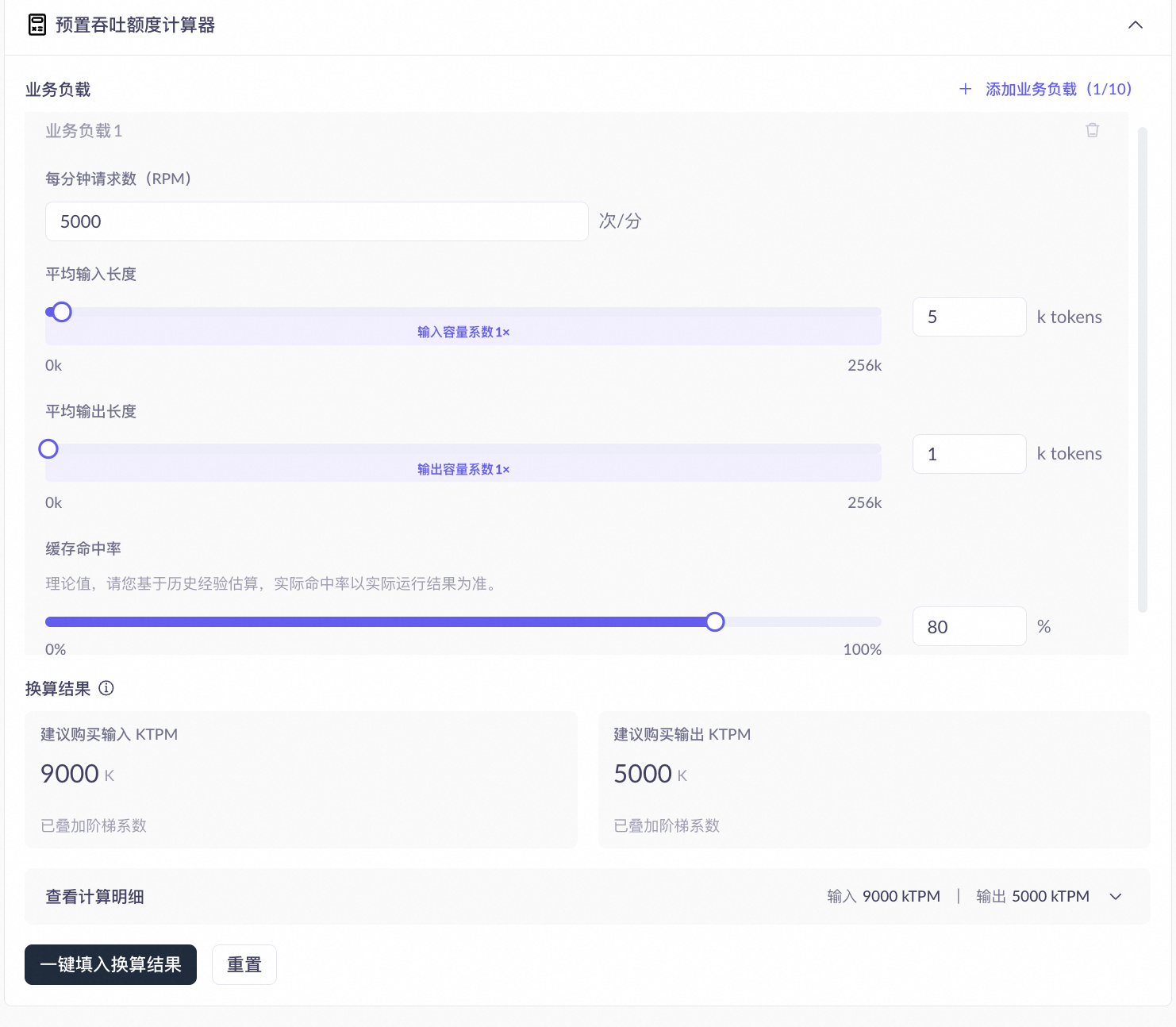
Parameter | Description | Impact on results |
|---|---|---|
Requests per minute (RPM) | Number of requests per minute during peak business hours. | The larger the RPM, the more the recommended input and output KTPM increases proportionally. |
Average input length (tokens) | Average number of input tokens per request. | The longer the input, the higher the tier and coefficient, and the higher the recommended input KTPM. Tier boundaries vary by model; refer to the console for actual values. |
Average output length (tokens) | Average number of output tokens per request. | The longer the output, the higher the possible coefficient, and the higher the recommended output KTPM. |
Cache hit rate (%) | The percentage of request prefix tokens that hit the cache. Actual hit rate depends on request content repetition; refer to actual runtime results. | A higher hit rate slows input quota consumption, reducing the recommended input KTPM. Affects input KTPM only, not output KTPM. |
API response fields
API responses for PTU deployments include the following quota-related fields that identify the billing method and quota consumption:
Field | Type | Description |
|---|---|---|
| String | A top-level response field (consistent across all API formats). A value of |
| Integer | The actual PTU quota tokens consumed after conversion (includes tiered coefficients and cache discounts). |
| Integer | The number of tokens that hit the prefix cache. For details, see Context Cache. |
- OpenAI Chat compatible
- OpenAI Responses
- Anthropic compatible
- DashScope
Field | JSON path | Description |
|---|---|---|
|
| Input-side cached token count |
|
| Input-side PTU quota consumption |
|
| Output-side PTU quota consumption |
Monitoring and verification
You can monitor PTU deployments through the model monitoring feature on the Model Studio platform. The following metrics are relevant to long-input and caching:
- PTU utilization: Three independent curves for input, output, and thinking mode output. In long-input scenarios, tiered coefficients can cause utilization to exceed 100%. This is expected behavior.
- Token usage and cache hits: Includes the
cached_tokensdata series to show the proportion of cache hits relative to total input. - In-quota and out-of-quota call counts: Shows the proportion of requests that fall back to pay-as-you-go billing after exceeding PTU quota.
Scaling
Click the Scaling button to self-service, manually adjust the throughput (number of instances). For detailed fee reduction and refund rules, please refer to: Refund rules for configuration downgrades.
In addition, you can configure an auto-scaling policy (including scaling thresholds, minimum/maximum replica count, scheduled scaling, etc.) via the scaling configuration button in the operation column.
FAQ
Q: What happens when PTU quota is exceeded?
Q: What happens when PTU quota is exceeded?
service_tier field is either absent or returns default, and the response header includes x-dashscope-ptu-overflow:true. Service is not interrupted.Q: What happens when a single input exceeds the model limit?
Q: What happens when a single input exceeds the model limit?
Q: How do I verify that caching is working?
Q: How do I verify that caching is working?
cached_tokens field in the API response. A value greater than 0 indicates a prefix cache hit. Cache-hit tokens consume quota at the model's discount coefficient (for specific discount rates, see Long input and prefix caching). You can also view trends in the token usage chart on the console monitoring page.Q: What if cached_tokens is always 0 and caching is not working?
Q: What if cached_tokens is always 0 and caching is not working?
Q: Why does utilization exceed 100%?
Q: Why does utilization exceed 100%?