Deployment

Model deployment

you can obtain an independent, resource-dedicated inference service through deployment to meet your business needs for different performance levels such as high concurrency and low latency.

Billing methods

Before deployment, you can view the estimated hourly cost of different models in the Model Deployment console.
The billing method cannot be changed after the service is created. To switch, you must take the deployed model offline and then redeploy it.

Provisioned Throughput (PTU, Provisioned Throughput Unit)

(High throughput; high performance)

Model Unit

(Custom performance metrics; resource isolation)

Token-based usage

(Pay-as-you-go after fine-tuning/effect validation)

Definition

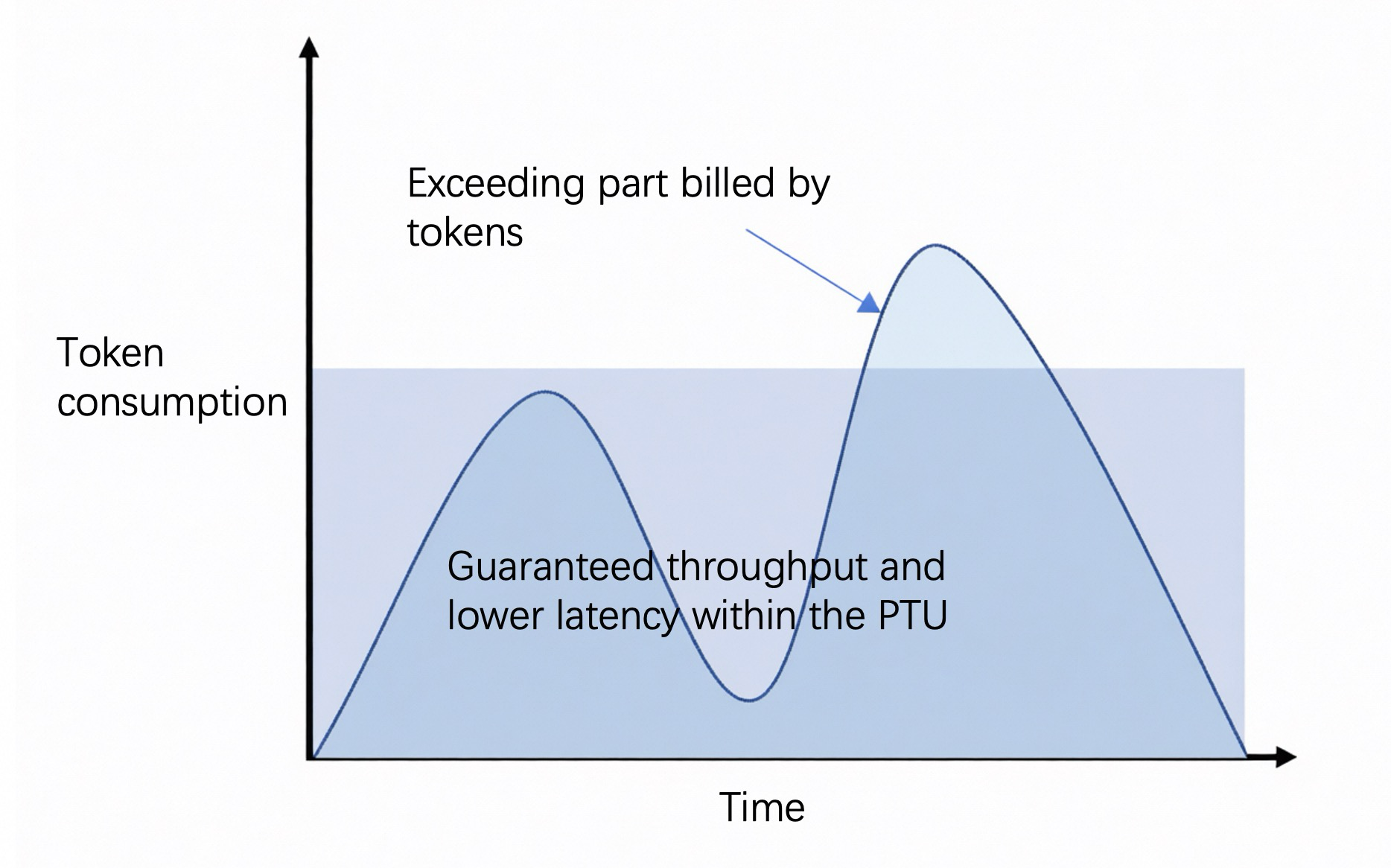
A model deployment method that reserves platform resources to guarantee a specific TPM throughput capacity; no rate limiting within the guaranteed quota.

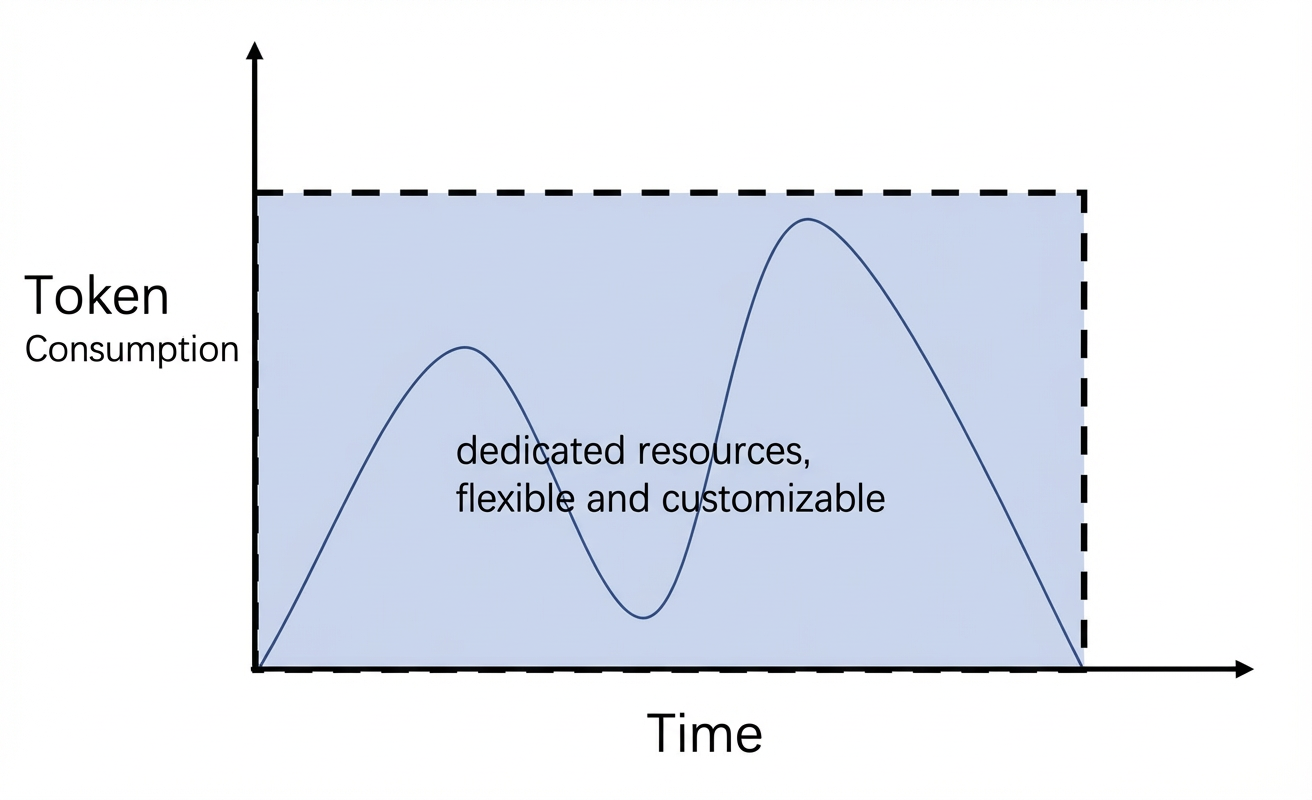
A model deployment method that configures computing power based on usage duration and the number of Model Units, with dedicated resources.

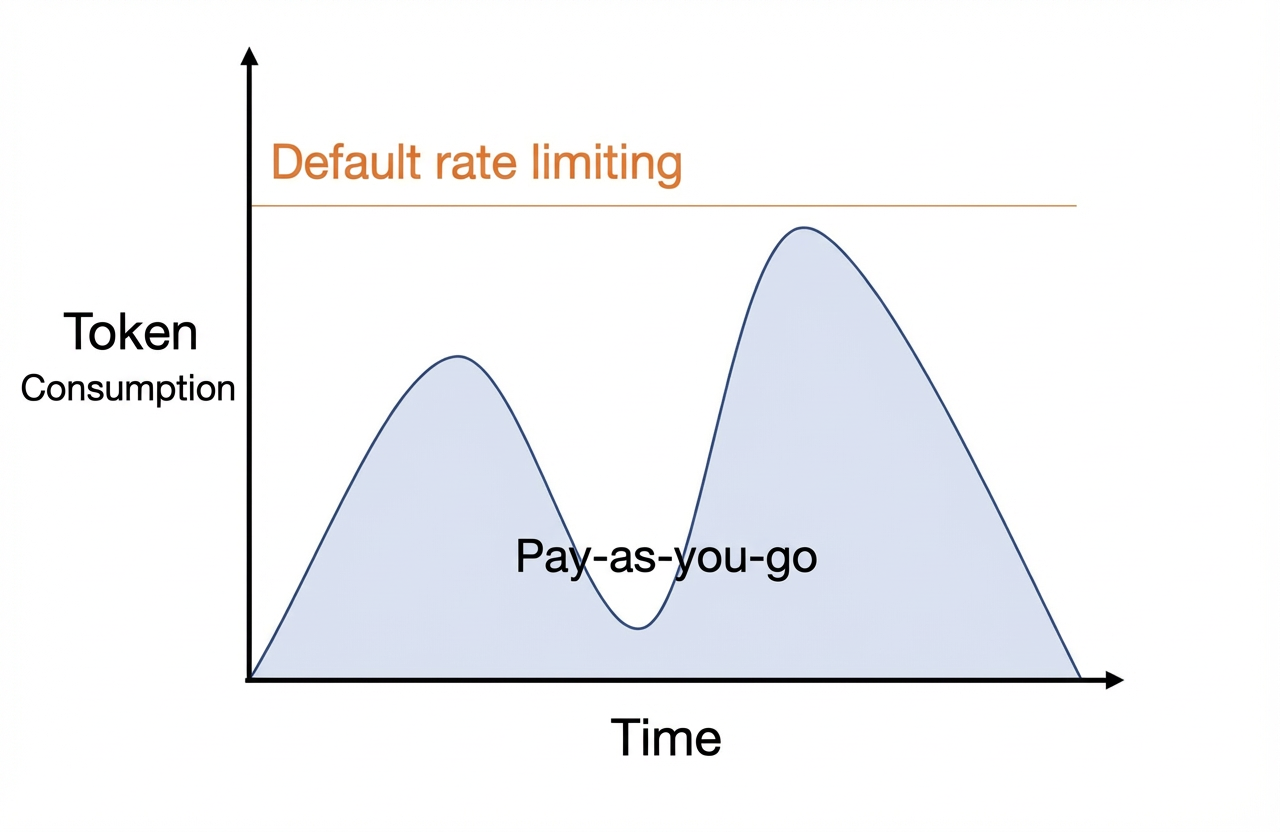
A model deployment method that uses the input Tokens and output Tokens generated per call as the usage metering basis.

Advantages

  1. Provides stable throughput capacity, lower latency, and stronger resource certainty for high-load production environments.

  2. Compared with Token-based billing, TPS (Tokens generated per second) typically increases by approximately 1.5 to 2.0 times.

  3. Supports auto-renewal settings.

  1. Performance metrics such as latency/throughput can be customized.

  2. Supports auto-renewal settings.

No charge when not in use.

Supported models

Some pre-configured models

Some pre-configured models and all fine-tuned models

Some models fine-tuned with LoRA

Use cases

  1. Intelligent customer service for banking apps (stable traffic, requires guaranteed concurrent experience).

  2. Real-time content moderation for social platforms (requires stable processing of predictable pipeline tasks).

  3. Public cloud translation API (provides baseline service guarantees for standard package users).

  1. E-commerce exclusive fine-tuned large models (deploy private models, manually scale up during major promotions).

  2. Pharmaceutical company molecular screening models (require dedicated resources for long-running tasks).

  3. Autonomous driving simulation (requires long-duration continuous computing).

Fine-tuned model effect validation

Billing diagram

image

image

image

Billing method

By usage duration and provisioned throughput

Pay-as-you-go, daily package

By usage duration and number of Model Units

Pay-as-you-go, monthly package

By model Token usage

Pay-as-you-go

Scaling method

Self-service increase/decrease of throughput

Self-service increase/decrease of Model Units

Submit an application in the console and wait for manual review.

Product constraints

  1. Prepaid billed daily. No early refund available.

  2. If usage within a unit time exceeds the purchased throughput, it is handled according to the overflow strategy selected at creation: auto-overflow switches to model invocation pay-as-you-go billing for that model, while using-only-PTU-capacity returns 429.

After a prepaid purchase, if you cancel early within the first month, the daily unit price (≈ monthly unit price / 30) will be billed at 1.2 times

  1. Only supports some models after efficient fine-tuning (LoRA).

  2. Will be automatically released if not used within one month.

To view the Token usage and call count history statistics for each call, go to: Model Monitoring.

Billing details

  • Billing by usage duration (Provisioned Throughput)
  • Billing by usage duration (Model Unit)
  • By model token usage
Fee = Usage duration × (Input TPM unit price × Input TPM + Output TPM unit price × Output TPM)Post-paid is calculated hourly: the usage duration unit is hours, and the unit price is taken from the "Continuous 1 hour" column in the table below; prepaid is calculated daily: the usage duration unit is days, and the unit price is taken from the "Continuous 1 day" column in the table below.
  • Prepaid orders take effect in real time after payment, with a validity period of N days ending at 23:59 on day N. If the order is placed after 22:00, the expiration date will be automatically extended by 1 day.
  • After a prepaid order expires, the service will be stopped with a 2-hour delay, and resources will be retained for 14 hours after the stop and then released.
  • Prepaid orders cannot terminate the service early.
  • For post-paid billing, if the account is in arrears, the deployed resources will continue to be retained and billed for 24 hours, during which the service can still be used normally. After 24 hours, the system stops billing, the model deployment enters an arrears state, and the underlying resources will be deleted, but the model deployment task will be retained. After the arrears are paid, the system will reallocate resources and restore usage (fees will continue to accrue after restoration). If you do not want to continue incurring fees, you can delete the model deployment task, and billing will stop after successful deletion.
When the model input exceeds the maximum input Token, the relevant call will automatically switch to the pay-as-you-go mode of the current model; when the purchased TPM is exceeded, it is handled according to the overflow strategy selected at creation ("auto-overflow" switches to pay-as-you-go, "use-only-PTU-capacity" returns 429). At this time, inference performance may degrade and will be subject to the public traffic control of the current snapshot model in the business space, and fees will be charged according to the model invocation (pay-as-you-go) standard.
  • In this case (only under the "auto-overflow" strategy), the API response Header will include: x-dashscope-ptu-overflow:true.
  • For TPM statistics, go to: Model Monitoring.
For the specific fee reduction and refund rules in scale-down (downgrade) scenarios, please refer to: Refund rules for configuration downgrades.
PTU deployment supports long-input tiered capacity coefficients and cache discounts; see Provisioned Throughput long input and caching for details.
  • Singapore
  • China North 2 (Beijing)
  • Qwen
  • DeepSeek
  • Qwen-VL
  • GLM

Model Name

Model Code

Max Input Token

Postpaid Input

Per 10K TPM/Hour

Postpaid Output

Per 1K TPM/Hour

Prepaid Input

Per 10K TPM/Day

Prepaid Output

Per 1K TPM/Day

Qwen3.8-Max

qwen3.8-max

1M

$4.8

$1.44

$57.6

$17.28

Qwen3.7-Flash-2026-07-15 Contact your business manager to activate

qwen3.7-flash-2026-07-15

128K

$0.072

$0.031

$0.864

$0.374

Qwen3.7-Max-2026-05-20

qwen3.7-max-2026-05-20

256K

$1.92

$1.8

$72

$21.6

Qwen3.7-Plus-2026-05-26

qwen3.7-plus-2026-05-26

256K

$0.96

$0.384

$11.52

$4.608

Qwen3.6-Plus-2026-04-02

qwen3.6-plus-2026-04-02

128K

$1.2

$0.72

$14.4

$8.64

Qwen3.5-Plus-2026-04-20

qwen3.5-plus-2026-04-20

128K

$0.96

$0.576

$11.52

$6.912

To deploy more models, refer to thissolution and select the most suitable deployment plan based on your business requirements.

Deployment methods

You can deploy models on the console. Refer to the following steps:
If you are prompted with insufficient permissions, refer to:What should I do if "insufficient permissions" is prompted during deployment?
  1. Go to themodel deployment console.

image

image

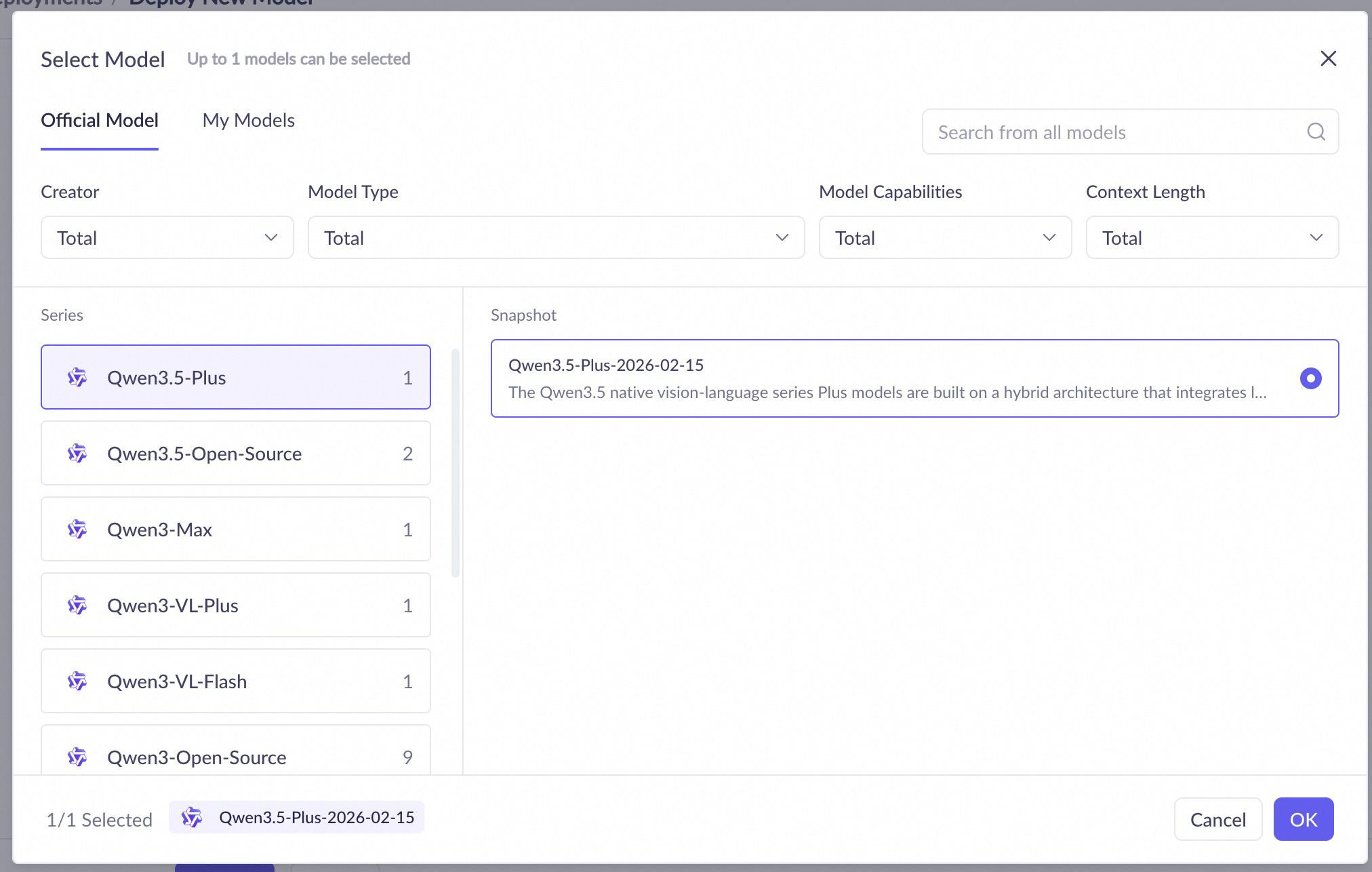
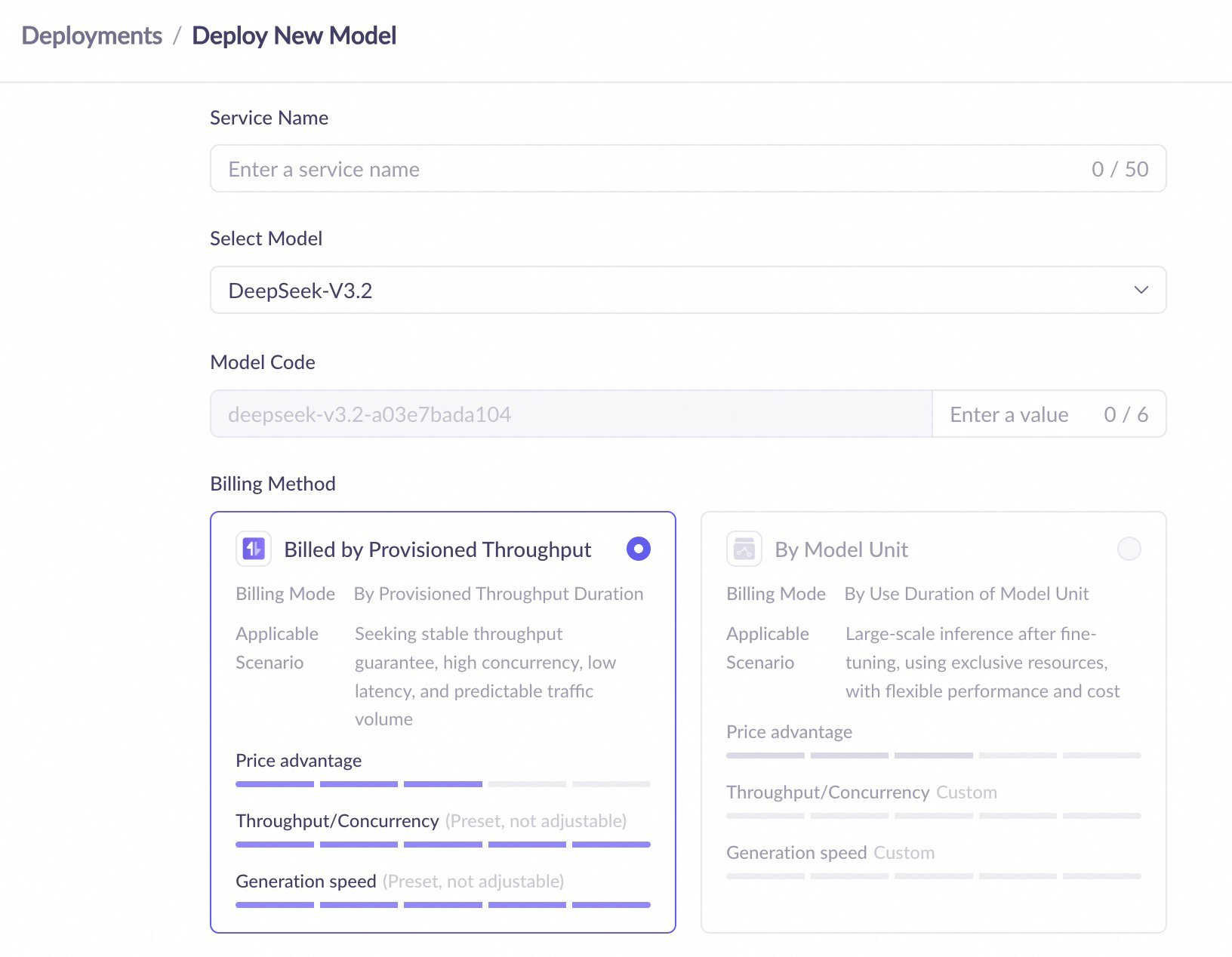
  1. Enter the service name, select a model and a billing method, keep other settings as default, and click OK.

  1. When the deployment status isRunning, the model has been deployed successfully.

Fees will be incurred after the model is successfully deployed.

Deployment configuration

  • Model Unit

Configuration item

Configuration details

Service name

A custom name for the deployment service.

Model

Select the model to deploy, including platform preset models and fine-tuned models.

Model unit type

Select the deployment specification. Different specifications correspond to different computing power and performance.

Replica count

Set the initial number of deployment replicas, which affects the concurrent processing capability of the service.

Deployment template

Select a deployment template (for example, "single-node deployment"). Different templates correspond to different resource configuration schemes. Available only in the model unit billing mode.

Model inference mode

For some models, when deployed inModel Unit mode, you can configure the inference mode, maximum context, and more.

  • Instruct - The model performs inference in non-thinking mode after deployment.

  • Thinking - The model performs inference in thinking mode after deployment.

Maximum context

TheModel Unit deployment mode of some models supports this setting. The maximum context length depends on the model type.

Service throttling

TheModel Unit deployment mode of some models supports this setting, which can limit the RPM and TPM of model calls.

Deployment list page

After successful deployment, you can view and manage all deployment services on the deployment list page. The list page contains the following information:
  • Service name: The name of the deployment service. Click to view deployment details.
  • Model name: The model used for deployment.
  • Model Code: The unique identifier generated after the model is successfully deployed, used to specify the model when calling the API.
  • Deployment status/Event status: Includes Pending deployment, Deploying, Running, Deployment failed, Going offline, Service paused, Stopped, Deleting, Subscription suspended/Overdue payment suspended, Resuming service, Running (Changing configuration), Running (Change failed), and other statuses.
  • Billing method: The billing method of the current deployment service.
  • Deployment details: Configuration information such as model unit type and replica count.
  • Throttling details: Displays the throttling configuration of the current deployment service, such as RPM (requests per minute) and TPM (tokens per minute).
  • Service time: Displays the creation time and expiration time of the deployment service.
  • Operation: Depending on the deployment status and billing method, you can perform operations such as Update, Monitor, Scale, Renew, Take offline, Delete, and Try.

Post-deployment calls

After the model is successfully deployed, you can call it through OpenAI-compatible, Dashscope, and Assistant SDK. When calling a successfully deployed model, the value of model should be the model code generated after successful deployment. Go to themodel deployment console to obtain the Model Code.
image
import os
import dashscope

messages = [
    {"role": "system", "content": "You are a helpful assistant."},
    {"role": "user", "content": "Who are you?"},
]
dashscope.base_http_api_url = 'https://dashscope-intl.aliyuncs.com/api/v1'
response = dashscope.Generation.call(
    # If you have not configured environment variables, replace the next line with your Bailian API Key: api_key="sk-xxx",
    api_key=os.getenv("DASHSCOPE_API_KEY"),
    model="qwen3-max-xxx-xxx",  # Please replace with the code returned after the model is successfully deployed
    messages=messages,
    result_format="message",
    enable_thinking=False,
)
print(response)

Scaling a Deployment Service

  • Preset throughput (billed by duration): Click the Scaling button to self-service, manually adjust the number of instances. For detailed fee reduction and refund rules, please refer to: Refund rules for configuration downgrades.
  • Model unit (billed by duration): Click the Scaling button to self-service, manually adjust the number of instances.
In addition, you can configure an auto-scaling policy (including scaling thresholds, minimum/maximum replica count, scheduled scaling, etc.) via the scaling configuration button in the operation column.

Take a Deployment Service Offline

Go to the Model Deployment console, find the deployment service you want to stop, and click the corresponding operation according to the billing type:
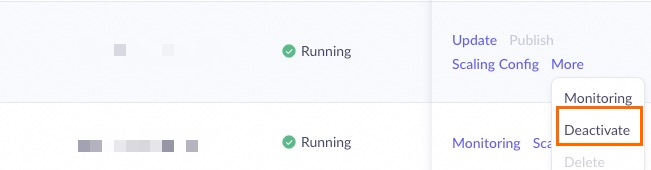
  • Model unit prepaid: Click Deactivate and confirm.
  • Postpaid: Click Delete and confirm.
No further billing will be incurred after the operation is completed.
image

Other Operations

In addition to going offline, the operation column on the deployment list page also supports the following operations:
  • Update: Update the model version of the deployed service, supporting full update or batch update (canary release).
  • Delete: Pay-as-you-go services can be deleted directly to stop billing.
  • Renew: Prepaid services can be renewed to extend the service time, and auto-renewal is supported.
  • Buy capacity package: Purchase a capacity package for the preset throughput deployment.

FAQ

Can I upload and deploy my own models?

Uploading and deploying your own models is not supported yet. We recommend that you keep following the latest updates of Alibaba Cloud Model Studio. In addition, Alibaba Cloud Artificial Intelligence Platform PAI provides the ability to deploy your own models. You can refer to PAI-LLM Large Language Model Deployment to learn about the deployment method.

What should I do if "insufficient permissions" is prompted during deployment?

  1. If "Missing permission for this module" is displayed, please ensure that your account has the Model Deployment - Operation permission on the permission management page of the business space.
    PixPin_2025-11-27_15-09-44
    If you cannot operate normally, please contact your organization or IT administrator to add the relevant permissions or check the permission issues on your behalf.
  2. If the error "xx business space does not have permission to deploy the xx model" is reported during deployment, please go to the Business Space Management page of Model Studio to add the deployment permission of the corresponding model for the corresponding business space.
    API call error: Workspace xxx does not have deployment privilege for model xxxx.
    PixPin_2025-11-27_15-03-57
    PixPin_2025-11-27_15-06-41
    If insufficient permissions are prompted, please contact your organization or IT administrator to add the relevant permissions or operate on your behalf.
Token Plan
Model Playground
  • Music generation
Statistics and Monitoring
Support