The video generation model of AnimateAnyone generates videos from an action template and an image. This topic describes how to call the video generation API.
Model overview
Model | Description |
|---|---|
animate-anyone-gen2 | Generates character action videos based on character images and action templates. |
Performance showcase
| Character image | Action template | Output (with image background) | Output (with video background) |
|---|---|---|---|
 | |||
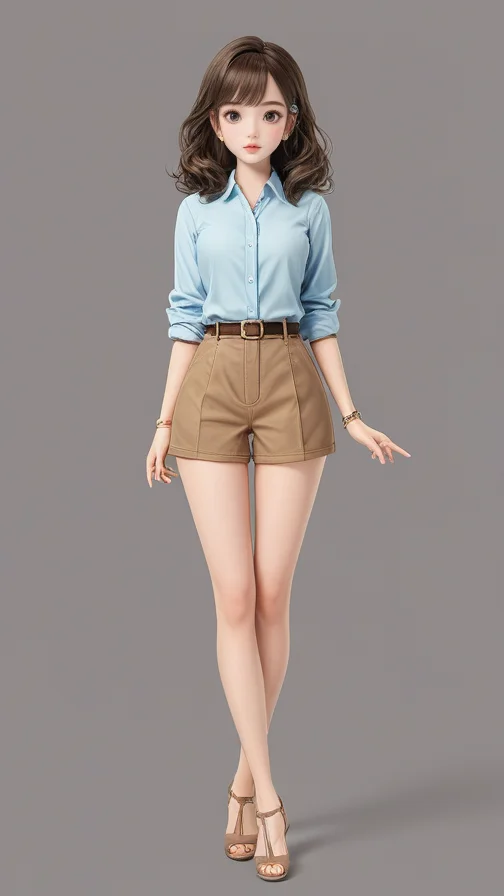 |
- The preceding examples were generated using the Tongyi App, which integrates AnimateAnyone.
- Create action templates using the AnimateAnyone action template generation API. Ensure that the source video for the action template complies with relevant laws and regulations. You must also have the rights to use the video content, including its audio.
HTTP
Prerequisites
- You have activated Alibaba Cloud Model Studio and get an API key.
- The input action template is generated by the AnimateAnyone action template generation API.
- The input image has been processed by the AnimateAnyone Image Detection API.
Input limitations
- Image format: JPG, PNG, JPEG, or BMP.
- Image requirements: The image file must be smaller than 5 MB. The aspect ratio must be 2 or less. The longest side must be 4,096 pixels or less.
- Use HTTP URLs of input image file. Local paths are not supported. To create a URL for a local file, you can upload the file to the temporary storage space.
-
Requirements for different video generation types:
Input image
Generate with image background
(use_ref_img_bg is true)
Generate with video background
(use_ref_img_bg is false)
Full-body portrait
Support
Support
Half-body portrait
Support
Not recommended
When generating with video background, the character in the image must match the position of the character in the video. If using a half-body portrait, the model randomly generates missing parts, such as legs, introducing significant uncertainty. Therefore, we do not recommend these scenarios.
Step 1: Create a task and get a task ID
- This is a time-consuming API call. Submit tasks asynchronously.
- After you submit a task, the system returns a task ID. Use this ID to query the task status and retrieve the result using the result query API.
Request parameters
| Field | Type | Location | Required | Description | Example |
|---|---|---|---|---|---|
| Content-Type | String | Header | Yes | Request body format. | application/json |
| Authorization | String | Header | Yes | Your API key with the Bearer prefix. | Bearer d1**2a |
| X-DashScope-Async | String | Header | Yes | Set to enable for asynchronous task submission. | enable |
| model | String | Body | Yes | Model to use. | animate-anyone-gen2 |
| input.image_url | String | Body | Yes | The URL of the image that you uploaded. The image must first be processed by the AnimateAnyone image detection API and cropped as needed for the desired output frame.
File uploads support only HTTP or HTTPS links. Local file paths are not supported. | http://aaa/bbb.jpg |
| input.template_id | String | Body | Yes | The action template ID. Enter the template_id generated by the AnimateAnyone action template generation API. The action template ID undergoes permission verification. Ensure that the template_id you use was created by your current Alibaba Cloud account. Suggestion: Increase the resolution and frame rate of the template video to improve the quality of the generated video. | AACT.xxx.xxx-xxx.xxx |
| parameters.use_ref_img_bg | Boolean | Body | No | Controls the background of the generated video.
| false |
| parameters.video_ratio | String | Body | No | When you generate a video with an image background, the available aspect ratios are "9:16" or "3:4". Defaults to "9:16". Not effective when generating with video background (use_ref_img_bg is false). The video will follow the aspect ratio of the template. Ensure that the aspect ratio of the input image matches the selected aspect ratio to avoid distortion. | "9:16" |
Response parameters
Field | Type | Description | Example |
|---|---|---|---|
output.task_id | String | ID of the submitted asynchronous task. Use this ID to query the task result. | a8532587-fa8c-4ef8-82be-0c46b17950d1 |
output.task_status | String | Task status after submission. | "PENDING" |
request_id | String | Unique request identifier. | 7574ee8f-38a3-4b1e-9280-11c33ab46e51 |
Sample request
Sample response
Step 2: Query the result using the task ID
Request parameters
Field | Type | Location | Required | Description | Example |
|---|---|---|---|---|---|
Authorization | String | Header | Yes | Your API key with the | Bearer d1**2a |
task_id | String | Url Path | Yes | ID of the task to query. | a8532587-fa8c-4ef8-82be-0c46b17950d1 |
Response parameters
Field | Type | Description | Example |
|---|---|---|---|
output.task_id | String | ID of the queried task. | a8532587-fa8c-4ef8-82be-0c46b17950d1 |
output.task_status | String | Status of the queried task. | Task status:
|
output.video_url | String | URL of the generated video. Valid for 24 hours after task completion. | |
usage.video_duration | Float | Duration of the generated video, in seconds. | "video_duration": 10.23 |
usage.video_ratio | String | Aspect ratio type of the generated video. Value: | "video_ratio": "standard" |
request_id | String | Unique request identifier. | 7574ee8f-38a3-4b1e-9280-11c33ab46e51 |