视频生成与编辑

图生视频-基于首尾帧

万相图生视频模型支持基于首帧图像、尾帧图像与文本提示词,生成平滑过渡的视频。

  • 视频规格:固定视频时长(5秒),指定视频分辨率(480P/720P/1080P)。
  • 其他能力:还支持智能改写prompt、添加水印。
快速入口:API参考Prompt指南

快速开始

输入提示词输入首帧图像输入尾帧图像输出视频(无声视频)
一个可爱且表情有些忧伤的蓝色小怪物站在雨中。镜头缓慢拉近,定格在小怪物抬头仰望天空的瞬间。
image
image
在调用前,先获取与配置 API Key,再配置API Key到环境变量。通过SDK进行调用,请安装DashScope SDK
  • Python SDK
  • Java SDK
  • curl
请确保 DashScope Python SDK 版本不低于1.25.8,再运行以下代码。若版本过低,可能会触发 “url error, please check url!” 等错误。请参考安装SDK进行更新。
import os
from http import HTTPStatus
from dashscope import VideoSynthesis
import dashscope

# 以下为新加坡地域URL,调用时请将{WorkspaceId}替换为真实的业务空间ID,各地域的URL不同,获取URL:https://www.alibabacloud.com/help/en/model-studio/image-to-video-by-first-and-last-frame-api-reference
dashscope.base_http_api_url = 'https://{WorkspaceId}.ap-southeast-1.maas.aliyuncs.com/api/v1'
# 各地域的API Key不同。获取API Key:https://www.alibabacloud.com/help/en/model-studio/get-api-key
api_key = os.getenv("DASHSCOPE_API_KEY", "YOUR_API_KEY")

print('please wait...')
rsp = VideoSynthesis.call(api_key=api_key,
                          model="wan2.2-kf2v-flash",
                          prompt="一个可爱且表情有些忧伤的蓝色小怪物站在雨中。镜头缓慢拉近,定格在小怪物抬头仰望天空的瞬间。",
                          first_frame_url="https://help-static-aliyun-doc.aliyuncs.com/file-manage-files/zh-CN/20260126/ixdxvt/wan-kf2v-blue-1.png",
                          last_frame_url="https://help-static-aliyun-doc.aliyuncs.com/file-manage-files/zh-CN/20260126/nhtdrc/wan-kf2v-blue-2.png",
                          duration=5,  # 固定为5,不可修改
                          prompt_extend=True,
                          watermark=True)
print(rsp)
if rsp.status_code == HTTPStatus.OK:
    print("video_url:", rsp.output.video_url)
else:
    print('Failed, status_code: %s, code: %s, message: %s' % (rsp.status_code, rsp.code, rsp.message))
输出示例
video_url 有效期24小时,请及时下载视频。
{
    "request_id": "c1209113-8437-424f-a386-xxxxxx",
    "output": {
        "task_id": "966cebcd-dedc-4962-af88-xxxxxx",
        "task_status": "SUCCEEDED",
        "video_url": "https://dashscope-result-sh.oss-accelerate.aliyuncs.com/xxx.mp4?Expires=xxx",
         ...
    },
    ...
}

适用范围

  • 各地域支持的模型有所差异,且资源相互独立。各地域支持的模型请参见百炼控制台
  • 调用时,确保模型、Endpoint URL 和 API Key 均属于同一地域,跨地域调用将会失败。
本文的示例代码适用于新加坡地域

核心能力

首尾帧生视频

支持模型:所有模型。 功能介绍:根据首帧和尾帧,生成平滑过渡的视频(无声视频)。 参数设置:
  • first_frame_url必填,必须传入首帧图像。
  • last_frame_url必填,必须传入尾帧图像。
  • prompt:可选,推荐填写,控制视频画面的变化。
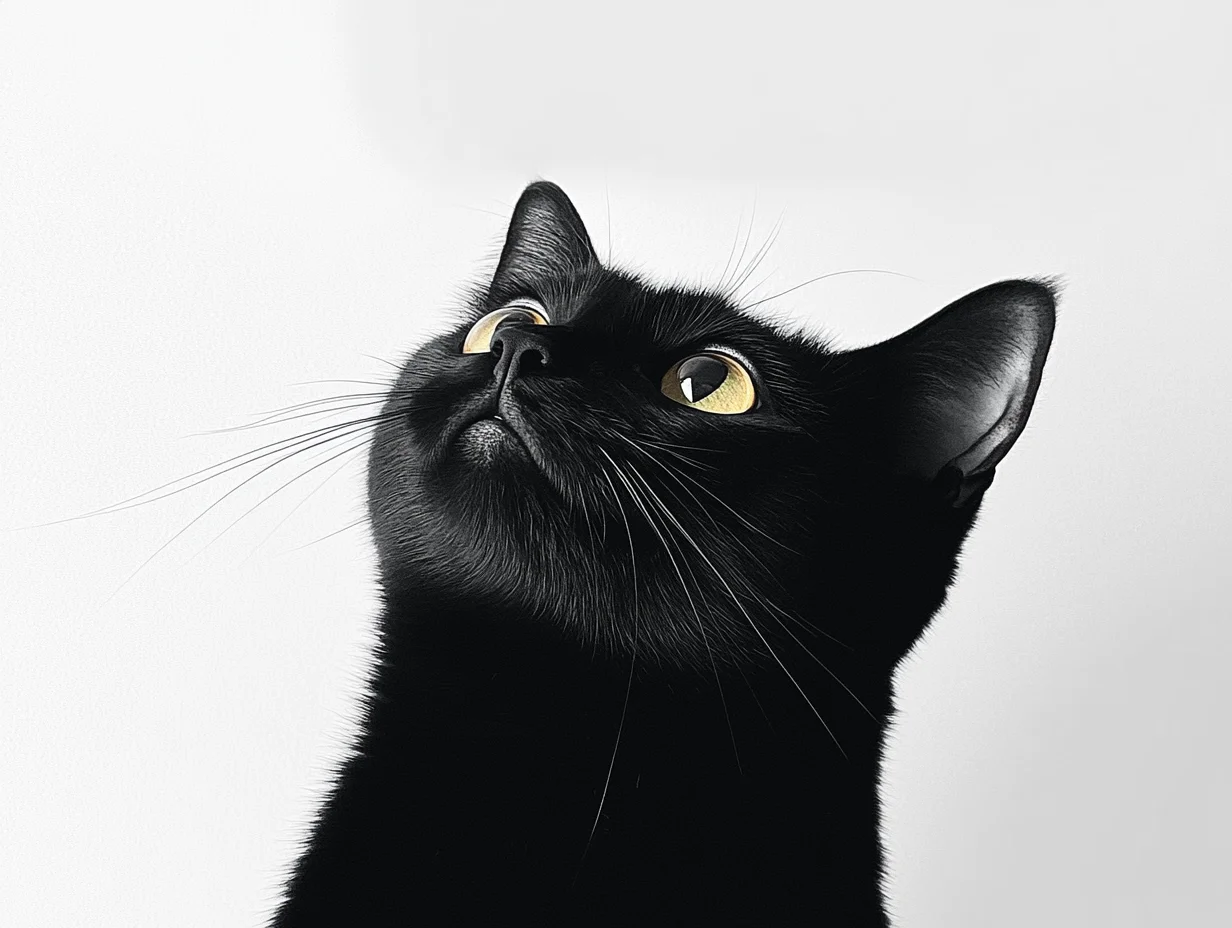
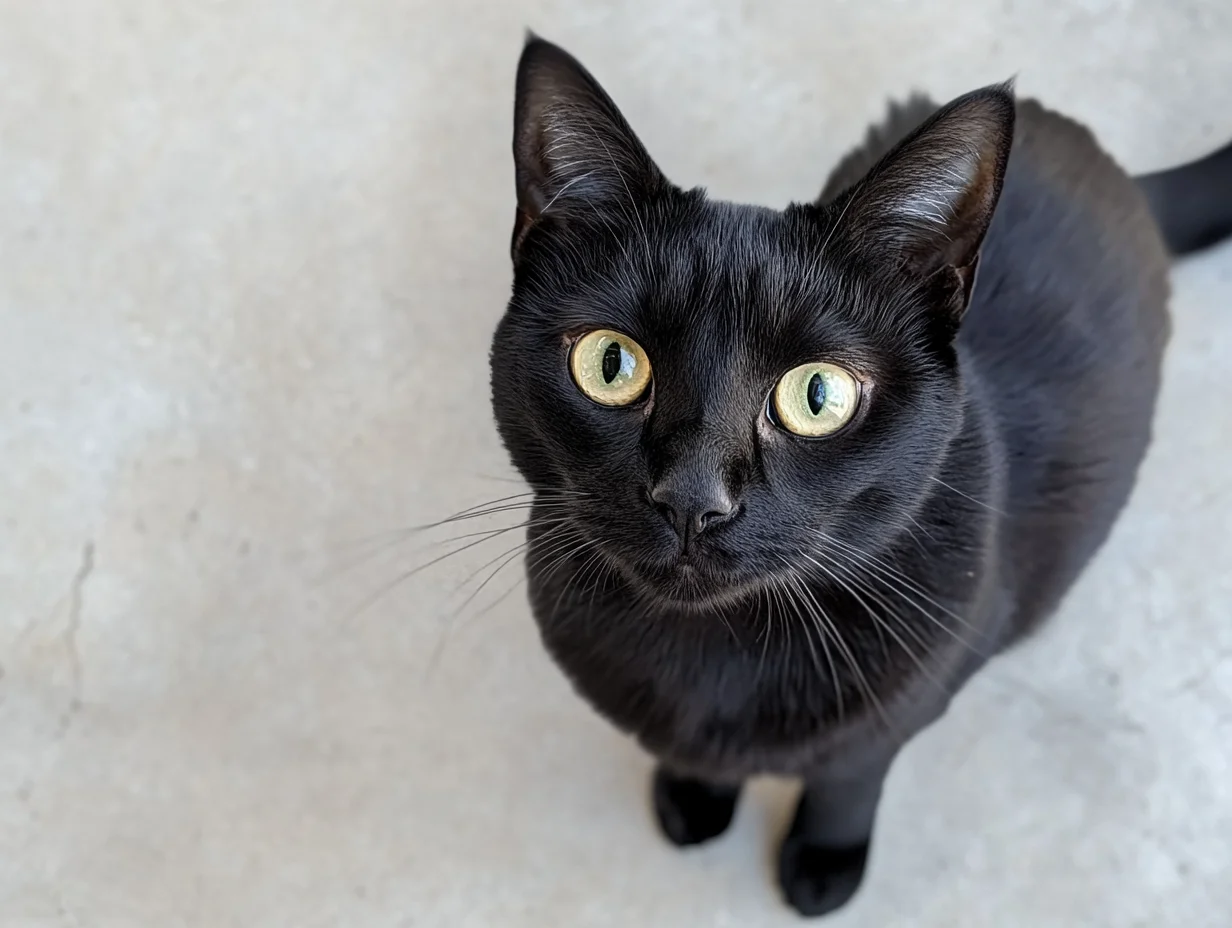
输入提示词输入首帧图像输入尾帧图像输出视频(无声视频)
写实风格,一只小黑猫好奇地仰望天空,镜头从平视角度逐渐升高,最后以俯视角度捕捉到它好奇的眼神。
首帧图像
尾帧图像
  • Python SDK
  • Java SDK
  • curl
请确保 DashScope Python SDK 版本不低于 1.25.8,可参考安装SDK进行更新。
import os
from http import HTTPStatus
from dashscope import VideoSynthesis
import dashscope

# 以下为新加坡地域URL,调用时请将{WorkspaceId}替换为真实的业务空间ID,各地域的URL不同,获取URL:https://www.alibabacloud.com/help/en/model-studio/image-to-video-by-first-and-last-frame-api-reference
dashscope.base_http_api_url = 'https://{WorkspaceId}.ap-southeast-1.maas.aliyuncs.com/api/v1'
# 各地域的API Key不同。获取API Key:https://www.alibabacloud.com/help/en/model-studio/get-api-key
api_key = os.getenv("DASHSCOPE_API_KEY", "YOUR_API_KEY")

def sample_async_call_kf2v():
    # 异步调用,返回一个task_id
    rsp = VideoSynthesis.async_call(api_key=api_key,
                                    model="wan2.2-kf2v-flash",
                                    prompt="写实风格,一只黑色小猫好奇地看向天空,镜头从平视逐渐上升,最后俯拍它的好奇的眼神。",
                                    first_frame_url="https://wanx.alicdn.com/material/20250318/first_frame.png",
                                    last_frame_url="https://wanx.alicdn.com/material/20250318/last_frame.png",
                                    duration=5,  # 固定为5,不可修改
                                    prompt_extend=True,
                                    watermark=True)
    print(rsp)
    if rsp.status_code == HTTPStatus.OK:
        print("task_id: %s" % rsp.output.task_id)
    else:
        print('Failed, status_code: %s, code: %s, message: %s' % (rsp.status_code, rsp.code, rsp.message))

    # 等待异步任务结束
    rsp = VideoSynthesis.wait(task=rsp, api_key=api_key)
    print(rsp)
    if rsp.status_code == HTTPStatus.OK:
        print(rsp.output.video_url)
    else:
        print('Failed, status_code: %s, code: %s, message: %s' % (rsp.status_code, rsp.code, rsp.message))

if __name__ == '__main__':
    sample_async_call_kf2v()

如何输入图像

  • 图像数量:1张首帧图像,1张尾帧图像。
  • 输入方式:图像URL、本地文件路径。

方式一:图像URL(HTTP 接口、SDK) 推荐

不同编程语言(Python/Java)对文件路径的要求略有不同,请严格参照下方规则拼写。Python SDK:支持绝对路径和相对路径。文件路径规则如下:

操作系统

传入的文件路径

示例(绝对路径)

示例(相对路径)

Linux / macOS

file://{文件的绝对路径或相对路径}

file:///home/images/test.png

file://./images/test.png

Windows

file://D:/images/test.png

file://./images/test.png

Java SDK:仅支持绝对路径。文件路径规则如下:

操作系统

传入的文件路径

示例(绝对路径)

Linux / macOS

file://{文件的绝对路径}

file:///home/images/test.png

Windows

file:///{文件的绝对路径}

file:///D:/images/test.png

示例代码:图像的多种输入方式

Python SDK
import os
from http import HTTPStatus
# dashscope sdk >= 1.23.4
from dashscope import VideoSynthesis
import dashscope

dashscope.base_http_api_url = 'https://{WorkspaceId}.ap-southeast-1.maas.aliyuncs.com/api/v1'

# 从环境变量中获取 DashScope API Key(即阿里云百炼平台 API key)
api_key = os.getenv("DASHSCOPE_API_KEY")

# ========== 图像输入方式(二选一)==========
# 【方式一】使用公网图片 URL
first_frame_url = "https://wanx.alicdn.com/material/20250318/first_frame.png"
last_frame_url = "https://wanx.alicdn.com/material/20250318/last_frame.png"

# 【方式二】使用本地文件路径(file://+文件路径)
# 使用绝对路径
# first_frame_url = "file://" + "/path/to/your/first_frame.png"  # Linux/macOS
# last_frame_url = "file://" + "C:/path/to/your/last_frame.png"  # Windows
# 或使用相对路径
# first_frame_url = "file://" + "./first_frame.png"              # 以实际路径为准
# last_frame_url = "file://" + "./last_frame.png"                # 以实际路径为准

def sample_sync_call_kf2v():
    print('please wait...')
    rsp = VideoSynthesis.call(api_key=api_key,
                              model="wan2.2-kf2v-flash",
                              prompt="写实风格,一只黑色小猫好奇地看向天空,镜头从平视逐渐上升,最后俯拍它的好奇的眼神。",
                              first_frame_url=first_frame_url,
                              last_frame_url=last_frame_url,
                              resolution="720P",
                              prompt_extend=True)
    print(rsp)
    if rsp.status_code == HTTPStatus.OK:
        print(rsp.output.video_url)
    else:
        print('Failed, status_code: %s, code: %s, message: %s' %
              (rsp.status_code, rsp.code, rsp.message))

if __name__ == '__main__':
    sample_sync_call_kf2v()

输出视频

  • 视频数量:1个。
  • 视频规格:各模型的输出规格有所差异,具体请参见视频规格
  • 视频URL有效期24小时
  • 视频尺寸:由输入首帧图像和设置的分辨率resolution决定。
    • 模型将尽量保持输入首帧图像的宽高比不变,缩放总像素数接近目标值。因编码规范,输出视频的宽高必须被16整除,模型会自动微调尺寸。
    • 例如:输入图像750×1000(宽高比 3:4 = 0.75),设置 resolution = "720P"(目标总像素约 92 万)。最终输出可能为 816 × 1104(宽高比 ≈ 0.739,总像素 ≈ 90 万),且宽高均为 16 的倍数。

计费与限流

  • 模型免费额度和计费单价请参见模型价格
  • 模型限流请参见万相系列
  • 计费说明:
    • 输入不计费,输出计费。输出按成功生成的 视频秒数 计费。
    • 模型调用失败或处理错误不产生任何费用,也不消耗新人免费额度
    • 图生视频还支持节省计划

API文档

图生视频-基于首尾帧API参考

常见问题

Q:如何生成特定宽高比(如3:4)的视频?

A:当前 API 不支持直接指定视频宽高比。您只能通过 resolution 参数设置视频的分辨率。 resolution 控制的是视频的总像素数量,而非严格固定宽高比。模型会优先保留首帧图像(first_frame_url)的原始宽高比,并在此基础上进行微调,以满足视频编码要求(即宽度和高度均需为 16 的整数倍)。因此,若希望输出接近 3:4 的视频,建议上传宽高比为 3:4 的首帧图像,模型将尽可能保持该比例。
例如:输入图像750×1000(宽高比 3:4 = 0.75),设置 resolution = "720P"(目标总像素约 92 万)。最终输出可能为 816 × 1104(宽高比 ≈ 0.739,总像素 ≈ 90 万),且宽高均为 16 的倍数。

Q:为什么运行SDK代码时出现 “url error, please check url!” 错误?

A:请确保:
  • DashScope Python SDK 版本不低于 1.25.8
  • DashScope Java SDK 版本不低于 2.22.6
若版本过低,可能会触发 “url error, please check url!” 的错误。请参考升级SDK进行更新。
Token Plan
模型体验
用量统计与性能监控
资产中心
服务支持