

本文介紹通過 WebSocket 串連訪問 Qwen-TTS 即時語音合成服務的介面地址、要求標頭和互動流程。
使用者指南:關於模型介紹和選型建議請參見即時語音合成
Qwen-TTS Realtime API 基於 WebSocket 通訊協定。Java 和 Python 推薦通過 DashScope SDK 調用,可免去處理 WebSocket 細節;其他語言可使用 WebSocket 庫直接連接。
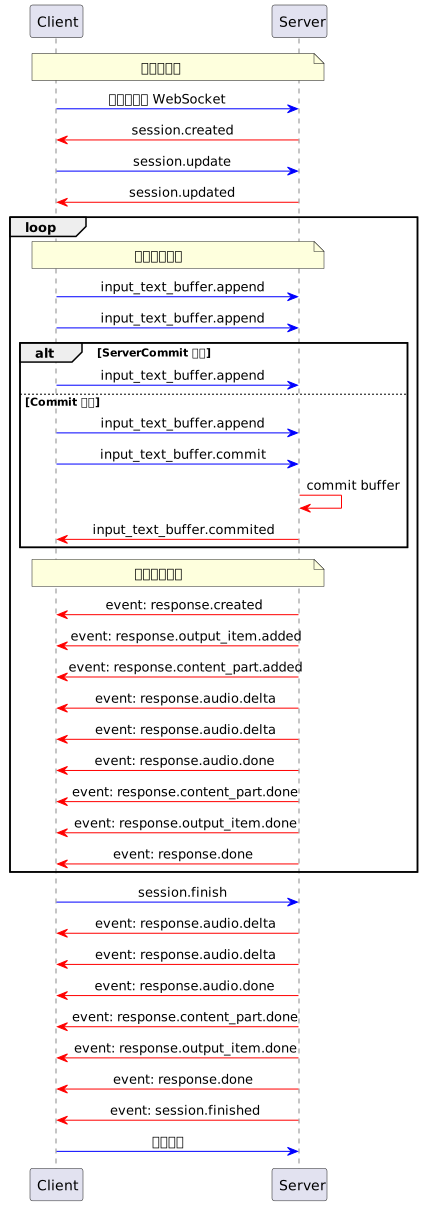 關鍵流程說明:
介面地址
WebSocket URL 固定如下,通過查詢參數model 指定要調用的模型名稱:
- 新加坡
- 華北2(北京)
WebSocket URL:
wss://dashscope-intl.aliyuncs.com/api-ws/v1/realtime?model=qwen3-tts-flash-realtimeWebSocket URL:
wss://dashscope.aliyuncs.com/api-ws/v1/realtime?model=qwen3-tts-flash-realtimeURL 必須使用
wss:// 協議。Authorization 在要求標頭中設定(參見要求標頭),模型通過 URL 查詢參數 model 指定。要求標頭
要求標頭中需添加如下資訊:參數 | 類型 | 是否必選 | 說明 |
|---|---|---|---|
Authorization | string | 是 | 鑒權令牌,格式為 |
user-agent | string | 否 | 用戶端標識,便於服務端追蹤來源。 |
X-DashScope-WorkSpace | string | 否 | 阿里雲百鍊業務空間ID。 |
Authorization 鑒權在 WebSocket 握手階段驗證。如果 API Key 無效或缺失,握手將失敗並返回 HTTP 401/403 錯誤。
互動流程
用戶端事件和服務端事件的詳細說明,請參見用戶端事件和服務端事件。 支援兩種使用模式:- ServerCommit 模式:服務端智能判斷文本分段與合成時機,開發人員無需關心內部狀態切分。
- Commit 模式:用戶端控制每一段文本的提交時間,需顯式調用
input_text_buffer.commit觸發合成。
模式說明:
- ServerCommit 模式下調用
input_text_buffer.append多次,系統根據內部規則判斷合成起點。 - 若在 ServerCommit 模式中主動調用
input_text_buffer.commit,表示立即合成當前緩衝內容,後續仍維持 ServerCommit 模式。 - Commit 模式下僅調用
input_text_buffer.append不會觸發合成,需明確調用input_text_buffer.commit。
-
串連階段:用戶端發起 WebSocket 串連,服務端返回
session.created,表示會話已初始化。 -
配置會話:用戶端發送
session.update事件設定音色、格式、模式等參數。 -
文本輸入階段:用戶端通過多次發送
input_text_buffer.append添加文本到緩衝區。 -
觸發合成階段:
- ServerCommit 模式中系統自動判斷合成時機,或用戶端手動調用
input_text_buffer.commit強制觸發。 - Commit 模式中僅
input_text_buffer.commit操作才會真正觸發語音合成流程。
- ServerCommit 模式中系統自動判斷合成時機,或用戶端手動調用
-
音頻產生階段:服務端發出
response.created表示任務已啟動,隨後分區返迴音頻response.audio.delta(base64 編碼),直到response.audio.done。 -
會話結束階段:用戶端顯式調用
session.finish通知服務端清理狀態,服務端返回session.finished後關閉串連。
session.created 事件:
Copy
{
"event_id": "event_xxx",
"type": "session.created",
"session": {
"object": "realtime.session",
"mode": "server_commit",
"model": "qwen3-tts-flash-realtime",
"voice": "Cherry",
"response_format": "pcm",
"sample_rate": 24000,
"id": "sess_xxx"
}
}
範例程式碼
以下範例提供 Python、Java 用戶端以及兩種提交模式。先設定DASHSCOPE_API_KEY,確保 API Key 與範例介面地區一致。Python 需要 websockets、pyaudio;Java 需要 Java-WebSocket、Gson,並使用 Java Sound 播放音訊。每個用戶端事件使用獨立 UUID。
Java
Copy
<dependencies>
<dependency>
<groupId>org.java-websocket</groupId>
<artifactId>Java-WebSocket</artifactId>
<version>1.5.3</version>
</dependency>
<dependency>
<groupId>com.google.code.gson</groupId>
<artifactId>gson</artifactId>
<version>2.10.1</version>
</dependency>
</dependencies>
-
建立用戶端
- Java
- Python
在本地建立 Java 檔案,命名為TTSRealtimeClient.java並複製以下代碼到檔案中:Copyimport com.google.gson.Gson; import com.google.gson.JsonObject; import org.java_websocket.client.WebSocketClient; import org.java_websocket.handshake.ServerHandshake; import java.net.URI; import java.util.Base64; import java.util.HashMap; import java.util.Map; import java.util.concurrent.CountDownLatch; import java.util.function.Consumer; /** * 與 TTS Realtime API 互動的用戶端。 * * 該類提供了串連 TTS Realtime API、發送文本資料、擷取音訊輸出以及管理 WebSocket 串連的相關方法。 */ public class TTSRealtimeClient { public enum SessionMode { SERVER_COMMIT("server_commit"), COMMIT("commit"); private final String value; SessionMode(String value) { this.value = value; } public String getValue() { return value; } } /** * 音頻回調介面 */ public interface AudioCallback { void onAudio(byte[] audioData); } private final String baseUrl; private final String apiKey; private final String voice; private final SessionMode mode; private final String languageType; private final AudioCallback audioCallback; private final Gson gson = new Gson(); private WebSocketClient ws; private CountDownLatch responseDoneLatch; private CountDownLatch sessionFinishedLatch; public TTSRealtimeClient(String baseUrl, String apiKey, String voice, SessionMode mode, AudioCallback audioCallback, String languageType) { this.baseUrl = baseUrl; this.apiKey = apiKey; this.voice = voice; this.mode = mode; this.audioCallback = audioCallback; this.languageType = languageType; } public TTSRealtimeClient(String baseUrl, String apiKey, String voice, SessionMode mode, AudioCallback audioCallback) { this(baseUrl, apiKey, voice, mode, audioCallback, "Auto"); } /** * 與 TTS Realtime API 建立 WebSocket 串連。 */ public void connect() throws Exception { Map<String, String> headers = new HashMap<>(); headers.put("Authorization", "Bearer " + apiKey); responseDoneLatch = new CountDownLatch(0); sessionFinishedLatch = new CountDownLatch(1); ws = new WebSocketClient(new URI(baseUrl), headers) { @Override public void onOpen(ServerHandshake handshake) { System.out.println("WebSocket 串連已建立"); // 發送預設會話配置 JsonObject session = new JsonObject(); session.addProperty("mode", mode.getValue()); session.addProperty("voice", TTSRealtimeClient.this.voice); session.addProperty("language_type", languageType); session.addProperty("response_format", "pcm"); session.addProperty("sample_rate", 24000); updateSession(session); } @Override public void onMessage(String message) { JsonObject event = gson.fromJson(message, JsonObject.class); String eventType = event.has("type") ? event.get("type").getAsString() : ""; if (!"response.audio.delta".equals(eventType)) { System.out.println("收到事件: " + eventType); } switch (eventType) { case "error": System.err.println("錯誤: " + event.get("error")); break; case "session.created": System.out.println("會話建立,ID: " + event.getAsJsonObject("session").get("id").getAsString()); break; case "session.updated": System.out.println("會話更新,ID: " + event.getAsJsonObject("session").get("id").getAsString()); break; case "input_text_buffer.committed": System.out.println("文本緩衝區已提交,專案ID: " + event.get("item_id")); break; case "input_text_buffer.cleared": System.out.println("文本緩衝區已清除"); break; case "response.created": System.out.println("響應已建立,ID: " + event.getAsJsonObject("response").get("id").getAsString()); responseDoneLatch = new CountDownLatch(1); break; case "response.output_item.added": System.out.println("輸出項已添加,ID: " + event.getAsJsonObject("item").get("id").getAsString()); break; case "response.audio.delta": if (audioCallback != null) { byte[] audioBytes = Base64.getDecoder().decode( event.get("delta").getAsString()); audioCallback.onAudio(audioBytes); } break; case "response.audio.done": System.out.println("音頻產生完成"); break; case "response.done": System.out.println("響應完成"); responseDoneLatch.countDown(); break; case "session.finished": System.out.println("會話已結束"); sessionFinishedLatch.countDown(); break; } } @Override public void onClose(int code, String reason, boolean remote) { System.out.println("串連已關閉: " + reason); } @Override public void onError(Exception ex) { System.err.println("WebSocket 錯誤: " + ex.getMessage()); } }; ws.connectBlocking(); } /** * 發送事件到伺服器。 */ public void sendEvent(JsonObject event) { String eventId = "event_" + java.util.UUID.randomUUID().toString(); event.addProperty("event_id", eventId); System.out.println("發送事件: type=" + event.get("type").getAsString() + ", event_id=" + eventId); ws.send(gson.toJson(event)); } /** * 更新會話配置。 */ public void updateSession(JsonObject config) { JsonObject event = new JsonObject(); event.addProperty("type", "session.update"); event.add("session", config); System.out.println("更新會話配置: " + event); sendEvent(event); } /** * 向 API 發送文本資料。 */ public void appendText(String text) { JsonObject event = new JsonObject(); event.addProperty("type", "input_text_buffer.append"); event.addProperty("text", text); sendEvent(event); } /** * 提交文本緩衝區以觸發處理。 */ public void commitTextBuffer() { JsonObject event = new JsonObject(); event.addProperty("type", "input_text_buffer.commit"); sendEvent(event); } /** * 清除文本緩衝區。 */ public void clearTextBuffer() { JsonObject event = new JsonObject(); event.addProperty("type", "input_text_buffer.clear"); sendEvent(event); } /** * 結束會話。 */ public void finishSession() { JsonObject event = new JsonObject(); event.addProperty("type", "session.finish"); sendEvent(event); } /** * 等待 response.done 事件。 */ public void waitForResponseDone() throws InterruptedException { responseDoneLatch.await(); } /** * 等待 session.finished 事件。 */ public void waitForSessionFinished() throws InterruptedException { sessionFinishedLatch.await(); } /** * 關閉 WebSocket 串連。 */ public void close() { if (ws != null) { ws.close(); } } }在本地建立 Python 檔案,命名為tts_realtime_client.py並複製以下代碼到檔案中:Copy# -- coding: utf-8 -- import asyncio import websockets import json import base64 import time import uuid from typing import Optional, Callable, Dict, Any from enum import Enum class SessionMode(Enum): SERVER_COMMIT = "server_commit" COMMIT = "commit" class TTSRealtimeClient: """ 與 TTS Realtime API 互動的用戶端。 該類提供了串連 TTS Realtime API、發送文本資料、擷取音訊輸出以及管理 WebSocket 串連的相關方法。 屬性說明: base_url (str): Realtime API 的基礎地址。 api_key (str): 用於身分識別驗證的 API Key。 voice (str): 服務端合成語音所使用的聲音。 mode (SessionMode): 會話模式,可選 server_commit 或 commit。 audio_callback (Callable[[bytes], None]): 接收音頻資料的回呼函數。 language_type(str) 合成的語音的語種,可選值Chinese、English、German、Italian、Portuguese、Spanish、Japanese、Korean、French、Russian、Auto """ def __init__( self, base_url: str, api_key: str, voice: str = "Cherry", mode: SessionMode = SessionMode.SERVER_COMMIT, audio_callback: Optional[Callable[[bytes], None]] = None, language_type: str = "Auto"): self.base_url = base_url self.api_key = api_key self.voice = voice self.mode = mode self.ws = None self.audio_callback = audio_callback self.language_type = language_type # 當前回複狀態 self._current_response_id = None self._current_item_id = None self._is_responding = False self._response_done_future = None async def connect(self) -> None: """與 TTS Realtime API 建立 WebSocket 串連。""" headers = { "Authorization": f"Bearer {self.api_key}" } self.ws = await websockets.connect(self.base_url, additional_headers=headers) # 設定預設會話配置 await self.update_session({ "mode": self.mode.value, "voice": self.voice, "language_type": self.language_type, "response_format": "pcm", "sample_rate": 24000 }) async def send_event(self, event) -> None: """發送事件到伺服器。""" event['event_id'] = "event_" + uuid.uuid4().hex print(f"發送事件: type={event['type']}, event_id={event['event_id']}") await self.ws.send(json.dumps(event)) async def update_session(self, config: Dict[str, Any]) -> None: """更新會話配置。""" event = { "type": "session.update", "session": config } print("更新會話配置: ", event) await self.send_event(event) async def append_text(self, text: str) -> None: """向 API 發送文本資料。""" event = { "type": "input_text_buffer.append", "text": text } await self.send_event(event) async def commit_text_buffer(self) -> None: """提交文本緩衝區以觸發處理。""" event = { "type": "input_text_buffer.commit" } await self.send_event(event) async def clear_text_buffer(self) -> None: """清除文本緩衝區。""" event = { "type": "input_text_buffer.clear" } await self.send_event(event) async def finish_session(self) -> None: """結束會話。""" event = { "type": "session.finish" } await self.send_event(event) async def wait_for_response_done(self): """等待 response.done 事件""" if self._response_done_future: await self._response_done_future async def handle_messages(self) -> None: """處理來自伺服器的訊息。""" try: async for message in self.ws: event = json.loads(message) event_type = event.get("type") if event_type != "response.audio.delta": print(f"收到事件: {event_type}") if event_type == "error": print("錯誤: ", event.get('error', {})) continue elif event_type == "session.created": print("會話建立,ID: ", event.get('session', {}).get('id')) elif event_type == "session.updated": print("會話更新,ID: ", event.get('session', {}).get('id')) elif event_type == "input_text_buffer.committed": print("文本緩衝區已提交,專案ID: ", event.get('item_id')) elif event_type == "input_text_buffer.cleared": print("文本緩衝區已清除") elif event_type == "response.created": self._current_response_id = event.get("response", {}).get("id") self._is_responding = True # 建立新的 future 來等待 response.done self._response_done_future = asyncio.Future() print("響應已建立,ID: ", self._current_response_id) elif event_type == "response.output_item.added": self._current_item_id = event.get("item", {}).get("id") print("輸出項已添加,ID: ", self._current_item_id) # 處理音頻增量 elif event_type == "response.audio.delta" and self.audio_callback: audio_bytes = base64.b64decode(event.get("delta", "")) self.audio_callback(audio_bytes) elif event_type == "response.audio.done": print("音頻產生完成") elif event_type == "response.done": self._is_responding = False self._current_response_id = None self._current_item_id = None # 標記 future 完成 if self._response_done_future and not self._response_done_future.done(): self._response_done_future.set_result(True) print("響應完成") elif event_type == "session.finished": print("會話已結束") except websockets.exceptions.ConnectionClosed: print("串連已關閉") except Exception as e: print("訊息處理出錯: ", str(e)) async def close(self) -> None: """關閉 WebSocket 串連。""" if self.ws: await self.ws.close() -
選擇語音合成模式
Realtime API支援以下兩種模式:
- server_commit 模式 服務端智能判斷文本分段與合成時機,用戶端只需發送文本。適合低延遲情境(如 GPS 導航)。
- commit 模式 用戶端將文本添加至緩衝區後主動觸發合成。適合精細控制斷句的情境(如新聞播報)。
- server_commit 模式
- commit 模式
- Java
- Python
在TTSRealtimeClient.java的同級目錄下建立另一個 Java 檔案,命名為ServerCommit.java,並將以下代碼複製進檔案中:編譯並運行Copyimport javax.sound.sampled.*; import java.io.*; import java.util.ArrayList; import java.util.List; import java.util.concurrent.ConcurrentLinkedQueue; import java.util.concurrent.atomic.AtomicBoolean; public class ServerCommit { // 以下為新加坡地區的配置。 private static final String URL = "wss://dashscope-intl.aliyuncs.com/api-ws/v1/realtime?model=qwen3-tts-flash-realtime"; // 新加坡和北京地區的API Key不同。擷取API Key:https://www.alibabacloud.com/help/zh/model-studio/get-api-key // 若沒有配置環境變數,請用阿里雲百鍊API Key將下行替換為:private static final String API_KEY = "sk-xxx"; private static final String API_KEY = System.getenv("DASHSCOPE_API_KEY"); private static final int SAMPLE_RATE = 24000; // 音頻資料緩衝 private static final List<byte[]> audioChunks = new ArrayList<>(); // 即時播放隊列 private static final ConcurrentLinkedQueue<byte[]> playbackQueue = new ConcurrentLinkedQueue<>(); private static final AtomicBoolean playing = new AtomicBoolean(true); public static void main(String[] args) throws Exception { if (API_KEY == null || API_KEY.isEmpty()) { throw new IllegalStateException("請設定 DASHSCOPE_API_KEY 環境變數"); } // 初始化音頻播放 AudioFormat format = new AudioFormat(SAMPLE_RATE, 16, 1, true, false); DataLine.Info info = new DataLine.Info(SourceDataLine.class, format); SourceDataLine audioLine = (SourceDataLine) AudioSystem.getLine(info); audioLine.open(format); audioLine.start(); // 啟動播放線程 Thread playerThread = new Thread(() -> { while (playing.get() || !playbackQueue.isEmpty()) { byte[] chunk = playbackQueue.poll(); if (chunk != null) { audioLine.write(chunk, 0, chunk.length); } else { try { Thread.sleep(10); } catch (InterruptedException ignored) {} } } }); playerThread.start(); // 建立 TTS 用戶端 TTSRealtimeClient client = new TTSRealtimeClient( URL, API_KEY, "Cherry", TTSRealtimeClient.SessionMode.SERVER_COMMIT, audioData -> { playbackQueue.add(audioData); audioChunks.add(audioData); System.out.println("收到音頻資料: " + audioData.length + " bytes"); } ); client.connect(); // 發送文本片段 String[] textFragments = { "阿里雲的大模型服務平台阿里雲百鍊是一站式的大模型開發及應用構建平台。", "不論是開發人員還是業務人員,都能深入參與大模型應用的設計和構建。", "您可以通過簡單的介面操作,在5分鐘內開發出一款大模型應用,", "或在幾小時內訓練出一個專屬模型,從而將更多精力專註於應用創新。" }; System.out.println("開始發送文本..."); for (String text : textFragments) { System.out.println("發送片段: " + text); client.appendText(text); Thread.sleep(100); } Thread.sleep(1000); client.finishSession(); // 等待響應完成 client.waitForResponseDone(); client.waitForSessionFinished(); client.close(); // 等待播放完成 playing.set(false); playerThread.join(); audioLine.drain(); audioLine.close(); // 儲存音頻檔案 saveWav("output.wav"); System.out.println("完成"); } private static void saveWav(String filename) throws IOException { if (audioChunks.isEmpty()) { System.out.println("沒有音頻資料可儲存"); return; } ByteArrayOutputStream bos = new ByteArrayOutputStream(); for (byte[] chunk : audioChunks) { bos.write(chunk); } byte[] allAudio = bos.toByteArray(); AudioFormat format = new AudioFormat(SAMPLE_RATE, 16, 1, true, false); AudioInputStream ais = new AudioInputStream( new ByteArrayInputStream(allAudio), format, allAudio.length / 2); new File("outputs").mkdirs(); AudioSystem.write(ais, AudioFileFormat.Type.WAVE, new File("outputs/" + filename)); System.out.println("音頻已儲存到: outputs/" + filename); } }ServerCommit.java,即可聽到 Realtime API即時產生的音頻。在tts_realtime_client.py的同級目錄下建立另一個 Python 檔案,命名為server_commit.py,並將以下代碼複製進檔案中:運行Copyimport os import asyncio import logging import wave from tts_realtime_client import TTSRealtimeClient, SessionMode import pyaudio # QwenTTS 服務配置 # 以下為新加坡地區的配置。 URL = "wss://dashscope-intl.aliyuncs.com/api-ws/v1/realtime?model=qwen3-tts-flash-realtime" # 新加坡和北京地區的API Key不同。擷取API Key:https://www.alibabacloud.com/help/zh/model-studio/get-api-key # 若沒有配置環境變數,請用阿里雲百鍊API Key將下行替換為:API_KEY="sk-xxx" API_KEY = os.getenv("DASHSCOPE_API_KEY") if not API_KEY: raise ValueError("Please set DASHSCOPE_API_KEY environment variable") # 收集音頻資料 _audio_chunks = [] # 即時播放相關 _AUDIO_SAMPLE_RATE = 24000 _audio_pyaudio = pyaudio.PyAudio() _audio_stream = None # 將在運行時開啟 def _audio_callback(audio_bytes: bytes): """TTSRealtimeClient 音頻回調: 即時播放並緩衝""" global _audio_stream if _audio_stream is not None: try: _audio_stream.write(audio_bytes) except Exception as exc: logging.error(f"PyAudio playback error: {exc}") _audio_chunks.append(audio_bytes) logging.info(f"Received audio chunk: {len(audio_bytes)} bytes") def _save_audio_to_file(filename: str = "output.wav", sample_rate: int = 24000) -> bool: """將收集到的音頻資料儲存為 WAV 檔案""" if not _audio_chunks: logging.warning("No audio data to save") return False try: audio_data = b"".join(_audio_chunks) with wave.open(filename, 'wb') as wav_file: wav_file.setnchannels(1) # 單聲道 wav_file.setsampwidth(2) # 16-bit wav_file.setframerate(sample_rate) wav_file.writeframes(audio_data) logging.info(f"Audio saved to: {filename}") return True except Exception as exc: logging.error(f"Failed to save audio: {exc}") return False async def _produce_text(client: TTSRealtimeClient): """向伺服器發送文本片段""" text_fragments = [ "阿里雲的大模型服務平台阿里雲百鍊是一站式的大模型開發及應用構建平台。", "不論是開發人員還是業務人員,都能深入參與大模型應用的設計和構建。", "您可以通過簡單的介面操作,在5分鐘內開發出一款大模型應用,", "或在幾小時內訓練出一個專屬模型,從而將更多精力專註於應用創新。", ] logging.info("Sending text fragments…") for text in text_fragments: logging.info(f"Sending fragment: {text}") await client.append_text(text) await asyncio.sleep(0.1) # 片段間稍作延時 # 等待伺服器完成內部處理後結束會話 await asyncio.sleep(1.0) await client.finish_session() async def _run_demo(): """運行完整 Demo""" global _audio_stream # 開啟 PyAudio 輸出資料流 _audio_stream = _audio_pyaudio.open( format=pyaudio.paInt16, channels=1, rate=_AUDIO_SAMPLE_RATE, output=True, frames_per_buffer=1024 ) client = TTSRealtimeClient( base_url=URL, api_key=API_KEY, voice="Cherry", mode=SessionMode.SERVER_COMMIT, audio_callback=_audio_callback ) # 建立串連 await client.connect() # 並存執行訊息處理與文本發送 consumer_task = asyncio.create_task(client.handle_messages()) producer_task = asyncio.create_task(_produce_text(client)) await producer_task # 等待文本發送完成 # 等待 response.done await client.wait_for_response_done() # 關閉串連並取消消費者任務 await client.close() consumer_task.cancel() # 關閉音頻流 if _audio_stream is not None: _audio_stream.stop_stream() _audio_stream.close() _audio_pyaudio.terminate() # 儲存音頻資料 os.makedirs("outputs", exist_ok=True) _save_audio_to_file(os.path.join("outputs", "qwen_tts_output.wav")) def main(): """同步入口""" logging.basicConfig( level=logging.INFO, format='%(asctime)s [%(levelname)s] %(message)s', datefmt='%Y-%m-%d %H:%M:%S' ) logging.info("Starting QwenTTS Realtime Client demo…") asyncio.run(_run_demo()) if __name__ == "__main__": main()server_commit.py,即可聽到 Realtime API即時產生的音頻。- Java
- Python
在TTSRealtimeClient.java的同級目錄下建立另一個 Java 檔案,命名為Commit.java,並將以下代碼複製進檔案中:編譯並運行Copyimport javax.sound.sampled.*; import java.io.*; import java.util.ArrayList; import java.util.List; import java.util.Scanner; import java.util.concurrent.ConcurrentLinkedQueue; import java.util.concurrent.atomic.AtomicBoolean; public class Commit { // 以下為新加坡地區的配置。 private static final String URL = "wss://dashscope-intl.aliyuncs.com/api-ws/v1/realtime?model=qwen3-tts-flash-realtime"; // 新加坡和北京地區的API Key不同。擷取API Key:https://www.alibabacloud.com/help/zh/model-studio/get-api-key // 若沒有配置環境變數,請用阿里雲百鍊API Key將下行替換為:private static final String API_KEY = "sk-xxx"; private static final String API_KEY = System.getenv("DASHSCOPE_API_KEY"); private static final int SAMPLE_RATE = 24000; private static final List<byte[]> audioChunks = new ArrayList<>(); private static final ConcurrentLinkedQueue<byte[]> playbackQueue = new ConcurrentLinkedQueue<>(); private static final AtomicBoolean playing = new AtomicBoolean(true); public static void main(String[] args) throws Exception { if (API_KEY == null || API_KEY.isEmpty()) { throw new IllegalStateException("請設定 DASHSCOPE_API_KEY 環境變數"); } // 初始化音頻播放 AudioFormat format = new AudioFormat(SAMPLE_RATE, 16, 1, true, false); DataLine.Info info = new DataLine.Info(SourceDataLine.class, format); SourceDataLine audioLine = (SourceDataLine) AudioSystem.getLine(info); audioLine.open(format); audioLine.start(); // 啟動播放線程 Thread playerThread = new Thread(() -> { while (playing.get() || !playbackQueue.isEmpty()) { byte[] chunk = playbackQueue.poll(); if (chunk != null) { audioLine.write(chunk, 0, chunk.length); } else { try { Thread.sleep(10); } catch (InterruptedException ignored) {} } } }); playerThread.start(); // 建立 TTS 用戶端(commit 模式) TTSRealtimeClient client = new TTSRealtimeClient( URL, API_KEY, "Cherry", TTSRealtimeClient.SessionMode.COMMIT, audioData -> { playbackQueue.add(audioData); audioChunks.add(audioData); System.out.println("收到音頻資料: " + audioData.length + " bytes"); } ); client.connect(); // 互動式輸入 System.out.println("請輸入文本(直接按Enter發送commit事件並結束本次會話,按Ctrl+D結束程式):"); Scanner scanner = new Scanner(System.in); while (true) { System.out.print("> "); if (!scanner.hasNextLine()) { client.finishSession(); break; } String userText = scanner.nextLine(); if (userText.isEmpty()) { // 空輸入:提交緩衝區並結束會話 System.out.println("空輸入,發送 commit 事件並結束本次會話"); client.commitTextBuffer(); Thread.sleep(300); client.finishSession(); break; } else { System.out.println("發送文本: " + userText); client.appendText(userText); } } scanner.close(); // 等待響應完成 client.waitForResponseDone(); client.waitForSessionFinished(); client.close(); // 等待播放完成 playing.set(false); playerThread.join(); audioLine.drain(); audioLine.close(); // 儲存音頻檔案 saveWav("output.wav"); System.out.println("完成"); } private static void saveWav(String filename) throws IOException { if (audioChunks.isEmpty()) { System.out.println("沒有音頻資料可儲存"); return; } ByteArrayOutputStream bos = new ByteArrayOutputStream(); for (byte[] chunk : audioChunks) { bos.write(chunk); } byte[] allAudio = bos.toByteArray(); AudioFormat format = new AudioFormat(SAMPLE_RATE, 16, 1, true, false); AudioInputStream ais = new AudioInputStream( new ByteArrayInputStream(allAudio), format, allAudio.length / 2); new File("outputs").mkdirs(); AudioSystem.write(ais, AudioFileFormat.Type.WAVE, new File("outputs/" + filename)); System.out.println("音頻已儲存到: outputs/" + filename); } }Commit.java,可多次輸入要合成的文本。在未輸入文本的情況下單擊 Enter 鍵,將從擴音器聽到 Realtime API返回的音頻。在tts_realtime_client.py的同級目錄下建立另一個 Python 檔案,命名為commit.py,並將以下代碼複製進檔案中:運行Copyimport os import asyncio import logging import wave from tts_realtime_client import TTSRealtimeClient, SessionMode import pyaudio # QwenTTS 服務配置 # 以下為新加坡地區的配置。 URL = "wss://dashscope-intl.aliyuncs.com/api-ws/v1/realtime?model=qwen3-tts-flash-realtime" # 新加坡和北京地區的API Key不同。擷取API Key:https://www.alibabacloud.com/help/zh/model-studio/get-api-key # 若沒有配置環境變數,請用阿里雲百鍊API Key將下行替換為:API_KEY="sk-xxx" API_KEY = os.getenv("DASHSCOPE_API_KEY") if not API_KEY: raise ValueError("Please set DASHSCOPE_API_KEY environment variable") # 收集音頻資料 _audio_chunks = [] _AUDIO_SAMPLE_RATE = 24000 _audio_pyaudio = pyaudio.PyAudio() _audio_stream = None def _audio_callback(audio_bytes: bytes): """TTSRealtimeClient 音頻回調: 即時播放並緩衝""" global _audio_stream if _audio_stream is not None: try: _audio_stream.write(audio_bytes) except Exception as exc: logging.error(f"PyAudio playback error: {exc}") _audio_chunks.append(audio_bytes) logging.info(f"Received audio chunk: {len(audio_bytes)} bytes") def _save_audio_to_file(filename: str = "output.wav", sample_rate: int = 24000) -> bool: """將收集到的音頻資料儲存為 WAV 檔案""" if not _audio_chunks: logging.warning("No audio data to save") return False try: audio_data = b"".join(_audio_chunks) with wave.open(filename, 'wb') as wav_file: wav_file.setnchannels(1) # 單聲道 wav_file.setsampwidth(2) # 16-bit wav_file.setframerate(sample_rate) wav_file.writeframes(audio_data) logging.info(f"Audio saved to: {filename}") return True except Exception as exc: logging.error(f"Failed to save audio: {exc}") return False async def _user_input_loop(client: TTSRealtimeClient): """持續擷取使用者輸入並發送文本,當使用者輸入空文本時發送commit事件並結束本次會話""" print("請輸入文本(直接按Enter發送commit事件並結束本次會話,按Ctrl+C或Ctrl+D結束整個程式):") while True: try: user_text = input("> ") if not user_text: # 使用者輸入為空白 # 空輸入視為一次對話的結束: 提交緩衝區 -> 結束會話 -> 跳出迴圈 logging.info("空輸入,發送 commit 事件並結束本次會話") await client.commit_text_buffer() # 適當等待伺服器處理 commit,防止過早結束會話導致丟失音頻 await asyncio.sleep(0.3) await client.finish_session() break # 直接退出使用者輸入迴圈,無需再次斷行符號 else: logging.info(f"發送文本: {user_text}") await client.append_text(user_text) except EOFError: # 使用者按下Ctrl+D break except KeyboardInterrupt: # 使用者按下Ctrl+C break # 結束會話 logging.info("結束會話...") async def _run_demo(): """運行完整 Demo""" global _audio_stream # 開啟 PyAudio 輸出資料流 _audio_stream = _audio_pyaudio.open( format=pyaudio.paInt16, channels=1, rate=_AUDIO_SAMPLE_RATE, output=True, frames_per_buffer=1024 ) client = TTSRealtimeClient( base_url=URL, api_key=API_KEY, voice="Cherry", mode=SessionMode.COMMIT, # 修改為COMMIT模式 audio_callback=_audio_callback ) # 建立串連 await client.connect() # 並存執行訊息處理與使用者輸入 consumer_task = asyncio.create_task(client.handle_messages()) producer_task = asyncio.create_task(_user_input_loop(client)) await producer_task # 等待使用者輸入完成 # 等待 response.done await client.wait_for_response_done() # 關閉串連並取消消費者任務 await client.close() consumer_task.cancel() # 關閉音頻流 if _audio_stream is not None: _audio_stream.stop_stream() _audio_stream.close() _audio_pyaudio.terminate() # 儲存音頻資料 os.makedirs("outputs", exist_ok=True) _save_audio_to_file(os.path.join("outputs", "qwen_tts_output.wav")) def main(): logging.basicConfig( level=logging.INFO, format='%(asctime)s [%(levelname)s] %(message)s', datefmt='%Y-%m-%d %H:%M:%S' ) logging.info("Starting QwenTTS Realtime Client demo…") asyncio.run(_run_demo()) if __name__ == "__main__": main()commit.py,可多次輸入要合成的文本。在未輸入文本的情況下單擊 Enter 鍵,將從擴音器聽到 Realtime API返回的音頻。